Category Archives: Powerpoint

Aside

Stimulated by the interested shown in the solving of the Final Cut Pro X sneak peek keynote build effect, I’ve raced ahead and included two more Keynote files, this time of my own making. In the first, I feature something … Continue reading

A new build feature discovered in Keynote 12 or just some really smart Keynote authors working at Apple?

Welcome to the first blog post of 2012!

In the lead up to my two presentations at Macworld in a few weeks time, I’m creating some Keynote effects which I hope will tantalise and enchant my intended audience.

Since there will be more people reading this blog than will attend, I thought I’d use you as a guinea pig to beta test some of my ideas. I’m going to put up some Keynote effects over the course of the next few weeks until I depart for San Francisco. The challenge will be if you can work out how I did it – and whether you think they are effects worth demonstrating and teaching at Macworld.

I was thinking about this in December, but my accidental discovery of a video on Vimeo (I’ve been playing with the AppleTV over the hot, slow days of summer here in Australia) has moved the schedule forward.

In fact, the effect I’m going to show you is one I didn’t create, but one created for a “sneak peek” keynote at Supermeet NAB Las Vegas in mid-April before the official  launch of Final Cut Pro X in  June 2011.

Now even if you don’t use FCP X, but you’re an Apple follower, you’ll know the huge ruckus this rewrite created in the professional editing community, with many saying it was iMovie Pro or “iMovie on steroids”, lamenting the lack of compatibility with previous versions, the exclusion of much loved previous features, and so on. I’ve been predicting for a while now that Keynote too will get the FCP X “treatment” when its next upgrade is released, and that prediction is somewhat forged by Apple’s long time between updates suggesting a rewrite. And if Apple can do what it did to its professional users with FCP X, it will certainly have no second thoughts about Keynote, which is in desperate need of a rewrite too, if only to put a “Magic timeline” into being. It too might be called a Magnetic timeline as it is for FCP X, (see live link, below).

I want to feature a video from Vimeo taken at the Las Vegas sneak peek of FCP X, by Emanuel Pamperi. It shows FCP X’s chief architect, Peter Steinauer, going through some of its feature set, to much rousing applause (especially the price of $299!). That applause turned to dismay when the same crowd got its hands on FCP X in June, from previously mentioned reports. There were even “Hitler parodies” made, wondering what Apple was thinking when it made the serious changes it did! (Link: http://www.google.com.au/search?sourceid=chrome&ie=UTF-8&q=hitler+parody+final+cut)

Emanuel’s video is in two sections of 25 minutes, and you can see section 1 in its entirety here (but don’t go there just yet): http://vimeo.com/22329493

About 9:10 in Steinauer introduces new features known as Content Auto Analysis where FCP X analyses the raw data such as searching for faces or crowds or colour matching. I’ve taken the video and edited it so you see how he brings in each feature, starting with the raw source (an SD card) and its target (an iMac).

Here is the edited feature set below (edited, because it’s not in real time and there’s no sound track):

1. Notice how the sequence begins with three elements: SD Card -> iMac

2. The first feature – what would be a dreary bullet point in another presentation software – comes in, separating the SD card and iMac with move builds. Notice how the arrow duplicates and separates in the one build. Probably there were two arrows layered over each other in step 1, and each arrow moved as part of the build. (Well, that’s how I would have done it.)

3. New features are added from the bottom up in table format, again keeping the focus on the features in an animated fashion, rather than static bullet points.

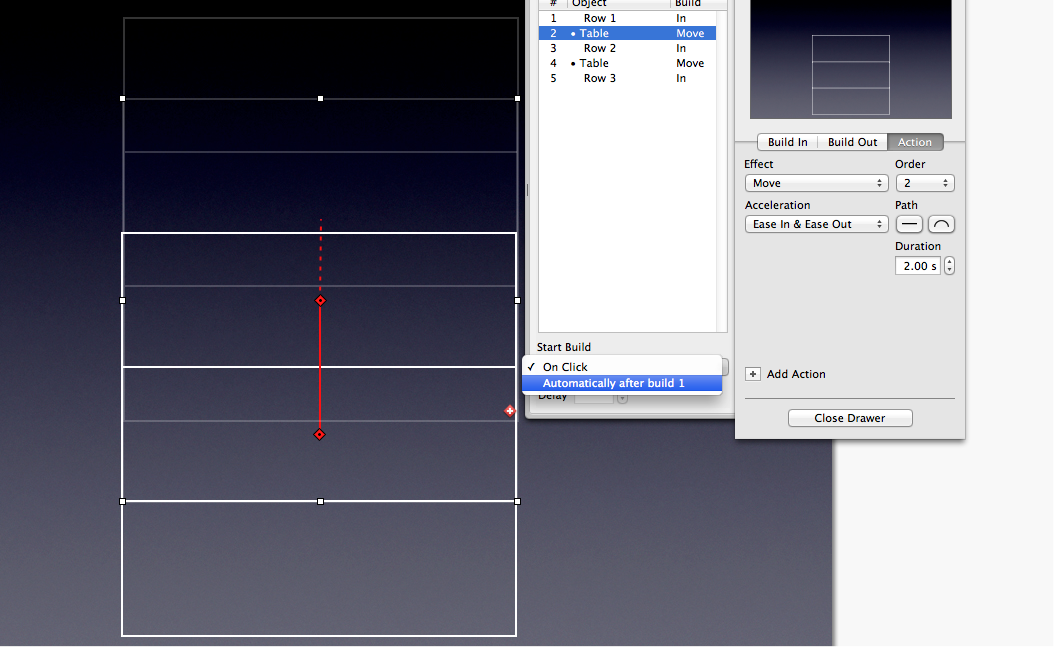
4. But do you notice something I’ve not been able to duplicate? Each new cell of the table both dissolves in and moves upward as the whole table moves to make room? Please go back and have another look because it’s easy to miss.

5. I’ve tried to reproduce this but Keynote 5 will not let a move and dissolve build together: it’s only after one build completes that the other build can occur, as the screen shot below shows. There is no Automatically with option.

6. So either I’m missing something, or what we saw at Las Vegas was a new Keynote feature, something I’m sure many of us could put to good use as we attempt to rid the world of bullet points!

I asked my esteemed Keynote colleague and theme creator John Driedger to have a go, and he came up with the same semi-solution as I did: we can move, then dissolve but not at the same time. (John will hopefully have some new themes and elements for me to show at Macworld).

So, over to you: Can you reproduce the effect here just using Keynote; do we have evidence of a new Keynote feature; or merely that the keynote author used a third party motion app to create the effect?

If you think you can do it in Keynote, email your Keynote file to me (lesatlesposen.com), I’ll verify it and post it as an update here. No prizes (yet!)

UPDATE (Jjanuary 5) : Problem solved using MagicMove and opacity controls. Well done to Spydre for suggesting this solution!

The vacuum left in presenting on things technology now that Steve Jobs has gone. Can All Things Digital’s Kara Swisher fill the gap? Um, er, No.

My preparations for Macworld 2012 are well and truly underway with flights booked, special guests invited, prizes being organised for attendees and reviewing my syllabus.

One of the things I’ve been doing in Presentation Magic workshops in 2011 is showing presentations by others and asking attendees to offer up a critical analysis of what they’re witnessing, based on the presentation principles so far addressed.

One of the primary sources for high quality presentations across a variety of styles and subjects has been the official TED website. Here, we’ve seen an increasing professionalism in the quality of both slides and presentation. Even Bill Gates has shown vast improvement.

Less so, but no less instructive, is the TEDx satellite circuit, where organisers can license the TED brand according to some very strict rules. Here, the quality control is much more varied, and occasionally one gets the feeling favours are offered to speakers by organisers. That was certainly my experience at the TEDx I attended in Canberra a few years back where I scratched my head at the inclusion of one or two speakers. Their presentations were poor, and seemed not to fit the theme of the day.

Moreover, the organisers had not thought to offer a vanity or confidence monitor for speakers, who continually turned their backs to the audience to view the screen behind them, some reading off their displayed slides. My tweets were very critical of the presentation style of some presenters.

This week, while on the lookout for more presentations to showcase at Macworld, I located the TedX BayArea Global Women Entrepreneurs event.

I was actually doing my usual search for all things Apple, when I located a talk at the event which mentioned Apple, by well known tech journalist, Kara Swisher.

I was aware of Kara’s work from her interviews with Steve Jobs, as well as her authoring a book quite a few years ago on the rise and fall of AOL, in which Apple had played a small part (if you recall eWorld).

Her talk was entitled, More, and on her blog called BoomTown, which is an RSS feed I see each day, this is how she had described it:

I recalled that Kara had been indisposed for the All Things Digital event in Hong Kong recently where she had planned to share the stage with co-host Walt Mossberg. And I was aware she’d suffered a stroke. Her speech description intrigued me so I was prepared to sit back and watch her for the standard 18 minute Tedx Talk.

Here is the speech below, from the YouTube site. Watch all of it before you come back, or just the first five minutes and make a mental note of your emotional response to what you witness.

What did you notice?

For me, there were several things that felt like the proverbial fingernails down the blackboard sensation.

1. Did she start her speech by dissing her host for mispronouncing her name? Did this set the tone for a rather snarky speech that followed? There seems to be no one safe from her sarcasm: United Airlines, Microsoft, Rupert Murdoch (her employer) to name a few.

2. Kara was placed between two screens showing her slides and spend about 80% of her time looking at the screens, and not at the audience. Even when the slides were no longer relevant to the story she was telling.

3. Within fourteen seconds, the thing that most got in the way of her presentation made its presence felt: “Um”. There were other connectors too, such as “Er” and “you know” but these did not grate on me nearly as much as the incessant river of “Ums”.

Now these might go right under your attention radar because the content of the speech is riveting and engaging for you. But for me nowadays, I attend to both process and content. Not just what is being said, but how are the ideas being conveyed?

In Kara’s case,  I appreciated her attempts at sarcasm and the occasional self-depracating dig and had a laugh too. But there is a quantum of hubris in this speech which is unattractive and disengaging, not helped by the torrent of Ums.

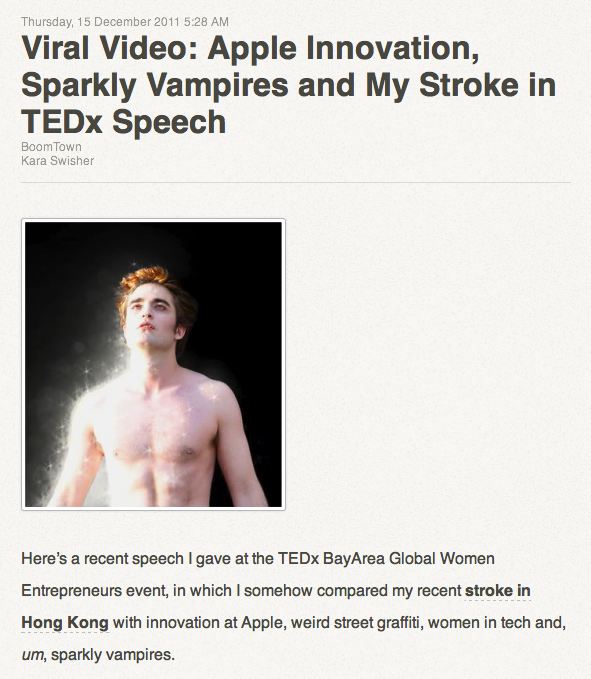
Curiously, in her blog writeup of the speech she actually refers to her ums, viz:

“…women in tech, and, um, sparkly vampires.” (see screenshot, above).

So I decided to see what her talk would be like without the “ums” included, but leaving in other connectors and pauses. I imported the video downloaded from Firefox into iMovie and edited out all the ums. In a moment I’ll reveal how many there were in her 20″ speech.

You can see the results below, and do note that the video does jump about a little, so if this bothers you, just look away and listen, and ask if her speech flows better without the ums.

But the fun discovery was what I did with the edited elements. Sometime ago, I had work led on a Keynote project where we had to include a sound file of an interview. It was recorded in Garageband, and it was in there that I edited out long pauses, “you knows”, “ums” and long breaths to give the podcast some polish.

It sounded so much better and professional, smooth and flowing.

So in Kara’s case, I look all the out taken “ums” and put them together in chronological order. The resultant movie file is below, and I’ve topped and tailed it with the intro and finish elements. What’s astounding is both the number of “ums” and how much time they take up out of an 18″ speech (actually it was more like 20″).

So, how many “ums” were there? Watch the video below, and I’ll give you the number below it.

If you can be bothered counting, there are about 96 Ums which fully take up a minute of her allotted time. That’s 6% of her total speech in connectors.

A little analysis

There are many ways to think about these utterances. Rarely do they add to the comprehensibility of the speech. For a few of them, they are cues for the audience to laugh: “Hey, I’ve said something funny – this is where you laugh.” It allows the audience to take a moment to digest what’s just been said before Kara moves on. Stage actors in rehearsal without an audience need to know from the director sometimes when to pause when the audience is expected to laugh, otherwise the next funny line goes unheard.

Jack Benny would merely pause and look at the audience for it to be their cue to laugh.

Other shows of course employ a laugh track to goad us into enjoying the performances. And many other comedians have found their own way, from the raising of an eyebrow, or the curve of a lip, to let you know it’s OK to laugh at this point.

However, in Kara’s case there are less than a handful of these. Most of the ums are signatures of other less redeeming aspects of a presentation.

To my eyes and ears, these other ums and other connectors like “er” and “you know” are signs of under-preparedness, too little rehearsal, anxiety, and attempts to wing it, possibly in the belief that the spontaneous retelling of her story will suffice.

Let me be straight with you. I don’t rehearse all eight hours of my Presentation Magic workshops. I do rehearse each of the slides and how best to use it to tell my story. I don’t write the lines out, nor add them to my slides in Keynote’s presentation mode. Rather, every so often I’ll use the Post-It note style comment icon to remind me of the movie that’s coming next, or a factoid that I’ve forgotten on a previous occasion. But I don’t memorise every word. I simply rehearse – lots.

In a TED talk however, you’ve only got 18″ minutes to make your story count, no matter how famous you are. You need to be rehearsed and unless you’ve really got vast experience winging it, like a stage comedian dealing with hecklers, you’re better not hoping for the best on the day.

Kara’s “um’s”, snarkiness and her leaving her essential message right to the very end – it’s OK to work to your own schedule even if you’re ill  – requires her to use Steve Jobs to provide ultimate evidence of her belief. He arguably produced his most influential and lasting creations while fighting cancer, so anything’s possible if you apply yourself.

I tweeted Kara to say I had watched her speech but her “ums” needed some work, to which she replied shortly afterwards,  “forest, trees”. Our next tweets ended up with her reinforcing her point I simply didn’t understand her speech, and ultimately would never “get it”.

Kara’s a very influential person in the tech world, an employee of Rupert Murdoch’s, but ultimately when you get up on stage in front of a live audience and another one which may number in the thousands who’ll watch you for years to come on YouTube, you owe it to your audience to be rehearsed and prepared, especially if you want your story to be persuasive. I include modifying your idiosyncratic speaking style to minimise your off-putting connectors. It’s something I continue to work on for myself.

By the way, I did give some thought that perhaps her anxiety or frequency of “ums” was a possible aftermath of her stroke, but locating other speeches she’d given before the stroke suggest this is Kara’s usual speaking style.

Your thoughts? Am I making too big a deal out of this, or did I miss something that is important to you?

UPDATE: Two predictable responses on Twitter and on a blog.

@karaswisher asks on Twitter if I have nothing better to do (presuming she’s read the blog) and the simple answer is we’re on holidays here in Australia, so things are slow, and I am putting together my Macworld syllabus and Kara’s presentation is a possible inclusion. Many people do want to know how to control their speech style even in workshops on Keynote. It’s value adding.

Over on his personal blog, Jose de Silva essentially agrees with Kara that I’ve mistaken the forest for the trees and have lost sight of locating a presenter’s content. My counter-argument (which I would have written on his blog if comments were allowed) has always been that audiences should not be made to work so hard to decipher the message. That you can assist the transfer of learning process by making it easier through an understanding of adult models of learning (see the work of Richard Mayer for examples), stagecraft, design and rehearsal. Make an audience work too hard and no matter who you are or your subject, they will disengage and reach for their iPhones to play Angry Birds.

I agree with Jose about Kara’s being a superb journalist with a little snark, and perhaps not having time to better prepare her speech. Is this a sufficient explanation? No, it’s not. One can do both. (Or, to parallel Apple, don’t ship a product until it’s ready and capable). We can all do with a little help with our presentations, and I have only just missed out seeing Edward Tufte in New York January 23 because I booked my flights to Macworld too swiftly without checking Tufte’s 2012 schedule. My learning plan for this year is to see him and Stephen Few and really upskill my data visualisation prowess. This is especially as I’ll be targeting scientists and educators this year with my Presentation Magic workshops and blog. Finally, if you look around the various presentation blogs, I’m one of the few who puts up his unedited workshop evaluations in all their “glory”, not just positive testimonials.

You gotta take it if you’re gonna dish it!

Happy Holidays, Joe and Kara!

UPDATE: It may have something to do with this blog entry, but Kara has now blocked me from following her Twitter feed. Quelle domage.

The never ending pursuit of perfection: the parallel universes of Steve Jobs, management guru Peter Drucker, operatic composer Giuseppe Verdi, ancient Greek sculptor Phidias, and economist Joseph Schumpeter – lessons to be learnt about learning lessons applied to professional development and presentation skills

It’s been an interesting week leading up to the the American Thanksgiving holiday, which of course we acknowledge but don’t celebrate in Australia. This may come as a surprise to my American readers, since we Australians can also participate in the Black Friday sales which follow and mark the official start of the US festive season. It’s collateral good fortune.

In the past week, I’ve been featured in the Fairfax media MacMan column on my work with Apple’s Keynote presentation software (see it here). A small screen shot is below:

(Welcome to new readers who have followed me as a result of reading this article. Hopefully, your investment of time will pay off.)

Also during the week, in an effort to maintain my professional development standing, where I must accumulate 30 hours of approved learning over a prescribed period, I attended a workshop sponsored by my professional society on Sleeping Disorders in Children. Here’s the Certifcate of Attendance below:

My professional development hours are mandatory in several ways. Without performing the necessary hours I would find myself in trouble with both my professional society, as well as my national registration body, and Medicare, Australia’s nationalised medicine scheme, where my patients can receive a rebate of in excess of $120 for each of 10 annual visits.

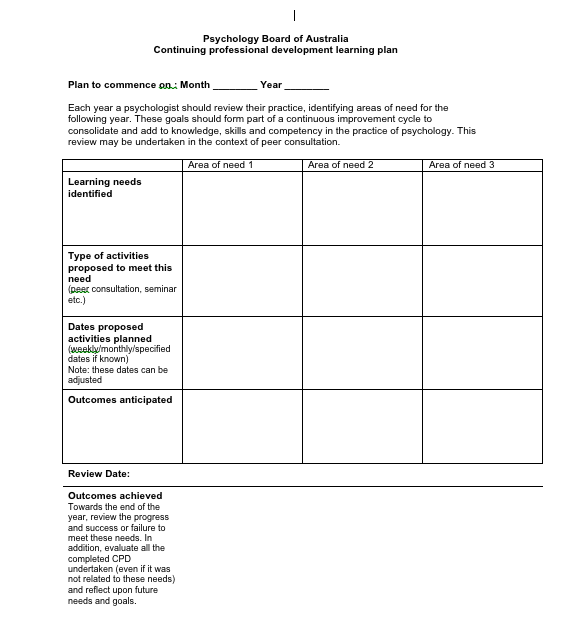
Each period of assessment which in this cycle lasts from July 2010 to November 2011, asks psychologists to provide at the outset a learning plan: What do you hope to learn about the professional practice of psychology during this period?

Below, is the exact form we are required to fill in at the commencement  of the professional development cycle:

In the case of the Sleeping Disorders workshop I undertook this week, it conforms with my training needs because one of the desires I have is to learn things about which I know very little or have no immediate practical need.

In the case of this workshop, I don’t believe I have ever seen a child for a sleep disorder in 30 years of clinical work. I’m not saying I haven’t seen a child with a sleep disorder – I have. It’s more that the referral has been for some other issue such as anxiety or depression of which sleep may be a component. So I don’t hang out a shingle that this is an area of specialisation but my desire to do the workshop was to challenge myself to attend a workshop for which there is no practical purpose. Strange, huh?

The purpose however reminds me of the times I have attended very expansive psychology conventions where there are more than 30 parallel sessions. While I’ll attend quite a few where I expect to apply any learning directly to my clinical practice, I’ll also attend other convention presentations to hear the “names” in my profession present, even if their field is not something I pay particular attention to –   who knows when I will ever have the same opportunity to hear them.

But I also wander into presentations whose fields I know nothing about, where I have minimal prior knowledge of the subject, and where I’m likely to not know the names of authors or experimenters being referenced, nor their body of work, nor the acronyms or special concepts. I enter de novo. As a teacher to psychologists (and others) of presentation skills, it’s a great opportunity to see leaders in their field, as well as first timers, present their stuff, and think about their presentation style and what I can learn for inclusion in my next workshop.

I must say however, that most times I attend psychology workshops and conventions, my learning is mainly what not to do, rather than come away thinking positively I really ought to include that in my workshop.

But going into those lectures with no prior background nor interest in how I will apply what I’ll witness (thus not needing to contemplate if I am up to date, or if my knowledge is sorely underwhelming i.e, the pressure is off) is truly liberating.

Without sitting in unconscious judgement of my own knowledge gaps, I am at liberty to think outside the box, or so I have discovered. I can make large intellectual leaps, because invariably what I learn ends up having some unpredicted relevance to my own work. I go in without pre-conceived ideas, with my only critical faculty being one of witnessing usually unimpressive presentation skills.

This phenomenon is well known to those who witness quantum leaps in understanding when two seemingly unconnected fields of knowledge come together. Each field’s “blindspots” are laid bare, their dogma of “it can’t be done” challenged by the other group’s unawareness of what has been tried and found to have – up to now – failed. The self-imposed limitations of one field are the challenges to another.

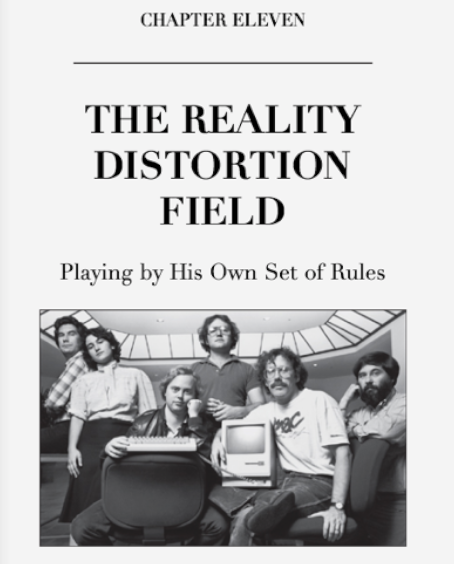
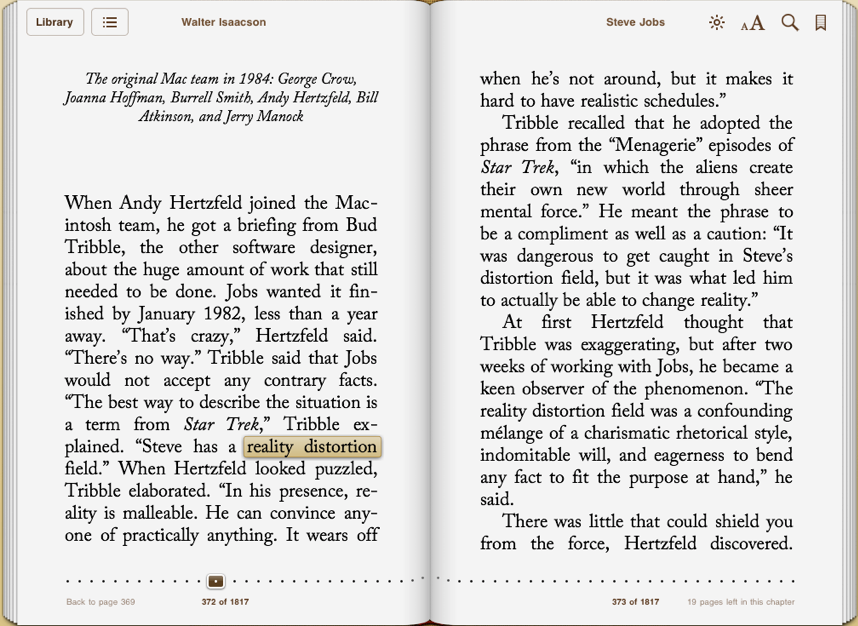
I was reminded of this with the reading of Steve Jobs’ authorised biography. The Macintosh group’s naming of Jobs’ Reality Distortion Field (RDF) (below) was not so much based on his salesmanship and marketing of Apple products, but his ability to convince his workers that what they thought was not possible, was possible.

Shown above is the original Mac team from Walter Isaacson’s book, and the history of the RDF is described, thus:
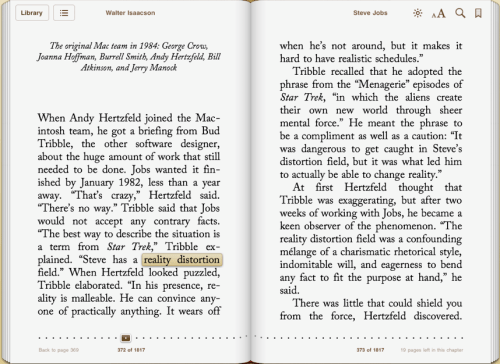
“Steve has a reality distortion field” (Bud Tribble)… “In his presence, reality is malleable. He can convince anyone of practically anything.”

There are several dozen references to the RDF in the biography, not just within Chapter 11. Of significance is its mention at the launch of Jobs’ NeXT computer in the time he was away from Apple.

Demonstrating why the NeXT “(had) made the first real digital books”, Jobs said: “There has not been an advancement in the state of the printed book technology since Gutenberg”. (Even though the NeXT failed commercially, Jobs desire to revolutionise the printed book and turn another industry on its head lives on in the shape of the iPad.)

While demonstrating the NeXT, Isaacson writes of Jobs:

“… he used the quotations book to make a more subtle point,  about his reality distortion field. The quote he chose was from Lewis Carroll’s Through the Looking Glass (orig. ital.). After Alice laments that no matter how hard she tries she can’t believe impossible things, the White Queen retorts, “Why, sometimes I’ve believed as many as six impossible things before breakfast.” Especially from the front rows (of the NeXT demonstration audience), there were roars of knowing laughter.”

The idea of professions learning from each other, and respecting how each can make a contribution, is well known in health care, where patients may well be seen by several different health practitioners who care about the global health of the patient, rather than their own specialisation.

To work together, the professions must learn about each other, and this has become known as InterProfessional Education (IPE).

Take a look at this definition from Western University:

PE is generally accepted to mean

“Occasions when (students) from two or more professions learn with, from and about each other to improve collaboration and the quality of care”.

– Freeth et al. Effective Interprofessional Education:
Development, Delivery & Evaluation
. Blackwell Publishing, Oxford, UK, 2005.

The World Health Organization recently described IPE and collaborative practice is to mean. “Interprofessional education occurs when students from two or more professions learn about, from and with each other to enable effective collaboration and improve health outcomes. Interprofessional education is a necessary step in preparing a ‘collaborative practice-ready’ health workforce that is better prepared to respond to local health needs. Source: World Health Organization (2010): Framework for Action on Interprofessional Education & Collaborative Practice”.

This is, by the way, why I was unhappy when my professional society wished to set up a mentor scheme for young psychologists and only wanted psychologists as mentors. I advised it would be too easy to confuse it with professional supervision, and mentoring would be best handled by experienced professionals outside of the practice of psychology. (That fell on deaf ears).

Let me now bring in the notion of Continuing Professional Education. My national registration body insists that:

“As a general guide, CPD (continuing professional development) activities should be relevant to the psychologist’s area of professional practice and have clear learning aims and objectives that meet the individual’s requirements”.

This of course leaves it wide open to argue what is defined as “relevant”, and indeed to even define what is a professional practice.

If for instance, I advertise my presentation skills training as almost unique in that few psychologists offer this training, and that my knowledge as a practising psychologist (spending 30 years persuading people to change) makes my workshops special, would my attending say Garr Reynolds Presentation Zen workshops which focusses less on my area of psychology and more on design theory be considered irrelevant?

But there is more to interprofessional collaboration and the gains to be made that just patient care. Surgeons and commercial pilots are getting together on a frequent and formal basis to learn about risk management mitigation strategies and preparedness, as I learnt from one fear of flying physician patient and his father who was a leading surgeon. He had brought his College of Surgeons and Qantas Safety culture experts together to learn from each other.

Going still further, yet returning to the point of one profession’s self-limitating beliefs and behaviours being challenged by collaborating with another profession, let me draw your attention to the book, below:

Hargadon’s book can be accessed in part from Googlebooks here but here’s an early main point:

This of course is why so many have compared Steve Jobs to Edison for their shared abilities to recognise the nature of innovation, bring disparate people together, and then in Jobs’ case in particular, get them to see beyond their own self-imposed limitations, not just their own profession’s with which they identify, and for which there can be various stigma applied if one steps out of prescribed, but often not coded, limits. I’ve been there, and done that with regard to my own profession, especially the application of technologies in psychological endeavours.

Also during the week, based on the article appearing in the media featuring my ideas on presenting and Keynote, I was contacted by a young psychologist (let’s call her by a nom de plume: Nicky) involved in a committee putting on a two day conference at which she was due to present on her Ph.D. Nicky asked if I would provide some coaching in constructing her message.

Not surprisingly, when I loaded her Powerpoint onto my Macbook Pro and projected it up on the wall, it contain the usual presentation errors I ask psychologists and other scientists to give consideration to: loads of text, small pixelated images of dubious relevance, lack of clarity as to the central message, overuse of concepts which needed further clarification before making the central point, disengaging use of article citations and their page numbers, and so on.

(At my Presentation Magic workshop at Macworld 2012, I’ll show for those in academia how to do this properly. My client, like so many I see, know that many presentations leave something to be desired, but have little idea what to do about it. The sooner those who train professionals understand that presentation skills is a teachable subject in demand for professional development, the sooner it will be included in syllabi, and the sooner presentations will improve. Based on the feedback I received a this year’s American Psychological Association convention in Washington, I completed the onerous task of applying to do a Presentation Magic workshop for continuing education for the APA Orlando convention, in August 2012.)

When I showed Nicky how I illustrate references, quotations, book titles and other devices using Keynote’s bag of tricks, she was wowed (as I expected). She “got it” immediately as most do when shown “before and after” slide modifications and we even worked through some simple transformations she could make before her presentation this week. All from an evidence-base.

Here’s her thank you email, with her ID obscured:

The good thing is both Nicky and I earn CPD points for this endeavour. (Update: I heard from Nicky her presentation went well and she is eager to return and play on her own with Keynote)

But today, through an obscure RSS feed, I came across a reference to the work of management guru, Peter Drucker. Published in INC., in 1997, his article entitled, My life as a Knowledge Worker, describes “seven personal experiences that taught (Drucker) how to grow, to change, and to age–without becoming a prisoner of the past”. The article itself is an adaptation from a 1996 book:  Drucker on Asia: The Drucker-Nakauchi Dialogue , by Peter F. Drucker and Isao Nakauchi,

I’m at an age and experience in my own profession where such articles draw me to them like a moth to a flame. And as you will see, there are parallels between Drucker as a management innovator, and that of Steve Jobs – uncannily so.

The First Parallel to Steve Jobs

Here is Drucker writing about his first experience:

THE FIRST EXPERIENCE 
Taught by Verdi

The work at the export firm was terribly boring, and I learned very little. Work began at 7:30 in the morning and was over at 4 in the afternoon on weekdays and at noon on Saturdays. So I had lots of free time. Once a week I went to the opera.

On one of those evenings I went to hear an opera by the great 19th-century Italian composer, Giuseppe Verdi–the last opera he wrote, Falstaff. It has now become one of Verdi’s most popular operas, but it was rarely performed then. Both singers and audiences thought it too difficult. I was totally overwhelmed by it. Although I had heard a great many operas, I had never heard anything like that. I have never forgotten the impression that evening made on me.

When I made a study, I found that this opera, with its gaiety, its zest for life, and its incredible vitality, was written by a man of 80! To me 80 was an incredible age. Then I read what Verdi himself had written when he was asked why, at that age, when he was already a famous man and considered one of the foremost opera composers of his century, he had taken on the hard work of writing one more opera, and an exceedingly demanding one. “All my life as a musician,” he wrote, “I have striven for perfection. It has always eluded me. I surely had an obligation to make one more try.”

I have never forgotten those words–they made an indelible impression on me. When he was 18 Verdi was already a seasoned musician. I had no idea what I would become, except that I knew by that time that I was unlikely to be a success exporting cotton textiles. But I resolved that whatever my life’s work would be, Verdi’s words would be my lodestar. I resolved that if I ever reached an advanced age, I would not give up but would keep on. In the meantime I would strive for perfection, even though, as I well knew, it would surely always elude me. (Italics added).

The Second Parallel to Steve Jobs

In his second experience, Drucker elaborates on this quixotic quest for perfection, and goes back in history much past Verdi. If you haven’t read Isaacson’s book yet, many of those who criticise him for a lost opportunity to really help us understand Jobs, point to Isaacson’s not immersing himself in technology history to place Jobs’ development into an appropriate perspective. We read of some clues however (click to enlarge):

The pride in workmanship is perhaps what has differentiated Apple from its competitors in the world of technology. It causes many who don’t understand why some prefer to pay that little extra to be label them as “sheeple” or Apple “Fanbois” or more affectionately within the Apple community as “MacMacs”.

But to drive the point home in the world of presentations, many who attend my workshops “complain” of my work ethic, with respect to labouring for hours over a slide which might only be on the screen for a few moments. Academics in particular claim they do not have the time to invest in their slides, hence their proclivity to “cut and paste” text from Word documents into Powerpoint slides, denude it of verbs and appropriate grammar, and shove a bullet point in front of the text.

I labour over my slides because I make the time to do so; I want the audience to understand I value their attendance and a high quality engaging slideshow is their reward; constructing difficult slides requires me to both understand the message I want to deliver as well as dig down deep into the software I choose to use to really understand its strengths and weaknesses. The latter get reported, with examples of what I want to happen, to Apple’s iWork team.

Finally, a slide or series of slides that work well can be repurposed for another presentation with a simple substituting of words and graphics, keeping the builds and transitions intact.

So what does the back of a cabinet made by Steve Jobs’ father have to do with Peter Drucker?

In his second learning experience to become a knowledge worker, Drucker writes:

THE SECOND EXPERIENCE 
Taught by Phidias

It was at about this same time, and also in Hamburg during my stay as a trainee, that I read a story that conveyed to me what perfection means. It is a story of the greatest sculptor of ancient Greece, Phidias. He was commissioned around 440 b.c. to make the statues that to this day stand on the roof of the Parthenon, in Athens. They are considered among the greatest sculptures of the Western tradition, but when Phidias submitted his bill, the city accountant of Athens refused to pay it. “These statues,” the accountant said, “stand on the roof of the temple, and on the highest hill in Athens. Nobody can see anything but their fronts. Yet you have charged us for sculpting them in the round–that is, for doing their back sides, which nobody can see.”

“You are wrong,” Phidias retorted. “The gods can see them.” I read this, as I remember, shortly after I had listened to Falstaff, and it hit me hard. I have not always lived up to it. I have done many things that I hope the gods will not notice, but I have always known that one has to strive for perfection even if only the gods notice.

Need I say more?

The Third Parallel to Steve Jobs
Jobs was relentless in his pursuit of change, not for the sake of it, but to discard even successful products and services when new technologies and materials became available. Others might have “stuck to a good thing” and milked a cash cow for all it was worth without engaging in much innovation, especially if the product had a near-monopoly hold in the marketplace. This was not Jobs’ way, and many were astonished when years ago he dumped Apple’s most successful iPod at the time, the iPod-mini,  for the iPod Nano. The iPod-mini had itself been panned by critics at each launch.
When all around Apple were griping about Global Financial crises, Jobs said Apple would innovate its way out of the financial mess the world found itself in. In 2001, introducing the iTunes Music store, he famously said:
“We decided to innovate our way through this downturn, so that we would be further ahead of our competitors when things turn up.”
Drucker too had been through a financial crisis having worked in Europe for a financial  brokerage firm at the time of the Great Wall Street Crash of October, 1929. Aged 20 at the time, he left finance to continue studies in law while learning to become a journalist. The latter taught him one of several lessons he continued to employ throughout his life. It supports my notion of delving into fields you know nothing about which can teach you more than alleged “relevant” continuing professional education:

THE THIRD EXPERIENCE 
Taught by Journalism

A few years later I moved to Frankfurt. I worked first as a trainee in a brokerage firm. Then, after the New York stock-market crash, in October 1929, when the brokerage firm went bankrupt, I was hired on my 20th birthday by Frankfurt’s largest newspaper as a financial and foreign-affairs writer. I continued to be enrolled as a law student at the university because in those days one could easily transfer from one European university to any other. I still was not interested in the law, but I remembered the lessons of Verdi and of Phidias. A journalist has to write about many subjects, so I decided I had to know something about many subjects to be at least a competent journalist.

The newspaper I worked for came out in the afternoon. We began work at 6 in the morning and finished by a quarter past 2 in the afternoon, when the last edition went to press. So I began to force myself to study afternoons and evenings: international relations and international law; the history of social and legal institutions; finance; and so on. Gradually, I developed a system. I still adhere to it. Every three or four years I pick a new subject. It may be Japanese art; it may be economics. Three years of study are by no means enough to master a subject, but they are enough to understand it. So for more than 60 years I have kept on studying one subject at a time. That not only has given me a substantial fund of knowledge. It has also forced me to be open to new disciplines and new approaches and new methods–for every one of the subjects I have studied makes different assumptions and employs a different methodology.

Again, the parallels to how Jobs conducted his life are clear. In terms of relevance to me as a professional, I have always asserted that Professional associations and societies and Registration Boards who assert CPD is good for protecting the public from out of date practitioners have badly sold CPD: it’s as much about the welfare of the practitioner as it is about the welfare of the profession and the public it serves. Unfortunately, too often I see sticks and not carrots in this domain. As agents of change, we psychologists have much to learn in this domain.

The Fourth Parallel to Steve Jobs

By now, if you are at all interested in presentations, Steve Jobs and Apple, you will be aware of what a terribly difficult person he could be, especially when leading his teams to produce the products he believed the public wanted to buy, although they didn’t know it yet. He wanted others to participate in his singular pursuit of perfection.  I must say, I have had the occasional person witness my presentations and ask me, “Why do you bother? Why spend time chasing down the one picture to illustrate your idea, and why not make do with a standard presentation style, like we all do?”
Here is Drucker writing of turning his journalism career into lifetime lessons, with a special emphasis on mentoring, training and learning from others with an eye to perfection:

THE FOURTH EXPERIENCE 
Taught by an Editor-in-Chief

The next experience to report in this story of keeping myself intellectually alive and growing is something that was taught by an editor-in-chief, one of Europe‘s leading newspapermen. The editorial staff at the newspaper consisted of very young people. At age 22 I became one of the three assistant managing editors. The reason was not that I was particularly good. In fact, I never became a first-rate daily journalist. But in those years, around 1930, the people who should have held the kind of position I had–people age 35 or so–were not available in Europe. They had been killed in World War I. Even highly responsible positions had to be filled by young people like me.

The editor-in-chief, then around 50, took infinite pains to train and discipline his young crew. He discussed with each of us every week the work we had done. Twice a year, right after New Year’s and then again before summer vacations began in June, we would spend a Saturday afternoon and all of Sunday discussing our work over the preceding six months. The editor would always start out with the things we had done well. Then he would proceed to the things we had tried to do well. Next he reviewed the things where we had not tried hard enough. And finally, he would subject us to a scathing critique of the things we had done badly or had failed to do. The last two hours of that session would then serve as a projection of our work for the next six months: What were the things on which we should concentrate? What were the things we should improve? What were the things each of us needed to learn? And a week later each of us was expected to submit to the editor-in-chief our new program of work and learning for the next six months. I tremendously enjoyed the sessions, but I forgot them as soon as I left the paper.

Almost 10 years later, after I had come to the United States, I remembered them. It was in the early 1940s, after I had become a senior professor, started my own consulting practice, and begun to publish major books. Since then I have set aside two weeks every summer in which to review my work during the preceding year, beginning with the things I did well but could or should have done better, down to the things I did poorly and the things I should have done but did not do. I decide what my priorities should be in my consulting work, in my writing, and in my teaching. I have never once truly lived up to the plan I make each August, but it has forced me to live up to Verdi’s injunction to strive for perfection, even though “it has always eluded me” and still does.

Most Fridays, I prefer not to see patients, instead writing reports, blogging, reading, and reflecting with colleagues on how the week went: What did I learn from my patients this week; what of the presentation I gave last weekend – could it be improved knowing what worked and what didn’t and the audience reactions to both. It doesn’t give me a long weekend, as I’m often flying with patients on Saturday or Sunday to help them overcome their fear of flying. But this time for reflection and solitude is very important.
The first time I saw Steve Jobs on the Apple Cupertino campus I was being hosted at lunch by one of the iWork senior staff, and there was Steve, about 100 metres away, walking alone around the campus, deep in thought. He was very thin at the time, somewhat stooped, but you could almost hear the cogs of his mind ticking over like an exquisite Swiss timepiece.
I’ve thought that with my current crop of supervisees we should sit down in our next session and work though their new professional learning plan, as mandated by the national registration board, get the signed paperwork out of the way, and work assiduously to NOT do it, but exceeding it in some unpredictable yet justifiable way. As Drucker noted, after six decades, he never succeeded with his plans, such was his striving for perfection, and the limitations such planning can embrace.
The Fifth Parallel to Steve Jobs
One of the important things that I do for my own learning, both as a psychologist and a presenter, is watch how experts work. It could be going to lectures and workshops by people at the top of their profession, but whose body of work I have only passing interest in. Sooner or later, an expert will teach you something. But as Alan Funt would say, it may happen when you least expect it.
Or it could be watching advertisements or those current affairs shows which each have limited time to get across their messages, usually aiming at the lowest common denominator. They need to pull out all the technology and story telling stops to do so, and I watch very closely how they do this, and wonder if I can emulate them in Keynote. Other times, I watch high brow documentaries for the same reason, and more and more we are seeing amazing CGI to get across very complex ideas. Please locate Brian Green’s NOVA documentary series, Fabric of the Universe,  to see what I am talking about, here.
Apart from having a deep foundational knowledge of their subject, experts have the ability to impart that knowledge to others who only possess superficial knowledge. They also possess a methodology for confronting data points which do not conform to their deep structural knowledge of  their subject. They are not frightened of their theories being challenged but instead, embrace the challenge in an effort to advance the science, and thus the profession. While they have a healthy appreciation of how their expertise developed, they do not look to history to provide the way forward; instead, they are quick to see it as irrelevant if the current facts negate that history. True expertise I believe is not adhering to old ways of doing things if the current evidence shows those ways to be false.
In my own profession, too often have I seen patients who have consulted colleagues who spent considerable time going through childhood history seeking the aetiology of the presenting concern. It’s a luxury we in Australia no longer have as this month rebated sessions under our socialised Better Access to Psychologists scheme have been cut from an annual maximum of 18, to a maximum of 10. The evidence base which saw psychologists’ services enter the Medicare system in the first place in 2006 is one that shows mild to moderate (and sometime severe) impairments, such as anxiety and depression, require between 16 and 20 sessions from a competent psychologist for significant and lasting change to occur.
I have always worked briefly, but ten sessions is getting very close to pushing me to my limits, even though I aim to achieve significant results in 6 to 8 sessions, leaving several sessions up our sleeves for follow up, and unexpected setbacks.
I don’t bring a great deal of focus to childhood origins and behaviour, but prefer to hear the patient’s theories of why their situation has presented itself, what they believe is needed to change that, how they know when change has been effected, and most importantly what factors are maintaining the current misery-causing situations, since they will become our targets for change. Occasionally, patients go back to parents or other figures of their childhood and get their side of the story. This sometimes sees a revision of their own story, but rarely does this cause an epiphany leading to behavioural change. That still requires work.
How change takes place is really what I do, both with my patients and those who attend Presentation Magic training, for whom the task is convincing them to move away from the tradition and style of disengaging Powerpoint to something more effective and rewarding.
Steve Jobs was one to rarely look back, and his biography and commentary about him focusses on his lack of nostalgia (except for his family) and his relentless pursuit of the new, because it would provide a better answer to problems than the old.
Drucker too talks about the old and the new:

THE FIFTH EXPERIENCE 
Taught by a Senior Partner

My next learning experience came a few years after my experience on the newspaper. From Frankfurt I moved to London in 1933, first working as a securities analyst in a large insurance company and then, a year later, moving to a small but fast-growing private bank as an economist and the executive secretary to the three senior partners. One, the founder, was a man in his seventies; the two others were in their midthirties. At first I worked exclusively with the two younger men, but after I had been with the firm some three months or so, the founder called me into his office and said, “I didn’t think much of you when you came here and still don’t think much of you, but you are even more stupid than I thought you would be, and much more stupid than you have any right to be.” Since the two younger partners had been praising me to the skies each day, I was dumbfounded.

And then the old gentlemen said, “I understand you did very good securities analysis at the insurance company. But if we had wanted you to do securities-analysis work, we would have left you where you were. You are now the executive secretary to the partners, yet you continue to do securities analysis. What should you be doing now, to be effective in your new job?” I was furious, but still I realized that the old man was right. I totally changed my behavior and my work. Since then, when I have a new assignment, I ask myself the question, “What do I need to do, now that I have a new assignment, to be effective?” Every time, it is something different. Discovering what it is requires concentration on the things that are crucial to the new challenge, the new job, the new task.

The Sixth Parallel to Steve Jobs

One of the things Jobs became legendary for was his focus. In particular, how to take a product or service and remove all that was unnecessary to the task, such as flashing lights and shiny decals, and make sure form matched function. If you into an Apple store you will experience this focus, bot just by playing with the products but in the actual customer service itself.

Jobs played to his strengths, focussing when he returned to Apple in 1997 (the year Drucker wrote his article) on simplifying the product line, which had grown to monstrous and unprofitable proportions under previous Apple CEOs.

Jobs wanted Apple’s return to its roots, to design and make the sort of products he had conceived of at Apple’s birth: ones that could cause massive change in how people worked.

While others around him had wanted Apple to compete with the “Wintel” (Windows on Intel powered PCs)  juggernaut by cloning the Apple operating software to other PC makers, Jobs killed those programs at great expense to focus on what he believed Apple did best.

Rather than a chase to the bottom of the barrel where profits were wafer thin and based on selling masses of “what everybody else is doing” products, Jobs went for the higher ground, knowing – as it was for his favourite auto maker, Mercedes Benz – that there will always be a market for high quality luxury goods where handsome profits can also be made. In time, the quality of the higher end, expensive products would filter down into less expensive, more easily afforded goods, such as the iPod Shuffle, an inexpensive iPod to groom young people into buying Apple products. To fill their Shuffles, they needed iTunes and its downloadable music. And when they could afford it, Macintosh desktop and laptop computers.

When it comes to presentations, I too play to my strengths, daring myself to take risks, to challenge my audience, and not give in to the lowest common denominator, even if it cancelling a presentation to a conference audience whose organisers demand I convert my Keynotes to Powerpoint for their convenience, not for the edification of the paying attendees.

Thus, Drucker too talks about playing to one’s strengths, and the role of continuous learning:

THE SIXTH EXPERIENCE 
Taught by the Jesuits and the Calvinists

Quite a few years later, around 1945, after I had moved from England to the United States in 1937, I picked for my three-year study subject early modern European history, especially the 15th and 16th centuries. I found that two European institutions had become dominant forces in Europe: the Jesuit Order in the Catholic South and the Calvinist Church in the Protestant North. Both were founded independently in 1536. Both adopted the same learning discipline.

Whenever a Jesuit priest or a Calvinist pastor does anything of significance–making a key decision, for instance–he is expected to write down what results he anticipates. Nine months later he traces back from the actual results to those anticipations. That very soon shows him what he did well and what his strengths are. It also shows him what he has to learn and what habits he has to change. Finally, it shows him what he has no gift for and cannot do well. I have followed that method for myself now for 50 years. It brings out what one’s strengths are–and that is the most important thing an individual can know about himself or herself. It brings out areas where improvement is needed and suggests what kind of improvement is needed. Finally, it brings out things an individual cannot do and therefore should not even try to do. To know one’s strengths, to know how to improve them, and to know what one cannot do–they are the keys to continuous learning.

The Seventh Parallel to Steve Jobs

The final parallel is perhaps the most haunting and significant one. Here, in the final installment of his seven learning experiences, Drucker writes of he and his father visiting the great economist, Joseph Schumpeter, who had been a co-worker of his father’s in Europe when both were very young. When he writes of comparing his father to Schumpeter, (below) I am reminded in his description of Steve Jobs and Steve Wozniak, and their contrasting personalities.

In this learning lesson, Drucker uses his visit to Schumpeter to review lessons learnt of a lifetime, of what’s important, and of giving consideration to one’s legacy to one’s fellow human beings. This would appear to have been an increasingly important concept  for Jobs too, as he oversaw the return of Apple to past glories, and indeed way beyond most people’s expectations. Having achieved incredible fame and fortune, he turned his attention to his legacy, both to Apple and mankind.

This phrasing might irk many people, but it certainly helps explain the unconstrained outpouring of grief and sorrow at Jobs’ passing only seven weeks ago, with so much ahead of him to yet achieve.

But once he knew he had to get his affairs in order, as he had been told early in his diagnosis of cancer, he went about it methodically and with an eye to his legacy. No doubt, he first thought of his family and how to care for them in his absence, and to some extent Isaacson’s book is meant to be a source of care for his children, to help explain his absences from important developments in their lives.

But he also turned his attention to the bigger picture of Apple itself, and how to leave the company he’d co-founded when he was 21, in good hands and with a culture  and ability to strategise that would long outlive him. Not so much in his image (he didn’t want a “What would Walt do” paralysis which afflicted Disney after his passing), but in his pursuit of perfection, continuous learning, and making products and services which make a difference in people’s lives. It’s no surprise then that he set up a Knowledge Management program – Apple University – to impart his life’s learnings, through the leadership of Yale’s Joel Podolny.

No doubt Podolny, like most in American business schools, was a student of Drucker’s even if he never sat in a class of his. Drucker was a force to be reckoned with, changing the face of American and world business practices over the course of his lifetime. Here is his seventh and most parallel of learning experiences:

THE SEVENTH EXPERIENCE 
Taught by Schumpeter

One more experience, and then I am through with the story of my personal development. At Christmas 1949, when I had just begun to teach management at New York University, my father, then 73 years old, came to visit us from California. Right after New Year’s, on January 3, 1950, he and I went to visit an old friend of his, the famous economist Joseph Schumpeter. My father had already retired, but Schumpeter, then 66 and world famous, was still teaching at Harvard and was very active as the president of the American Economic Association.

In 1902 my father was a very young civil servant in the Austrian Ministry of Finance, but he also did some teaching in economics at the university. Thus he had come to know Schumpeter, who was then, at age 19, the most brilliant of the young students. Two more-different people are hard to imagine: Schumpeter was flamboyant, arrogant, abrasive, and vain; my father was quiet, the soul of courtesy, and modest to the point of being self-effacing. Still, the two became fast friends and remained fast friends.

By 1949 Schumpeter had become a very different person. In his last year of teaching at Harvard, he was at the peak of his fame. The two old men had a wonderful time together, reminiscing about the old days. Suddenly, my father asked with a chuckle, “Joseph, do you still talk about what you want to be remembered for?” Schumpeter broke out in loud laughter. For Schumpeter was notorious for having said, when he was 30 or so and had published the first two of his great economics books, that what he really wanted to be remembered for was having been “Europe’s greatest lover of beautiful women and Europe’s greatest horseman–and perhaps also the world’s greatest economist.” Schumpeter said, “Yes, this question is still important to me, but I now answer it differently. I want to be remembered as having been the teacher who converted half a dozen brilliant students into first-rate economists.”

He must have seen an amazed look on my father’s face, because he continued, “You know, Adolph, I have now reached the age where I know that being remembered for books and theories is not enough. One does not make a difference unless it is a difference in the lives of people.” One reason my father had gone to see Schumpeter was that it was known that the economist was very sick and would not live long. Schumpeter died five days after we visited him.

I have never forgotten that conversation. I learned from it three things: First, one has to ask oneself what one wants to be remembered for. Second, that should change. It should change both with one’s own maturity and with changes in the world. Finally, one thing worth being remembered for is the difference one makes in the lives of people.

I am telling this long story for a simple reason. All the people I know who have managed to remain effective during a long life have learned pretty much the same things I learned. That applies to effective business executives and to scholars, to top-ranking military people and to first-rate physicians, to teachers and to artists. Whenever I work with a person, I try to find out to what the individual attributes his or her success. I am invariably told stories that are remarkably like mine.

Your observations and comments about your own learning experiences, for the education of others, is welcomed, below.

With the passing of Steve Jobs, its primary beta tester, has Apple now orphaned its presentation software, Keynote, which hasn’t received a major update for almost three years. Will dissatisfied users abandon it for Powerpoint (which Jobs despised)?

I’ve just finished reading on my iPad and iPhone Walter Isaacson’s superb biography of Steve Jobs. I knew much of the story he told from the various unauthorised biographies as well as individual blogs written about him, as well as movies such as “Triumph of the Nerds” and “Pirates of Silicon Valley”.

I saw Steve a few times up close when I visited the Apple campus in the last few years, but never had a chance to speak with him. I can certainly fantasise that he many have read some of my blog articles about Apple products such as the Mac, the iPod, the iPhone and of course his presentation software of choice, Keynote.

In more recent years, he spoke of hoping to keep Apple’s DNA alive after he was gone by dint of the new Apple building he has commissioned to be built on some previous Hewlett-Packard land. Perhaps he had read of the “Apple DNA” concept on my blog article in December, 2004, a screenshot of which is below. It is on this website that I first suggested Apple ought to make a tablet (I nicknamed it the iScribe) which would be brilliant for Keynote users to remote use:

(If you can find a description of Apple’s DNA earlier than 2004, please let me know!)

I’m sure many readers have fantasised what they would have said to Steve Jobs if they happened to meet him, and perhaps some of you have! My other fantasy includes him walking into my first Presentation Magic  presentation at Macworld 2008, saying  “This sucks!”, then taking over the show to share his presentation ideas. How I and attendees would have had special memories to take with us had that happened!

But before you think it merely fantasy, others in the health professions have indeed been on the receiving end of Jobs’ “advice” with regard to their presentations, especially when they used Powerpoint.

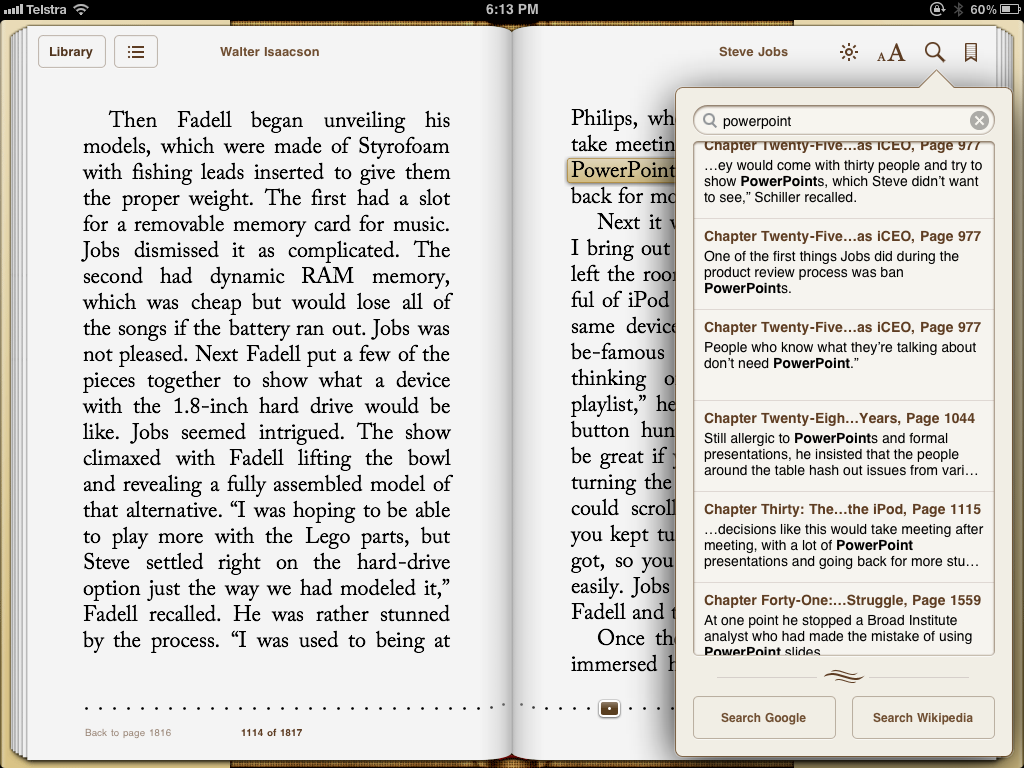
Walter Isaacson’s Jobs’ biography mentions his distaste for Powerpoint, and slideshow-based presentations in general (save for his own keynote presentations) on six occasions. You won’t find Powerpoint or Keynote listed in the book’s index, but in the iBooks’ version I have, you can of course do a global search for keywords. So, here you have them:

Global search of Powerpoint references in "Steve Jobs" by Walter Isaacson

We’ll work our way through some of them because it’s quite illuminating to hear what someone who presentation bloggers and authors rate as one of the world’s best presenters (and the world’s best CEO presenter) has to say about Powerpoint, and presentations in general.

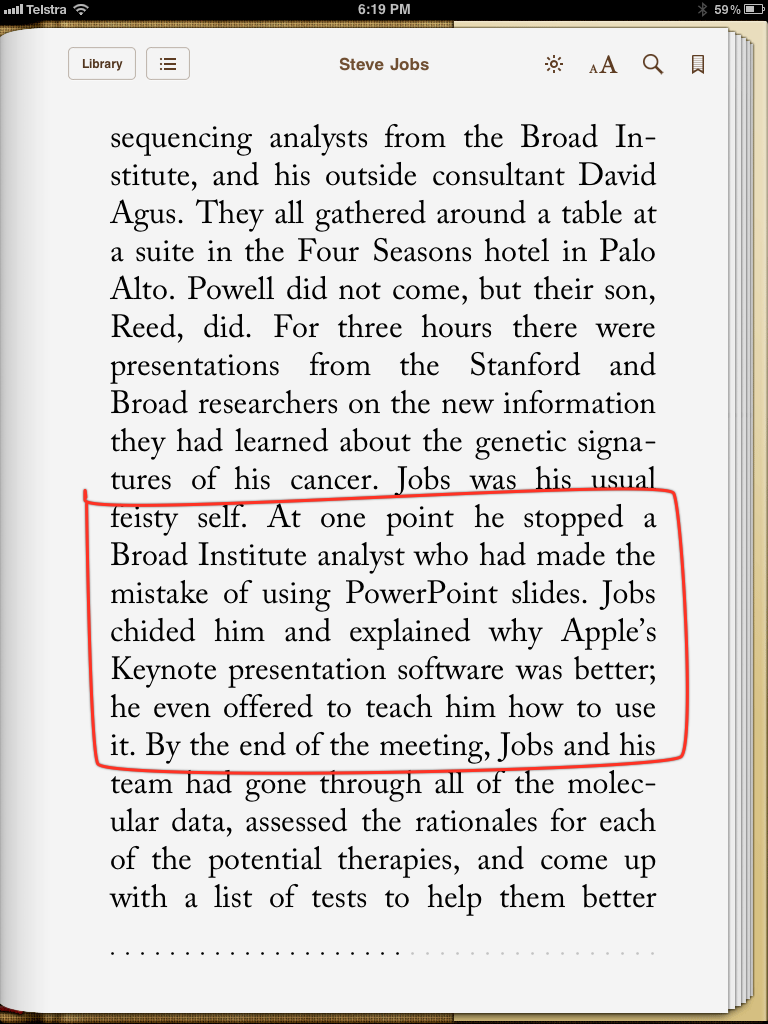
Let’s start with the final reference where Jobs is very ill, and his wife Laurene and others have organised various medical and genetics research staff to investigate where next in his treatment:

One could just imagine Jobs focussing on the expectedly lousy Powerpoint slides of medical researchers while they’re focussing on his genome sequence for which he’s paid $100,000!

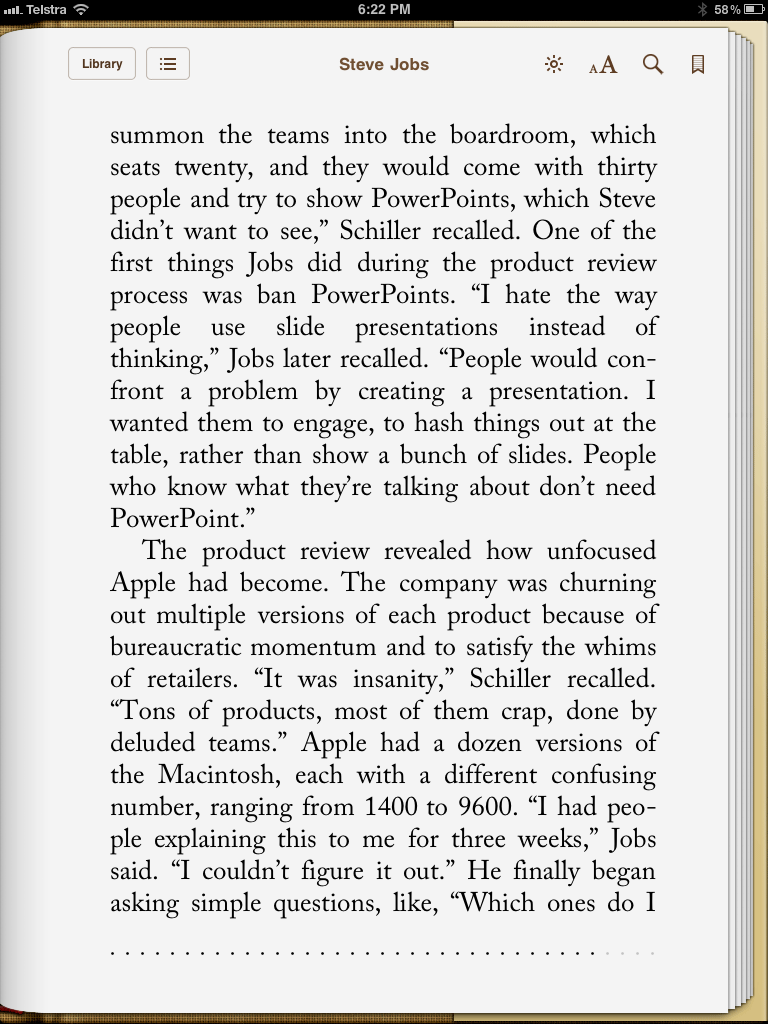
But earlier on the book, when Jobs has returned to Apple and is setting about constructing his “A” team to resurrect Apple, we see how he eschews presentations with slideware when he believes it takes from, rather than adds to, the creative process:

“People who know what they’re talking about don’t need Powerpoint”

This might sound strange coming from someone who was the original beta tester for Apple’s Keynote, and who continued to employ it to show Apple’s wares right up to the release of the iPad 2.

But as I have written elsewhere, a Jobs’ keynote does not engage the audience in a dialogue. The audience is engaged with the story he tells of Apple’s products and services, where he employs Keynote like a storyboard, outlining a roadmap. It’s not used as a lecture technology, as an adult training tool, or as a brainstorming of ideas technology. Jobs never hid behind his slides as so many people do, preferring their slides to sell the story. No, Steve emulated for us how the slides were adjuncts to our spoken stories, never getting in the way of what the presenter was saying or doing, but ready to illustrate ideas when words were not enough.

With Steve’s passing who at Apple can carry the torch for Keynote? The obvious answer is Phil Schiller who, after Steve, is most associated with demonstrating iWork in action at Apple keynotes, and showing us updates.

But is Phil invested sufficiently in Keynote to see it continue to be updated with features for a contemporary presentation population, both givers and receivers who have become steadily sophisticated in their expectations.

I say that with some sense of caution however. I was sent a link to YouTube video of several start-ups competing for venture capital, each giving a recent 3 minute presentation.

You can watch it below. But let me remind you that since the release of Lion 10.7 and a point update for Keynote, many in various discussion groups have complained of considerable unhappiness regarding the auto-update feature, which for some means minutes of spinning beach balls for even the slightest of changes to a slide. It has meant on Apple discussion support boards that some have either reverted to Snow Leopard or an earlier edition of Keynote so as to bypass the auto-save feature, or have returned (shudder) to Powerpoint.

So when you watch the video below, bear in mind two things:

1. There is still plenty of room for presentation skills training to judge by the young group of entrepreneurs missing the central point of their presentations, viz.: their failure to appreciate the most important obstacle to overcome as soon as possible is the audience’s fundamental cognition: “Why should I give a $%# about your product?”

2. Feel some empathy for the first presenter, who uses the organiser’s Powerpoint (Mac-based) when it falls over (at 2min56sec):

Notice too what happens when you don’t provide speakers with a vanity monitor, which I have been discussing lately. You’ll see how often the presenters need to look over their shoulder to see what’s happening and lose contact with their audience. Not good when you’ve only got three minutes to persuade people.

You’ll also see many presentation errors with the slides (perhaps I’ll use this as an exercise at my Macworld presentation), which shows I hope that even young, hip entrepreneurs whose presentations really count can so easily be sucked into the Powerpoint vortex of lousy knowledge transfer.

So the mission Steve started in 2003 with Keynote 1.0 is way from over, I believe. Yet the last significant update to Keynote was in 2009 when it moved to version 5, as part of iWork 09, giving us MagicMove (which has become a default Apple transition for their keynotes), some new chart animations, and some remote apps for iDevices.

In two months, it will be three years while its users have patiently waited for Keynote’s multitude of shortcomings to be dealt with in the form of a brand new version, making a significant form and function leap as did Final Cut Pro X.

Yet without Steve there to champion it, as he did in the final period of his life, who within Apple will take it to Tim Cook, hardly renowned so far as a presenter par excellence, and the senior executive team, and offer up an improvement?

Apple keynotes themselves have settled into a very predictable pattern, with incredibly overused build styles, such as the “anvil” whenever amazing financial figures are displayed. In the last few keynotes we have not seen any hints of new effects or styles, although  of course there could be events happening outside of visual awareness, such as the much sought after timeline for more precise animation and build timings.

What’s worse, Apple’s own internal briefings using Keynote which I get to see when my MUG has an official presentation from an Apple rep., are merely Powerpoint converted to Keynote, and I recall conversations with my iWork contact who lamented the generally low level of presentation skills using Keynote performed within Apple’s various divisions. It’s probably why people like me and Larry Lessig were invited to present to the Keynote team, not just to discuss what we wanted in future Keynotes, but for the team to witness how to Present Different.

Prior to the current version 5, the longest time in Keynote’s history  when its users had to patiently wait for a new version was twenty four months, between versions 1 (released January 2003) and 2 (released January 2005).

There were some minor point updates in that time, more for stability than features. Version 2 was a huge improvement, almost like going from OS X 10.1 to its first really useable, put away System 9, version 10.2, Jaguar.

Three years is a very long time, although if one lives in the Windows Powerpoint world, where in the last decade you go from PPT 2003 to 2007 to 2011, it’s not so remarkable. And in the face of continuing updates of significance to the iPad version of Keynote, perhaps not all hope is lost.

But unless we see something new soon, and the current Lion auto-save issue is resolved, I fear issues of abandonment will continue in the face of Apple’s seeming orphaning of what appeared to be one of Steve Job’s favourite applications he loved using himself; one where we watched its use in amazement not just of the products he showed as emblems of Apple’s DNA, at the intersection of technology and the liberal arts, but of the “how” he showed them, the likes if which in a CEO we won’t see for a long time.

Vale Steve.

Vale Keynote?

Enhancing presentation skills by acknowledging your various audiences – using the iPad as a presentation tool to enhance connection with your audiences (even when others criticise this approach)

There’s a reason why I give away my information and experience on this blog for free, without expectation of reciprocal exchange.

It helps me bring my ideas to paper, to sort them into practical “chunks” so that when I give paid workshops, there’s a place for people to go to investigate more of my ideas and practices. The blog brings me no income, as you can see, containing as it does no Google Adwords or other sources of money, not even a tip-jar.

There’s also an area after each blog entry for readers to both make comments, and to pass on to others the entry link to share around.

So, when I read a blog entry from another presenter which is critical of my endeavours and yet offers no opportunity to respond directly, I have to use my own blog to open up the discussion and see where it takes me and my readership.

Such an event occurred today when my twitter feed showed the following:

Hmm… Something I’ve shown hampers public speaking inadvertently? Well, colour my curiosity piqued!

Heading to the linked website, reveals a blog link on José Silva’s Scrapbook which examines my recent APEX presentation in Seattle which I uploaded to YouTube and blogged about in much detail, describing my choices along the way.

Here’s how José begins his blog entry – and I’m grateful he gets to the point and doesn’t make me wait around too long!

Presentationist Les Posen inadvertently shows why one of the products he recommends is likely to make presenters worse public speakers.

I like Les’s Presentation Magic site (on the internet we’re all on a first name basis, right?). I think it focusses a bit much on presentation sizzle, but then most sites on presentations do. Tufte and Norman, when they discuss presentations, are the exception.

Les gave a presentation about fear of flying where he used a product he recommended before, the iKlip. From the video of that presentation he appears to stay mostly in the same place, standing at parade attention near his stationary iPad.

If he sat down on a comfy chair it would be less distracting; it would at least feel natural.

The iKlip in question is merely a holder for my iPad attached to a microphone stand. It facilitates using the iPad as a vanity monitor so I can best know what’s happening on the main screen behind me without turning my back to the audience.

Previously, I’d either use my Mac in presenter mode – something which means you’ve got to stand within easy sight – or bring with me my own vanity monitor and a switch box so the feed to it and the data projector match. Most conference venues will nowadays supply with you a monitor but it’s expected you’ll use it in mirror mode, something I believe is unhelpful to professional presenters when compared to being in presenter mode, previewing the next build or slide.

The iKlip merely allows me to position the iPad in such a way as to facilitate presenter mode, although because I also use the Doceri software package, I can annotate the slides at will. I’m sure many in education will find that facility very useful, and if one’s running an all day workshop, you could add a white slide to the end of your Keynote or Powerpoint stack, and use Doceri as a whiteboard.

Returning to José‘s critique, he observes something I had not perceived or received feedback from others: that I appear to be standing at “parade attention” due to needing to be in close proximity to the iPad, and this is not good public speaking practice.

Personally, I don’t experience my presentation that way, believing myself to be quite animated using hands, body and voice appropriately. Jose would prefer me to have my iPad in my hands and move around the auditorium, freeing up myself and not appearing so stiff and “unnatural”.

In preparing my response, I was reminded of my training in Family Therapy more than twenty years ago. This therapy developed in response to an increasing medicalisation of behavioural issues, especially in children,  as well as institutionalisation of those with serious mental illness issues.

Rather than seeing a child or adult as being ill, Family Therapy asked therapists to look at the presenting problem in more systemic, global ways, so that the individual was referred to as the “Identified patient” but treatment involved the entire family. The idea was to remove stigmatising and paralysing “blaming of the patient” and look to see how the whole family interacted and to give the family work to do between sessions to ameliorate the “identified” problem behaviour.

This was a radical approach at the time, and required radical interventions. One of these was the Greek Chorus and the one-way screen. Essentially the therapist interacted with the family while a team behind a one-way window observed the family-therapist interaction, using a two-way intercom to call attention to behaviours not necessarily witnessed by the therapist as well as offer questions and observations, hence the Greek Chorus, as it was termed.

Such devices are great for therapists in training, even if it’s a rather nerve wracking experience. Those behind the screen also had much learning to do, sharpening observational skills, formulating hypotheses about what they were witnessing, and providing feedback and guidance to the therapist in the room with the family.

There was one thing though one learnt via this experience: ultimately, the therapist in the room was best placed to “feel” the ambience and mood in that room, something not experienced behind the screen. Whatever advice they received via the intercom, it was their choice as to what they acted upon, sometimes discarding it completely.

Later, in the group debrief, they needed to justify their actions, and the “you had to be in the room” explanation was used sparingly, since it’s hard to put into words the “being with the family” experience.

This is my rebuttal to Jose. What he’s seeing is a video of what happened in the auditorium where the presentation took place. I was there, and responded to the experience as I felt best at the time.

Let me get more to the point, so we may all learn something here.

How I chose to move or not move around the auditorium was determined far less by the iKlip and Doceri than Jose would have it. It was more determined by the practicalities of my audiences. Yes, audiences.

You see, going into this presentation I had in my mind several audiences whose compositions and needs I could only guess at. The first audience was the live one in the room, composed of aviation personnel. As it turned out, they were not a homogeneous group, but came from many areas of aviation. They were seated in a very large room, which held 250 people. The room setup was to place the presenters on a podium, the guest speaker behind a lectern, stage right, and the slideshow way over on stage left.

I was probably the only speaker on the day to get down with the audience, and use Keynote, not Powerpoint. (Many conferences I attend either expect you to bring your own laptop and do all the tech support; or they go completely into control freak mode, and expect you to hand in your Powerpoint which they place on a central server to be played on their supplied PCs.)

So that’s my primary audience which will give one instant feedback as to one’s presentation, and either charge you up or deflate you as you go along.

But I also prepared, when constructing the presentation and its delivery, that I would have at least two other audiences, with quite different learning expectations and priorities…. and these would not be in the live audience to give me instant feedback.

It was my plan to video the presentation and give it to the APEX education committee to place on their private site, for members to watch and download at their leisure. What I was told was that my slides were required for this exercise. And of course I know that if I just sent them just the plain slides without builds and transitions or the accompanying stories, so much would be lost in translation. Of course, being steeped in the cognitive style of Powerpoint (having seen previous APEX slides), their expectation was that my slides would contain all that was needed to convey my story, without my narrative or voice-over. I knew otherwise, so had planned to video my presentation with me on the floor, and cutting in live-action video with my Keynote slides to make it a far more engaging video.

If you go back and view the video on YouTube, you’ll see why I had to limit my movements, so as to stay in camera shot. My iPhone was stationary and set by me to record, with no one to track me as I moved about. Hence, the need not to move out of camera range. That would be fine for the live audience, but the audience watching on YouTube would find it frustrating just to see me move in and out of camera. Here’s Jose himself in action from a camera’s static position, with an hour’s lecture sped up to take just a few minutes (much like we see how Boeing or Airbus assemble a plane in a two minutes.)

Firstly, here’s a screenshot from the video of Jose out of screen range:

This is what I tried NOT to do, and if one of the resultant effects was to come across stiffly, I was prepared to pay the price.

Here’s his YouTube video, and I’m not sure when I watch what is the message behind speeding it up. Note also the hulking and distracting video monitor stand in the centre of the video. Give me my less intrusive iKlip anyday 😉

I mentioned earlier three audiences I was addressing: (1) the live audience, (2) the aviation audience who would watch it on the APEX members-only website, and (3) now a third audience: my own presentation training audience who would watch the video on YouTube where its subject, fear of flying, was merely a vehicle to illustrate my presentation ideas.

For them, how I constructed my slides has always been of interest, but this would be the first time many who had not attended a Presentation Magic workshop would witness me interact with my slides and a live audience, and then read about what and how I did what I did moment by moment. If you can find another presenter who has done this naked work (so to speak) please send me a link so I can put it here and share it.

(This is likely why Jose’s blog entry confused me, focussing as it did on such a small element of my presentation, and making a big deal of something, warning other presenters their’s might be negatively affected.)

I want to focus on a couple more comments Jose made on his blog entry. He asserts I would have come across as more “natural” had I sat in a comfy chair and opined.

Sitting in chairs has the purpose of making a presentation more intimate with strangers. We’ve seen this when the Apple executive team demoed the iPad in keynotes, and more recently, it’s the setup Walt Mossberg took at his and Kara Swisher’s All Things Digital conferences, such as their recent one in Hong Kong.

Here’s Walt and Al Gore in conversation in front of hundreds of high powered Asia-based tech executives:

So sitting down has its place in public speaking in order to create an intimate dialogue when in front of a rather formidable audience or in a friendly small setting, because you want to create a special feeling in the room.

In my presentation at APEX, I was not interested in an intimate dialogue. I was challenged with 30 minutes to convince three audiences of the worthiness of my ideas, and my authority and authenticity in at least two fields: aviation and public speaking. It was not a time for intimacy.

Let me finish this critique of Jorge’s critique with his final words:

For me, Doceri won’t help. I use either a real teleprompter, the eyes-only presenter screen on large monitors at the ten-and-two positions on the floor, or — overwhelmingly — good memory supplemented by notes.

This is all well and good if you are repeating lectures in a familiar environment. But if you’re a public speaker as I am, most often – actually invariably – you are not given these tools Jose relies upon. So, I have to be inventive and the iPad, Doceri and the iKlip take me a long way to being self-sufficient as a presenter while hopefully delivering high quality presentations to diverse audiences on diverse subjects in diverse and sometimes hostile locations.

I appreciate the value of a great memory (which is why I rehearse so much as its an aide memoire), as are notes as long as they don’t interfere with you connecting to the audience.

But I fear that there is only so much of a rapprochement possible here. Focussing on such a small component of what I think is a rather complex, multilevel presentation with numerous audiences in mind doesn’t give me a sense of optimism.

Your comments are welcomed.

Using Apple’s Keynote in a Powerpoint-centred convention (Aviation), I also show how I use a third party software, ScreenFlow 3 to make up for some of Keynote’s deficits. Watch how I create a Director’s Cut, showing Presentation Magic principles in action

In my previous blog post, I wrote of presenting to an Aviation-based convention, APEX, held in Seattle the second week of September, 2011. This was an important time for aviation and travel, given it coincided with 10th anniverary of the events of 9/11, and their aftermath, which continue to impact on travel.

This is especially so in the USA, where commercial aviation remains vigilant about repeat events, while trying to make travelling by airliner as comfortable and pleasant as possible, in the current circumstances. It’s not an easy ask, but technology appears to be coming to the rescue, up to a point, by its introduction to the cabin environment of everyday technologies, such as wifi, iPads and other sources of entertainment to while away the hours. It’s as if a return to the fun days of commercial aviation is possible, before the introduction of budget airlines and tight security.

I had such issues in mind when I constructed my presentation on fear of flying for aviation personnel for the APEX conference , which I delivered at the convention, September 12.

As my previous blog entry describes, I was the first of three to speak in the late afternoon session, which allowed me to set up my equipment during the coffee break.

This included setting my iPhone 4 on a nearby table so as to video record my presentation for later editing.

That’s now complete, and the result is on my page on YouTube.

Now I get many notes in the evaluations of my Presentation Magic workshops, or indeed any presentation I do using my presentation magic “style”asking how and why I did what I did.

So, I decided I would do a Director’s Cut version of my APEX presentation here on this blog. Those in the aviation industry who watch the video will likely not be interested in the same things as presenters wishing to learn more of my presentation concepts, so it’s here in this blog where I’ll ask you to follow along.

You can do this in one of two ways:

1. Just watch the video through from beginning to end (it’s roughly 38 mins) and let it wash over you as if you are a member of the intended audience.

2. Or, you can open it in a separate window and keep this page open as I take you through each element on a timed basis, using the time elapsed in the YouTube video as the key.

3. Or you could do 1, then 2, and see the video twice. Hence, the reason for calling it the Director’s Cut, as is done with DVDs with its extra tracks.

How was the video constructed

One of the missing elements in the current edition of Keynote 09 is a timeline, an easy way to edit resultant videos so as to play as a standalone video or on a service like YouTube. When it exports it as a video, Keynote either allows the viewer to manually advance each element of the video, or it allows for a fixed timing for each build and slide. This has its uses but not with the video I wish to show you.

For this, I had to step away from Keynote and use an editing software. I could have used iMovie or Final Cut, but instead I chose software which I find more intuitive and that’s ScreenFlow 3 from Telestream, the same people who provide Flip4Mac to allow viewing of .wmv movies on Macs seamlessly.

Intended initially to help software developers make videos of to show users how to best employ their apps by showing the workflow on the screen, I find it has applications to help make up for Keynote’s shortcomings.

The Workflow

To record my presentation, I simply placed the iPhone on its edge, having made sure the camera captured the physical area in which I would be presenting. I switched it on as the session started, then moved into frame for the introductions.

At the conclusion of my presentation, I synched the iPhone with my Macbook Pro, at which time the 3GB or so video was imported into iPhoto.

From there it could be dragged into the ScreenFlow 3 timeline, where the audio and video tracks were separated. I needed to do this because my Keynote file also contained movies with sound which needed to be mixed with the live sound so as to capture the audience reaction to what I was showing.

My intention was to cut back and forth between the live presentation featuring me centre stage with the projected images behind me (see below), and the movie of my Keynote file, once it was exported in Quicktime format.

Here

All things considered, the Quicktime output does a good job of preserving the embedded video files and maintains the sharpness of the fonts, pictures and build styles and transitions, as long as you don’t overuse compression protocols. I actually allowed the Quicktime movie to be in DV-PAL format despite the resultant size, which was then imported into ScreenFlow 3. The resultant file was more than 4GB.

I could have extracted the audio and video from this Quicktime file, which woud have left two audio and and two video files. This is not the sort of production I do everyday and I wanted it up on YouTube quickly, so I left the Keynote video intact, with both audio and video. In future efforts, I may change the workflow and separate the tracks, but the issue of keeping all the material synchronised is a serious challenge.

The decision one needs to make in producing this kind of video is when to cut away from the live presentation to the Keynote presentation and when to cut back. It needs to be done smoothly with consideration given to any transition styles, just as one would with Keynote or Powerpoint.

Up to a point, the decision is made for you. At the beginning, you have your opening slide where you’re being introduced, then cut to you making your opening statements with the same opening slide behind you, then cut to the slideshow again once the first slide makes its appearance.

It’s actually not quite as easy as it sounds as I wanted to use some of ScreenFlow’s built in transitions to make the appearance a little easier on the eye, rather than just cut back and forth. This means careful timing so as not to cause a disjuncture or rupture of the sequence, nor loss of information on the Keynote builds I used.

Let’s just say that it required quite a few “undo-redo” commands before I was happy with the outcome. This wasn’t easy, since the more small Quicktime movie files built up (rather than two long videos), the more ScreenFlow began to act flakily, crashing frequently, something I am still working with its helpdesk team to resolve. In essence I had scores of small Quicktime movies from both the Keynote video and the iPhone video littering the timeline, and it’s likely these choked ScreenFlow. Trouble was, rather than falling over early in the export of what I thought was the finished product, it fell over right at the end, often after a half hour of processing, only to have me start again. Very frustrating.

In the end, I firstly exported the Screenflow audio track only, then the video only using Voila’s Screencasting ability. The irony here is I had to use a screenmovie (Voila) of a screenmovie (ScreenFlow 3) to achieve the final product! I then used Quicktime Pro to bring video and audio together in synchrony.

So, let’s go to the YouTube video now, and I’ll walk you through a timeline of what, how and why I did what I did, including errors which I would correct if I gave the presentation again. This way we all learn.

00.00: This is the slide I created by using the brand slide I was asked to use throughout my presentation by APEX management. I used it only once, because it made no sense to use it elsewhere. I saw some other presenters staying with it, but then others merely used their own presentation stacks which they had clearly used for other conferences or sales meetings.

While I’m being introduced by a member of the APEX Education Committee, I’m actually fiddling around with the Macbook Pro on the ground, tweaking a few things. I left this out of the video 😉

00:27 I use one of ScreenFlow’s transitions to open the live video coverage. I had positioned my iPhone so as to capture a fairly wide shot yet with me in the centre, with the screen behind my left shoulder. I actually placed some marks on the floor so as to remember where I ought to stand most of the time, especially when I played videos and needed to be out of shot temporarily.

If you look at the first time I’m shown, you’ll see my Macbook Pro on the ground infront of me (it has an Incipio black cover so as to not draw attention to the Apple logo. If people think I’m using Powerpoint to achieve my effects because it looks like I’m using a Lenovo or Dell laptop, all the better!).

Also, you’ll notice my iPad sitting in landscape mode in an iKlip holder attached to a music stand. This is my vanity monitor setup, with Doceri software allowing me to see what’s on the screen behind me, and to go into presentation mode at the tap of a button on the iPad screen. In my right hand, is my Kensington remote for controlling the Keynote show.

00:46 At this point, having read the bio I had supplied her, the session moderator asks this aviation audience if anyone has a fear of flying. To her and my surprise, quite a few hands go up, and I’m already thinking ahead about my content and if it will need any alterations on the fly given the audience composition.

I thank the host, and launch into one of three different introductions I had rehearsed, depending on the size and composition of the audience, as well as the tone set by the moderator. I rehearsed these out aloud in my hotel room to hear what sounds good, and to make sure the words come out clearly, given the audience might be surprised at my Australian accent. This is especially the case as the audience was a very mixed one culturally, a point I’ll come back to later on when I discuss a potential faux pas I made.

Notice how the brightness of the screen behind me washes out much of the slide due to the iPhone 4’s mediocre camera quality, hopefully improved in the iPhone4s, just released. This is why it was necessary to edit in the actual slides from Keynote.

01:12 An unrehearsed element here, where I acknowledge the number in the audience who have identified as having a fear of flying. It’s possible I might call on them later in the session to discuss some of my ideas in a workshop style, but frankly time is so tight (I have 30 minutes allotted to me) it’s unlikely.

01:17 At this point I launch into my prepared and rehearsed presentation with accompanying slides. Because fear of flying is an almost undiscussable in the aviation community, especially this one which is about the positive passenger experience, I knew I had to make the subject palatable rather than scholarly. An academic presentation would be for a different audience. This audience needed to be convinced it was a worthwhile topic, and that if they understood it, there could be financial gain for them.

So I started off by taking a one-down position, making fun of myself for having chosen potentially the wrong profession to be in, by focussing on two times in history when fear of flying was not at all unusual, and thus not requiring the services of a clinical psychologist.

As you’ll hear, the first was during the barnstorming days in early aviation when it really wasn’t that safe to fly.

01:37 I needed to get this group onside very quickly given their expected defensiveness, and so early on I introduced a visual joke, using aviation terminology to catch the audience off guard: “If you were offered a seat on the wing, they really meant it!”

This generated a little laughter, as if the audience wasn’t sure if they were meant to laugh at such a serious, academic and potentially dry subject, but as they got into the talk, you can hear how they loosened up, hopefully with me giving them permission to have a chuckle. This is part of the engagement process, keeping your audience expecting more fun or surprises ahead.

01:49 Note how the picture of the wingwalker is framed like an old photo album, using one of Keynote’s border features including album corners. You’ll see the picture dissolve into full colour, because it’s actually a very modern photo. I had tried to find an original photo from the barnstorming days, but failing that I located a modern one, and using an effect from software called FX Photostudio Pro (which came with one of the recent Mac software bundles), I used a supplied filter to give it an aged look.

The use of a fullscreen, high-res photo which then dissolves into a full colour image gives the audience an immediate sense that this is not your usual Powerpoint. It keeps me central as the main generator of words and ideas, and informs the audience from the get-go that this will be a highly visual presentation, accompanied by my commentary.

I do this in almost all the presentations I give no matter what the subject. Those opening moments are crucial in setting the mood and expectations for what is to follow in the next 30 minutes.

02:00 At this point, I head into some rehearsed storytelling, attempting to establish the long history of treating fear of flying, starting with the first flight attendants, who were in fact, nurses. This likely comes as a surprise to many in the audience, and I personalise the story by focussing on a groups of flight attendants (FA), and at…

02:07… I single out Ellen Church as the first FA and tell a little of her story. Note please how I do NOT use a laser pointer to locate her on the slide. I dissolve to a second slide – a duplicate of the first – but where the second slide is altered in both sharpness and contrast, leaving a cut out of the subject in high contrast so the eye is drawn there. I also use a shadow effect to outline her with a glow so as to be absolutely sure where your attention goes. I believe it’s important early in a presentation to have these effects to train your audience to expect their attention to be directed by the story you are telling.

How I actually created this effect in Keynote is interesting. I used Keynote’s “Mask with shape” feature to create the cutout of the subject from the first slide which was then pasted into the second slide, and the two slides are then dissolved. To the audience it appears as if the subject has materialised from the slide, which is the intended effect, and they are oblivious to the fact two slides were used. This is not easy to achieve in Powerpoint, because its “dissolve” transitions do not come close to Keynote’s underutilised and underestimated “dissolve”.

02:30 I continue to establish the story of FAs and their initial employment to help nervous flyers, thus establishing that fear of flying is as old as flying itself, and thus there is a body of knowledge about the subject. However, I still need to make the connection to current understandings of fear of flying, and why it is still a relevant subject in 2011, despite the vast improvements in aviation safety and comfort.

03:10 The slide has been on the screen for long enough, so it’s time to give the audience more things to please the eye and ear, yet remain true to the story I’m telling. At this point, I introduce the audience to a new ABC TV show which is due to start in two weeks from my presentation (September 25) called, PAN AM, based on the defunct airline during its halcyon days in the 1960s, when commercial aviation was still glamorous and exotic.

With the video I am hoping to hit the audience with some emotion – nostalgia for the “good ol’ days” – and at the same time, demonstrate Keynote’s seamless segue to video, something those using older versions of Powerpoint struggle with. Note at…

03:13… my choice of transition, the droplet, to convey a change in time, much like you see in movie dream sequences, or when directors wish to convey a memory or scene change an actor is experiencing. What you see and hear is the video of the exported Quicktime of my Keynote file, with no resolution loss at all.

03:37 The edit here is a bit too sudden, when the actress says, “You’re famous now”, and if I were to re-edit the movie, I would soften the transition.

04:04 I am back centre stage to bring my first point home: the notion of there being a time when it was normal to have a fear of flying, because indeed it was a risky time to fly, and not at all irrational, thus not requiring the services of a clinical psychologist.

At this point, I remind the audience I earlier mentioned there being two times when it was normal to be fearful of flying, and now I’m about to introduce the second and more contemporary time, which has direct relevance to the date on which I’m presenting.

04:09 I wanted to talk about the second time being post 9/11, and how companies refused to let their senior staff fly rather than drive to business appointment if they were less than 500 miles away. I needed to find a visual to represent 9/11, and did not want to show the audience of aviation personnel images of crashing planes. For all I know, they may have known victims on board the aircraft involved, and I needed to be respectful of this. The image I used contained elements of patriotism for whom I assumed would be a mainly American audience, as well as showing the WTC towers intact. As it turned out the audience was very mixed in terms of nationalities, and the patriotic image was likely unnecessary.

04:20 I surprise the audience with stories that the fear of flying business suffered after 9/11 because no one thought it strange to not want to fly in the months after.

04:27 I bring in these New Yorker magazine covers (September 24th edition) to break the previous image being on the screen too long. I created these two magazines from a single cover from a gathering of some of the best magazine covers ever which I have stored in iPhoto. I used BoxShot3D to create them, and I used the same software for some of the book images I produce later in the presentation. (I probably bring the New Yorker image in to the YouTube presentation a little too early as it seems to just hang there until I make direct reference to it at 04:45)

04:52 Having said the New Yorker cover captures the feelings of New Yorkers, I attempt to justify this assertion by telling of my time in NYC just a few days before 9/11, then tie it in to another aviation event, the collapse of Australian airline, Ansett, to whom I consulted on fear of flying. You’ll thus note that while some of the story elements seem disconnected at first, I try and pull them together with connecting elements, like my own story and memories.

05:22 After telling a personal and unrehearsed story, I return to the main story which is to show at this point that the unnecessary fears over flying post 9/11 had real consequences, and indeed tap into current fears which see people preferring to drive rather than fly despite the available safety statistics. Many people hear these statistics frequently and ignore them, but I chose a particularly interesting study (2009) which shows how driving fatalities increased significantly in the months after 9/11, ostensibly because people drove when they previously would have flown.

05:31 Notice how I display the actual article itself, located from the web, and brought in as a screenshot. I duplicated it twice more, and sent each duplicate behind the other with a shadow outline to convey it was a multipage article and lift it off the screen a little.

While the body of the article contains almost unreadable text, the article title is very clear and legible.

05:33 I needed to make my point very quickly and directly, so lifted out the main talking point using a screen shot to create a “call out” using a scaling build in Keynote. Notice how I once more fade the actual article so as to direct attention to the main point. This too was done using two duplicate slides, with the build-in set to appear automatically after the transition.

Notice too how the enlarged quote ends on the third line with the word “about”.

In fact, the line continues but I wanted the words that appear there to have greater impact. So I took another screenshot of them, and covered them in the original call out with a white shape, then built in the second call out at…

05:51 …to make my main point, that driving is still a more dangerous proposition than flying, and here’s the evidence. The other thing to note is that the only time I ever read a slide to an audience is if

1. I am reading a direct quote from pictured source,

2. The presentation is being recorded and it’s possible the viewing audience will see the slide on a poor resolution monitor so it helps to read it,

3. The auditorium is very big, and those at the back will be challenged to see even large font words.

06:15 I now return with the audience to a current understanding of fear of flying and why those in the aviation industry need to understand it more. I do it by reviewing a seminal 1982 research paper (displayed) produced for the Boeing Corporation, a major presence at APEX whose executives had presented in the morning educational sessions, along with rival Airbus.

Once more, I don’t just cite it, but show it, something which required some effort to track down, having long ago lost my original signed copy given to me by one of those mentioned in the article, Dr. Al Forgione of Boston, one of the first to run fear of flying group programs in the USA.

06:37 If my memory serves me correctly, it was Al Forgione who suggested the then CEO of Boeing, Bill Allen (not Paul Allen whom I mistakenly named in the video) wanted to know more about the subject for personal reasons, not just commercial ones.

06:53 “The most telling part of the report”. At this point, I have once more duplicated the slide, enlarged and relocated the image, and used Keynote’s Magic Move transition to give a Ken Burns’-like movement to the slide. One could do this with a move and scale build on the o Continue reading

How the iPad is disrupting the Inflight Entertainment Business, or, Using a Mac and Keynote at a Powerpoint-dominated Aviation convention

PART 1 – The Presentation Experience

(Scroll down for Part 2, The iPad as IFE disruptor)

I’m in Seattle, Washington currently, where I presented today at the Airline Passenger Experience Convention – APEX. You can see how my talk was described on the website here.

As I expected, mine was the only Mac being used to present, everyone else having to upload or bring along their PowerPoint slides to be placed on the PC laptop at the lectern.

I came 90% prepared for this, and the night before my presentation, scoped out the room where I was presenting for size, layout, screen and other A/V equipment.

In the morning, I finished my slides (I had been waiting for a co-presenter’s slides to arrive – he didn’t attend at the last moment due to illness) and headed over to see how others were presenting.

Would it be steeped in PowerPoint with all its usual faults, or because of the conference’s raison d’être – the customer experience – would it be more Keynote-like?

Suffice to say mine was the only Mac used to deliver a presentation, thus the only Keynote on show, and the rest you can guess with a few exceptions. I missed the presentations from Airbus and Boeing in the morning (but that’s not what I came for) but will catch up with them another time. I heard they were terrific.

But what I did see – great for a gadget head like me, since it was very much about IFE (Inflight Entertainment) – was standard aviation powerpoint: text too small, diagrams better suited for a handout to be read at close range in your own time rather than from the back of a cavernous hall, images with copyright labels still on the them (e.g. Getty Images), and too many small pictures on a single slide.

So for me the bar was rather low to leap over.

BUT – as engaging as my presentation was, the content was perhaps too challenging for this group which wishes to focus on products that will enhance the customer’s experience. Fear of flying is not a fun topic, and is in fact – like comparing the relative safety of airlines – an “undiscussable” in this context.

I had that feeling in my gut, so decided that since I wasn’t there to sell a product as such, I could throw caution to the wind and go the full entertainment experience, setting myself a challenge to make what can be a dour topic which is to close to the bone for some in aviation, into an interesting and engaging half hour presentation.

Keynote can’t do that for you of course, but it can elicit ways of thinking about a topic, and thus conveying your knowledge, authority and authenticity, presenter qualities I have written of previously here.

I choose to do these talks to stretch myself as a presenter. While I live and breathe free of flying most days of the week with patients, I don’t present on it at aviation-based conferences. So, it was a multiple challenge, including the 20 hour plane trip the day before (for the aviation buffs: UA840/870/820 – MEL/SYD/SFO/SEA).

And unlike recent workshops I have done, I didn’t start with a master slide deck to then tweek for a designated presenter group.

I had to design this deck from scratch, think about a different audience than my usual, reckoning on their dependency on the cognitive style of PowerPoint, and put together fifteen years of professional endeavour into thirty minutes. I didn’t finish the presentation until the morning of the conference. I really had to think in very narrative terms, which I’ll explore with you in a blog entry to come.

On the way over the Pacific, reading the United Airlines Hemispheres magazine, I was inspired to add a couple of ideas to my presentation. One of them was a writeup of a new ABC TV show I had read about: PAN AM

Perhaps inspired by the Leonardo DiCaprio movie, Catch Me If You Can, this new series which starts September 25 in the US (soon after that on Bit Torrent 😉 was exactly what I wanted to include in my presentation with respect to how flying has changed over the last several decades, and how its timing is perfectly suited for those nostalgic for more pleasant flying experiences, now something a thing of the past, due to 9/11, GFC and the rise of budget airlines.

Because I was short of time, I decided not to fire up Screenflow to record the promo on the ABC site, guessing it may appear on the ABC official YouTube page. And indeed there were several promos there which I duly downloaded using a Firefox plugin to get it in reasonable mp4 format. As it turned out, Keynote coughed it up like a fur ball, looking for some kind of reference file, the sort of thing I expect of Powerpoint. Converting the mp4 into a .mov file using Quicktime Pro 7 solved that problem. It went down a treat in my presentation, fitting in well with the narrative.

(An hour after my presentation at a flashy Awards dinner I was invited to attend, the whole theme of the show revolved around this same TV show, even using two tall models dressed in uniform to bring award winners on stage!)

Here I am pictured with them. I’m not tall at 5’9″ but I’m no shrimp either.

For the presenters amongst you, I was most fortunate to be the first of the speakers for the 4pm session. There was a coffeebreak at 330pm so I had 30 minutes to get my Macbook Pro hooked up with the aid of the specialist A/V staff, test the projector for colours (it was great), and indeed I could have used my HDMI adaptor and cable thus making the transition back to the PC much easier by the projector’s remote switching rather than unplugging/replugging VGA cables and holding up the others’ presentations. Had I been the session’s second or third speaker, I would have rushed back to the Hyatt, grabbed my HDMI cable during the break, and hooked it up ready to go when it was my turn.

The thirty minute break allowed me to test my Keyspan remote, and lavelier microphone since I was following my usual presentation style of not standing on a dais behind a lectern. I got my iPad/iKlip/Doceri remote software operating using the Seattle Convention Center’s free wifi. You can see a picture of the setup below. The Doceri app is here hunting for the connection to my Mac which is showing the first slide in mirror mode, soon to switch to Presenter Mode.
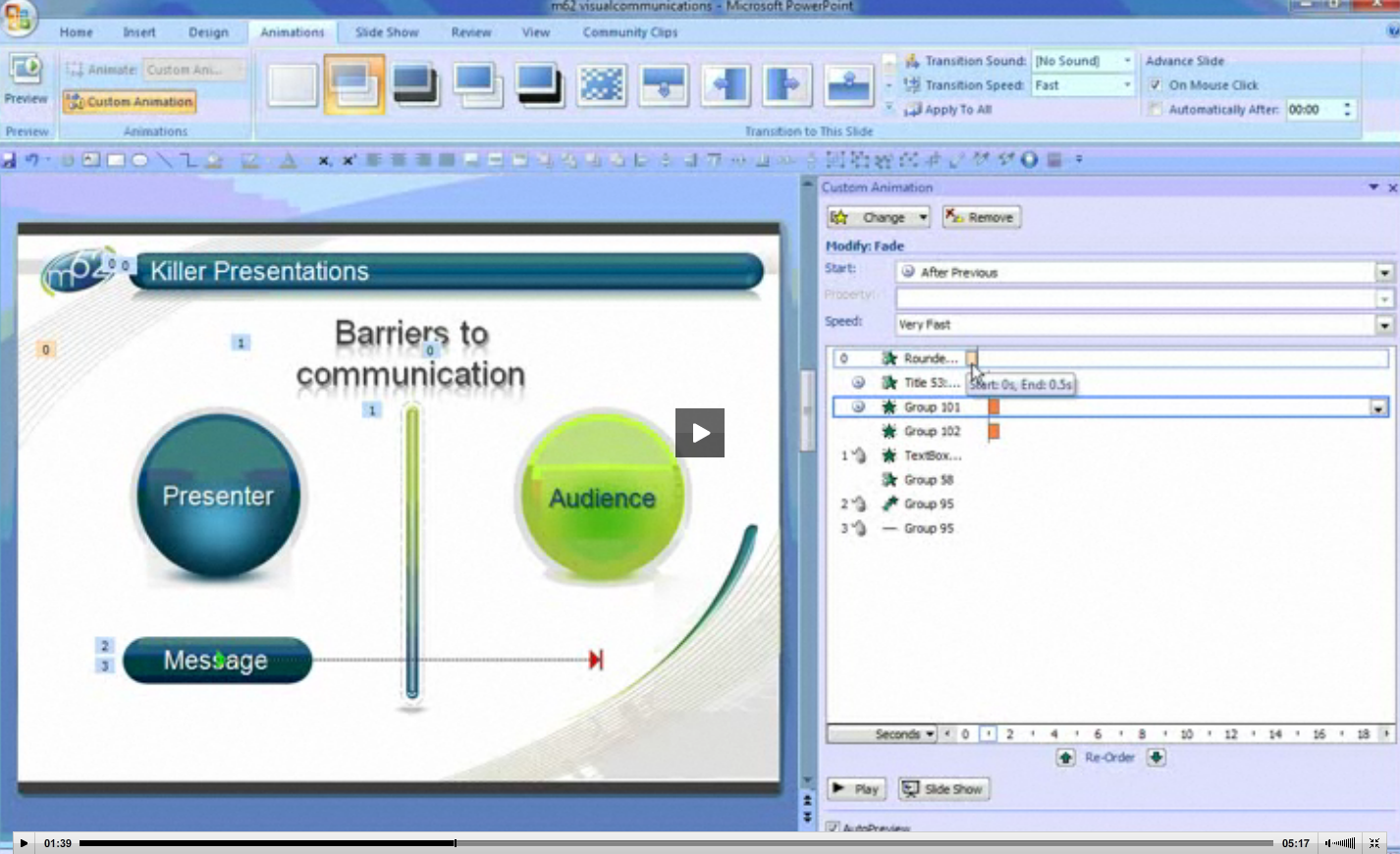
I started at a few minutes past the hour and all went well until the Pan Am video began. I heard the familiar Mac alarm beep, and discovered the Keynote app had left the show and gone into working mode, i.e. bare naked, one of the worst presentation sins where the audience sees your slides naked and their sense of immersion in your story is lost.

It’s just as well I was in Presenter Mode such that only I saw Keynote this way. The audience saw the secondary display desktop view. Now ordinarily this would be the default blue constellation Lion desktop. Itself not too bad, but a little jarring nonetheless.

Presenting in a new venue with unfamiliar, untested setups can be very testing of one’s faith in technology, especially given the gnashing of teeth regarding the latest versions of Keynote and Lion being so problematical for people to either downgrade to Snow Leopard or go back to Powerpoint to get the work done. Desperation indeed!

So while in rehearsal for both timing and practice, all had worked without a problem. I knew this presentation was one that really counted and so needed contingency plans. I knew I could do the talk without slides, confident in my ability to create a “theatre of the mind” experience. And that while I really wanted to display my prowess with Keynote, all would not be lost on this crowd who were so steeped in Powerpoint that a good oral story telling would work fine.

So I also added something new to my kit which I learnt from fellow presenter Kerrie Mullins-Gunst at a MUG meeting recently. She took her first slide, called the poster slide, and made it her desktop picture for the secondary display. You do this when your Mac is in span mode, not mirror mode, otherwise only the Mac gets the poster for its desktop picture, and the secondary display stays with the default blue constellation. When in span mode, two pref screens open up, one for the Mac and one for the second display screen and you choose just the one for this screen.

So when I dropped out of my presentation accidentally, my poster slide, below, with the APEX-supplied theme I was compelled to use (supposedly throughout the presentation, but once was enough), was on display, which is the best outcome possible in the circumstances.

The reason Keynote dropped out was due to the A/V technician not connecting my power supply properly and me not double-checking my setup. When battery power becomes too low, Keynote cleverly drops out, issues a warning message and sound, and gives you an opportunity to power up in a few seconds, which is what I did, cracking a joke at the same time. What else is there to do at such a moment? This outcome is better than allowing the Mac to be completely drained then have to wait until it powers up, perhaps even needing to be rebooted. There goes several valuable minutes.

If you’re really tight for time, and such an event would be fatal to your presentation, your best bet besides having a second Mac ready to go (such as at Apple keynotes) is to put your presentation onto your iPad or even iPhone, modified so it works properly, being careful of how movies make the transition from desktop to iDevice. After your Mac boots up again, you have to keep your talk going on the iPad while you get Keynote fired up and locate the current slide. Not exactly seamless, but the best of a difficult situation. The same thing can happen by the way if Keynote begins any recalcitrant beach ball behaviour suggesting it’s frozen or doing a lot of thinking!

In the end, things worked fine, no movies froze or stuttered, the Magic Move transition was well-used (especially for showing publications in detail – a blog entry for another time) and people had a good time staying engaged even after a full day of heavy duty Powerpoint.

Doceri continues to impress and while I haven’t yet found a way to use annotations on a slide, preferring to plan my callouts ahead of time, I’m confident the Doceri developers will now keep presenters more in mind, in addition to their main focus on educators.

PART 2: Apple and iDevices as the elephant in the (Inflight Entertainment) Room

The convention I presented at had two streams. One, a day of presentations by key players in the passenger experience arena, such as Boeing and Airbus there to discuss cabin design philosophy through to OEMs supplying onboard screens and entertainment systems. This included movie houses like Time Warner, Disney, and National Geographic who supply content to be viewed on the hardware.

The second stream was break-out sessions where small players could talk about their software, hardware or research outcomes in the field of IFE. This is where my Fear of Flying session was slotted in. I discussed towards the end the use of iDevices supplied by airlines, or with content downloadable from their websites or iTunes to passengers’ devices which could contain information andy techniques for being a better flyer (implying its utility to fearful flyers).

I should also note that there is a three day show floor expo where IFE suppliers can demo their wares, usually in appointment booths. I didn’t see it, but the very tall and delightful Mary Kirby (see her in action here) told me in discussion of a firm using a Samsung tablet to develop a tray table tablet called TrayVu. You can read the Flightglobal story and the very confident CMO of the firm designing the device, SkyCast, here. The CMO, Greg Latimer is quoted as saying “It’s an Android world.” Others whom I saw presenting would disagree harshly suggesting it’s indeed going to be an iPad world in planes.

Behold, the Android powered TrayVu

(UPDATE: I was able to see first hand the TrayVu system, speak with its sale staff and take pics with my iPhone, below)

In my own presentation, I referred to a trial of specially-modded iPads under consideration by Australian budget carrier, JetStar. Placing the iPad in a special case to give it twice the battery life, and using proprietary apps, the plan appears to be to rent the units with chosen content to passengers. The kits would also come with RFID tags to prevent passengers walking off the planes with the iPads.

I located previous APEX slides from the teams putting this together for JetStar and used them as discussion points for how technology could be put to good use for the better flyer. (After my talk I was introduced to the President of APEX who works for Emirates who told me that after installing cameras in their planes for passengers to see takeoffs and cockpit views, their impression was that it was very helpful to fearful flyers. We then reminisced of times one could visit the flight crew mid-flight until the events of 9/11 put a permanent stop to that delight.

Here’s a few of the JetStar slides you might find interesting:

It seemed to me with my limited exposure to this world of inflight entertainment, other than as a consumer, aviation consultant and now APEX attendee and speaker, that the IFE world is fracturing. Just like old world media fighting a rear guard action against new means of publishing and accessing content, the old guard in IFE where the airline controlled what you saw and how it was displayed is disintegrating.

One of the co-founders of a new web-based startup, MondowWindow.com, whose content is accessed on iDevices on wifi equipped aircraft – another big discussion development at APEX – spoke of how Clayton Christenson’s concept of Disruptive Innovation was now entering the world of IFE. New players such as his Mondowindow would take now-familiar technologies such as iPads, and repurpose them in environments previously “owned” by incumbents with many years of technical prowess, leadership and trust in aviation.

It was his strong assertion that the IFE world is about to be turned on its head by the iPad in particular given its 85% market share for this device, and this will perhaps climb with iPad 3. IFE takes years to develop, install, then make deals with content providers for the airline industry and by the time seatback hardware and systems are installed, iPad-like devices have leapt ahead another generation.

With wifi taking off big time now after a false start some years ago, and compression protocols vastly improved, it’s now possible for airlines to consider entering into deals with wifi providers like GoGo who are embarking on a plan to provide streaming content, Hulu-like, rather than plain vanilla wifi. Go here to see Mary Kirby talking with one of the Gogo team.

So the way things are moving along, it seems like the incumbents like Panasonic and Thales who provide the hardware, need to look at how the low cost airlines are avoiding them, preferring to purchase iPads with chosen content as in the Jetstar model, or equip their flights with robust wifi and take a cut from suppliers like GoGo.

Interestingly, over a lunch sponsored by GoGo, I sat with one of their team quite by accident, surrounded by Australian attendees from Qantas and VAustralia. We discussed my forthcoming presentation, and I explained to him how GoGo too could develop content for better flying and on-sell it to airlines, together with the usual fare like movies and TV shows.

At one point he asked about fear of flying and if crews should give passengers advanced warning of impending turbulence. At the time of his asking, I didn’t think much of it, as even commercial pilots have asked me if they should not announce likely bumps thus minimising unnecessary worry (since turbulence is uncomfortable but not unsafe – which is what they should say). If you announce it before, and the worrying passenger doesn’t know what to do about it, it doesn’t help.

But as our conversation expanded, I came to understand the relevance of his question. Apparently, GoGo is developing an app for the iPhone which takes advantage of its accelerometers.

Put your thinking caps on: what does this mean in the context of our discussion? Well, if you have a plane full of iPhone users or perhaps just a critical number, and the plane experiences turbulence, it will register on those accelerometers. Logged into the Gogo wifi, it will feedback to GoGo the data which can then be shared with other Gogo users on a similar heading or the same vicinity. Passengers will get information about their flying conditions before the FAA and their own flight crew do!

(It reminds me of listening in to United’s Channel 9 which repeats Air Traffic control to their aircraft and being informed before UA820 was to leave San Francisco to Seattle that there were pushback delays of 20 minutes due to extreme traffic. The FA was making her safety announcement in preparation for an immediate pushback which wasn’t about too happen.)

We then discussed how the iPad’s success had caught many industries unawares, (“perhaps even Apple itself” was my contribution) and agreed no one knows where things will next move in the next few months when the iPad 3 is released. The GoGo guy lamented their streaming efforts would be restricted to Android devices until they can work out how to overcome the 30% impost Apple employs in its iTunes store. Much like how Amazon’s Kindle app is now a mere portal to read downloaded content and access the Amazon website, rather than a sell through app, GoGo faces a similar hurdle and a 30% “tax” means goodbye profit. Forcing people to go to a website to download content once they’ve become used to the iTunes model is anathema, putting too many hurdles in the way for the average user.

It’s been a fascinating, rather risky visit, coming to APEX totally unknown but with an interesting story to tell, and hopefully the session evaluations will bear out it was a good decision to have me speak. it has certainly opened my eyes to a world in which I spend time on the periphery, yet it has also empowered me to explore other airline opportunities with some of the people I’ve met here.

The airline industry is rather addictive in nature: very family oriented, a curious mix of cutting edge technologies and very human interaction, people who leave it for various reasons often are drawn back to it in time.

Tomorrow, a visit to the Boeing factory, a first ever look at the new 787 and 747-800 and their facilities, and then a visit Friday to my old chum Dr. Kim Silverman, from Apple. Here’s his talk at San Jose TEDx earlier this year.

Rethinking Apple’s Keynote presentation software: the need for a timeline feature which shows Apple design and engineering at its finest

It’s nice to know a week after I suggested it in this blog that well-known blog, Cult of Mac, has also written a day or two ago that it too believes we may see a re-write of Keynote much like has occurred for Final Cut Pro X.

The hint it took would appear to be an advertisement for a user interface engineer to join the iWork team. Me, it comes from close observation of Apple as well as having presented to a section of the iWork team with regard to how I think about presenting, using Keynote, and where Keynote needs to go next.

One of the things I expressed most forcefully on my meeting in Pittsburgh two years ago was the need for Keynote to have better timing assembly and control both within slides and across slides.

The feedback I received indirectly, and which continued when  members of the Keynote team attended my Presentation Magic workshops at Macworld, was that it was high priority. If I could read between the lines, the fact that it has not occurred even after five editions of Keynote was not that it wasn’t important but that it needed to be done right.

Right in Apple’s vernacular normally means that the senior executives approve it, and in Keynote’s case, since we see it so often used to tell Apple’s story, it’s in Steve Jobs’ hands to give ultimate ascent to any published improvements.

As Keynote has grown in sophistication these past eight years, playing leap frog with its sandpit buddy, Powerpoint for Windows and Mac, as well as new kid on the block, Prezi, the demands for high quality presentations has increased, perhaps stimulated by the popularity of sites like TED.com, with its host of wonderful speakers .

I don’t include Slideshare and its ilk in this list because of their static nature, and its emphasis on the slides themselves, and not the presentation.

Why the emphasis on a Timeline?

While presentations, especially in the sciences, remain static, the need for a timeline is low to none. So are transitions and even builds for that matter to judge by the vast majority of science-based presentations I witness at conferences and workshops. If animations are used, it’s usually done so appallingly to bring text in or out. The academic or scientist stands at a podium staring at their Dell or HP laptop or a 17″ monitor hooked into the conference venue’s central server, and hits the mouse, spacebar, or right arrow to advance the next slide or build, if there are builds.

But with Keynote’s attractive and different builds, themes, and transitions crying out for their use, especially when others at the same conference are using good ol’ fashioned Powerpoint, the need for more accurate timings of the eye catching, and potentially more engaging and persuasive message delivery has become increasingly important.

Powerpoint has had timelines for a while now, but only in its Windows product. And even there it’s buried away. While I’ve demanded a timeline for Keynote, and I have played with Powerpoint for Windows (more toyed with it) I can’t say anything positive or negative about it. Indeed, not many people do, even on those blogs dedicated to Powerpoint. If you google “timeline in Powerpoint” you’ll come up with thousands of websites about how to created a slide showing a timeline effect in Powerpoint, or templates to do likewise, but very few about the functional timeline Powerpoint possesses.

One great PPT site is the UK’s m62, and below is a screenshot of how PPT2007 shows its timeline.

You can see the movie and description from which this was taken here.

But it’s clear that the way the Powerpoint engineers have stuck the advanced timeline away as an option that it’s not considered terribly important. I could be even more harsh with Keynote since one doesn’t exist at all!

In fact, if you have a long list of builds on any one slide, you’ll know that changing the timing for one will effect the timings of those builds before and after. And as I have discovered recently, these timings are not rock solid; they seem to be somewhat flexible, such that for one mission critical keynote I had to export the slide to a Quicktime movie and then import the result onto another slide so that with one click all the timings would be spot on permanently since I was playing a movie.

Now it’s not as if Apple has no expertise in creating functional timelines.

Starting with the original iMovie 1.0, its software has been dominated by timelines which leap off the page as central to the workflow for the application.

Below, an image of iMovie 4 and its timeline, not too different from the original iMovie 1.0.

Later in iLife, with the introduction of Garageband, amateurs got their first taste of using multiple audio timelines, and iDVD can be considered another amateur’s example. And of course in all the professional variations of Final Cut Pro suite, the timeline is the dominant feature for FCP, Motion, DVD Studio Pro, and Soundtrack Pro.

To go the other direction, iMovie on the iPhone and iPad further demonstrates Apple is very capable of easy to use, functional timelines, (below, from tested.com)

Outside of Apple, few have bettered the timeline implementation experience than the Boinx software folks, with their Fotomagico software as well as BoinxTV, and iStopMotion (below).

And here is Fotomagico’s interface, with multiple graphics manipulations in the one window (note the two rotary dials above the timeline):

The other area in which specific timelines has become a very important asset is screen movies, where one is trying to teach the use of software in real time as it were, by recording mouse and window manipulations in real time, with a voice over recorded live or added later, plus special effects like call outs.

I use ScreenFlow for my own training, and here’s an example in action (not me, however!):

I think by now you get the idea. There is no shortage of models, good and not so good, for the development of a timeline in Keynote where the timing of events within and across slides can be precisely manipulated.

For me, I’d say it has become my #1 essential element in any Keynote update on the horizon (there are several #2s, including call outs, QT movie manipulation and effects within Keynote, improved masking, etc.)

That said, what are the essential elements a timeline in Keynote should do?

1. It ought to provide a live preview of the effect in question, such that it displays in both real time, as well as being scrubbable so that I can see what happens before and after in rapid time. Too often now, I have to wait minutes before I get to see if my current build on a busy slide needs to be tweaked by a second or two.

2. This means I should be able to see a build or effect in the middle of a slide’s sequence, not have to go back to the beginning each time I make an adjustment.

3. I should be able to see multiple builds and actions in relation to each other, much like I can with Garageband’s multiple tracks, where I can see where one starts and one ends precisely.

4. Currently, the builds when individual elements are grouped to act as one are broken. That is, while each element gets its own name, when grouped, each group is simply named “Group.” You have no idea which group the name refers to: not even Group 1, Group 2 etc to give some idea of which group is being worked on. This also causes much headaches when figuring out which group is front or back.

5. For some time now, Powerpoint has allowed a sound file to play as a transition takes place. While a minor consideration, there are number of times when I have wanted to employ not just a visual but an auditory metaphor when transiting slides. This also goes for having the one track play across several slides for continuity. If you want this now in Keynote, you have to crowd all the elements onto one slide, with one track of music per slide.

6. A well constructed timeline would also make it see much easier to follow and select out individual elements on a complicated, multi-build slide which currently is a virtual nightmare of force forward and back to gain control. The Inspector is little help here currently. If I am right in thinking Keynote will get the Final Cut X treatment, the Inspector will be the first to go and be completely redesigned.

These are some of my thoughts on timelines and Keynote. Perhaps for you, it’s not important and other feature sets cry out for implementation. But given the level of work needed to bring these ideas into a future version of Keynote, I am becoming more and more convinced a redesign is necessary. The length of time between updates provides more evidence that this is the case.

Your thoughts?

Will Apple do to the next Keynote what it just did to Final Cut Pro? A complete redesign? Me? I certainly hope so…

If plentiful rumours hold to be true, in the next 72 hours we may well see Mac OS X Lion released into the wild. As I write this, it has just become July 14 in Australia, Bastille Day for Francophiles.

How timely would it be that a software which has leant itself to revolutionary products would be updated on a day which recognises freedom and independence? It would be a fitting acknowledgment of the contribution to OS X (and NeXT before it) of retiring Apple senior VP, Bertrand Serlet. Personally, I think Steve Jobs is something of a Francophile, having featured crosses to Paris when first demonstrating iChat at Macworld many years ago, as well as featuring the Eiffel Tower when showing off the iPhone’s Google maps in 2007.

The rumours of Lion’s imminent release gathered further credence in the last day or so with the updating of iLife’s elements, including curiously iWeb and iDVD which some have presumed are to be end-of-lifed soon.

And of course with Lion imminent, iLife updated and iCloud waiting in the wings, thoughts to turn iWork being updated.

It’s been two years now, and amongst other things, online training has become a billion dollar business. I have managed to convince my own professional society not to go with a Continuing Education online program which features Adobe Flash, so as to encourage more members to become mobile users of its website where the training is undertaken.

While I wasn’t able to convince them to use Keynote to create the training, it’s my belief more and more organisations will see Apple’s inexpensive application as offering real advantages for creating engaging presentations.

But now I’m going to stick my neck out and ponder the likelihood of Apple doing a “Final Cut Pro X”: that is, a radical rethink and repurposing of Keynote to meet the needs of modern presenters.

We know that many professional video editors have expressed sincere unhappiness with the new version of FCP, while others have expressed admiration for Apple’s desire to change familiar programs in the belief they can be significantly improved, but only with a complete rewrite and rethinking.

I for one will not be surprised if this same event occurs for Keynote in the next few days. While much of its energy has been expended on Keynote for the iPad, the small Keynote team has also been working on Keynote for the desktop to judge from keynotes delivered at Apple events in the past year.

While we’ve seen nothing radical in its effects, we haven’t been exposed to how Keynote is constructing these presentations. I’m going to offer an educated guess that one of Keynote’s most requested items, a timeline to better manage events on a slide as well as across multiple slides, will make its appearance, and will require a completely new look-and-feel. I’m aware from discussion with the Keynote team this has been a high priority but a difficult one to institute to match the velvety smooth workflow Keynote offers when compared to Powerpoint.

For instance, in the last day to two, I’ve once more had to resurrect a slide I constructed for a consultee. It’s a complex slide, incorporating several movies, builds and a voice over narration.

The builds require precise timing to match the voice over. But moving from one Mac to another and with repeated playings, the timings become inconsistent. Moreover, when adopting the workaround of exporting the slide to a Quicktime movie, the timings become even more bizarre. The best handling of this dilemma is to play the slide manually while recording a screen movie using something like Screenflow.

This is hardly the best solution for a professional software. Having a sophisticated timeline device to manage multiple media and their ins and outs is a truly missing piece of the presentation puzzle for Keynote to overcome. Professional users really don’t need that many more themes, transitions and builds styles, but better management of existing ones.
Other desirable elements include editing of sound and video within the Keynote slide. Editing currently is terribly crude, allowing for alteration of beginnings or endings, but altering something in the middle or multiple edits requires the user to head to an external app and do the editing there, and re-import  the finished file.

While masking and Alpha masking photos has been a terrific addition to the most recent Keynote (2009), Powerpoint has caught up, and Apple needs to lift its game and improve the Alpha masking for finer detail. Moreover, it truly needs to find a way to perform masking for the moving image. We know Apple can do it judging from its recent efforts with masking with iChat, due to be updated in Lion.

And of course, exporting Keynote to another format, such as Powerpoint or Quicktime is a very hit and miss affair. With iCloud and document updating and perhaps some extra features in Lion to come, Keynote’s sharing abilities will also be enhanced.

We’ll know hopefully in the next little while whether the long wait for a new Keynote has been worthwhile. But given Apple’s history with successful apps., such as Final Cut and iMovie, whereby an inspired worker can initiate a radical shift in work flow, resulting in upset professionals, I won’t be at all surprised if we soon see a new Keynote with familiar features left out. But I’d expect that in time, with new features added which simply couldn’t be managed in the old but familiar version, long-time Keynote users will manage the transition with aplomb.

After all, some people did amazing things with Keynote 1.0 when it was released in 2003, coming as it did as a breath of fresh air when compared to the dominant Powerpoint. It’s eight years later, and it’s time for a new look and feel Keynote which takes presenting to whole other level.

Comments invited below.