
Category Archives: Powerpoint

Will a new iWork and iLife be revealed at this week’s Apple “Back to the Mac” event? It had better in the case of Keynote – Powerpoint has caught up, believe it or not…

When all eyes and ears turn to Cupertino this Wednesday for Apple’s “Back to the Mac” event,  observers will have their own agendas they’ll be following in the hope that Apple reveals something of interest to them.

Users of Apple’s iLife and iWork suites of applications will be looking especially closely at what will be released. iLife is surely one of Apple’s jewels in the crown for its consumer Macs, providing Mac users with a value proposition unmatched in the Windows world. Each of the apps integrates with the other, and represents “as good as it gets” software solutions which come bundled with each new Mac.

To achieve better outcomes of a professional standard means leaping to an expensive Pro set of suites, such as the Final Cut Studio. It represents a huge leap above the domestic iLife which for many people including some professionals, represents “good enough” computing.

Apple’s office suite, iWork, used to come bundled with all new Macs as a 30day fully functional demo, only requiring purchasing a serial number online to allow continued full use after that trial period elapses. That bundling stopped some time ago, and it’s now a 500MB download for those who want to use it in demo mode.

Both iWork for the Mac and iLife were last updated in January 2009, when Phil Schiller performed Apple’s last keynote at Macworld Expo in San Francisco.

During this time iWork’s principal competition, Microsoft Office, has recently updated to Office 2010 for Windows, and a few days after the Back to the Mac will update to Office 2011 for the Macintosh.

Should iWork not be updated, it will be a strange reversal where Apple products are named in an outdated fashion, while Microsoft is ahead. But the stars are aligning which strongly suggest both Apple suites will be updated this coming week.

The blogosphere has begun reporting back dating on iWork/iLife orders, a usually reliable sign of updates on their way. We know a new Keynote version is out there, starting in January this year when Steve Jobs revealed the iPad and we saw new Keynote builds.

The stopping of the .Mac service on November 8 (not just the ability to update its content, but now to access it at all) suggests MobileMe, iWork.com and iWeb will see significant updates, hopefully with new functionality including sharing and social networking aptitudes.

More importantly, with updates to Microsoft’s Office suite, Apple must improve its iWork suite very very soon. iWork’s jewel in the crown, Keynote – the only Apple product Steve Jobs telegraphs by his use of it that an update is upcoming – has been caught and in some areas of functionality, surpassed by Powerpoint, both in Windows and Mac versions.

I’ve played with both, and the luring of Windows users to the Mac via Keynote’s superb media and font handling is now no longer feasible – Powerpoint has caught up that much. Mind you it’s caught up by adopting an incredible amount of Keynote’s look and feel. Even if it feels like a nightmare to navigate around its interface which lacks simplicity and kindness to new users.

In the Mac version, it has several features which exceed the functions of Keynote. It allows movies to be dropped in, framed and angled while Keynote remains flat by comparison. Yes, you can rotate movies, but its current editing capability is poor by comparison. Take a look below at the screenmovie I created in beta showing me manipulating Powerpoint’s media controls.

Powerpoint has its own advanced Masking abilities, and has cleverly found a way to visualise and control layers on a single slide, something Keynote is currently deficient in… how the Keynote team didn’t include some kind of Coverflow ability to move through a slide’s layers is beyond my understanding. Here’s how Powerpoint 2011 does it, below, using a ppt file I downloaded:

(Curiously, in his Wall Street Journal review, Walt Mossberg describes this effect of seeing a slide’s layers as Powerpoint’s ability to “dynamically reorder PowerPoint slides in a 3-D view”. I wonder how closely he actually played with Powerpoint, as I have described this as a feature unique to Powerpoint.)

Another important differentiator is Powerpoint’s ability to better employ its presenter mode. So overlooked by Windows users for whom setting up a second monitor has traditionally been a pain and because convention organisers give you a monitor to work in mirror mode, presenter mode allows you to see the current slide (the one your audience is viewing) as well as the next slide’s next build on your Mac or PC. I can’t tell you how many times in Presentation Magic workshops I have revealed how I don’t use notes because I know the story coming up on the next slide. Even experienced presenters sometimes are unaware of this facility. On the Mac, you can swap displays in presenter mode, such that your audience now sees what you see on the Mac. There is no reason to do so of course unless you are teaching how to use Keynote or now, Powerpoint.

But Powerpoint now goes several steps further. It actually plays the current slide in presenter mode, while in Keynote it remains static, even if a movie is playing. The slide ready to progress bar, which is green when Keynote is ready to go to the next slide, and red when it is in the middle of a transition or build and can’t progress, in Powerpoint is replaced by a green progress bar, which gives immediate visual feedback about how far through your slide deck you’ve come.

A third difference is restarting your countdown timer. On the Mac, to restart the timer, you need to escape the presentation, and start again. In Powerpoint 2011, there is a restart arrow to zero and begin the counter once more (as will advancing to the next slide).

In the screen shot below, you can see all these elements at work, plus Powerpoint’s ability to, on the fly, adjust slide note font size, and add notes to the next slide, which might be useful if asked questions during your presentations or as a personal reminder for a presentation debrief about which slides worked and which didn’t – strongly recommended, by the way.

Mind you, Powerpoint’s presenter view lacks many of the preference settings Keynote 09 possesses, and I could not locate a means to countdown your slide show, ie. time remaining rather than elapsed time. Additionally, Powerpoint as well as its siblings in Office 2011, all perpetuate the use of a floppy disk icon to signal the “Save” command, something an eighteen year old freshman has probably never seen in his or her computing lifetime!

I’ll have more to say about this and other UI elements of Microsoft products in a forthcoming blog entry.

Finally, as much as I praise Powerpoint 2011 (if only to facetiously place a rocket where it belongs) its builds and animation are lame by comparison to Keynote. It still can’t do a proper slow dissolve which Keynote 1.0 achieved in 2003, and its collection of transitions, while attempting to emulate Keynote (I am so tired of seeing Cube transitions – get over it already), looks better matched to your basic Windows Movie Maker software to show the holiday movies, than a professional presentation software meant to persuade people to either part with their money, or change the way they think.

So, will iWork be updated this week? Well, the gap between iWork 08, released August 7, 2008 and iWork 09, released January 6, 2009 is 16 months. If it’s released this week, iWork 11 (if that’s what it will be called) will be 22 months in the baking – that’s a heck of a long time when you have Office breathing down your neck, as well as open source office apps, not to mention non-linear Flash-based Prezi.

Keynote needs now to step up to the plate, integrate better with its baby brother on the iPad (I’m sure this is part of the plan) and move to a new level, leaving Powerpoint in its wake as just another slideshow app.

I’ve been sending the Keynote team screen movies of effects I’ve either created or viewed in movies, on TV, or on the web. News and current affairs programs in particular are marvellous sources of engaging visuals, from The Daily Show with John Stewart, through to Rachel Maddow as well as PBS, BBC and History Channel specials.

The kind of effects these programs employ is what 2011 audiences will expect. No longer do audiences passively drift off into imagination when bored and disengaged, they actively pursue other attention-grabbing activities on their iPhones and iPads and Blackberries, making the task of holding their concentration even more difficult in 2011.

Keynote can now leap ahead if only Steve Jobs has allowed the team to exercise their imaginations. Not everyone wants to present like Steve, as good as he is at demonstrating Apple’s products and vision. Not all presentations are simple exercises in placing huge text in iStockphoto cliched visuals.

There is a world of science communicators ready to move to another non-Powerpoint level (you would shudder to think how many top scientists and academics still use Powerpoint for Windows 2003) in order to communicate within their communities and just as importantly to those outside their depth of knowledge, but who have the power to help science advance or to withhold funds and stifle pure research to all our detriment.

Yes, I think it’s that important that we find better ways to communicate complex ideas in 2011, and I will be bitterly disappointed if:

1. Keynote is not updated very soon, preferably this week,

and

2. it’s just another point update, with a few more transitions and build effects.

The presentation world and its audience deserves better.

Why Apple needs to strike hard and fast to make Keynote the dominant presentation software in colleges and other institutes of education – it can be done in the next five years despite Powerpoint’s undeserved current dominance.

In my last several posts, I’ve asked you to observe with me a changing landscape for presentations, in particular how the nature of audiences is forcing a shift towards visually-rich media.

Some of the research I have cited argues that a new generation is coming through who have grown up with the internet, especially broadband, which can deliver media in different ways than it was for their parents for whom dialup was the standard, as was your traditional text- and bullet-point driven Powerpoint stacks in college and the boardroom.

Young people coming through the ranks have grown up creating their own media, using devices like Apple’s iMovie and publishing it on YouTube and Facebook for friends and strangers to share.

Other social media like Slideshare have allowed academics and authors to upload their presentations and while many old-fashioned slide stacks still abound, it’s clear that they simply won’t catch the attention of younger viewers.

We are also seeing more and more mainstream media articles challenging Powerpoint’s dominance as the major channel for delivering knowledge and blogs such as mine and Garr Reynolds’ Presentation Zen asking for a rethink of the evidence behind engaging and persuasive message delivery.

While I like this blog to be as useful to a Powerpoint user as it is to an Apple Keynote user, I want to suggest that Apple is now primed to take a leadership position in helping the knowledge sharing process with a much more active and aggressive promotion of Keynote to an audience who is primed to receive and act on this message: College students and staff.

Recent surveys suggest the Macintosh, the only platform Keynote runs on, is making serious inroads as the platform of choice for many students and faculty.

In March, 2008, Appleinsider published the following:

Apple’s rapidly rising mindshare amongst current generation college students is setting the company up for an “aging phenomenon” that will spur further market share and revenue growth as those students enter the work force, investment bank Morgan Stanley said Wednesday.

A recent higher-education survey cited by analyst Katy Huberty reveals that roughly 40 percent of college students say their next computer purchase will be a Mac, well ahead of Apple’s current 15 percent market share in the demographic.

John Gruber’s Daring Fireball blog last week offered a more recent statistical analysis:

Philip Elmer-DeWitt, quoting survey results from Student Monitor:

“Among those who planned to purchase a new computer, 87% planned to buy a laptop. And among those students 47% planned to buy a Mac.”

Among student laptop owners, Apple has the highest share, at 27 percent. These numbers are short of the claim by analyst Trip Chowdhry that “70% of incoming University freshman students are coming with Macs”, but they’re still remarkable, and the trend is very strong in Apple’s favor.

At one time, Apple bundled its iWork office suite on all laptops as fully-operational demo software, which was operational for 30 days before it require the purchase online of a serial number.

It’s time for Apple to give serious thought to returning to this bundling for students. It’s also time for Apple’s online tutorials about iWork to shift to how academics can use Keynote especially in the sciences with its need often for special formulas, equations and graphs.

It’s clear to me also that the boardroom is still slavishly devoted to Powerpoint. But the trojan horse here will be those graduates who have used Apple’s laptops all their college lives, who have become au fait with Keynote as their preferred choice of multimedia knowledge sharing tool – even in MBA courses – and who will soon be entering junior then senior levels of management. It might take five years, but the statistics I’ve cited suggest a change is already underway, and it’s there for Apple to capitalise on.

Despite great improvements in the current and forthcoming versions of Powerpoint (much of it emulating or playing catchup to Keynote), there is still a huge legacy of basically awful Powerpoint for these new versions to overcome. Keynote users, in my observations, have rarely had this allegiance to old style, no evidence for it, styles of presenting now so much out of favour by those who make a study of knowledge transfer. But it’s a long way to go.

With the expected uptake of the iPad in academia and business, with its specialised Keynote app and maybe a new desktop version of Keynote, and you have a prefect storm of change brewing.

I’m guessing the next version of Keynote is in the oven almost cooked, just waiting for the sprinkles to be added before its release. Hopefully it will leapfrog Powerpoint 2010 (Windows) and 2011 (Mac). But what needs to be done also by Apple is to really ramp up its thrust into these important territories where significant change is occurring for which Keynote with its media rich properties is tailor made and a much better fit than default Powerpoint, even in its latest incarnations.

I’m hoping Apple can return its gaze for the next little while to the desktop/laptop application market place, and drive home the platform’s advances and advantages. I want Apple to especially offer a means for those in academia, student, teacher and researcher alike, to learn new ways of knowledge transfer in a manner that better suits the evidence base for how humans learn.

My visits to Apple HQ in Cupertino as well as iWork teams in Pittsburgh where I presented emphasised this shift; I am truly hopeful my message was received and applied in the next imminent version of Keynote, and beyond.

UPDATE: Even Bill Gates says so, sort of…

Gates acknowledged in a recent talk how the world of online education may well surpass traditional education in the next five years. Even more reason to get with the program of improving academic instructional training with appropriate tools and methods. Here is Engadget’s reporting:

Bill Gates just might be the world’s most famous college dropout (sorry, Kanye), but lest you think he’s changed his mind about the educational establishment, he’s got a few words of reassurance for you. As the closing speaker of the Techonomy 2010 conference, Bill dished out his vision of how learning will evolve over the next few years, stating his belief that no single university will be able to match the internet when it comes to providing the learning resources a student needs. Describing traditional studies as “place-based” and inefficient, he forecasts that university education will become five times less important within five years, with online lecture sources picking up the reins of enlightening our youth

More mainstream media evidence that presentation skills need to enter the 21st Century – looking at generational divides and why default Powerpoint won’t cut it.

Many Presentation Magic readers and workshop attendees will know that I am always on the lookout for evidence for how presentations are changing to suit changing times.

Often, technologies and shifting economies drive the need for presentations to alter, especially when audiences shift in their desires to be informed and entertained.

The last week I have come across three mainstream media articles I wish to share with you now to reinforce the message that audiences are changing and the standard default means of delivering messages via slideshows  – the so-called Cognitive Style of Powerpoint – no longer cuts it.

Media Evidence #1: The Age – Education Liftout, August 2, 2010

Each Monday the Melbourne newspaper of record, The Age, publishes an Education Age liftout looking at all things education, right across the age range.

There is also a blog attached to the section, known as Third Degree. Last week, its author, Erica Cervini, penned an article entitled, Let me entertain you, where she reviewed some British educational research into how students evaluated their tertiary lecturers. The research, by University of Hertfordshire lecturers, Mark Russell and Helen Barefoot, suggested that students want more from their lecturers: they want them to be edutainers, lecturers “who can mix education with entertainment”.

Now this is not the first time I have heard this term used. In my Presentation Magic workshop, I will often refer to unusual places where presentations take place. In one case, I refer to a Fort Lauderdale cruise company, who places entertainers on board cruise ships. Their task is to nightly entertain patrons with illustrated talks on a variety of subjects, from the food they will encounter at the next port of call, to other more esoteric subjects. Above all else, their publicity blurb says… well, here’s the section on the webpage for you to read:

The link to read more of this service, and maybe apply is here.

A few more choice quotes from the Education Age article:

The academics found that students commended their tutors and lecturers for motivating them and for being a ”great person”. ”He is a legend with an incredible sense of humour,” one student wrote.

The students also rated highly a lecturer’s ability to ”edutain” them. They described their classes as ”fun” and ”enjoyable”.

”As a student I look forward to his lectures, his charisma and dynamic teaching style are a breath of fresh air,” one student wrote. ”He adds flair and humour to his teaching making learning difficult subjects seem a little easier.”

Now there will be many a lecturer who will shudder at “giving in” to the whims of students, who can be very capricious with their desires and what they think is good for their education. Unfortunately, particularly at the undergraduate level, students have insufficient depth of subject knowledge nor knowledge of their own learning styles to drive the means by which they can best learn.

Post graduate students, perhaps because they’ve been around a lot longer and are more motivated to turn their education into a career, may be more circumspect about what makes for a good lecturer.

Let me finish this first part of the blog entry with some fine quotes from the Age article:

Lecturers are also being trained to think they have to be edutainers by those in charge of university teaching awards. Australian universities also ask students to nominate tutors and lecturers for teaching awards.

In many universities students only have a minor role in saying who should win the awards. It’s the academics who have the big say. Once they accept their nomination, the lecturers then write a mini-thesis boasting why they should win the best teacher prize.

What are they going to say? That they suffer from a personality bypass and eschew all technological wizardry in the lecture theatre?

The Hertfordshire academics will be presenting their research at the International Society for the Scholarship of Teaching and Learning conference in October.

You can see Erica’s blog article here.

Media Evidence #2: The Los Angeles Times, Entertainment Liftout, August 2, 2010

In an blog article, entitled, “Why is it the the older you are the more you can’t stand ‘Inception'”, writer Patrick Goldstein muses about the Christopher Nolan film, Inception, and how he believes it is dividing audiences.

He writes of discussing the film with “an old Hollywood hand” who had seen the film at a private screening with other senior “elder statesmen” of the film profession, along with their much younger children.

Here is what he wrote:

After the movie was over, the industry elders were shaking their heads in disbelief, appalled by the film’s lack of clarity, having been absolutely unable to follow the film’s often convoluted story.

But before anyone could register their complaints, one of the younger people on hand, flush with excitement, praised the film to the rooftops. To him, it was such a thrill ride that if the projectionist could show the film again, he’d sit through it again right away.

And after discussing Inception’s box office success, Goldstein then writes:

But from the moment “Inception” was released, it was obvious from polling data that the movie had created both a critical and a generational divide. Some critics have raved about the film’s originality while others have mocked its excesses. If you were a young moviegoer, you loved the visually arresting puzzle-box thriller. But the older you got, according to polling data, the more likely you were to detest its run ‘n’ gun, dream-within-a-dream complexity.

I think by now you will be seeing the point of including this LA Times article in this entry about changing audiences and the need to understand how one’s presentation needs to address audience qualities.

Goldstein goes on to write that movies have often split audiences down generation lines, citing films which did not enjoy (older) critics’ admiration, such as Bonnie and Clyde, or A Clockwork Orange, both of which found success with younger audiences. (Goldstein discusses how the New York Times put its negative fill critic out of a job when he dissed Bonnie and Clyde).

Goldstein also cites the current youth orientation to social media which can give a film instant weekend buzz or kill it after the first day’s showing:

In the old days, the culture zeitgeist took much longer to coalesce. Now buzz is often instantaneous. “Inception’s” opening weekend was made up of young male zealots and Chris Nolan acolytes. By the time I saw it again last weekend at a local mall, the audience was full of a much broader cross section of moviegoers who simply wanted to find out what the excitement was all about.

But the paragraph if his very good blog article that should be of most interest to presenters aware of their own audience generational gap comes in one of his mid-section paragraphs:

If “Inception” plays especially strongly with a young audience, it’s probably because they instinctively grasp its narrative density best, having grown up playing video games. “When it comes to understanding ‘Inception,’ you’ve got a real advantage if you’re a gamer,” says Henry Jenkins, who’s a professor of communications, journalism and cinematic arts at USC. ” ‘Inception’ is first and foremost a movie about worlds and levels, which is very much the way video games are structured. Games create a sense that we’re a part of the action. Stories aren’t just told to us. We experience them.”

Let me write that last sentence again for you:

Stories aren’t just told to us. We experience them.

This reinforces a message I have given over and over again  in my workshops, with evidence. We are hard wired to listen to and tell stories. Great presenters evoke those brain actions that bring audience attention to bear, such that they feel involved in what the presenter is saying and doing. If you simply fill your slides with words, expecting your audience to follow along as you read them, you are not engaging in audience involvement. You are engaging in audience affront.

There are times I know when I’m presenting where I see quizzical looks on the faces of my audience. They don’t know where I’m going with my current slide and its story, a “Huh?” moment. When they see the connection, they have an “Aha!” moment, and the next time it happens (which is often), they are better prepared but just as eager to see how the mystery of what I’m doing will be resolved, just like a magician when he or she performs their tricks, especially when they require considerable “setup”.

As the session goes on, this game of “Huh? Aha!” becomes involving and enjoyable, and helps get my message across. It’s why I often stop and allow small group conversation to take place before moving on to another section of my workshop. Let me allow Patrick Goldstein to conclude this part of my blog entry:

Even though the density of “Inception” can be off-putting to older moviegoers, it’s a delicious challenge for gamers. “With ‘Inception,’ if you blink or if your mind wanders, you miss it,” says Jenkins. “You’re not sitting passively and sucking it all in. You have to experience it like a puzzle box. It’s designed for us to talk about, to share clues and discuss online, instead of having everything explained to us. Part of the pleasure of the movie is figuring out things that don’t come easily, which is definitely part of the video game culture.”

Media Evidence #3: The Australian – Education section, August 11, 2010

If the Age brings out its Education section on Monday, its competitor, the Australian brings out a much larger section devoted to tertiary education on a Wednesday.

Today’s section caught my eye because I’ve been thinking about this blog article for a few days, readying myself for writing. Because I so often talk about presenting in threes (related to not getting an audience to go into cognitive overload by having them hold more than three concepts in working memory), this third piece of evidence compelled me to get this blog article written.

It features a story by Jeremy Gilling, entitled, Three minutes to present a life-changing thesis.

It features PhD student, Jayanthi Maniam from the University of Sabah in Malaysia, and her work in medical science supervised by Australian professor, Margaret Morris from the University of New South Wales.

Maniam’s thesis revolves around research into rat metabolism, as a model for understanding human behaviour, especially in the area of early life trauma and food choices, particularly, so-called “comfort food”, high in sugar and tasty fats.

Here is how the article sums up her testing of her central hypothesis:

The results support the hypothesis that the behavioural deficit associated with early-life trauma can be reversed by (two) forms of behaviour, exercise and eating comfort food.

Naturally, if you’re a health scientist, you’d be inclined to recommend exercise over comfort food. As you’d expect, Maniam’s thesis is heavily technical, not just describing the experiments she undertook, but also the neuroscience underpinning her hypotheses and results.

What caught my eye however was Maniam’s entry into her university’s “trials for the annual three minute thesis competition, which allows postgraduate research students from universities across Australasia to present their topic to a lay audience in a manner that is engaging, informative and as comprehensive as the time permits.” (Bold added).

What a challenge! Two or three years of research and write-up boiled down to its essence and delivered to a lay audience! This puts TED talks to shame, with their 18 minute limit!

The article then discusses Mariam’s reaction to her talk:

(She) found the competition challenging and stimulating: “Scientists generally aren’t all that skilled at explaining their work and the benefits it brings to the community… It’s important (scientists) learn to communicate to diverse audiences.”

She regards the competition as a good training ground in communication, especially with young people: “That’s where we have to start if we’re going to spark their interest in science.”

(The research cited is in the June issue of Psychoneuroendocrinology)

And so we see a further piece of evidence hinting at the nature of presentations, the emphasis on making them engaging, and trying to reach an audience of young people who might otherwise be turned off by dour text-laden slides without a cohesive story to engage them.

Having only three minutes to tell your story will surely sharpen anyone’s storytelling abilities, and cut to the chase quickly and resolutely.

In summary – audience needs are changing

When I see more and more of these stories entering the mainstream media highlighting an urgent need for those in positions of knowledge sharing to sharpen their game, it stirs me even more to try and get my Presentation Magic information out there, whether via this blog, or my workshops.

In a follow up article, I’ll argue why Apple with its Keynote software is in an excellent position to take advantage of this shift.

UPDATE: One of my professional RSS feeds, PsychCentral, yesterday featured an article by Rick Nauert PhD, entitled Medical School Education from Video Games?

In it, Nauert discusses research from an online edition of BMC Medical Education, a journal devoted to open access to peer reviewed research.

The article is entitled, Medical Student attitudes towards video games and related new media technologies in medical technologies, by Kron et al.

One of the centres which conducted the research, the University of Michigan, has released a media release which gives a good coverage to the highlights here.

This article caught my eye because it too reinforces my main proposition that a new generation is coming through the ranks for whom the standard Powerpoint will no longer do the job, and needs to be abandoned. Here are a few choices quotes:

The study helps dispel the stereotype of video games as the exclusive purview of adolescent loners. Instead they may be used as advanced teaching tools that fit an emerging learning style, authors say.

“Due in large part to their high degree of technological literacy, today’s medical students are a radically different audience than the students of 15 to 20 years ago,” former medical educator and president of Medical Cyberworlds, Inc. Frederick W. Kron, M.D., says of the so-called millenial generation. “They are actually more comfortable in image-rich environments than with text.”

Their clear preference is for active, first-person, experiential learning and a level of interactivity that is absent in traditional lectures, but vibrantly present in new media technologies. Thus, the growing movement towards using new media and serious games in education fits well with Millennial medical students’ learning styles.

And further along:

“Academic leadership has called for innovative methods to enhance how medical students access the concepts that they need to become doctors,” says Kron, former assistant professor of family medicine at the University of Wisconsin. “New media technologies developed by the video game industry hold great promise to helping educators to meet that critical mandate.”

PS I have two blog entries in the holding pattern, waiting to finish them. I assure, you it will be worth the wait.

New York Times article once more rips into the military use of Powerpoint for decision making: when will they ever learn?

One of the slides I showed in my Presentation Magic workshop at Macworld Expo this year has now made it into a Powerpoint critique in a New York Times article, by Elizabeth Bimuller, entitled, “We have met the enemy and he is Powerpoint”. Here’s the featured slide from a war room Pentagon briefing:

Unfortunately, the projector at Macworld didn’t talk nice with my Macbook Pro so those present at the workshop couldn’t make it out too well, but here I think you get the picture. It is but one of several similar mappings in Powerpoint presentations to the US military leadership which the Times article describes thus:

Like an insurgency, PowerPoint has crept into the daily lives of military commanders and reached the level of near obsession. The amount of time expended on PowerPoint, the Microsoft presentation program of computer-generated charts, graphs and bullet points, has made it a running joke in the Pentagon and in Iraq and Afghanistan.

No doubt there will be many who will complain, with some justification, that once more Powerpoint is being ripped into as a cause rather than the medium it is… but, as I have long written and demonstrated in my workshops, if it is only the medium, then why are 95% of presentations one sees so similarly disengaging with their overuse of text, bullet points and impenetrable graphics? That number increases to 99% if you randomly download Powerpoint presentations from the web (using any esoteric keyword you like in Google) and add .mil or .gov.

As has been written elsewhere, the look and feel of a Powerpoint slide is directly correlated with the hierarchical structure of an organisation: the more levels in the organisation, the more headers, sub headers, and sub sub headers you’ll see in the slides the organisation generates. And the more disengaging the slide in its message delivery.

Here’s a Government example from own state’s Education Department:

One day, these kind of Powerpoint slides will be a thing of the past

The New York Times article is a great read, and it reaches all the way up to President Obama. I like the way the author, with co-writer Helene Cooper conclude their piece, referring to news briefings to reporters:

Senior officers say the program does come in handy when the goal is not imparting information, as in briefings for reporters.

The news media sessions often last 25 minutes, with 5 minutes left at the end for questions from anyone still awake. Those types of PowerPoint presentations, …. are known as “hypnotizing chickens.”

The hypnotizing chickens quote comes from retired Colonel, Dr. Thomas X. Hammes who wrote a blistering critique of Powerpoint in the military, called “Dumb, dumb bullets”. Available here.

To see more of the military style of Powerpoint knowledge sharing and planning, you can download more examples here. (Do not eat lunch before, however.)

Afghanistan_Dynamic_Planning

With Powerpoint 2010 released to manufacturing last week, all presenter eyes turn to when Apple will release its answer in the next version of Keynote.

A regular visit to the statistics for this Presentation Magic blog reveals that a consistently popular entry features a discussion of iWork 10’s date of release; that is, there appears to be a pent up demand for the next version of Apple’s productivity suite.

Now I will guess that a significant proportion of visitors are trying to hedge their bets against making a premature purchase of the current iWork, knowing that Apple does not offer dates for upgraded products. It does work in cycles, such that at least for hardware, we know that Macbooks usually get a refresh in March/April, iPhones in June/July and iPods in September/October.

Software, however rarely gets advance notice, unless it is the OS itself, such as OS X or iPhone 4.0, given the needs of developers and their use of SDKs. Apple’s application software, such as iLife and iWork, as well as Pro applications like Final Cut Pro, operate on less predictable timelines, and rarely do we get much advanced notice.

clip_image002Contrast this with Microsoft’s Office Productivity suite for Windows, which has been freely available in beta for many months, and was released to manufacturing last week. Its official date for purchase is listed as June this year, and unlike Apple, Microsoft offers a free update path for Office 2007 purchasers who activate their copy between March and October this year.
This stands in marked contrast to Apple’s strategy: no beta, no release dates, no advance notice of upgrade features (albeit what you see Steve Jobs deliver in a product keynote), no free  or discounted update, and no product team blogging.

When you own 99% of the presentation landscape I imagine you can offer some largesse to your customers in Microsoft’s fashion!

With Powerpoint now released to manufacturing, meaning its major features are now locked down, it’s up to the Apple Keynote team to play its hand.

As I’ve suggested in previous blog entries, the two presentation teams play leapfrog with each other in terms of feature sets and performance. Powerpoint, at least for Windows, has always enjoyed many more features than Keynote. But in its case, more can often mean less. While I occasionally see brilliant use of Powerpoint’s expansive feature set, in the vast majority of presentations I attend (where I can quickly identify a Powerpoint stack from Keynote – usually the over-used background themes are the giveaway) the slide construction is dull and repetitive. Perhaps this is because so many presentations I see in person (compared to those that make it to the web via Ted.com, YouTube, or SlideShare) are in the science domain, where “just give me the facts, ma’am” rules the presentation style, rather than something a little more engaging and thus memorable.

Why is this so? I can only imagine that time-constrained scientists, whose main creative outlets might be experimental design followed by paper publications, simply follow the cognitive style of Powerpoint, with headers, subheaders and bullet points, with plenty of text. For that, they actually don’t need Powerpoint, just a pdf which can be projected up on a screen.

There is a real possibility that this may change in the next year or two. Not just are there many more books and blogs on the subject of presenting using slideware (and now scientific conferences where they are being workshopped, as I am doing several times this year), but Keynote on the iPad will deliver more interest in graphically intense and rich presentations. But perhaps it will be very feature rich Powerpoint 2010 that will really see the acceptance of a different style of presenting.

In many respects, it has leapt ahead in terms of features with respect to Keynote. It has caught up in significant areas such as embedding movies (woeful in earlier versions), image manipulation and alpha masking (what Powerpoint calls background removal) In “sharing and broadcasting presentations“, it is in a league of its own, reflective of its importance in enterprise and educational settings, and leaves Apple’s iWork.com looking beta-like. The Powerpoint blog team has suggested ten significant benefits of using Powerpoint 2010; some of these are clearly attempts to catch Keynote, while others move ahead. See the list here.

I still find its interface confusing and non-intuitive, preferring Keynote’s simplicity, and it’s as if Microsoft likes it this way to keep alive a flourishing third party book and blog industry to help users better understand all of Powerpoint’s innards and aspirations.

So now the ball is in Apple’s court and it truly must deliver in the next update to play the leapfrog game and not let Microsoft dictate the look and feel of 21st century presentations. As I keep pointing out in my workshops, more and more consumers are becoming familiar with how graphics can better transfer information when accompanied by appropriate words, either spoken or displayed or both. They are seeing it not just in documentaries, but in the nightly news and current affairs programs. (I’m preparing a blog entry on this for publication soon). The use of text only presentations will become untenable unless that is the precise desire of the presenter, as I occasionally do to make a point.

When will Keynote be updated?

So it’s time to speculate given the recent hardware and software roadmap Apple has revealed of late. And also given the level of unhappiness with Keynote on the iPad by long term Keynote users who were hoping for something special.

One possibility is that with the iPhone 4.0 release for the iPad occurring in September or so, the iPad’s capabilities will be vastly improved and the kind of omissions unhappy Keynote users are reporting will be overcome. At the same time, we might also see iPad and desktop Keynote versions each updated, with more commonality of operations. As it stands, I would have to create Keynotes for the iPad on the iPad as my 1GB, many-groups and build files wouldn’t make the transition currently.

Mind you, I don’t believe feature parity is Apple’s aim here, preferring very high end Keynote users to remain with Macbook Pros so as not to cannibalize their sales. (I truly believe a not insignificant proportion of those 50% of switchers who buy from Apple stores do so after they see Keynote in action). And moreover, given my expectation for the next Keynote, it would make feature parity quite difficult.

So with a June release date for Powerpoint 2010 for Windows, and end of 201o for the next Mac version (news of the beta here), Keynote 6 is in the wings and being beta tested by Jobs and others in Apple special events. I’m guessing we will have to be patient until August or September for Keynote to be updated, together with its iPad brother. Of course, if negative reviews continue to accrue for this version (I am starting to see some positive reviews too, such as this one from MacApper) we might see a Version 1.2 released before August but I doubt Apple will admit to defeat so quickly.

As for Powerpoint, I think it’s great that it has made such colossal improvements, acknowledging that it needed more refined features to match the qualities so evident in Keynote. That it has leapt ahead in some regards (it remains to be seen how many average users will actually produce more engaging presentations as a result) is also a good thing, pushing Apple to up the ante too.

But for those who are holding out for a new version of iWork, my guidance would be if you’re happy with your current version of Keynote, as long as its either version 3 or 4, stay with it for now unless special Keynote 5 features like Magic Move are a necessity. If you’re on something older, invest the money and reap the benefits immediately. Getting three or four months of use will likely pay you serious dividends.

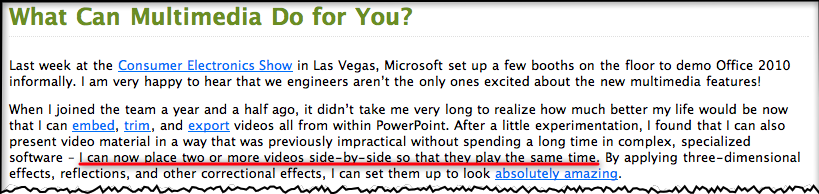
Newsflash: Microsoft announces Powerpoint 2010 will be able to run two videos on the one slide at the same time! (Yawn) Watch this demo I made in 2006 with Keynote 3 running nine (yes, nine) videos simultaneously, without dropping a frame.

The official Powerpoint  2010 blog today made an exciting announcement regarding how Powerpoint will handle video in the future. Here’s a screenshot below (I’ve added the red underline to draw your attention to the money quote, click to enlarge):

Because Powerpoint 2010 will take advantage of hardware acceleration and DirectX9.0, you no longer need to use auxiliary software like Windows Media Player to play videos on a slide. If you’re a Apple Keynote user, you’ll know that since it was released in 2003, seven years ago, it’s had superb video handling capabilities even on old G4 Powerbooks. It’s because Steve Jobs wanted it to have “cinematic” properties, in addition to very fine text rendering.

In 2006, shortly after Keynote 3 was released, and when Powerpoint 2003 was still the current version, I created a Keynote slide for a presentation I was giving to challenge Powerpoint’s dominance of the presentation market place. I was particularly enamoured of Keynote’s video handling abilities while Powerpoint struggled with it, keeping its users from truly becoming creative and keeping them to awfully pixelated images and multi-step complicated management of video placement on slides (as the Powerpoint blog states above).

The video below is one I created today using that old 2006 Keynote 3 slide, playing in Keynote 5 on my MacBook Pro (2008). As I explain, you’ll see nine videos with sound playing simultaneously, all on the one slide, all timed to come in one after the other automatically. The video is a little on the dark side because I’m using a data projector to show the Keynote slide, while simultaneously using the Macbook Pro’s built-in iSight camera to create a Quicktime Pro movie (actually an mp4). So the poor Macbook’s doing double time!

So while the Powerpoint crowd can whoop it up today (and it really is an important change for that crowd and hopefully means we’ll see more creativity emerge from the average user), those in the Keynote community will be looking forward to update announcements for Keynote to be made very soon, truly making it the presentation software of choice for those who value creativity in their presenting.

(Before you watch the video below, keep in mind I created it to be watched in YouTube so I give an introduction first. The money shot starts around 4’20” in after I setup verbally what I’m doing and why!)