As we enter the last year of the first decade of the current millenium (that’d be 2010) it occurs to me this will be the first year since Steve Jobs returned to Apple that neither he or the next in line at Apple will be presenting any new products at Macworld early in the new year.
About this time each year, mid-December, various pundits would wax lyrical about future Apple product releases “expected” to be released at the Jobs’ Keynote in early January. In 2006, the iPhone was the hot topic although none of the soothsayers predicted its form factor nor its OS. (I guessed it would be something like OS X in operation but didn’t come straight out and say it would be a flavour of OS X).
The hot prediction, hardware wise, for 2010 is an Apple tablet. Let’s put that to one side, however.
Apple’s software releases for 2010
I’m more interested in Apple’s software pipeline for 2010, especially as I prepare for my 2010 Macworld Powertools workshop (using Apple’s Keynote presentation software). I still have strong memories of predicting Keynote 5’s arrival, as part of iWork ’09), even though I’d prepared my 2009 workshop based on iWork ’08 and Keynote 4. Lucky for me, I accessed it after Macworld’s Schiller keynote, and partially reworked my slides the night before.
With this in mind, let’s turn to predictions for the next version of iWork, and iLife for that matter.
A little history first
But first, think about the nomenclature systems of the major OS suppliers in use by the majority of consumers. This puts Linux and Unix to one side, and leaves us with Mac OS and Windows variants.
Windows has now returned to numerical naming systems for Windows 7, with a visual descriptive term – Vista – now a sullied brand best forgotten. The last one of these was Windows 3.1 two decades ago. In between, we’ve had Windows 95 (which began Microsoft’s assault on Apple’s GUI lead), followed by Windows 98, Windows Me (another non-numerical nomenclature best forgotten like Vista), then Windows 2000. Lettering then followed in the guise of NT and Xp.
When the Mac OS reached version 10, Arabic numerals were dropped in favour of Roman (Mac OS X), and as each variation took place (10.0 through to 10.6) it was named after a big cat. Jobs himself in all his Keynotes much preferred to refer to the Mac OS by these more colloquial expressions, mentioning numbers in passing.
The first bundling of Apple’s much-lauded consumer applications such as iMovie, iTunes and iPhoto occurred at Macworld 2003, a keynote which had received such little advanced expectations from the rumour mills that at its conclusion when he summed up all he had offered in a two hour spectacular (including not one but two new Powerbooks when certain pundits the week before had said on air, “read my lips… they’ll be no new Powerbook’s at next week’s Macworld), Jobs told the audience not to believe all they read on rumour sites.
All initial iLife apps. had been out in the wild in their own incarnation, but in 2003, with each undergoing an update, iLife (undated) brought them all together for download (all except iDVD), free bundling with a new Mac purchase, or purchase as optical media for USD49, to operate with OS X 10.1.
In later, years, other popular apps were added including iWeb and Garageband. Most were iterative improvements, although iMovie 7, which followed iMovie HD6, proved particularly unpopular, a situation cleared up in iMovie 8, released in January 2009.
As usual, Wikipedia provides a comprehensive history of iLife, a table reproduced below which sets out its lineage.
Unlike Microsoft, which persists in allowing its dated Office Suite to linger on for years (the current version is 2007, with many still using 2003, and awkward version compatibility), it appears it’s anathema to the Apple team to be so out of date with respect to how it names its suites such as iLife and iWork. Each in previous years since their inception has been “rebooted” at Macworld just a few days or weeks into the year that carries its name, with the exception of iLife 08 released in the fall of 2007, well ahead of 2008. You can say that this was Apple flaunting its uptodateness in Microsoft’s face, or that it was so late with iLife 07 it skipped it completely and went to 08 instead.
While none had predicted iLife, iWork had received much speculation once a prior arrangement between Apple and Microsoft has reached its use-by date. This was the much misinterpreted “saving” of an Apple on life support by Microsoft by an injection of $150m purchase of Apple non-voting stock, an agreement to continue Office for Mac for the next 5 years after Jobs return to Apple, and the use of Internet Explorer for the Mac, announced at August Macworld 1997. (For a more radical interpretation of these events, read Roughly Drafts’ entry here.)
Keynote 1.0 itself was released at the same Macworld which saw iLife bundled for the first time (2003) and one might ask why it was left as a stand alone app, and not bundled with iLife given its creative DNA. (It was given away to all who attended Jobs’ keynote).
One could guess that with the MS Office agreement concluding, Apple was already plotting to release its own Office suite, and bundling Keynote with iLife would contaminate its brand as a professional, not consumer, app.
Unlike iLife which was not rumoured to be released in the lead up to 2003’s Macworld, news that Apple might take on the might of Office was always a big deal, given Office’s place in the business firmament as the default suite for enterprise on both platforms. Even now, despite frequent requests to have friends send me text embedded in an email, or even as a text document, they insist on sending Word documents. I usually view them first in Quick Look, and if I need to copy any text, download and open them in TextEdit.
It would be prudent to point out at this point for younger readers (!) who may have grown up with Microsoft Office as the “only” productivity suite, that one of the first suites for PCs (to use the term generically) had been introduced for the Apple II in 1984, as Appleworks. It continued on into the Macintosh, released in the same year but earlier, and was eventually named Clarisworks. Its interesting history is available at Wikipedia here.
Rumours that Apple would produce a productivity suite for OS X apart from Appleworks and its derivatives, reached their peak in very late 2004, when the now defunct Think Secret rumour site went public with “news” of a slew of new products for Macworld 2005, including the update of Keynote to version 2, some non-specific add-ons to Keynote, a hardware appliance called Asteroid (which eventually saw Think Secret put out of business by Apple), and a mysterious software called Sugar.
On New Year’s Eve 2004, just a few days before Macworld 2005, MacRumours reported Sugar to in fact be iWork, containing Keynote 2 and a word processing document called Pages. Rumours that it was to be called iWork got a boost when software developer IGG Software (whose products iBank and iBiz I personally use and enjoy) stopped using the name iWork for their billing suite, and renamed it iBiz.
When iWork was revealed, it was a rather anaemic combo of Keynote 2 and Pages 1.0. Nonetheless, it certainly raised eyebrows that Apple was not afraid to take on the might of Office. Keynote was already winning hearts, minds and eyes of those tired of the usual Powerpoint backgrounds and amateurish animations and transitions, while Pages’ dual page layout/word processing roles seem to hold promise.
But unlike the initial release of iLife in 2003 which received no year appendix, the first iWork was named iWork 05, and each year has been updated up to iWork 09 at Macworld in January, except for 2007. In this year, just as for iLife, iWork 07 was skipped, and iWork 08 released in August, four months ahead of January 2008.
So, in thinking about the next update to iWork, if history is a good predictor of Apple’s behaviour, we will see an update early in the new year, or in August at a special Apple event.
But 2010 will be a little different of course. There is no official Apple presence at Macworld for the first time in decades, and no Steve Jobs or Phil Schiller keynote scheduled for the official release of new Apple products.
Would Apple simply release a major software product simultaneously while Macworld is proceeding and presumably garnering considerable attention? Would it release it, and perhaps new hardware, during CES in January to once more steal some media spotlight from Microsoft’s showings, just as it did when the iPhone was released in 2007? Think Tablet, in this case, as the ideal attention-grabber (but it’s unlikely).
What’s clear to me is that Apple will not allow too much time to pass with iWork 09 or iLife 09 on its Apple store shelves once 2010 rolls around. Too much like Microsoft to let products linger in some outdated fashion.
And if either of these two products make it to the next version, will it be iWork 10 or iWork X? And as a commenter has reported, will it be restricted to Snow Leopard?
In iWork 09, Keynote 5 is the most mature of the products, and certainly the one I’m most familiar with. Pages I use, but less frequently and not exclusively, spending time also in TextEdit, Mellel, and Word (when I have to.) I almost never use Powerpoint except to open others’ Powerpoint stacks to see them in their original format, despite being able to open them in Keynote. I use Numbers once a year to update my professional development workshop schedule.
I’ve also played with Powerpoint 2010 for Windows, and it has come a long way since Powerpoint 2003 or 2007. Its attempts to emulate Keynote are palpable, and it seems its developers are very aware of the criticisms heaped upon it, some unnecessary, and others quite appropriate.
Somewhere between now and June 2010 when Powerpoint 2010 is released officially, Apple will update Keynote, I’m sure. The question I have is whether they’ll wait until they feel Keynote is ready (there is no known beta program outside of Apple), or leave it late until Powerpoint is virtually locked down and then release a stunning leapfrog, making Powerpoint’s emulation efforts look pitiful. Expect very short notice from Apple, rather than a long, “lock-you-in, can’t go back” strategic effort, as per Microsoft.
A few Keynote 6 (iWork 10) predictions
I have a strong feeling that whenever Apple chooses to release a Keynote update, it will be stunning. Already in Keynote 5 we saw such effects as Magic Move which will be further refined in Keynote 6. I predict more advanced alpha masking approaching that which can now only be performed in third party software such as Photoshop or Vertus Fluidmask; more subtle but powerful 3D effects such as we can see in Picturesque; more impressive manipulation of Quicktime movies including angular display distortions to accentuate 3D possibilities, and of course some transitions added and some retired (such as the turntable effect).
The big hope will be a streamlined and easy to use timeline which is desperately needed to bring Keynote up a notch. Several iLife consumer-level applications have timeline devices built in, and it’s very odd that its professional software in Keynote doesn’t. Its inclusion, which would mean a radical restructuring of the Inspector, whilst attempting to maintain some semblance of simplicity and UI ease of use, will be a sore test of Apple’s UI creativity and engineering mix.
When it does so, my prediction is that it will make Powerpoint’s efforts to control elements on a timeline look very weak indeed. You just know that Apple wants a timeline in Keynote, but it has waited this long to do it right.
I am hoping that the Keynote team will also make users’ lives easier with new and creative ways to highlight events on the screen thus doing away from laserpointers in the Mac community! Again, if they do include new “call outs”, expect them to have strong 3D elements and animations similar to what you see on television current affairs programs.
I’m not particularly enthusiastic about new themes or transitions, as we’re well served by both Apple and third parties currently, but I do expect certain build styles to be dropped, and some seriously eye-popping ones to be added, especially word and letter effects. I am hoping that the motion and scaling builds will be extended and include freehand drawing of object movement, rather than the more cumbersome method in Keynote 5.
There are lots of things to be hoped for in the next update, some of which are truly necessary, and others less needed. I do expect one or two delightful surprises however, if past updates are anything to go by…
The big question is, when? I have hinted that it will be sooner rather than later given Apple’s naming history, but it may be that delaying is a good option while Powerpoint moves into final form. My own feeling is that while Apple observes Powerpoint – if only to keep its export to Powerpoint feature current and accurate – it marches to its own beat, knowing the Microsoft development team will have an awfully tough task playing catch up not just to new Keynote features, but its sheer elegance and panache.
After all, Bill Gates may have left the building on a full-time basis, but his lack of taste still lingers and permeates the design culture at Microsoft.
Should an Apple tablet be released and coincide with Keynote 6 features (as I have written elsewhere on this blog) Apple will move the field of presenting up several notches.
(Please note: Give this blog entry some time to load as it’s replete with large but necessary picture files, and a movie – Les)
This week in Copenhagen various heads of states, their advisers, and a slew of climate science researchers will be meeting at COP15 for discussions and demonstrations which some have suggested is the best and one of the final opportunities to do something about forestalling man-made changes to Earth’s atmosphere which may end up having profound consequences future generations.
I’ll keep my views on climate change to myself for the sake of the exercise, but as one with a background in science and who likes to think he applies a science to presenting skills – the doing and teaching – I have a few thoughts to share on presenting as a scientist, to scientists, or to lay audiences.
One of the things that informs me of how to do presentations especially presentations to audiences unfamiliar with my material, is the scientific method. By this I mean measurable differences between the effects my presentations have on my audiences, in contrast to the effects other presentations have on their audiences.
So it’s reasonable to say that I’m very aware of the power of science to both inform and confuse, especially when scientific experts appear to use the same factual material yet come to differing conclusions.
The Mad Scientist remains a popular image in the public's mind
How confusing it must be to the general public not versed in science to hear how the same data can be interpreted almost in polar opposite form. Or how scientists are conspiring to manipulate data for their own (unspecified) nefarious ends. The concept of the Mad Scientist with megalomaniac desires to rule the world remains a popular science fiction depiction in the general public’s collective mind.
I want to assert too that Al Gore’s presentation, now movie, “An Inconvenient Truth”, which I first saw in part-form as a TED short presentation, ironically may turn out to be more unhelpful to climate change advocates rather than sceptics.
Now this might sound a little odd coming from someone who so advocates the use of Apple’s Keynote to perform memorable presentations, as Gore did and continues to do, although he is conspicuous by his absence in Copenhagen this week.
But stay with me as I explore why I think my assertion holds water, if you’ll pardon the pun. It’s to do with how scientists see themselves in their own communities and how they walk a fine line between spending time sharing their data within those communities, and moving outwards to communities whose knowledge of their expert material is far, far less.
How Scientists Teach
You see, while many scientists are also teaching academics as part of their full-time jobs, very few will have received or taken upon themselves, formal training in adult learning. While more and more universities are evaluating student perceptions of their teaching experiences, it still remains important for academics to publish or perish, and for their research to be endowed with grants partially based on the quality of their research and where it is published, the more prestigious the better. It’s almost as if their teaching of students is very much a secondary aspect of their tenure. That’s not to say great scientists can’t also be great teachers, but in my experiences there isn’t much overlap here.
So to begin with scientists who are also academics – that is, there is a teaching component to their tenure – have the need to perform in presentation-like ways in a number of different situations.
The Different Styles of Scientific Presenting
1. Firstly, of course, there is a series of semester long, one hour lectures which nowadays is so often based on PowerPoint slides and minimal student interactivity. This promotes of course a very linear demonstration of information according to a set timetable of events in class and only the most astute lecturer is able to leave their slides and enter into an open discourse with their students in class. I’ve heard it said by many academics that they wish they could do it differently, without the slides, but the paying students demand they be shown slides which they can download and later review at their leisure. My belief is that many academics give in to their students in a folie a dieux of shared laziness and desire for better evaluations.
There is much more to say about academic teaching methods, but this blog entry is not the place right now.
2. The second style of presentation used by scientists I want to refer to is their convention or conference presentation, which like publishing, is expected of them by their faculties. The usual format of conferences is for a group, perhaps from the same university or research institute, to come together in an organised symposium which they present to the conference organisers as something conference goers would pay to see and hear, and raise the status of the conference. There is usually a theme to the symposium, with each speaker building on and extending the work of the other speakers. These presentations usually are somewhat shorter, about 20 minutes, with question time of just a few minutes after each speaker and a more extended period moderated usually by a conference appointed facilitator to lead audience discussion.
My experience is that it’s often junior or early career academics who perform these 20 minute presentations. There is often no room during the presentation of discussion because after all 20 minutes goes very quickly and there is often much material to get through in this relatively short time. I have worked with my fair share of postgraduate students presenting at a conference for the first time and attempting to sum up years of a Masters’ degree or three years of a PhD in one very brief presentation. The temptation to fill up every slide with reams of words and almost impenetrable tables and charts in order to get as much information “out there” is palpable and almost overwhelming.
Combine that with speaking to one’s peers and in some cases one’s betters (in terms of far more experienced academics) can prove to be a rather nerve wracking experience. Not surprising, my suggestion to move away from the lecturn and stand before the audience is met with great trepidation, and word-filled slides become a great comfort and hiding place for neophyte presenters. They allow the slides to be the presentation, while they stand offstage playing second fiddle, hands trembling on the mouse ready advance to the next impenetrable chart, graph or bullet-filled slide.
In another blog entry in the planning, I’ll discuss how I assist novice presenters with this daunting task.
3. The other conference presentation is usually the invited address by a leading academic in his or her field, and is usually 45 minutes in duration, with an allowance of 15 minutes for questions. Again, they are designed to flow uninterrupted by the audience, and so the keynote speaker, usually an expert in the field, has two dual tasks: the conference organisers expect them to provide a state-of-the-art summary of their research in order to justify their selection as a keynote speaker; and secondly, they need to keep their audiences engage non-stop for 45 minutes, now made even more difficult in an age of iPhones, Twitter, and other technogically-based distractions.
Indeed there is perhaps a third and hidden task that meets the requirements of being a good keynote speaker. And that is that many in the audience may have little knowledge of the expert’s field, and so the presenter must walk a fine line between providing a depth and breadth of material to what is likely to be a very mixed audience with respect to prior knowledge of the subject.
Think now about the keynote speaker who spoke for an hour and kept you entranced for all that time, not wishing to even briefly check your e-mail or Twitter account, and what it is they did in order to accomplish this rarest of achievements, public speaking wise.
4.Presenting at conferences can also entail leading workshops of three hours to one day in length and this requires quite a different approach than the first three presentation style I’ve mentioned, since people sign up with an expectation to learn certain things as espoused in the conference manual as workshop objectives. Indeed, at most scientific conferences you can’t get your workshop selected until you offer an hour by hour summary of what will occur including any learning objectives and how they will be achieved (if not measured).
The importance of delivering persuasive messages in Copenhagen
Over the weekend, while preparing my Presentation Magic workbook for MacWorld 2010, I’ve been giving some thought to the presentations I expect would be given in Copenhagen this week. If there was ever a time and situation for our presenters lecture to really count, to make a real difference, and to be memorable and persuasive, Copenhagen is it.
So I decided to research some of the presentations of the leading scientists and academics in the field of climate research. There is plenty of it about, and it won’t take long for the serious researcher, using Google alone, to locate “the names” who are outstanding in this field, simply on the basis that their names keep cropping up in various conferences on climate change. No doubt they will make their appearances at Copenhagen as well this week.
What I wanted to do is look through their presentations and where possible watch them perform them too, not just their slides, so as to see the state of the art of climate science presenting.
Scientists dirty little secrets when it comes to presenting
Let me preface my findings by saying that the conferences and workshops I mainly to go to are designed for psychologists and neuroscientists to keep up to date with current practices and research. It is from these but I have learnt what constitutes the current practices of scientific presenting using slides as constructed in PowerPoint and a much lesser extent keynote. Suffice it to say that there is a curious irony in what I’ve found.
For as much as academics and scientists gain a speaking position in conferences partly based on reputation but more importantly on evidence-based research, the means by which they choose to convey that research to conference attendees is not based on any evidence of how people learn, especially people with very limited knowledge of their field, but is much more based on tradition and social conformity: if everybody uses PowerPoint, who am I to rock the boat?
Indeed I’ve had my fair share of arguments with conference organisers when I insist I won’t use PowerPoint and thus won’t give them a USB drive housing my presentation for them to dump into the intranet server. I understand how this can make the conference organisers job easier and saves much time not waiting for each individual speakers’ laptop to be connected – fingers crossed that it works – especially when we are trying to put four 20 minute speakers into a two-hour session.
The other block to good communication apart from the usual PowerPoint sins such as too many words on the one slide, chintzy clipart, and the much maligned reading of slides, is how scientists seem not to understand that writing a paper for publication and presenting the paper’s main findings at a conference is not one and the same thing.
You see, while some who attend the presentation might be the same populace who reads the scholarly journals, the means by which the same audience takes in the information is considerably different. Each means of transferring knowledge needs to be carefully considered in its own right.
Too often do we see presentations as if the writer has merely taken their Word document, dumped it over several PowerPoint slides, removed the connecting words, and then added the seemingly necessary bullet points to conform to standard scientific Powerpoint. Here’s how I demonstrated this in Keynote at a conference in October where I gave a one day Presentation Magic workshop:
Too often do we see presentations as if the writer has merely taken their Word document, dumped it over several PowerPoint slides, removed the connecting words and grammar, and then added the seemingly necessary bullet points and subheaders.
They then of course take the same graphs and charts as in the published paper version, and then dump them into slides as well, often two graphs per slide as in the example below.
Now it’s not at all uncommon in published papers to see graphs side-by-side on the one page. It’s fairly standard practice as long as the graph or chart conforms to the publisher’s standards, or where the publisher can manipulate the chart to facilitate printing.
The reader has the luxury of both reading the text, viewing the chart or graph, and going back into the text to verify, explore, and make associations with what’s been written, at their leisure. They can do so over a coffee, in their library, or sitting up in bed at the conference hotel. If their ageing eye meets with a very small chart, they can hold it closer or wear magnifying spectacles.
My main point here is that the reader has a great deal of control over their reading experience.
Let’s contrast that with the audience for a presentation which has seen a Word dump into PowerPoint take place. The audience is at the mercy of the presenter’s pace, slide design with respect to the size of the charts or graphs, and the words the presenter has chosen to describe what is on the slide. The audience passively attends to whether those spoken words match what’s on the slide, or in fact they witness an an inconsistency with the slide’s content.
This “split attention” is one of the most fundamental and overlooked aspects of presenting, which can lead to boredom and disengagement on the part of audiences.
It comes about because presenters in their haste to construct their slides and in their prioritising paper publishing over presenting give short shrift to the needs and “humanness” of their audience.
A really important message for scientists
If you gain anything at all from reading my blog it’s that the audience always comes first when you present. Just last week I had to explain to some senior members of my profession to whom I was demonstrating my version of slide construction leading to better professional development workshops that it is the audience to whom one must always attend, rather than how expediently one can construct slides based on written papers.
I wanted to impress upon them that the transition from the written paper to the slide is not a transparent and automatic process, but one that requires considerable thought and creativity. In my amusement at their reaction, I said to them that if you see me stare into space at a conference it’s not because I’m bored or away with the faeries, but I’m probably constructing my next set of slides in my imagination. I’m conceiving of themes, motion builds, visuals, and my intended audience reaction. In fact I must admit that often at conferences I spend a lot of others’ presentation time reworking in my head how I would convey the information the presenter is discussing, and probably missing a great deal of content!
Once more, the problem when scientists present
So the problem with many scientists presenting is the failure to consider not so much what they bring to an audience but what an audience is bringing with them to the presentation.
By dint of their expertness and their selection as a keynote speaker, science presenters already bring a degree of authority and authenticity to the conference before they even get up to speak. It is then their task to confirm the legitimacy of these qualities by how they present, not just what they present.
This will be especially important in Copenhagen when so many of the attendees will have very limited understanding of the science of climate change and may easily be flummoxed by an overwhelming number of confusing data points.
I have an awful apprehension that many scientists believe that their published work alone will get them across in their presentations to an audience of very mixed levels of prior knowledge. If they are to convince the attendees and the world who may be sceptical of their research, and/or any “hidden agendas” some may conspire exists, the scientists must understand much more about human learning and how to convey complex information persuasively.
While the Copenhagen talkfest may have all the trappings of a scientific conference, the norms of presenting at such conferences will not be sufficient nor in fact, useful.
Indeed, my awful apprehension extends to an unpleasant fear that some scientists believe the more monotonic, acronym-dense, and inscrutable chart-laden is their presentation, the more effective and scientific they appear. Unfortunately, that merely plays into the Mad Scientist meme.
This behavioural norm might work fine amongst themselves at conferences where one must appear as objective and unemotional as possible – that is, let the data to tell the story – but in Copenhagen, I believe this norm won’t wash.
Why Al Gore’s proclivity with Keynote may prove unhelpful to the climate change cause
Put another way, it’s as if many of the scientists wish to distance themselves as much as possible from the popularist demonstration of science as exemplified by Al Gore’s “An Inconvenient Truth” presentation and movie. So while Gore’s presentation de force did much to pull the general public’s attention to climate change (as compared to the 35 mm slides he used to use in his talks), I fear that many scientists with a very legitimate story to tell based on strong data, will not wish to emulate a layman with fancy presentation material, lest they be considered showmen and thus contaminate their status as bona fide scientists and researchers.
Of course, one is reminded of the work of Hans Rosling at TED(left) where he passionately and humorously plays with his data which in paper form might be very unstimulating to an outsider but which is engaging and attention-grabbing in presentation form.
To stay with these traditional means to convey complex data, perhaps pushed even further into obfuscation by all the worst of the cognitive style of Powerpoint so lamented by those who study knowledge transfer such as Stephen Few and Edward Tufte to name two of the more outstanding exponents of data visualisation is just so wrong in 2009.
I can also imagine how many scientists will try to be as unemotional as possible in contrast with the public demonstrations of emotion which surround this controversial subject. It’s a way of saying “I’m a scientist, not given to emotional interpretation of data.”
Which is all fine and good, but one can still give a persuasive, memorable and appeal-to-the-emotions presentation without appearing subjective and unscientific.
The emotions I’m referring to are not the classic anger, jealousy, happy, etc., that most of us think of as human emotions and form the fodder for most patient visits to therapists (as well as attorneys on many occasions!).
How we make decisions
I’m referring to affective, mood or feeling states which help us make sense of the world around us. Without this part of our humanity, we are unlikely to ever make decisions. Left with just our pure logical abilities, as is the case with individuals with damage to midbrain areas, we prevaricate, waiting for ever more information before making a decision. (This should sound familiar to those attending Copenhagen who see this conference as a moment in history to stop prevaricating and take action). It seems we need both our logical, planning and linguistic centres to work in tandem with our emotional centres in order for us to make the best decision at the time.
Those scientists in Copenhagen who wish to be persuasive rather than merely presenting the latest data, need to be cognisant of how the human mind works. This is especially so with complicated information which is being presented to groups of attendees with extremely variable knowledge of the subject.
If the scientists presenting are anything like the group who presented in Copenhagen almost as a dress rehearsal earlier this year in March, without wishing to sound prejudiced or engage in ad hominem attacks, they have their work cut out for them if their intention is to be persuasive rather than merely presenting data.
So, let’s take a closer look at some of those presentations and you can decide, with a little help from me, if the slides make for a persuasive argument.
Remember, I’m not particularly concerned about scientists presenting to colleagues, where they can cut corners in terms of explanations or the use of acronyms and familiar, agreed-upon terms. These presentations rely heavily on a syllabus of what’s called “deep foundational knowledge”, requiring very little in the way of explanation of method, measures and results.
Tables and graphs merely need to be labelled accurately, differences highlighted, and a knowledgeable audience will quickly see the forest for the trees and tune in for the discussion and conclusion, which is where disagreements often are displayed and worked through.
But in Copenhagen, there will be a very mixed audience and presenters will have to more clearly enunciate their results and the meaning they carry to an audience that may well be swayed more by emotion than by data (just like elections!).
Studying climate scientists presentations
The Congress whose presentations I want to look at as a lead up and rehearsal for this week’s convention is called “Climate Change – Global Risks, Challenges and Decisions”and was held March 10-12, 2009. The final report of this conference is to be handed over by the Danish Government to this week’s UN Conference on Climate Change, known as COP 15.
Interestingly, the principal media sponsors for the March conference were Time magazine, Scientific American, and National Geographic. Each of these organisations publishes some of the finest data visualizations you can find, whether on paper or as moving images. As you’ll soon discover, it’s a pity the speakers didn’t spend time watching how established media conveys complex topics.
On the website’s home page, you’ll locate a bullet point listing “presentations” and that’s the source of some of the slides I want to demonstrate to you.
You can see the full list of speakers, and their publications, as well as webcasts (restricted to “Windows Internet Explorer, but downloadable as wmv files also, which Mac users can view using Flipformac or VLC). The videos don’t show the slides, so you have to download the presentation, and follow along the webcast as best you can.
Where better to start than with the Opening Address of the IPCC Chairman, Dr. Rajendra Pachauri.
Here is a small portion of his very well endowed CV:
“Dr Pachauri’s wide-ranging expertise has resulted in his membership of various international and national committees and boards. At the international level, these include his positions as Adviser, International Advisory Board, Toyota Motor Corporation, Japan, April 2006 onwards, Member, Board of the International Solar Energy Society (1991-97); Member, World Resources Institute Council (1992); President and Chairman, International Association for Energy Economics, Washington, D C (1988, 1989-90, respectively); and President, Asian Energy Institute (1992 onwards). He has also joined the board of the Global Humanitarian Forum, recently founded by former United Nations Secretary General Kofi Annan.”
And now to the slides (you can download the Powerpoint file here). I’ll select a few to give you a feel for the good and the not so good of his presentation.
Here’s his opening slide, probably showing as he’s being introduced:
Let’s start by saying there’s a lot going on in this first slide. each corner is occupied with a logo or image, and while there is a big, bold header which is intended to tell us what is to come, our eyes scan all over the slide trying to convey meaning from all the images which seem to bear no connection to each other, except that they are on the one slide. This is too much work for the audience at the opening bell.
This is also a good time to speak of research and academic institutes’ marketing departments’ interference in scientists’ presentations by insisting that the organisation’s logo or branding, whether it be small or the slide’s entire background, be used for every slide, even if it produces clutter, confusion or overwhelms the colours in a chart or graph.
Here is my own professional society’s slide background it insists on using (and I continue to strongly reject when I get the chance):
I’m sure the graphic designer ought to be very happy with the effects achieved, but as one looks at more slides in this stack, the visual interference the logo in the background offers is truly astounding. See how a later slide in the same stack has what I will called “interference effects”.
You can download the entire PPT file, in the public domain, here.
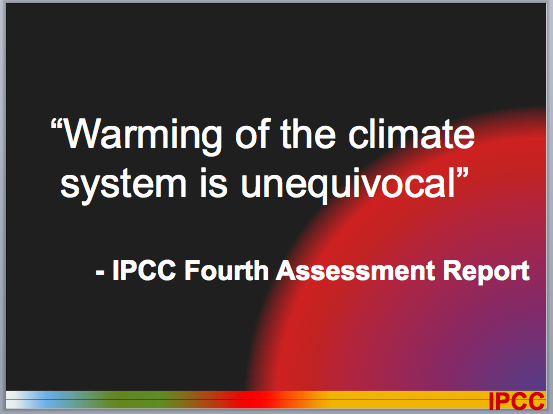
Let’s return to Dr. Pachauri’s stack. I like one of his earlier slides very much:
Straight to the point, with big words and legible fonts so even those in the back of the auditorium can read it. The bottom graphic containing the letters “IPCC” as a logo is unnecessary for its chairman to include, and merely clutters the boldness of the slide. This next slide is very appropriate too:
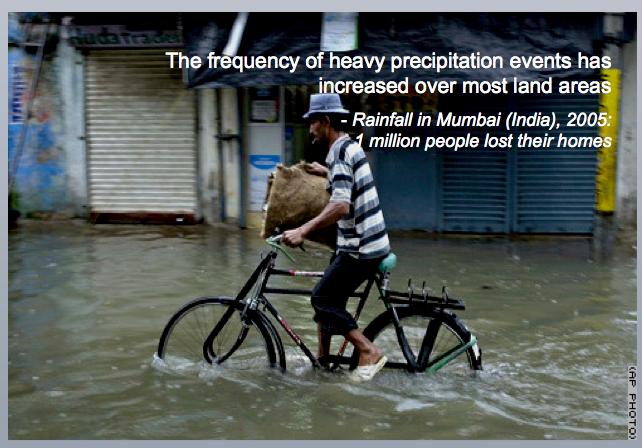
Perhaps he read Garr’s Presentation Zen on the flight to Copenhagen! But I do think the words referring to a million homes lost in Mumbai needs its own graphic illustrating on a separate slide what such devastation looks like. So far, so good, but then…
Here’s an example of a slide that would work well as a double-spread in a magazine or book, but will make an audience work so hard in a presentation because of the very small print and shear quantity of information it contains. Now if the presenter brought in each part in large writing, explained its significance, minimised it then brought in the next section, that would work. But I’m guessing that’s too much work and this graphic, most likely pasted into Powerpoint rather than created in it, would have come up on the screen as is. Such a contrast to the simple but powerful message conveyed by the deluged bicycle rider.
Let’s look at a few more:
Again, the unnecessary IPCC logo continues to be conspicuous. This slide is taking a bet both ways: heaps of text, most likely read to judge by the notes accompanying the slide, but the visual images bear no immediate connection to the main message, and indeed by shoving them into the four corners in some effort at symmetry, only prove to be items of clutter. Certainly they form a boundary for the words, containing them, but in the end, they add nothing to the slide in a meaningful sense. For that reason, they make the audience work harder than they need to…
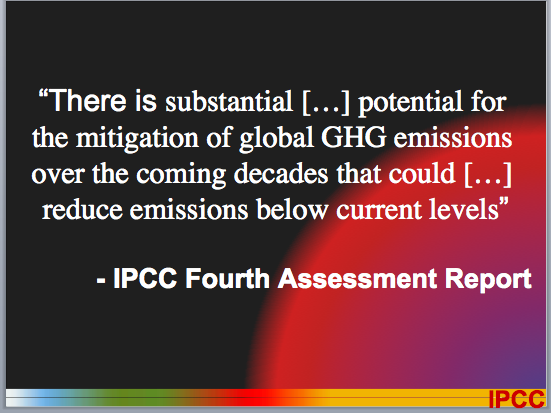
And now to one of the concluding slides:
Regular Presentation Magic readers and workshop attendees know how I would have reproduced this slide: take the actual report, show it on the slide, blur it into the background then build out the actual section using this quote from report to maintain authenticity; a task that would take about 5 minutes and worth every second of that time.
Here’s how the Rachel Maddow show does it:
From here, with a little finesse, you take the enlarged quote and “swoosh” it in front (using one of Keynote’s builds) so we know where the quote has come from. It’s effective, keeps the audience interest, and adds to the presenter’s authentic use of materials. (I’ll be showing how to do this at Presentation Magic at Macworld, by the way, complete with animations).
Let’s move on to some rather tragic slides that exemplify all I worry about when it comes to scientists basing their talks on evidence but not offering evidence-based presenting:
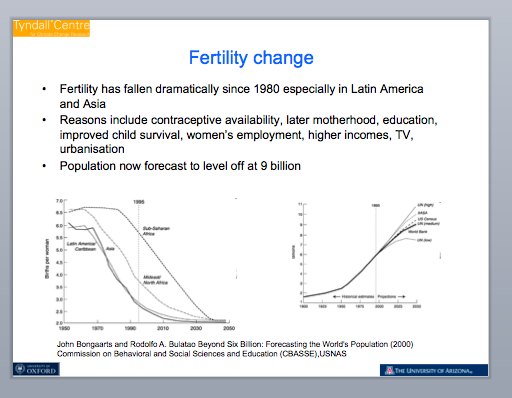
Here’s some slides from Diana Liverman’s presentation in Copenhagen this past March. From her supplied CV:
“Diana Liverman is Director of Oxford University’s Environmental Change Institute and holds a University Chair in Environmental Science in the School of Geography. As Director of ECI, Dr. Liverman co-ordinates the work of 80+ interdisciplinary contract researchers and doctoral students who work primarily in the areas of climate, energy and ecosystems with a strong applied and policy focus. ECI hosts or co-hosts national and international projects that include the UK Climate Impacts Program, the Oxford node of the Tyndall Centre for Climate Change Research, the U.K. Energy Research Centre and the ICSU/ESSP Global Environmental Change and Food Systems (GECAFS) programme.
This is her opening slide, used to introduce her talk.
This slide remains on the screen while her notes (under her ppt slide) suggest about five minutes of reading text. Me, I use as large and clear a single image per slide as I can, hooked to what I’m saying, and leaving out small images which bear no immediate connection to my message. Others may differ in their view of the success of this opening slide.
To continue:
A train wreck of a slide, which allows one to see numerous slide errors rolled into one.
We see unnecessary logos in three of the corners, so small as to be blue or yellow blocks from the back of the auditorium no doubt. Slide clutter.
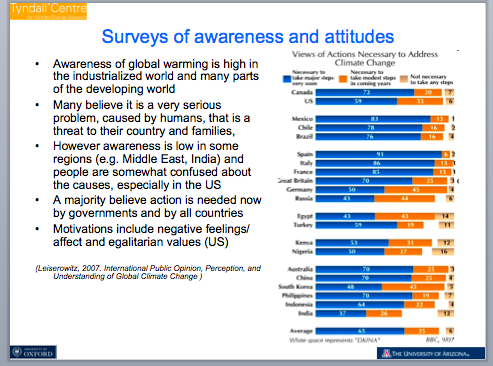
The graphic on the right will be indecipherable unless one is very close to the screen and unless the presenter has gently built each element, which I strongly doubt has occurred. It’s been dumped in from a publication rather than specifically created for this slide. And of course to its left, the expected list of bullet points. Now if the notes under the slide which the speaker read are a guide, she didn’t actually read the bullet points. But she makes references to several authors and even cites a reference on the slide. Again, astute readers would know what I would do to maintain audience interest: either show a quality image of the authors, their published books, or the actual publication cited, together with a screenshot of any quote used.
Using Citations in slides – it’s not the same as with published papers
One of the faults I find with scientists when they present is using citations on a slide. It’s useless, I’m afraid and adds to clutter. Of course, it’s expected in a publication where the full citation will appear in the Reference section. But for a presentation, it’s unnecessary, with one exception.
If, like these slide stacks, it’s intended they be downloaded for later reference for those not in attendance, then create a second stack just for publication purposes. Merely, duplicate the stack with all the citations, then leave them out in the version you will use for the actual presentation. Mention of the authors is sufficient, or you can get interesting as I’ve suggested by actually showing the publication you’re citing, but otherwise your verbal mention is enough.
Another disaster:
Need I elaborate?
The spoken words for the slide that now follows (another teachable moment in how to present data) is the following:
“Information and feedback are certainly one key to reducing household carbon emissions. This graphic from AR4 suggests that the introduction of appliance energy labels in Europe shifted the average purchase from a D to an A or B over a relatively short time period as both consumers and producers responded to the labelling programme saving considerable GHG emissions, but counteracted by larger fridges perhaps.”
There is a lot of information contained in this graph. My rule for charts and graphs is keep it simple, and proper labelling ought to make the graph’s meaning self-evident. In this case, left as it is, the author could have changed the title to something meaningful, rather than a label, as per a published paper. Something like: “Europe shifted from purchasing low efficiency appliances to high efficiency ones over a relatively short time period.”
The other glaring problem with this graph is that the years become almost illegible because they are all shades of blue! I like the spectrum shift from red for poor efficiency to light green for high efficiency however.
One final example:
Again, fine for inclusion in a paper publication, but breaks so many guidelines I think pertinent for presenting to mixed groups in large auditoriums. By now, you ought to require no elaboration on my part.
There are many other fine scientists discussing their research and showing their presentations on the website for you to hear and view. I invite you to visit the site and download what you can and use them to inform yourself of what works and what doesn’t.
In particular, bear in mind the fundamental errors I think scientists make: A presentation is not merely a written paper converted into Powerpoint. Powerpoint, in the traditional way most in academia use it, is a poor means by which to convey complex ideas. It’s an even worse way, in the means by which it is mainly employed, when attempting to be persuasive with lay audiences, potentially resistant to change, whose main reference point can be summed up as:WIIFM (“what’s in it for me?”)
To reach these people requires much more than fastidious and double checked data – this is a necessary but insufficient condition for behavioural change.
Scientists need to acknowledge that their audiences have three levels of brain functioning: a brainstem to maintain vital bodily functions without thinking about them; a cortex and in particular pre-fontal lobes for executive functioning such as planning, connecting ideas, and making sense of the world, and a midbrain, where emotional processing takes place.
Using slideware appropriately, and being able to help audiences with both visual and verbal illustrations, will allow greater learning to take place in a persuasive and memorable fashion.
But if I am to judge from the slides I saw from the March Copenhagen conference, we are still a long way away from scientists merely converting Word documents into Powerpoint. Saying you’re too busy to spend time in creative acts of storytelling both diminishes your persuasiveness and dilutes your passion.
One final point: During the current Copenhagen summit, which is viewable live by the way, I note there is a daily seminar offering Media Training. What a pity I couldn’t locate an area labelled “Presentation Skills Training”. For that matter, how interesting a conference it would have been in terms of presentations if the likes of Garr Reynolds, Nancy Duarte, Edward Tufte and Stephen Few could have been invited over to assist. I know I would have waived fees (but expected to receive flights, accommodation and meals) to assist in helping attendees present more powerfully. If you visit the site and view an outstanding presentation, please forward the link to me for inclusion in a follow-up blog entry.
In my Presentation Magic workshops, if the audience suits and time permits, I’ll give an extensive insight into how best to use graphs and charts to get your message across succinctly and persuasively. Like so many slideshows that follow the cognitive style of Powerpoint (and which I am lamentably seeing increasingly used with Apple’s Keynote as more Windows users are making the switch and discovering Keynote, but persisting in using it like Powerpoint), graphs and charts are too often used poorly. In essence, it’s commonplace to see data points slapped into Excel, then a graph derived without consideration given to whether it actually helps an audience better understand the raw data, or whether a graph is generated because that’s what’s expected. This is especially true for those in the sciences.
At Macworld in 2010, I’ll spend some of my workshop looking at these issues in my usual offbeat but highly persuasive fashion, and most ought to come away with a new appreciation of the virtues and vices of graphical data displays. Anyway, for the current moment, Australian journalist Mia Freedman (@miafreedman) has twittered a most excellent humorous blog entry featuring the use of pie charts (and an exchange between a designer and a potential user of his services). Littered with expletives, so you’ve been warned.
Two popular blog writers in the past few weeks have noted the importance of faces in presentations and advertising.
My colleague in doing away with Death by Powerpoint, Garr Reynolds (Presentation Zen) noted the advertisement below on his Posterous blog.
Garr notes on his blog:
We notices faces just about more than anything else, especially the eyes. Beauty is highly subjective (obviously), but there is a lot of evidence that we are more drawn to faces with greater than average symmetry.
This is one aspect of our attraction to faces, and certain types of faces.
Turning to another popular presentation blogger and twitterer, Andrew Dlugan who notes a Toastmaster’s current blog entry, called “Look this way, please”.
The author of the entry, John Zimmer, notes the important of where eyes in portraits look and how to best complement for adding text to a slide. Have a look at this part of his blog entry with an example of how not to mix portraits with text:
Here, Zimmer is adding to the conversation the idea of split attention, where our visual processing is confused: Where should I look? At the text or the picture?
What he’s getting at is: there’s a way that works better than another.
It won’t come as a surprise to regular readers of this blog and attendees of my Presentation Magic workshops that I place heavy emphasis on visual processing, and how, by understanding the underlying neuroscience, you can construct slides which have a much better chance of helping you get a persuasive message across to your audience.
In a recent full day workshop for psychologists I gave (which I am half way through writing up for you) I placed much emphasis on understanding the visual system. Now you might think psychologists know this stuff, but if you judge their knowledge by their presentations, then you’d conclude whatever knowledge they may have hasn’t been translated into their presentations! And the same goes for medicos and other scientists!
In my original presentation to Macworld in 2008 (you can see the evaluations on this blog) I asked the audience what they thought was the first visual pattern we human beings attended to… it is of course, mother’s face. We have an innate ability it seems to search out faces, and we see faces in inanimate objects, so powerful is this ability.
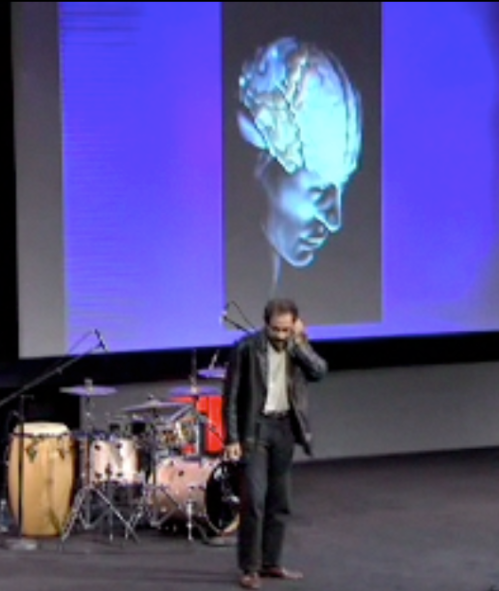
Moreover, when there is a failure to have emotional reactions to certain faces with which we ought have a reaction, a psychopathology can develop, as in Capgras Syndrome, so well illustrated in this TED talk by Vilayanur Ramachandran: “A journey to the centre of your mind”.
As a psychologist, I’m aware of the long history of studying the brain which is based on when things go wrong. This has been the way forward for centuries, although it’s only in more recent decades when a much clearer understanding has become available. This has been accelerated through the use of normal subjects being tested in fMRI instruments which can show areas of the brain in action in normal (and abnormal) subjects.
Whenever abilities or attributes seem universal or exist prior to early learning or language formation, I take it to mean they have evolutionary significance, hence their automaticity. Presenters need to know about such things so as to cut through filters and biases, inattention and distraction and capture their audience’s imagination and gaze.
So, when a baby looks at its mothers’s face, it is learning the patterns of her face (as well as her voice) based on an innate ability to recognise her major features: her eyes and her mouth and their relationship to each other (and other facial characteristics). Our faces are extremely expressive, with more than two hundred muscles and ten major cranial nerves supplying it.
Clearly, this bond is extremely important to form for the baby’s survival, and a baby’s big eyes (in comparison to the rest of its face) elicits reciprocal feelings of bonding in the mother. We know for instance that a failure to bond in these early months can often lead to a baby’s failure to thrive and later onset psychopathology.
So nature does what it can to set up as much as possible a bond between mother (as initial primary carer) and offspring. And in setting up this bond, we humans carry around with us predilections to act in a certain way, which presenters can ethically act upon. (I say ethically because there are enough shonks out there who also take advantage of these human traits to deceive us).
If you’ve been to a Presentation Magic workshop, you’ll know I illustrate this aspect of human behaviour using visual and motion illusions which prove irresistible even when you know how they work. Not just is their use a humorous part of the workshop, but having the audience experience for themselves what I’m talking about really drives the point home, as well as further illustrating the importance when presenting of involving your audience using a variety of fun methods. This is the meta part of the workshop.
There is a little more science to this to elaborate on the blogs so far mentioned of Garr, Andrew and John. You see, taking a cognitive neuroscience and evolutionary psychology approach not just has great explanatory value, it can be hugely entertaining and educational at the same time. And if you can use your slide show software of choice to illustrate both the how and why, your audience gets bonus learning points!
If there’s something I really enjoy doing in a Presentation Magic workshop, it’s emulating something Malcolm Gladwell does so well: Taking ideas and activities we take for granted and building up a case using very disparate evidence sources to build up another and usually surprising way to undertand the so-called “bleedin’ obvious”.
This is my self-titled, “Huh?… Ah, huh!” method. It is taking your audience on a journey away from their comfort zone of knowledge (thus causing an emotional shift) and just when they think you’ve lost the plot, pulling it all together in a “Eureka, now I get it.. It’s so bleedin’ obvious!” manner.
Speakers who don’t use slides, by the way, do it with their story telling and ability to use their voice and body to create a theatre of the mind experience.
I want to direct your attention to the idea behind putting words and faces together on a slide. We learn at an early age, if all is developing nicely, to watch where other people gaze.We appear to be unique in this ability. Almost no other animal can direct its attention by looking at where another animal is looking.
The only animal that comes close are domesticated dogs of the working breeds, like my German Shepherd Dog, Shrek. Here he is in a photo I use in my workshops to illustrate this point:
There have been a number of recent experiments examining the cognitive abilities of dogs (border collies appear to be the smartest breeds to work with) to see if they can first follow hand pointing, then eye gaze). Most dogs will keep looking at your eyes even you point to something they find interesting, such as their toys or food. Shrek seems to be able to follow my pointing although I wonder if I give something away without knowing it, but to which he is extremely sensitive, quite typical for “one-owner” breeds.
In humans, children with deficits in their social and communication skills also find it difficult to follow pointing hands, and they don’t look at faces either for emotional information. These children often are described as having an autism spectrum disorder. Other children including those with low IQ such as Williams Syndrome, a chromosomal abnormality, go the other direction and can’t stop looking at faces and are overtly friendly and love telling stories, something their IQ would not normally predict.
Again, these conditions help inform us of how visual processing exists in combination with other important social and survival functions.
Now perhaps by now you might be asking why this ability to track others’ gaze is universal in normal humans, and what by extension might be its evolutionary significance. (When you see evolutionary, think importance for our survival, at one time in our development at least).
One way to think of this is to examine our visual system’s characteristics. As John Medina writes in his book, Brain Rules, and You Tube video (below), “Vision trumps all other senses.”
Compared to many other species, we have superior visual capacity for recognising depth and distance, colour, shape and size, and movement, amongst many characteristics. Dogs’ visual systems are not as well developed as ours, but their ability to detect and discriminate hearing and smell are way out in front of ours.
There are two obvious and almost unique characteristics our peripheral visual data detectors (our eyes) possess. Can you guess what they are?
Here’s a hint: Think about your pet pooch or cat, and compare their appearance with your favourite cartoon animal, be it Mickey Mouse, Pluto, the Coyote and Road runner, Jiminy Cricket, Nemo, etc.
Well, what do you notice?
Ok, here’s the answer. When cartoonists draw animals which have human characteristics (“they can be more human than humans” according to a documentary I once saw about the work of Chuck Jones), they make the animals eyes huge and with “human qualities”.
What are human qualities? There are a few of note:
1. Humans are one of the few species where the eyes are located in the front of the face, rather than the side as in so many other species. This gives us poorer peripheral vision, but superior depth perception.
2. Humans tend to move their eyes within their orbits, while other animals tend to move their entire heads to gaze in a certain direction.
3. Humans appear to be unique in that our sclera (the whites of our eyes) are visible at all times. When dogs show us their whites, we tend to think of them as more cute (i.e., more human-like) and more expressive of emotions (we imbue in them).
Now would be a good time to ask of the evolutionary signficance of all this, and thus get a little closer to what this means for our presentations (You are currently in the midst of the “Huh?” part of my Presentation Magic mini-workshop).
Having good depth perception but poor peripheral vision (and the latter gets worse as we age) is the outcome of having our eyes at the front of our heads. Poor peripheral vision means predators or enemies can come creeping up from behind us undetectably. Our forward facing ears (which our dog companions can swivel to hear from behind) don’t help much.
So in order to survive, humans developed social collaborative mechanisms to warn each other of impending danger, as well as other survival opportunities needed for hunting, such as letting our hunting team mates know where we’re looking without making a sound. If we can’t point, we can use our eyes. Think about how your favourite comedian uses his or her eyes to get a laugh from their audience without saying a word. Jack Benny was a past master of this:
To make this a little more obvious, do you remember as a child playing a game where a group of friends would look up at a building (at nothing in particular) and note how passers-by would also stop and take a look? It would be evolutionary advantageous to look where others are looking either to be forewarned of danger or opportunistically note where food, water and yes, chances for sex might happen (more likely of you’re male, which is why so much pornography made by men for men features so much “visually oriented” material. Perhaps if I do a Presentation Magic workshop in Sweden one day, I’ll be able to illustrate this point… just kidding!)
By having the whites of our eyes always on show, we instantaneously know when someone is looking at us, or looking away, and we can be quite good at tracking where they’re looking. This has huge survival benefits for a species that must utilise its intelligence rather than brute strength to survive.
So if you want to draw attention to something on your slides, whether it be an object or words, you can increase the chance of it being noticed by having people look in that direction.
Advertisers have known about this for decades, as they are the most studious of persuasion agents.
Take a look at this advertisement for baby products, below (I wish I could remember the webpage source):
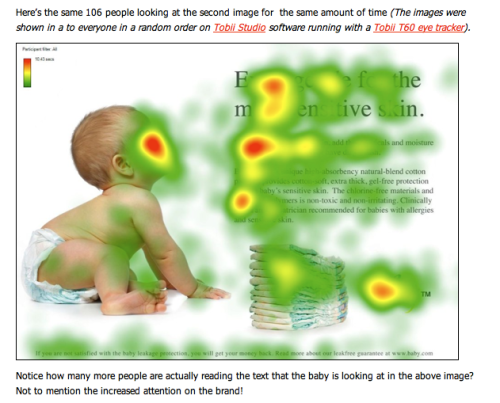
A few things to note: This is a measure of how much time experimental subjects spent looking at various areas of the advertisement. Red is greatest time, followed by yellow, then green. In other words, red is a “hotspot”. In airliner weather radar mapping, red hotpots are water-filled thunderstorms. Now you might think they would use blue which we tend to more associate with water than red. But the point is to bring pilots’ attention to a zone, and red is a better choice to get attention than blue. I spend a fair bit of Presentation Magic time discussing this with examples, but this blog entry is too long already!
In any case, it’s not a satisfactory outcome for the advertiser as potential buyers look at the cute baby but ignore the text selling the product, before they turn the page. But now look what happens if the photographer changes the baby’s direction of gaze:
By having the baby look at the text, metaphorically speaking, the readers’ gaze follows the baby’s and they are much more likely to notice and hopefully (if you’re the advertiser) read the text, and get a little closer to making a persuasive argument for purchasing.
I’m guessing quite a few people are using this little device in their presentations, and now you know why your intuitive design tendencies are more likely to work than having portraits looking away from text or an object. And by adding a little human emotion to the picture, you can be even more persuasive and suggestive, as I created for a project on stress in the workplace I’m currently working on…
Hopefully, by now you’re in the “Aha” phase of this blog entry. I’ll be elaborating much more on these ideas, and how I use software like Apple’s Keynote to do so in Macworld’s Presentation magic Powertools conference in February, 2010.
There’s a live Media140 conference occurring in Sydney, Australia following the international model of other such conferences looking at the changing world of social media, including the impact of Twitter, facebook, MySpace and lesser known brands.
Australia’s national broadcaster, the ABC, is providing a live media coverage, here: http://www.media140.com/live/ and the conference is scheduled to continue through Thursday into Friday (AEDT – remember, we’re 11 hours ahead of GMT).
There’s a live twitter feed occurring, and some very savvy and witty twitterers are expressing themselves.
Australian Opposition leader, Malcolm Turnbull dissing Powerpoint
I just tuned in to hear a Q and A between the Media140 audience and the Australian Federal Opposition Leader, Malcolm Turnbull. Turnbull, a lawyer, made his millions providing legal advice for some of Australia’s media owners, before investing in an ISP, and eventually a leading merchant bank, before being elected to the Australian Parliament, and eventually the leadership of the Liberal Party, now in opposition after eleven years in power.
Turnbull is a very switched and engaging free enterprise marketer, and very hip when it comes to social media compared to most other politicians.
In response to a question this morning about engaging with his audience on twitter, it didn’t take long before Turnbull drifted from twitter to discussing the pros and cons of giving speeches, of which he does scores each year. What was thrilling to hear was Turnbull debating whether to read a speech, give a Powerpoint, or to have eye contact with his audience.
Turnbull made it very clear how important it was to maintain eye contact and thus engagement with his audience, and thus while he might write out his speeches, his usual preference is to put it aside and speak directly to the audience. To drive his point home, he dissed those who he implied over-use Powerpoint to get their message across: the current Prime Minister, Kevin Rudd, a former career diplomat, and the former federal treasurer, Peter Costello, just retired and seen to be undermining recently Turnbull’s leadership.
While many doubt whether Turnbull will remain as Opposition Leader when the next election occurs next year, it’s certainly rewarding to know there is one federal politician who understands how to better engage with audiences, whether live in front of a gathering, or via social media.
(UPDATE, December 2, 2009 : Malcolm Turnbull was disposed of as Oppositional Leader yesterday, primarily on his principled stance on man-made global warming which his party in the majority couldn’t abide. The new Opposition Leader will bring a very different range of views to the moderate ones espoused by Turnbull. Think of America or Australia going back into the 1950s)
Others on the twitter coverage were quick to pick up on Turnbull’s Powerpoint commentary:
Ah, at least Keynote got a mention!
Once more, the lively conference continues into Friday, local Aussie time.
I’m attending a business breakfast featuring my bank’s Chief Economist, Alan Oster. He’s giving a briefing as to the world economic situation so the well-heeled in attendance can be assisted in their financial and business planning.
Alan Oster, Chief Economist, National Australia Bank presenting
I was fortunate to be given a few minutes prior to his presentation (a stand and deliver, no slides conversational style presentation) to let the audience know of some forthcoming Presentation Magic workshops. I spoke of how the time had arrived to bring presentations to a new level, well above the usual traditional style of Powerpoint which most take for granted as the default means to present complex ideas to all audiences, regardless of empirical and anecdotal evidence to the contrary.
When I returned to my breakfast table to light applause, I noticed how many iPhones were sitting on the table next to the toast and jam. And the thought then hit me as to how I could have really sent my “sticky” message home to the audience:
“My style of presenting known as Presentation Magic is to the conventional style of Powerpoint as the iPhone is to your previous cellphone”.
In doing so, I figured in future those who had iPhones will instantly understand the point I was making, while those without iPhones might be intrigued enough to come up to me after and ask me to elaborate.
That would represent the parallels of two contemporary memes: presentations that engage and delight, and communication technologies that take the means to engage in the mundane (telephone conversations) to another, more satisfying emotional level.
Extra: Just before the meeting, I downloaded part of the script of a speech given by Mark Scott, the Managing Director of the Australian Broadcasting Corporation who was reflecting on the future of journalism in Australia and the world, at the AN Smith memorial lecture in Journalism.
The following paragraph from his speech provides an excellent summary of why presentations need to change too:
But we all know for sure, there is a greater thirst for knowledge, for insight, for entertainment, for engagement, for viewing and sharing media today than at any other time in history. Never has the audience been bigger. Never has news travelled faster, or been more accessible in more places more quickly. Never has a big news story reached larger audiences in more ways. Ways of telling stories, making them immediate and compelling and alive, have never been more vibrant.The opportunities to connect and engage have never been more exciting.
One of the big deals I discuss in my Presentation Magic workshops is how the brain acts as a pattern detecting and assembling device, and the more one knows how it operates this way, the better you can construct your presentations to be memorable and persuasive.
There are two professions who have known about this for a long time, without necessarily knowing to a great level the cognitive neuroscience underpinning their knowledge base. They are Magicians and Advertisers.
TED.com has just posted a wonderful 20 minute presentation by advertising guru, Rory Sutherland, from the recent July Oxford TED, where he offered a wide-ranging, pictorially rich, two bullet points-only talk which I will likely use at some future Presentation Magic workshop.
For now, in the video link below, watch for several things:
1. How Rory weaves stories with pictures, unscripted,
2. His use of language to provide surprising elements of humour,
3. His use of a Canadian advertisement which is a wonderfully humorous example of pattern detection in action. (If you want to jump to it immediately, it’s at the 11m55sec spot),
4. How Rory left his audience wanting more, and had them utterly engaged throughout his presentation. Lots of lessons to be learnt.
Every so often, I come across a marvellous brief movie that looks like it could have been produced using either Keynote or Powerpoint. When that happens, it reminds me of how these two popular software bundles are slowly moving closer and closer to professional production level competencies usually found in much more expensive and specialised video technologies and used in advertising or television studios, and high-end video production houses.
Below you’ll find an Australian-based Google video, released this past week, discussing YouTube’s penetration into the Aussie psyche. It’s a powerful short presentation (Do you like the Aussie accent? Reminds you of your Garmin GPS?) using many effects that make it look like it could be Powerpoint or Keynote, but if you know these softwares you’ll also see that only some of the effects are possible currently. But it certainly gives one hope that sooner or later, Keynote (I hope) will be able to achieve these effects, and very soon. (Perhaps most effects could be achieved now, but with huge effort).
If you think you recognise the software that Google used, please let me know in the comments section. Then I can communicate it more effectively to Apple’s Keynote team!
One more point: The comments make for interesting sceptical reading. Me, I’m far more interested in the movie conception and production qualities.
UPDATE: (September 22, 2009). A commenter writes the video has been taken down by the user. This WAS true. But a new version replaced it the next day, and can be seen below. I don’t know of the difference between the two – perhaps a statistical correction or removal of some copyrighted info.
I feel very fortunate to have been invited back yet again to Macworld in 2010.
I’ll be presenting a two day Presentation Magic Powertools workshop, focussing on how to better present, using Keynote as the tool of choice.
But in 2010, I’ve also been asked to present a 75 minute Users Conference for those who can’t make the full two days – call it a “highlights” or Presentation Magic distilled presentation.
Birds of a feather get togethers are also planned, so there may be one also on Keynote sometime during Macworld.
It will be interesting to see how Macworld gets on without Apple’s presence or a commencement keynote from Steve or Phil, but I’m happy to support Macworld as being a central point in Macintosh users’ universe.
While I sit at Sydney Airport waiting for my flight to San Francisco and New York, a friend has forwarded me this story from the BBC reviewing the progress the world has made since Powerpoint became one of the main knowledge transfer technologies (to give it very polite credit).
Written by Max Atkinson (who is on my blog roll to the right) he starts this way:
“In the past 25 years, I’ve asked hundreds of people how many PowerPoint presentations they’ve seen that came across as really inspiring and enthusiastic.
Most struggle to come up with a single example, and the most optimistic answer I’ve heard was “two”.
So what are the main problems?”
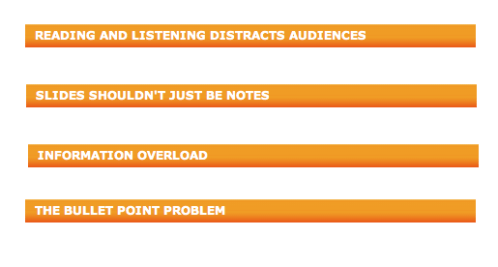
And from there he outlines many of the criticisms which have been levelled consistently at how Powerpoint (and Keynote to a lesser degree) have been used to abuse audience over the past two decades. Click on the slide show to see the criticisms in action. And if you can’t see what’s wrong with the slides, you have truly been assimilated by the Borg!
I’ve gathered the four topic headers below and you’ll notice they are the usual suspects when it comes to a critical analysis of presentation tools:
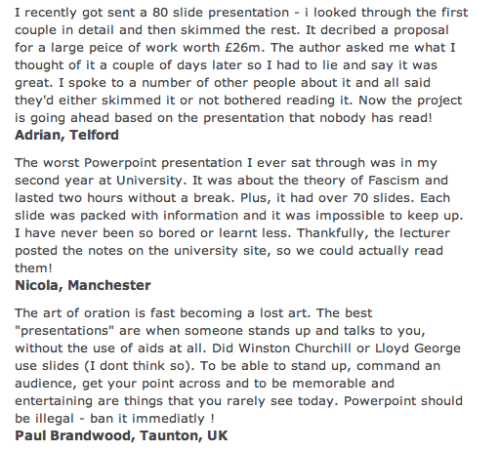
If you read the article (located here) you ought head to the comments section, where it’s if as readers are suddenly in receipt of a revelation! A sample of a few (right).
Just goes to show there’s a long road still to travel to bring the magic of presenting to audiences as well as those who wish to bring their presentations to another level – one better matched to how humans actually learn and remember.
On this trip, I’ll be in Manhattan and surrounds so if you’re in the mood for a summer get together to discuss presentation skills or share your ideas (especially about how you use Keynote) or you’d like a quickie seminar/workshop at short notice, just email me: les at lesposen.com
I’ll be in San Francisco early September for meetings at Apple, then getting ready for a one day Presentation Magic workshop in Australia’s Northern Territory capital, Darwin.
Back in the US (New York and Boston) in mid-November, so there’s another possibility of a get together with like minded presenters.





















 Les Posen's Presentation Magic