Category Archives: Presentation Skills

For those who don’t get why Gizmodo is in deep trouble, imagine if the iPhone prototype was a new model Honda about to be released. For the truly challenged, eat some breakfast first – it improves learning, at least in schoolchildren.

Take a look at the pictured car, above. Is there anything unusual about it? The picture comes from the UK online car site, Autoexpress, and is the sort you will frequently see in car magazines who wish to appraise their readers of new models about to hit the market. This is of keen interest to potential purchasers, as well as car manufacturing competitors in terms of both the nature of their models, as well as release dates.

Often, car journalists will plaster the front of magazines with scoops of the next very popular vehicle, and it’s always possible that news of an impending update may delay the purchase of current models by prospective buyers, or at least cause them to drive a much harder bargain for the current model. Apple followers know full well the times to delay a purchase of an Apple product at certain times of the year. In the past, this was around Macworld in January.

Why the car’s disguise then? Well, clearly, after the prototypes are driven around proprietary performance tracks designed to simulate a variety of motoring conditions, at some point, “real world” testing needs to take place in the sort of conditions purchasers will use the car, but incognito. The Australian outback is often used by car manufacturers to really give their cars a workout. Boeing too, in testing out their new aircraft for certification, will fly them into all manner of conditions world wide, as well as use the time for publicity purposes. It’s unfeasible to disguise the aircraft of course, and indeed mockups of what it will look like, inside and out, are known well in advance of firm orders. The analogy only goes so far. (The 747 model below is not some disguised next model, but a modified 747 to transport 787 parts)

But the car analogy should now be obvious to those following the Apple/Gizmodo/iPhone prototype story. Soon to be released products are literally road-tested. Drivers of test cars are highly skilled, perhaps have an engineering background, but they’re not lowly courier van drivers. They have special skills necessary for evaluating the car’s performance. But is there any doubt they are NOT in the upper echelons of management?

So let’s imagine for a moment the driver of the car, above, has taken it out for an evaluation drive. It’s clearly disguised so as not to reveal its final appearance, and in this case no effort is made to disguise the disguise, unlike the iPhone. For non-car watchers, its appearance might only be that of an unusual colour scheme and bonnet protector. For those who follow auto-manufacturing, the disguise is clear, and they might want to snap a few pictures with the car on the open road, and find an eager buyer, like an auto-paparazzi. No harm done, no laws broken, as long as no entry is unlawfully made to take pictures inside the car or under the hood. As it is, auto-journalists even camp out at test tracks hoping to get pictures of undisguised cars getting the full work out, and occasionally we see long-distance grainy shots on magazine covers, screaming “Scoop!” Take a look, below, at 2007 Autoexpress story of a new Jaguar model about to be released. It’s Spy vs Spy stuff! (Note too the effort of the magazine to protect the facial ID of the driver(s).)

Let’s continue to imagine our test driver pulls over and runs into a bar because he desperately needs a restroom. As he asks the bartender where to go, he inadvertently leaves his car keys, with car registration ID, on the counter. Coming out from the restroom, he passes by the bar’s huge TV playing the world series final and the game’s all even. Let’s add some zest to it by suggesting his team is in the final which captures his interest in a moment of supreme relaxation following his restroom distress. An hour later, still at the bar, his team wins, and he high-fives all the other bar customers. A very human moment of losing oneself in an exciting event, a little like the bar discovers it’s also your birthday and everyone joins in the celebrations.

Meanwhile, the car keys left on the bar near the entrance have been knocked to the ground accidentally, where another patron has picked them up. Let’s imagine for a moment the patron glances at the keys, and notes the car registration number. He looks through the bar window and matches car to keys. But it’s a most unusual looking car. Let’s now imagine the patron is something of a car afficionado and knows a disguised new model when he sees one. What to do?

Does he call out in the bar, “Hey anyone lose a set of keys?” or “Hey, who owns the funny looking car out there – I think these are your keys”. Or does he simply hand the keys to the bartender saying, “I found these on the floor”?

If we are to take the Gizmodo line, having identified the car as say a Honda (which has research facilities nearby), he instead rings Honda headquarters’ 800 number to report he has the keys to a some funny looking Honda, who, as secretive as Apple, has no idea about any research car out in the wild, but will get back to him anyway. Our key finding patron then goes to the car, uses the key to open it (perhaps it’s a new fangled electronic opening device too) and locates the driver’s wallet and driver’s license with picture ID on the front seat. So he knows now the identity of the driver.

But instead of going back inside the bar to locate the driver, he drives the car home, where he removes all the disguising devices, takes pictures, and emails various car magazines with a potential scoop. He caused no damage to the car, used the keys to start it, and drove it without breaking any road laws, such as speeding or going through a stop sign or a one-way street the wrong way. And he didn’t hot wire the car, but used the rightful key. (At this point, it should be dawning on some readers that he has in fact stolen the car, even if he used the right key, no?)

Meanwhile, our evaluation driver has been up and down the bar trying to retrace where he might have left his keys, hopeful that someone has handed them in. After an hour or so, he gives up, calls his boss at the Honda research centre, and using a new wireless GPS device, the car is immobilized. The GPS system is still to be finalised however, and can’t be used to locate the car. Honda security is called in to try and locate the car, rather than advise police about a missing experimental car which would see its disappearance turn into a media circus.

In the days that follow, the driver keeps ringing the bar to see if the keys have turned up, the car has been returned or if someone noticed the patron getting into the car. But soon enough, an edgy car review website announces they have all the goodies on Honda’s next Accord (one of the US’s best selling cars), and here are the teardown pictures of its insides and outsides. And they tell the world they paid $250,000 to obtain the car (even though it had been mooted to sell for about $30,000). Readers of course are entitled to ask why pay so much for a car that’s about to be released in a few months anyway, but the story is the scoop and resultant website hits, not the use of the car.

And that, dear reader, is what Gizmodo, Jason Chen, and the mystery iPhone finder did, on Gizmodo’s own admission.

So, should Honda do nothing, because following their written request having seen the website announcement, the auto magazine gave back the Honda, although perhaps not in quite the same condition they found it. I mean, no damage done; after all, you’ve got back your property, right? Wrong! Apart from the initial theft, and receiving stolen goods, there is the problem of publication of trade secrets. Apple, like Honda, has every right to inform the FBI, or in this case REACT, of the theft, whether or not it is part of a delegation to the FBI of manufacturers seeking to reduce the plundering of their IP and its selling to the highest bidder, which seems to have occurred in this case. There is no conflict of interest at all. It’s like saying the Police Commissioner should ask his or her force not to investigate a break in at their office where important legal documents have been taken, regarding an upcoming serious criminal trial.

That the auto magazine believes that it can get away with its receiving the car (and they were told it could no longer be driven, yet still organised to have it put on a flatloader and driven to their offices) because of journalist shield laws would be preposterous. They know it, any thinking person knows it, and sooner or later, the court system in California would make an official decision on it, as they will with Gizmodo.

Those that dismiss the story as Apple acting like a bully, or a waste of police resources because the police never helped much when their car was stolen, or that Apple is corrupting the journalism process as in this foolish Time blog article, have their heads firmly in places the sun don’t shine.

We’re talking here of a business worth millions if not billions of dollars (read, jobs with a small J) being thwarted by those who are willing to flout the law and think by being witty bloggers they are immune from prosecution.

This matter will only get more interesting in the next few weeks. Once the identity of the mystery key finder (that is, iPhone “finder”) is known, and the full story comes out, along with a few surprises to be sure, a lot of journalists and lawyers will have much omelette on their faces.

Watch and wait.

New York Times article once more rips into the military use of Powerpoint for decision making: when will they ever learn?

One of the slides I showed in my Presentation Magic workshop at Macworld Expo this year has now made it into a Powerpoint critique in a New York Times article, by Elizabeth Bimuller, entitled, “We have met the enemy and he is Powerpoint”. Here’s the featured slide from a war room Pentagon briefing:

Unfortunately, the projector at Macworld didn’t talk nice with my Macbook Pro so those present at the workshop couldn’t make it out too well, but here I think you get the picture. It is but one of several similar mappings in Powerpoint presentations to the US military leadership which the Times article describes thus:

Like an insurgency, PowerPoint has crept into the daily lives of military commanders and reached the level of near obsession. The amount of time expended on PowerPoint, the Microsoft presentation program of computer-generated charts, graphs and bullet points, has made it a running joke in the Pentagon and in Iraq and Afghanistan.

No doubt there will be many who will complain, with some justification, that once more Powerpoint is being ripped into as a cause rather than the medium it is… but, as I have long written and demonstrated in my workshops, if it is only the medium, then why are 95% of presentations one sees so similarly disengaging with their overuse of text, bullet points and impenetrable graphics? That number increases to 99% if you randomly download Powerpoint presentations from the web (using any esoteric keyword you like in Google) and add .mil or .gov.

As has been written elsewhere, the look and feel of a Powerpoint slide is directly correlated with the hierarchical structure of an organisation: the more levels in the organisation, the more headers, sub headers, and sub sub headers you’ll see in the slides the organisation generates. And the more disengaging the slide in its message delivery.

Here’s a Government example from own state’s Education Department:

One day, these kind of Powerpoint slides will be a thing of the past

The New York Times article is a great read, and it reaches all the way up to President Obama. I like the way the author, with co-writer Helene Cooper conclude their piece, referring to news briefings to reporters:

Senior officers say the program does come in handy when the goal is not imparting information, as in briefings for reporters.

The news media sessions often last 25 minutes, with 5 minutes left at the end for questions from anyone still awake. Those types of PowerPoint presentations, …. are known as “hypnotizing chickens.”

The hypnotizing chickens quote comes from retired Colonel, Dr. Thomas X. Hammes who wrote a blistering critique of Powerpoint in the military, called “Dumb, dumb bullets”. Available here.

To see more of the military style of Powerpoint knowledge sharing and planning, you can download more examples here. (Do not eat lunch before, however.)

Afghanistan_Dynamic_Planning

There are a couple of things about the “lost” iPhone that just don’t add up; and why charges should be laid if laws have been broken

In the next few days, we’ll know if the San Mateo police authorities will be pursuing those involved in the lost Apple property matter, which has now made the New York Times, here. The sheer idiocy of some of the Times blog commenters ought to provide a few minutes amusement for readers.

There are a couple of arguments posted that bother me, however. Some argue that Apple deserved what it got (whatever that may turn out to be) for letting a relatively junior employee loose with a prototype iPhone. By all accounts, however, it makes good sense so late in this product’s development for it to be tested in the wild by someone who knows something of its workings, can follow test bed instructions (much like Boeing test pilots are currently following engineering instructions testing the Boeing 747-8 and 787 aircraft), and perhaps resembles in his usage patterns a typical expected purchaser.

No doubt, despite its release slated for May 7 in the US, there are disguised 3G iPads roaming the country in a similar fashion, and for all I know, in other countries too.

While Gizmodo has seen fit to out the Apple engineer it alleges was responsible for its loss – we will no doubt learn of his fate shortly – the mystery “finder” who sold the item to Gizmodo remains a mystery.

It’s alleged when he or she located the phone they tried to call Apple to ostensibly arrange for its return. Some of the NYT’s commenters write that this should get him/her off the hook of being charged with “theft by finding” under California law, as s/he was apparently not treated seriously by the Apple respondents s/he spoke with. Given Apple’s secrecy, it’s hardly surprising that this low-level Apple employee group would be in the dark about unreleased products. Go into an Apple store and ask about a rumoured product, and its employees will deny its existence or knowledge. Anyone could have rung up Apple based on a rumour to see if Apple would “bite”, thus confirming the rumour. It was only when Gizmodo published the pictures of the unreleased product that Apple wrote its letter of “please return”.

“Theft by finding” does sound unusual, though, doesn’t it? I hadn’t really known of it until earlier this month when a local Melbourne couple were charged with it in unusual circumstances. Apparently, this couple had attended a Salvation Army outlet in March and purchased a well-used suitcase. It had been donated a few weeks before by a woman doing some home spring cleaning. But unknown to the kindly donator, her husband had lined the suitcase with $100,000 in cash!

The purchasers had discovered the cash on getting the item home, and had already begun depositing it in various back accounts. Meanwhile, the husband and owner of the suitcase had learnt of its loss, and contacted the Salvation Army depot. The suitcase had been paid for by EFTPOS, and so the purchaser’s identity could be traced quite easily. Had they paid in cash, some old fashioned detective work would have been the order of the day.

In the end, the couple were charged for not returning the suitcase – or at least the $100,000 as they had actually legitimately purchased the suitcase – since they did not own the $100,000 merely by possession of said suitcase.

In the lost property case, how is it that the “finder” decided to ring Apple? If you found a lost iPhone in Marshall’s, would you ring Apple to try to return it? No, you’d take it to Marshall’s management and hand it in. You wouldn’t take it home, and place it on eBay, even after you learnt that it had been “bricked” overnight, would you? I’ve found mobile phones in the street, looked up “Mum” or “Dad” or “work” in the directory, and rang to tell whoever answered I’ve found this phone, and will be handing it in to the nearest police station (I’ve actually done this twice). I don’t ring Sony Ericsson or Motorola to try and locate its owner through them!

But the “finder” took it home apparently, and dismembered it enough to dislodge its disguise as a 3G phone and discover it was something quite unusual. But unusual or not, you still take it back to the bar, or if it’s now too far away or it’s closed, you hand it in to police, surely? The idea of not trusting staff at an Apple store so as not to return it there is also preposterous. Somehow this aspect of the story as published doesn’t hang together. Did the “finder” and the Apple employee engage in conversation for the “finder” to learn of the device’s “special properties”? Did he or she observe two Apple employees in communication over each of their unusual devices (the lost item was in use that night according to reports) and devise a plan to heist one of them, or take advantage of the state of mind of an Apple employee?

But the disconnect for me also comes to the “lost” device’s being hawked about the place so that it ends up at Gizmodo who pay to take it off the “finders” hands. Did they do this after seeing the device and forming a very strong opinion that it was a genuine Apple product, and not a cheap knock-off, and so had a scoop?

By paying for the device, are they not similarly abetting the “theft by finding” charge the original “finder” may now be facing, whose identity is known to Gizmodo? If Gizmodo does not turn over the “finder’s” name, are they acting according to defensible journalistic principles of not revealing sources? But this defense, for which some journalists have been jailed, is usually restricted to information, not property and certainly not theft of property.

On the New York Times’ blog article I’ve mentioned above, some commenters have voiced that the local San Mateo authorities are either acquiescing to Apple pressure to charge the “finder” or Gizmodo, or that since the item has been returned, all is good in the world and we can get on with our lives. The latter is clearly stupid: do we let go kidnappers because they felt guilty and returned a five year old child to its parents? No, but their act of contrition may lighten their sentence.

And what of a more sinister outcome than Gizmodo ending up with the “lost” item? What if the “finder” had hawked the item to those who in their homeland had the opportunity, motive and wherewithal to reverse engineer the Apple device, or at least plunder some of its intellectual property? Would the same commenters be cheering in the bleachers if it was a foreign owned company who went on to make cheap copies at a time when the US is recovering from its financial despair and where every little bit of foreign export can help?

There are principles at stake here, whether you like Apple as a company, or its products or its CEO. To not go ahead and charge those who have broken the law would be seen as taking sides, and not taking seriously the importance of trade secrets, not just for Apple’s benefit, but for those who benefit from Apple’s place in the technology world.

With Powerpoint 2010 released to manufacturing last week, all presenter eyes turn to when Apple will release its answer in the next version of Keynote.

A regular visit to the statistics for this Presentation Magic blog reveals that a consistently popular entry features a discussion of iWork 10’s date of release; that is, there appears to be a pent up demand for the next version of Apple’s productivity suite.

Now I will guess that a significant proportion of visitors are trying to hedge their bets against making a premature purchase of the current iWork, knowing that Apple does not offer dates for upgraded products. It does work in cycles, such that at least for hardware, we know that Macbooks usually get a refresh in March/April, iPhones in June/July and iPods in September/October.

Software, however rarely gets advance notice, unless it is the OS itself, such as OS X or iPhone 4.0, given the needs of developers and their use of SDKs. Apple’s application software, such as iLife and iWork, as well as Pro applications like Final Cut Pro, operate on less predictable timelines, and rarely do we get much advanced notice.

clip_image002Contrast this with Microsoft’s Office Productivity suite for Windows, which has been freely available in beta for many months, and was released to manufacturing last week. Its official date for purchase is listed as June this year, and unlike Apple, Microsoft offers a free update path for Office 2007 purchasers who activate their copy between March and October this year.
This stands in marked contrast to Apple’s strategy: no beta, no release dates, no advance notice of upgrade features (albeit what you see Steve Jobs deliver in a product keynote), no free  or discounted update, and no product team blogging.

When you own 99% of the presentation landscape I imagine you can offer some largesse to your customers in Microsoft’s fashion!

With Powerpoint now released to manufacturing, meaning its major features are now locked down, it’s up to the Apple Keynote team to play its hand.

As I’ve suggested in previous blog entries, the two presentation teams play leapfrog with each other in terms of feature sets and performance. Powerpoint, at least for Windows, has always enjoyed many more features than Keynote. But in its case, more can often mean less. While I occasionally see brilliant use of Powerpoint’s expansive feature set, in the vast majority of presentations I attend (where I can quickly identify a Powerpoint stack from Keynote – usually the over-used background themes are the giveaway) the slide construction is dull and repetitive. Perhaps this is because so many presentations I see in person (compared to those that make it to the web via Ted.com, YouTube, or SlideShare) are in the science domain, where “just give me the facts, ma’am” rules the presentation style, rather than something a little more engaging and thus memorable.

Why is this so? I can only imagine that time-constrained scientists, whose main creative outlets might be experimental design followed by paper publications, simply follow the cognitive style of Powerpoint, with headers, subheaders and bullet points, with plenty of text. For that, they actually don’t need Powerpoint, just a pdf which can be projected up on a screen.

There is a real possibility that this may change in the next year or two. Not just are there many more books and blogs on the subject of presenting using slideware (and now scientific conferences where they are being workshopped, as I am doing several times this year), but Keynote on the iPad will deliver more interest in graphically intense and rich presentations. But perhaps it will be very feature rich Powerpoint 2010 that will really see the acceptance of a different style of presenting.

In many respects, it has leapt ahead in terms of features with respect to Keynote. It has caught up in significant areas such as embedding movies (woeful in earlier versions), image manipulation and alpha masking (what Powerpoint calls background removal) In “sharing and broadcasting presentations“, it is in a league of its own, reflective of its importance in enterprise and educational settings, and leaves Apple’s iWork.com looking beta-like. The Powerpoint blog team has suggested ten significant benefits of using Powerpoint 2010; some of these are clearly attempts to catch Keynote, while others move ahead. See the list here.

I still find its interface confusing and non-intuitive, preferring Keynote’s simplicity, and it’s as if Microsoft likes it this way to keep alive a flourishing third party book and blog industry to help users better understand all of Powerpoint’s innards and aspirations.

So now the ball is in Apple’s court and it truly must deliver in the next update to play the leapfrog game and not let Microsoft dictate the look and feel of 21st century presentations. As I keep pointing out in my workshops, more and more consumers are becoming familiar with how graphics can better transfer information when accompanied by appropriate words, either spoken or displayed or both. They are seeing it not just in documentaries, but in the nightly news and current affairs programs. (I’m preparing a blog entry on this for publication soon). The use of text only presentations will become untenable unless that is the precise desire of the presenter, as I occasionally do to make a point.

When will Keynote be updated?

So it’s time to speculate given the recent hardware and software roadmap Apple has revealed of late. And also given the level of unhappiness with Keynote on the iPad by long term Keynote users who were hoping for something special.

One possibility is that with the iPhone 4.0 release for the iPad occurring in September or so, the iPad’s capabilities will be vastly improved and the kind of omissions unhappy Keynote users are reporting will be overcome. At the same time, we might also see iPad and desktop Keynote versions each updated, with more commonality of operations. As it stands, I would have to create Keynotes for the iPad on the iPad as my 1GB, many-groups and build files wouldn’t make the transition currently.

Mind you, I don’t believe feature parity is Apple’s aim here, preferring very high end Keynote users to remain with Macbook Pros so as not to cannibalize their sales. (I truly believe a not insignificant proportion of those 50% of switchers who buy from Apple stores do so after they see Keynote in action). And moreover, given my expectation for the next Keynote, it would make feature parity quite difficult.

So with a June release date for Powerpoint 2010 for Windows, and end of 201o for the next Mac version (news of the beta here), Keynote 6 is in the wings and being beta tested by Jobs and others in Apple special events. I’m guessing we will have to be patient until August or September for Keynote to be updated, together with its iPad brother. Of course, if negative reviews continue to accrue for this version (I am starting to see some positive reviews too, such as this one from MacApper) we might see a Version 1.2 released before August but I doubt Apple will admit to defeat so quickly.

As for Powerpoint, I think it’s great that it has made such colossal improvements, acknowledging that it needed more refined features to match the qualities so evident in Keynote. That it has leapt ahead in some regards (it remains to be seen how many average users will actually produce more engaging presentations as a result) is also a good thing, pushing Apple to up the ante too.

But for those who are holding out for a new version of iWork, my guidance would be if you’re happy with your current version of Keynote, as long as its either version 3 or 4, stay with it for now unless special Keynote 5 features like Magic Move are a necessity. If you’re on something older, invest the money and reap the benefits immediately. Getting three or four months of use will likely pay you serious dividends.

Keynote on the iPad: Curious minds wish to know how many are playing with Keynote for the first time, and how many are Windows users. It might tells us why Keynote has disappointed so many

If you’re a Mac user who enjoys the results you get with Apple’s Keynote presentation software (“When your presentation really counts”, Steve Jobs, January 2003) you will no doubt be intrigued by the deployment of Keynote, and the other elements of the iWork productivity suite, to the iPad, released a week or so ago.

And if you’re like me, your hopes that the iPad could become an “outrigger” display device similar in functionality to your Macbook, allowing you to present with Keynote while leaving your Macbook at home, were dashed when you read the first reviews from the mainstream media, Mac media, and the blogging community of users.

Various reports suggest that there are serious hurdles to synching iPad and desktop created Keynote presentations, both in terms of what is transferred and the means by which the transfer takes place.

For now, without having first hand experience at the process, it’s hard for me to offer constructive criticism, nor to ask the iWork team direct questions because I want to be very specific when I do. In a few months time, in the Northern hemisphere autumn, Apple plans to release iPhone 4 for the iPad which may well resolve some of the general issues raised in iPad reviews, and may offer improved parity between the iPad and desktop Keynote apps.

I previously blogged that an updated Keynote is on the way (I saw no new features in Keynote in the iPhone 4 event this past week) and predicted it could see the light of day around the first sales of the iPad last weekend. That didn’t occur, but perhaps a new version, Keynote 6, will be revealed around the same time as iPhone 4 updates the iPad, allowing for much greater seamless file exchange and feature parity.

Just like the iPhone and before it, the iPod, introduced many Windows users to Apple products in a so-called “halo” effect – “if these products are this good, then their other products must be just as good too” – allowing some Windows users to lose restraint and actually allow Apple products into their households, one must assume all the hype over the iPad must be following a similar pattern.

An additional point to this join-the-dots marketing effort are the Apple stores, placed carefully in locations conveying sybaritic lifestyles. So what we have are likely hordes of Windows users as well as never-used-a-computer-before types with disposable income to venture into Apple stores to see what all the fuss is about.

We’ve seen previous Apple keynotes where Steve Jobs has referred to the number of switchers who have purchased a Mac in an Apple store, and it hovers around 50%.

That is, 50% of Mac sales goes to previous Windows’ users. One presumes then that the remaining 50% are a combination of Mac owners purchasing a Mac once more, as well as new computer users purchasing their first PC (in the generic sense of the term).

We know too that the vast majority of iPod sales go to Windows’ users, given that group’s massive numbers compared to Mac ownership. Given iPods and iPhone update themselves, new software, new music and videos, and new apps. through iTunes speaking with the mothership, Apple knows how many of these devices sync to Windows PCs versus Macs.

Returning to the iPad, as yet you need to connect to iTunes to get the device on its way first thing after purchase. So once more Apple knows something of the demographics of iPad use, from location through to which operating system is being employed.

So the questions goes begging: How well is Keynote selling on the iPad (you buy each of the iWork apps individually)?

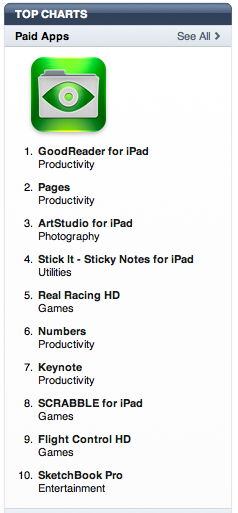
Well, Apple conveniently lets us know (left) by showing a chart of the top selling apps., both paid and free. In the days after iPad was released, Keynote was in the top three. Now, on Monday a week later, it’s 7th with an advanced pdf reader (which I have bought in advance) at number 1.

And there’s a second question for curious minds: Given the ubiquity of Powerpoint as the presentation software default in corporations, universities and schools, what proportion of iPad users purchasing Keynote are Windows users? And if they like Keynote, what is the chance it will act in a halo fashion to cause Windows users to switch to a Mac with the full blown Keynote app installed as part of iWork, instead of Microsoft’s Office which doesn’t seem will see the light of day on the iPad.

At this point we can become playful with numbers.

During last week’s iPhone 4 special event, Steve Jobs announced that in the week since its launch, 3.5 million apps had been downloaded to iPads, which had sold 450,000 at that time – that’s an average of almost 8 apps per iPad.

Is it thus possible to assume that for Keynote to rate so highly on the sales chart, it was one of those  eight apps downloaded to each iPad? Now comes the difficult question: What proportion of iPads are hooking up to iTunes on Windows devices, thus letting us know how many users are using Keynote for the very first time (although they may well have seen it in action without knowing it)? On the first weekend, analyst Gene Munster of PiperJaffray estimated, based on a survey of 448 iPad purchasers, some 26% were PC owners. That same weekend, Keynote, as I recall, was number 3 on the chart of paid apps. So lots of PC users were sampling Keynote for the first time.

It then dropped four places in the next week as more apps came online and took away some spending and sampling dollars.

Sooner or later, I am hoping Apple sells enough iPads and enough iPad-exclusive apps to generate sufficient numbers to declare the iPad a growing success and not a flop. Perhaps this will happen at month’s end when the 3G version is released, when world wide sales begin and app prices begin to drop, as they will.

Perhaps then, Apple will let us know the if that 75/25 split between Mac/PC has shifted to something more like 50/50. Do remember that the initial sales that opening weekend of 300,000 were very much taken up by pre-orders, sight-unseen and touch-untouched, and hence the 75% Apple faithful figure.

But with the hype machine still running strong, the 3G and international versions on their way, word of mouth amongst friends and availability in Apple stores to play with, will the iPad only appeal to the Apple user community? 75,000 sales to PC users the first weekend suggests not, and I fully expect a forthcoming Apple event to show another Jobs’ graph showing trend lines of iPad sales to Mac uses and PC users, perhaps with a crossover where PC users outnumbered Mac users.

That of course has happened before with iPods, where Mac users had a year of exclusivity in a giant Economics and Business 101 course experiment to see if consumers would actually buy music rather than pirate it online. Once proven that they would, iTunes for Windows was released together with USB-powered iPods (via the 30pin dock), and the record companies sat back in horror as Apple drove the market for music and the mobile technology to listen to it.

Now with iPads and Keynote, the question for curious minds is whether Apple will release Keynote for Windows (not very likely) or work towards a same-same feature list and functionality for desktop and iPad Keynote in the next few months.

Frankly, I don’t believe for a minute that we will forever more be stuck with an underperforming iPad Keynote. Sooner, rather than later, only half, not three quarters, of iPad users will unaware of its inferiority as more Windows users purchase iPads and Keynote. That is not good for Keynote feature parity but good for better presentations!

The question for curious minds is whether Apple is prepared to do something about Keynote when iPhone 4 is released or let it sit there pleasing half of iPad users ignorant of Keynote’s possibilities. That would be a massive insult to Mac users and not assist the morale of the iWork team which takes much pride in its labours.

So unlike complaining Mac Keynote users who were hoping for an as-good experience with Keynote on the iPad, is it not likely that a huge number of Keynote on the iPad users are very happy with its performance, seeing that the iPad is the only place they will use Keynote? Yes, there is still the ugly matter of transferring files off the iPad, but if you’re a Windows user, where are you moving it to, other than backup? Unlike a Mac user who wishes to transfer the Keynote file they created on the plane ride from JFK to SFO over to his or her Macbook Pro via iTunes, Windows-tethered iPad users have nowhere to go.

In their case, ignorance is bliss. And there also is the situation of importing Powerpoint files into the iPad for Keynote to use. This presents little of the problems Keynote users are facing, it seems. I’m going to take a guess here, but I think the vast majority of Powerpoint slides you see contain very few animations or builds, and very few slide-to-slide transitions. Keynote users delight in using these features in an effort to elicit their own creativity, to stand out from the mostly Powerpoint crowd, and because of their ease of use. This is why their loss in the iPad version is being felt so strongly.

Windows Powerpoint users, especially in the sciences, use mainly text-driven slides with pictures and very occasional movies thrown in (usually with all the Windows Media Player bits dangling all over the place.. ugh!). These will easily convert to iPad’s Keynote, if in mp4 format, I believe.

So if the iPad and Keynote are part of an Apple long term plan to take market share from Windows (starting with the cheap notebook sector) then Keynote as is, is good enough. That’s the plan in the short-term perhaps. But in the long term, surely the plan must be to continue to delight ALL its users, and keep on innovating.

That’s why despite having my hopes dashed about how I wanted to use the iPad for presentations, I’ve been around Apple long enough to be both resilient and patient.

Coda: Take a look at this great video from a Sydney based Aussie creative team, Creative License Digital, and their animated infographic about iPhone statistics. Sooner or later, we’ll see a similar concept for the iPad. Expect to be blown away too.

Where to go to find people using iPads this weekend? In all sorts of interesting places!

We’re just a few days away from the iPad falling into users’ hands, in time for Spring Break, Easter, and Passover.

So where might you go and find iPads if you weren’t lucky enough to order one for yourself? Well, as the video below shows, a whole variety of places, perhaps even at the White House Passover seder hosted by Barak and Steve himself!

Enjoy!

While the 3 year old will yelp with delight when they discover the iPad’s games, the 80 year old will quietly say, “I get it. This is what computing’s about.”

I had dinner last Friday with colleagues with whom I had studied and graduated in Knowledge Management from the University of Melbourne. That course, which was a grand experiment to combine the talents of academic staff from the University’s Education, ICT, and Business/Economics schools lasted but a few years.

Its driving force, recently retired Professor Gabriele Lakomski attended the dinner, and asked when I first started the course with her. In fact, I was in the first intake of 2003, and I remember it clearly, I told her. It’s because in 2003, Apple’s Keynote was introduced (along with Safari and 12″ and 17″ Powerbooks), and I used it very early in our course, some time in March or April. (You need to know that the Australian university year runs from March through November.)

Seated next to us was another student from the same intake, Victoria, and when I said to Professor Lakomski I still remember my first use of Keynote in class, Vicky exclaimed, “Yes, I remember. It was the study on British Aerospace Industries!”

Now this was seven years ago almost to the day, and she still remembered the presentation I did! This was because for all in the class, it would have been the first time they saw Keynote (and me) in action anywhere (unless they had seen the 2003 Macworld Jobs-delivered keynote). I still remember the “oos and ahs” this rather mature student group spontaneously let out when I first showed Keynote’s cube transition, and some red call out boxes to highlight data.

Seated at the same dinner table last Friday were students who entered the course after I had completed my studies, and whom I’ve met at other functions organised by this very social graduate group. One, Winston, works for a very large car manufacturing company whose world headquarters are in Detroit, and was in receipt of bailout money in recent months. The company has been part of the Australian manufacturing sector since the 1940s, and their vehicles remain very popular with Australians.

Somehow, the discussion moved to the iPad, perhaps after I had excused myself from the table to answer my iPhone, and Winston suggested on my return he was interested in getting an iPhone too. I suggested he wait a little while, perhaps June or July, when a new model might become available, and from there a discussion took place about the iPhone’s place in business now that Microsoft Exchange could work with it. It was a quick skip to speculation about the iPad.

Winston put me on the spot to pronounce why the iPad was a better choice than a netbook, which in Australia would be half the price and pack more features, such as a camera, “real” keyboard, iPhone tethering, and the full Microsoft Office suite.

My response was to suggest that the iPad should better be considered not as a computer in the common use of the term, i.e. a notebook or desktop device, but as a knowledge management tool in its own right, and rattled off the sort of apps it would inherit from the iPhone as well as those likely be designed to take advantage of its speed and screen size.

I suggested to Winston that the iPad would have limited initial appeal to computer wonks who wanted merely a smaller form factor for Windows-based computing. It would fail their needs. But I then suggested that there would be huge numbers of ordinary people with very limited knowledge of computer innards and workings – that is, the vast bulk of the Australian population – for whom the iPad would elicit the spontaneous remark:

So this is what computing should be!

No menu bars, no operating system to fiddle with, instant on and ready to use at the simple touch of one button, yet also have powerful business applications such as iWork and Bento and Evernote should this group of users work its way up the skill and learning curve.

When Winston said he had elderly parents who had never touched a computer but had expressed interest in what their use might bring to their lives, I asked him in all honesty which he would buy them: A $400 netbook running Windows Xp (then add the cost of Microsoft Office 2007) or a $650 iPad plus the $50 for iWork + Bento?

The picture of 75 year old mum and dad sitting on their couch wrestling with a netbook with its tiny keyboard and poor resolution screen was enough to observe Winston momentarily pause in his tracks to reconsider his options. Yes, for him, with his background in engineering, a netbook was a no-brainer. A good match for the problems he wished to solve.

But he acknowledged that perhaps he had been too quick to judge the iPad from his own perspective of what he thought computing was about, and not see it from another’s perspective. Of course, being the empathic psychologist I am, this is how I work! It wasn’t to him I was suggesting the iPad made sense, but to the many people for whom, like Winston had learnt for himself, the iPhone had delivered mobile telephony bliss – this is how a phone should work.

Now the same group would discover that the same training they had voluntarily undergone to understand the iPhone and make it a valuable and enjoyable part of their daily living was transferable to the iPad.

In Knowledge Management, one of the key elements, perhaps a Holy Grail, is knowledge transfer: how those with vast experience in complex systems which may take decades to accrue, can transfer this unspoken knowledge to those new to the organisation, lest it be lost when they leave or are fired.

(To illustrate this concept, I often invoke the sad story of Ansett Airlines, to whom I consulted, being sold to Air New Zealand in a fish-swallows-whale story. Management of its Boeing 767 fleet, one of the world’s oldest at the time, was handled by staff in New Zealand while the aircraft were serviced in Australia. Knowledgeable staff who knew these aircraft like they were their own children with their own personalities were let go, as if the aircraft were just hunks of metal. Ultimately, because of oversights, essential Boeing-driven examination for potential cracks in vital engine areas were not performed, and the fleet was grounded not once, but twice. It spelt the ultimate demise of the airline after seven decades of operation, not helped by the entry of brash new airlines like VirginBlue, and a federal government prepared for the airline to fail.)

Whenever you hear someone dissing the iPad as an overgrown iPod Touch, congratulate them, not mock them, for getting what Apple’s on about. They have given us a very practical example of knowledge transfer, something we take for granted whenever we walk to a door and see the “push” or “pull” label to know what to do, without needing further knowledge in physics or mechanical engineering.

With the iPad, school’s out when it comes to having to learn how to operate a computer. The funny thing is, watch what happens when you give a three year old, and his or her great grandfather an iPhone without instruction what to do to make things happen. That same intuitive but unspoken “I think I can understand this device just by toying with it using my fingers” will occur.

While the 3 year old will yelp with delight when they discover the iPad’s games, the 80 year old will quietly say, “I get it. This is what computing’s about.”

Why Apple included iWork on the iPad

Last month at Macworld 2010, I reminded attendees in my Presentation Magic workshop that I had written about Keynote, Apple’s presentation software part of its iWork productivity suite, and how it might function on a tablet device. Here’s the link I illustrated in my talk:

In his January 27 special event, Steve Jobs spoke of approaching the iWork team and asking if it was possible to bring iWork to the iPad.

Here are his exact words, after the demo on the iPad as an eBook reader:

January 27, 2010: Steve Jobs announces iWork on the iPad

Now, something very exciting: iWork. A little over a year ago, I asked the head of our iWork team to take a look at creating a version of iWork for the iPad. And the initial reaction was… “the iWork apps – Keynote, Pages and Numbers are really heavy duty apps… they require a lot of horsepower. Could the tablet power them?”

And the answer turned out to be a resounding “You betcha!”

And then, could we come up with an entirely new user interface for these apps? Very different from writing on a personal computer. And what they came up with is really magnificent.

Now you have to wonder if asking the iWork team leader “to take a look at” whether iWork can be situated on the iPad is Jobs’ code for: “the Apple executive team thought iWork as an extra item would be icing on a very sweet cake” or “take your team off desktop iWork for a few months and make iWork on the iPad happen. Here’s the date by which I want it finished” or Steve and iWork Team Leader meet at the Apple commissary and kick around a few ideas with SVP iPhone software, Scott Forstall, sharing the table, and all together say, “Hey, iWork on the iPad: killer apps from Apple”.

Who knows, yet I am going to assume that the iPad has been in the Apple skunkworks for several years. How far back it goes might one day be revealed in a future book, such as there have been books written about the gestation of the iPod. (Indeed, if you go to Amazon.com and search for <iPad> you’ll be surprised how many books are coming out about it in the next six weeks, as in the example, above.)

Most of these will be how-to books, in the iPads for Dummies style if you like, rather than telling what is for me the more interesting developmental story behind its concept and execution.

What for me is also interesting to speculate upon is the decision-making behind including a productivity suite – iWork – for the iPad.

Certainly and simplistically, it serves to derail those who naysay that the iPad  is a just a big iPod Touch. To which a sensible rebuttal might be, “And… the problem with that, is…?”

If anything, it’s an advantage in many respects given users will be drawn to the iPad based on their positive experience with other Apple multitouch appliances, such as the iPod Touch and iPhone, meaning simple learning curve.

So, as much as the eBook aspect of the iPad has garnered much attention given its similarity to what Apple did with iPod/iTunes Music Store/Music industry tectonic shift, the iWork-on-the-iPad  plan should not be overlooked in some casual fashion. Whether it was a last minute inclusion, a “hey, can we really do this” marketing effort, or a well-thought through design decision, what remains at the end of the day (or the beginning of the changes iPad will ring in), is that a tablet device is bringing enterprise-level apps to a platform where they have previously been unsuccessfully applied.

I have long said Keynote is a trojan horse to get Apple products increasingly into the enterprise setting, allowing Apple users to shape policy to, in the main, Microsoft-preferring IT departments. This occurs in fact at the C level, when execs see Keynote in action and then know they want to present differently. Of course, in reality, it’s been iPhone users who’ve forced IT departments to acknowledge Apple exists and has a place other than in schools, homes and the graphic arts industries.

But iWork on the iPad is another story; indeed, an extension of the iPhone story. It raises the iPad above the “just a big iPod Touch” argument, and places it before enterprise workers as another challenge to the domination of Microsoft’s Office suite. At this point, I have no idea of how well say my 1.2GB Keynote files will play on the iPad, which effects will be retained and which will cause Keynote on the iPad to crash – indeed, I don’t even know how those files will be transferred: via a new version of iTunes to be released next week, a beefed-up iWork.com, or some other magical software exchange system?

Placing iWork on the iPad is a serious bit of gauntlet tossing to other tablet wannabees or netbooks, whose likely full implementation of Office on Windows 7 will lead to rather anaemic presentations given the horsepower needed to get the most out of Powerpoint. Moreover, you’re hardly going to use your tiny Acer netbook to show a group your Powerpoint, while I do imagine the iPad will work well as a standalone device in small office gatherings.

Time will tell whether bringing iWork to the iPad was merely a case of “Hey, look what we can do” (not in Apple’s DNA) or represents a determined effort to tantalise those who still think Apple makes toys  for computers, and provide the rest of us with great tools to better do our work in engaging and effective ways.

Thinking about the iPad in a professional psychology practice – in response to a fifteen year old’s dissing of it as useless

In my previous post, I wrote of a workshop participant whose 15 year old son, upon learning of her impending attendance, had warned her off getting an iPad when it’s released.

A day or two ago, having absorbed some of my workshop content, she went back to the son and asked him to be more specific about his opposition to its purchase. I’m guessing his reply utterly flummoxed her, given she passed it on to me in an email, below, in its entirety, and without comment herself. Here it is, with ID protected:

Hi Les,

Really enjoyed your session on Saturday. I picked up on your excitement about the pending iPad but had been previously deterred by my 15 year old so I asked him to put together a list of why he thought the iPad wasn’t going to be useful (we both have iPhones and I have a MacBook which you may recall I run as a PC as well as Mac to accommodate some untransferrable programs and files). So I thought you might be interested in his list:

  • Apple trimmed down the iPad to leave market for MacBooks
  • It’s basically a larger iPhone with less features
  • All text is aligned to the left. There is no justification or centering
  • The iPad is meant to the greatest web-surfing experience available but there is no Flash support
  • The iPad has no camera, the iPhone does, the MacBook does and even the iPod Nano does
  • Doesn’t run a proper operating system, high risk of being maliciously hacked
  • Can’t multitask, period
  • No replaceable battery
  • No HDMI support, no USB support
  • It’s incapable of tethering to your iPhone’s data plan meaning you have to pay twice as much for 2 separate plans

What’s interesting, apart from the false positives list, is the depth of understanding a 15 year old brings to the subject and his knowledge of terms; as well as his thinking about the iPad in the first place. I don’t know how much time he put into this, but I can guess the iPad and other Apple products are much in discussion amongst his friends and acquaintances. If you’re over 40, do you remember what tekky things you discussed when you were fifteen, in the mid-1980s? Perhaps the Mac Plus, or an Amiga or Commodore PET… Yikes!

Anyway, here’s my reply, where-in I take each exception individually. I didn’t put much thought into it, nor much research, so in the comments section please feel free to make corrections, additions etc., which I will selectively pass on, and use for a further blog post, where possible:

I’ll take them one at a time. I intend tomorrow to write a new blog entry as to how a psychologist might use an iPad.

·         Apple trimmed down the iPad to leave market for MacBooks
The iPad is not a netbook or notebook. It is its own entity and can be used by anyone who also owns a desktop or laptop for its specific purposes. I’d rather hand a patient an iPad to fill in a BDI or DASS (Ed: mood questionnaires) than hand them a Macbook, wouldn’t you?
·         It’s basically a larger iPhone with less features
No, in some respects it has more features such as iWork, plus a much bigger screen which will allow developers to construct new apps plus the already existing 170,000 apps. That it’s like a familiar device you really like means your learning curve will be simple.
·         All text is aligned to the left. There is no justification or centering
Plain wrong. You can download Pages for US9.99 and it operates just like Pages on the Macbook.
·         The iPad is meant to the greatest web-surfing experience available but there is no Flash support

Flash is over-rated and a memory hog responsible for lots of crashes. I have Click-to-Flash installed on my Macbook Pro to prevent Flash pages from opening. Flash on the web is 80% ads and porn. Occasionally, I can’t access certain pages, but as the iPhone and iPad gain popularity, more webpages will move from Flash to html5 and Quicktime.

·         The iPad has no camera, the iPhone does, the MacBook does and even the iPod Nano does

Oh, you already have these cameras, then you’re not missing out, A next generation may come with a camera, but it won’t be anything like what’s on the iPhone. It may well be a fullscreen version of a new type of camera.

·         The iPad has no camera, the iPhone does, the MacBook does and even the iPod Nano does

Oh, you already have these cameras, then you’re not missing out, A next generation may come with a camera, but it won’t be anything like what’s on the iPhone. It may well be a fullscreen version of a new type of camera.

·         Doesn’t run a proper operating system, high risk of being maliciously hacked

Exactly the reverse. Every app has to be uploaded via the iTunes store. If there’s no malware or virus for the Mac, there won’t be any for the iPad, as it operates a cut down version of OS X. Perfectly safe. The iPhone has been out 3 years already – have you heard of any malware for it? No.

·         Can’t multitask, period

On this sort of device compared to a desktop, multitasking is overrated. You can still surf the web while your email comes in. But anything heavy duty that requires background operations, is best left to a desktop or notebook device like a Macbook pro. A next gen iPad like the iPhone may see multitasking introduced

·         No replaceable battery

You’ll be charged $99 and get a new iPad after about 3 years. It keeps the unit light to have a non-user replaced battery, and third parties will bring out battery extenders as exist now for the iPhone.

·         No HDMI support, no USB support

It has the 30pin USB adaptor. There are better ways to watch TV than hook up an iPad via HDMI. Really, a non issue for most users of an iPad.

·         It’s incapable of tethering to your iPhone’s data plan meaning you have to pay twice as much for 2 separate plans

We don’t know yet pricing for the iPad. Premature to worry about data fees just yet. Might add $15/month extra to run it.

So there you have it, and I imagine many naysayers will have similar concerns as this young man pointed it to his mother, although the more I read of them the more I wonder if he’s simply gone to a PC magazine website and plagiarised the negatives, you know, “Ten worst things about the iPad (even though we haven’t toughed one yet, and we’re just going on specs and kinda what we said about the iPhone in 2007).

At this point, I am more than happy to have such challenges thrown at me to help sharpen up my own way of thinking how I’m going to use the iPad. In the next week or so, you can expect similar thinking about out of the box uses, plus those that will startle us, with the usual headslapping, “Of course!”, which is the reaction all good magic-like products compel in us.

So here are my thoughts, without yet getting my hands on it, as to how I might use the iPad in a professional psychology setting, as well as (as an addendum to be added to once I actually see how Keynote works) how to use it as a Presentation tool.

1. Intake: Patients waiting to meet me can fill in questionnaires or biographical information (much of it radio buttons or tick boxes) or using the built in or outrigger keyboard. In the future, a pend device for handwriting might become available.

2. Billing: As of now, many patients make direct payment using their internet banking or via PayPal if using credit cards. Just like iccpay.com, I imagine we’ll see similar instant credit card payment systems evolve for the iPad.

3. Patient database management, using an evolved form of Bento or a specific Numbers template which is easily transferred back to the Macbook Pro.

4. Showing educational movies, either on the iPad itself or via a USB or wireless connection to a TV or data projector.

5. Testing: I can see a number of specialist psychological testing outfits developing normed tests for use with children and adults on the iPad.

6. Distractor for children: Sometimes, a child in a session needs to be kept occupied when parents are the subject of interview, and the iPad with its games will be great for this. The last thing I want to give them is my Macbook Pro.

7. Information to read about their disorder or malady, which can then be printed out at will. Yes, it can be done on the Macbook Pro, but it’s always hooked up to monitors, backup drives and my iPhone and isn’t moveable during a session. Much easier simply to give a patient the iPad to read.

8. Make audio recording of the session. I record all sessions (patients remember about 10% of a sessions content) and from the iPad the AAC or mp3 file is emailed to them. Again, it can be done on the Macbook Pro using an external microphone like a Blue Snowball.

9. Specialised measuring tools, such as biofeedback devices like the emWave I now use to monitor heart rate variability, useful in stress management and arousal modulation. If patients get their own iPads with the software (possibly in development now), practise the techniques I’ve taught, and theit data can hopefully be transferred to my main database for comparisons and expose improvements over time.

10. A miniature whiteboard using Keynote to highlight ideas and demonstrate concepts.

These are just a few ideas thrown together without too much effort. Once the ball is rolling and the first of a new generation of apps of released, no doubt surprising us with their look, feel and innovation, the ball will start rolling and the penny dropping. For myself, I can see workshops ahead for using the iPad in professional health consulting, and hopefully hooking up with developers with a psychology interest to create new apps.

I think we are all, including Steve Jobs and the Apple staff, to discover how users will bring the iPad to bear on solving their problems better than current solutions.

As Bloomberg News’ Olga Kharif has reported today,

Professionals in health care and education as well as students will probably be among the biggest purchasers of the iPad, Mr. Wolf (an analyst at Needham & Co.) said. More than 30% of 178 health-care workers surveyed in January by Software Advice, an online software vendor, said they were “very likely” to buy a tablet. George Fox University in Newberg, Ore., said on its Web site that it will give each incoming freshman a choice of an iPad or a MacBook, also made by Apple, starting with the 2010-2011 academic year.”

How I know the iPad will be a success – unusual sources of evidence: potential users

I gave a workshop today to a small group of psychologists in the southern district of Melbourne called Mornington, about an hour’s drive from my home.

I’ve visited the group on several occasions these past few years, principally offering workshops on things technological. Today’s workshop was focussed on current trends in IT for psychological practice, including a number of demoes of equipment I use myself or propose to use shortly.

Things started with me reviewing how technology so often leads a double life, that for which it was intended by the developer, and then the uses made of it by others co-opting the technology to solve other problems. I emphasise that in selecting a technology, the psychologists present ought to give serious consideration to what problem they’re intending to solve: does it enable a solution that is superior to the present one, but perhaps it is cheaper, quicker, more durable, or easier to use?

I also suggested that humans have a history of resisting new technologies for fear of change or a shift of societal power, such as the threat books first posed, and that we often overinvest in believing how technologies will improve our quality of life, without realising that change for humans comes slowly and often not without a struggle.

I showed the group the picture (with theme song) below, and said I had grown up with this family in the 1960s:

Of course, this is the Jetsons, developed by Hanna-Barbera, whose signatures can be seen at the bottom.

When I asked the group to name the dog (whose name isn’t mentioned in the theme song) the group was stuck. But in the conference room corner were two young boys under 10, the sons of two of the attendees, who were watching a DVD on a portable player. They called out the answer :“Astro”. When I mentioned I was surprised  they knew (they were the same age give or take a few years as I was when first exposed to the Jetsons), their father told the group they watched the show on the cable cartoon network channel. The cartoon show had aged well, and indeed in another slide I showed the box cover of a DVD where the Jetsons meet the Flintstones (a similar family set in prehistoric times) to illustrate how such shows position domestic issues regardless of time, but using the technologies of the age to solve various family dilemmas.

The point I was making with the Jetsons was that the hope of the technological age it represented, the cartoon being developed when the transistor was beginning to make itself an important part of modern life, would give us much more leisure time. Robots, like the Jetsons’ Rosie, would do dull, tedious work, and we would spend more time in leisure pursuits. Most people in these IT workshops chuckle at the simplicity of this concept, knowing many are working harder than ever before, much of which can be blamed on the way we have employed technologies without thought of the societal consequences.

At this point the boys went back to their DVD, and I went on with my workshop.

This saw me demo a selection of hardware and software to illustrate my concerns about some technologies. I started with the decades-old effort to setup the Paperless Office. But because psychologists work so often with medical referrals, we are compelled at this point to keep original paper documents, so my focus became the Less Paper office which I showed in Keynote using the Magic Move transition, below. My assertion, which I included in the following slide, was that any effort to reduce paper must take into account a better way to archive and sensibly retrieve our documents.

For the record, the technologies I demoed, in order were:

1. Fujitsu SnapScan scanner 300M – in Australia: http://www.fujitsu.com/au/services/technology/scanners/ S300M

2. Evernote – software to extend your brain http://www.evernote.com

3. Notetaker software (Mac only) – http://www.aquaminds.com/ This for a section on note taking on your computer, and audio recording lectures too (OneNote in MS Office comes close on the Windows side of life.

4. Apple iPad http://www.apple.com/ipad

5. ICCpay credit card payment solution for the iPhone: http://iccpay.com/

6. Winc – software based 3 x 5 cards http://getwinc.com/ I use this when retraining patients to shift their automatic catastrophic thinking to something more reasonable and actionable. When confronted with scary situations, my patients “freeze” so the cards act as their ourigger frontal lobes reminding them of appropriate self-talk in the situation. The software has a version for the iPhone/iPod Touch.

7. Livescribe Pulse Pen: http://www.livescribe.com/ For those not ready to give away the power of the pen but who want to archive and retrieve notes in digital form. Can also convert writing to text.
All during this time, even though some of the technologies are quite compelling – such as the ability of the Fujitsu scanner to scan directly into the Evernote application which then sends it up to the cloud as a great backup strategy – the boys continued with their DVD playing. When I mentioned the forthcoming Apple iPad as likely offering even better Scanner/Evernote integration, and that I was very bullish on its use in the consulting room, one of the attendees stated aloud that her teenage sons had scoffed at the device. When I remarked that they’d not even touched a unit to reach such a conclusion, I was told they saw it as just a big iPod Touch, just like so many other critics have stated since its first display in late January.

So while I asked the group to use their imagination to think of how they might use the iPad in their practices, I had another idea in mind when I showed them this French video from poissonrouge showing an app. for the iPad they are working on:

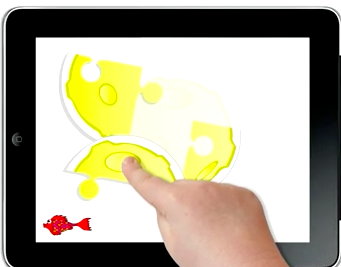
Two things: As I was watching the video with the group, from the corner of my eye, I saw the two boys both staring transfixed at the video. Their DVD was still playing, but the sound, movement and colour of the iPad’s Redfish game had momentarily mesmerised them. They didn’t see me motion to the adults to watch their reaction to the video.

The second thing: There is one game displayed where what looks like a jigsaw where pieces of yellow cheese are assembled into a one piece, about 21secs into the video. Here’s a stillshot:

When I first saw this clip, I was reminded of a widely-used IQ test, known as the WISC (Wechsler Intelligence Scale for Children), which contains a series of tests, some timed, which measures both verbal and non-verbal aspects of intelligence.

The equipment comes in a box and is several thousand dollars. Several of the tests use jigsaw-like elements asking the child to assemble the elements into a gestalt. At first, the child is told what the final assembly looks like. More challenging elements see the child merely told to assemble the pieces without knowledge what it is.

There are also small individual squares (3″ x 3″) containing elements of an illustrated story for which there is one best way to place them in order. The child starts with just two pictures and it’s very easy to place them in linear order of occurrence. The stories get more complicated and take longer as the child progresses.

As I was showing the Redfish video a second time, I asked the audience to consider how the WISC could be almost entirely performed on the iPad, together with a stopwatch function which could then automatically time and enter scores without the manual being needed for norming the results. There is one block test that requires small blocks to be laid out according to an illustration that may not be doable on the iPad, but if imagination is allowed to reign, the next generation of children could be tested with a WISC specifically designed to be performed on the iPad with a new block test normed for a new generation. Readers should bear in mind that psychologists don’t simply gathers scores, but also look keenly at how the child goes about the task, how he or she deals with frustration or failure or success, things that aren’t normed but important clinical indicators nonetheless.

But all this is a digression for certain interested readers, away from the point I wish to make in that this was a natural small experiment into the appeal of the iPad for certain groups: one with concerns about adapting new technologies who understood my enthusiasm for the iPad and where I think it fits in professionally; and the second of course were the young boys who ignored their DVD which had so occupied them to stare gobsmacked at the iPad Redfish video. You could almost see them aching to get their hands on one, and play the same game, one of many Redfish will be releasing for educational purposes.

I have every confidence their excitement is the tip of the iceberg, and naysayers will be looking very glum in a year’s time for their shallow prognostications.