It was but a mere coincidence that after my previous blog article here, entitled,
“If the expression “Give me the child aged seven….” applies to the iPad and Keynote, I’d start to worry if I ran the Microsoft Office marketing department: Lessons from a Las Vegas school”
the blogosphere somewhat choked with the “news” reported by The Daily that they had seen Office ported to the iPad. From there, many sites echoed the report, some saying The Daily had been duped, others pursuing Microsoft for comment only to receive a strange kind of denial, that more would be known in a few weeks.
That didn’t help the rumour mongering, because the time schedule placed it into iPad 3 release rumour territory. “What is possible”, some asked, “that Microsoft would appear at the iPad 3 keynote to demonstrate Office for the iPad?”
And what would they mean for Apple, for Microsoft, for Google Docs, for Android devices, and for humanity in general? OK, it’s not that big a deal, but for many it’s a serious business. After all, Office is responsible for much of those billions Microsoft earns each month, it is the default communication platform in the enterprise and many academic and military settings, and its placement on the iPad is certainly worth contemplating for its meaning.
If memory serves me correctly, the last time Microsoft took to the stage with Apple in the form of Steve Jobs — happy birthday, Steve 😦 — it was in the form of Roz Ho, from the MacBU showing a version of Office for the Mac.
These were never really stellar performances, and Office for the Mac was always a step behind the capabilities of its Windows brother. So those of us with long memories will greet any availability of an Office app with a yawn, as long as we are already using iWork equivalents, such as Pages, Keynote and Numbers.
There is one Microsoft Office product in the App store, and that is OneNote. There are other MS apps of course:
Do note, if you’ll pardon the pun, that OneNote is free, but limited to 500 entries. After that, to add more you must upgrade for unlimited notes by an in-app purchase of $14.99. This may hint at the cost of individual Office apps or we may see a bundled suite.
How Microsoft chooses to price and assemble Office will intrigue some for the next few weeks, given Apple showed its hand at the very beginning of the iPad Journey almost two years ago (less a few days).
The reviews for OneNote are not great in general, and indeed it’s competing against many very fine and not very expensive notetaking apps, including the free Evernote, as well as Notify.
It was the best of opportunities
For Microsoft, it must have come as an inevitable acknowledgement of the iPad’s market power to bring Office to it, while still developing its own tablet software with a full Windows 7 installation and a version of Office very close in capabilities to that of the desktop version.
That it will bring a denuded version to the iPad is a no-brainer, much like it has suited Apple and its iWork to do so while the iPad’s CPU and GPU grow in power with each new version.
So while the opportunity exists for Microsoft to add more millions to its coffers on sales of Office for the iPad, it may come at some cost. Some may ask if a Windows 7 tablet is needed if Office can be found on the iPad, and perhaps go without. Farewell potential sales.
But of course, it’s the full completely compatible version of Office on a Windows tablet as compared to a “thin” version on the iPad, so that may be enough to steer those in the enterprise away from the iPad to the Windows powered tablet.
For Apple, this is a further opportunity to move more iPads into the enterprise by giving users their default communication and productivity tools, hopefully equipped with extras such as tracking changes and easy cloud-based updating between iPad and desktop and laptop.
Does Apple care that its own iWork suite may go Missing in Action? I don’t think so. Its addition in the first place we were told by Steve Jobs was more of a “Can we do this” aspiration rather than a dagger plunge to the heart of Microsoft. And while Pages on the iPad has met universal acclaim, the same cannot be said of Keynote. At least we have seen several upgrades for the iPad version while the updated/upgraded desktop Keynote stays locked up, ready for the right moment to pounce.
Always remembering that Apple’s software and services exists to sell hardware, Office on the iPad will do more to sell iPads than iWork ever will, if I am to be totally frank about it.
Despite iWork’s two year head start, the iPad is still on an early adopters’ curve. This means there is still a huge market to penetrate and Office will help enormously. The best of times and opportunities will continue for Apple.
The worst of times and opportunities
But there is one downside to all this merriment, if one believes Office for the iPad is a good thing.
And it is here I write selfishly, although for me it may present opportunities too.
My concern is that once Powerpoint moves onto the iPad, the grace and finesse of Keynote will be a thing of the past, and we will see the continuation of the default Powerpoint style. Even while many in the presentation world are working diligently to rid the speaking domain of its dumbed down and empirically unvalidated knowledge transfer capabilities, Powerpoint on the iPad will set presentations backwards.
Yes, I know many will say “but it’s the user, not the tool“, yada yada. But if this is the case, why do 95% of the Powerpoints I witness bore me and most of their audiences silly, breach so many of the guidelines research-based multimedia learning informs us of, and even have end-users complaining when tasked to draw up a new presentation, something I don’t hear of with Keynote users?
So, yes, the best of times for Apple perhaps, and the worst of times ahead for audiences if Powerpoint on the iPad becomes the default presentation tool.
Let’s hope if Office is coming to the iPad, that Apple has lent some UI engineering effort to the MS development team, so we at least get apps that can stand up to scrutiny, look and feel more Apple-like than Microsoft, and “just work”.
I fear it’s all too much to ask however. Reflecting on my previous blog entry, the best predictor of future behaviour is past behaviour. ‘Nuff said.
This morning I woke early early to attend the Channel 7 Melbourne studios for an interview on its morning program, Sunrise. The topic was the virtual site, Second Life, which had apparently been mentioned in the midst of some controversy in a Sydney-based morning radio show.
As so often happens, television picked up on it and I was rung by a producer to offer comments as a media psychologist. You can read something about what happened at this link here from the Metaverse Journal website. A video of my interview is below:
After that breakfast, a brutal workshop with a personal trainer (2012 resolution in action), it was time to settle back to watch the Apple Education Event whose details I had been avoiding all morning. That’s been my habit these past few years: avoiding another’s opinions and perceptions of Apple keynotes, and trusting my own reactions first.
In my previous post (scroll down), I had made some predictions as to what we might see announced, and I was particularly interested to see the fate of Keynote and Pages – indeed, iWork in general – should Apple roll out an iTunes Scholar app (called iTunes U in the event) as well as an book authoring tool, whether it be a beefed up Pages or a new app entirely.
As it turned out, it was both. Yes, a new app called iTunes Author but with an exceptionally close resemblance to Pages.
But my heart was gladdened, having been buoyed by learning iWork’s VP Roger Rosner had been seconded to the iBooks team, when I saw how Keynote was integrated into the iBooks Author workflow, something I had discussed in my earlier blog post.
While neither it nor Pages received published updates, it’s clear to me they will, given iBooks Author is only in version 1.0. As Apple watchers know, such versions are quite acceptable as they are for initial versions – very functional with great ease of use based on familiarity with other Apple apps. There are clear omissions which some with a predilection to diss all things Apple will seize upon, but again long term Apple observers know they will eat their words and look sheepish when V 1.5 then V 2.0 rolls out in a few months.
Witness the same thing when Keynote 1.0 for the iPad was released. Now it is a very competent app., and I expect even more feature matching (with desktop Keynote 5) when the iPad 3 is released soon with its beefier CPU and graphics.
So, with my worst fears that Keynote was to be orphaned not realised and indeed almost a centre of attention with its place in the iBooks Author workflow and feature set, I could concentrate on the event’s central message: Apple is about the inovation experience, supported by its hardware.
In returning to its educational roots, Apple once more puts itself forward as a technology company that can do it all, supplying hardware, software and content for a specialised cohort in real need of innovation.
All the time I was watching this trifecta in action, I kept thinking how any Android-based tablet maker is going to make any headway into the K-12 marketplace. Yes, I expect to hear many complaints not merely of an Apple walled-garden but such a severe lock-in as to call it a moat. Especially with respect to exclusivity of iBooks Authored works being sold only within the iBooks store. Of course, if you repackage the contents for another ePub service using other publishing/creation tools, Apple has no lock on you. Perhaps that other service does. So it seems to me Apple is applying the same prohibitions and permissions as it does for apps you create using its proprietary coding. Yes, you might create the images in Photoshop and the words in MS Word, but if you lay it out and include iBooks Author’s wrapping to publish it, yep, it’s exclusive to Apple. The content and IP is still your’s; how and where you choose to create and publish the final work is your choice.
The lock in to iPads has some arguing families will not be able to afford iPads. These are fair criticisms, but if we wait a little longer, let’s see the price of an iPad 2 when the iPad 3 is released. It’s made its moolah for Apple, and perhaps will be reduced to a more affordable $399 or even a version for $299. Do kids spend this much on Nike sneakers nowadays?
So Android-based tablets might be cheaper or even preferred by those filled with anti-Apple sentiments, but where’s the content? Apple seems to have sewn up those educational textbook makers who in the USA control 90% of the market, according to figures shown at the Apple Education event.
Where do Android-based tablets go in this marketplace? Nowhere, I think, perhaps left to focus on the enterprise setting. But if you were Toshiba or ASUS or Acer or even Microsoft, you’d be worried that children in Kindergarten are being exposed to Apple’s iPad economy, and they will accept the iPad form factor as the norm for “computing”. I put this in quotes because I’m trying to think of another term these children will use as they grow up, because it’s not the computer their parents have known to be a computer.
And you know what? Those kids won’t care. It’ll be called an iPad. That’s sufficient.
[UPDATE: I have added the Sunrise TV video from YouTube, corrected some of the spelling errors from commenters, and in gratitude, include this cartoon:]
In my previous blog post, I wrote of presenting to an Aviation-based convention, APEX, held in Seattle the second week of September, 2011. This was an important time for aviation and travel, given it coincided with 10th anniverary of the events of 9/11, and their aftermath, which continue to impact on travel.
This is especially so in the USA, where commercial aviation remains vigilant about repeat events, while trying to make travelling by airliner as comfortable and pleasant as possible, in the current circumstances. It’s not an easy ask, but technology appears to be coming to the rescue, up to a point, by its introduction to the cabin environment of everyday technologies, such as wifi, iPads and other sources of entertainment to while away the hours. It’s as if a return to the fun days of commercial aviation is possible, before the introduction of budget airlines and tight security.
I had such issues in mind when I constructed my presentation on fear of flying for aviation personnel for the APEX conference , which I delivered at the convention, September 12.
As my previous blog entry describes, I was the first of three to speak in the late afternoon session, which allowed me to set up my equipment during the coffee break.
This included setting my iPhone 4 on a nearby table so as to video record my presentation for later editing.
That’s now complete, and the result is on my page on YouTube.
Now I get many notes in the evaluations of my Presentation Magic workshops, or indeed any presentation I do using my presentation magic “style”asking how and why I did what I did.
So, I decided I would do a Director’s Cut version of my APEX presentation here on this blog. Those in the aviation industry who watch the video will likely not be interested in the same things as presenters wishing to learn more of my presentation concepts, so it’s here in this blog where I’ll ask you to follow along.
You can do this in one of two ways:
1. Just watch the video through from beginning to end (it’s roughly 38 mins) and let it wash over you as if you are a member of the intended audience.
2. Or, you can open it in a separate window and keep this page open as I take you through each element on a timed basis, using the time elapsed in the YouTube video as the key.
3. Or you could do 1, then 2, and see the video twice. Hence, the reason for calling it the Director’s Cut, as is done with DVDs with its extra tracks.
How was the video constructed
One of the missing elements in the current edition of Keynote 09 is a timeline, an easy way to edit resultant videos so as to play as a standalone video or on a service like YouTube. When it exports it as a video, Keynote either allows the viewer to manually advance each element of the video, or it allows for a fixed timing for each build and slide. This has its uses but not with the video I wish to show you.
For this, I had to step away from Keynote and use an editing software. I could have used iMovie or Final Cut, but instead I chose software which I find more intuitive and that’s ScreenFlow 3 from Telestream, the same people who provide Flip4Mac to allow viewing of .wmv movies on Macs seamlessly.
Intended initially to help software developers make videos of to show users how to best employ their apps by showing the workflow on the screen, I find it has applications to help make up for Keynote’s shortcomings.
The Workflow
To record my presentation, I simply placed the iPhone on its edge, having made sure the camera captured the physical area in which I would be presenting. I switched it on as the session started, then moved into frame for the introductions.
At the conclusion of my presentation, I synched the iPhone with my Macbook Pro, at which time the 3GB or so video was imported into iPhoto.
From there it could be dragged into the ScreenFlow 3 timeline, where the audio and video tracks were separated. I needed to do this because my Keynote file also contained movies with sound which needed to be mixed with the live sound so as to capture the audience reaction to what I was showing.
My intention was to cut back and forth between the live presentation featuring me centre stage with the projected images behind me (see below), and the movie of my Keynote file, once it was exported in Quicktime format.
Here
All things considered, the Quicktime output does a good job of preserving the embedded video files and maintains the sharpness of the fonts, pictures and build styles and transitions, as long as you don’t overuse compression protocols. I actually allowed the Quicktime movie to be in DV-PAL format despite the resultant size, which was then imported into ScreenFlow 3. The resultant file was more than 4GB.
I could have extracted the audio and video from this Quicktime file, which woud have left two audio and and two video files. This is not the sort of production I do everyday and I wanted it up on YouTube quickly, so I left the Keynote video intact, with both audio and video. In future efforts, I may change the workflow and separate the tracks, but the issue of keeping all the material synchronised is a serious challenge.
The decision one needs to make in producing this kind of video is when to cut away from the live presentation to the Keynote presentation and when to cut back. It needs to be done smoothly with consideration given to any transition styles, just as one would with Keynote or Powerpoint.
Up to a point, the decision is made for you. At the beginning, you have your opening slide where you’re being introduced, then cut to you making your opening statements with the same opening slide behind you, then cut to the slideshow again once the first slide makes its appearance.
It’s actually not quite as easy as it sounds as I wanted to use some of ScreenFlow’s built in transitions to make the appearance a little easier on the eye, rather than just cut back and forth. This means careful timing so as not to cause a disjuncture or rupture of the sequence, nor loss of information on the Keynote builds I used.
Let’s just say that it required quite a few “undo-redo” commands before I was happy with the outcome. This wasn’t easy, since the more small Quicktime movie files built up (rather than two long videos), the more ScreenFlow began to act flakily, crashing frequently, something I am still working with its helpdesk team to resolve. In essence I had scores of small Quicktime movies from both the Keynote video and the iPhone video littering the timeline, and it’s likely these choked ScreenFlow. Trouble was, rather than falling over early in the export of what I thought was the finished product, it fell over right at the end, often after a half hour of processing, only to have me start again. Very frustrating.
In the end, I firstly exported the Screenflow audio track only, then the video only using Voila’s Screencasting ability. The irony here is I had to use a screenmovie (Voila) of a screenmovie (ScreenFlow 3) to achieve the final product! I then used Quicktime Pro to bring video and audio together in synchrony.
So, let’s go to the YouTube video now, and I’ll walk you through a timeline of what, how and why I did what I did, including errors which I would correct if I gave the presentation again. This way we all learn.
00.00: This is the slide I created by using the brand slide I was asked to use throughout my presentation by APEX management. I used it only once, because it made no sense to use it elsewhere. I saw some other presenters staying with it, but then others merely used their own presentation stacks which they had clearly used for other conferences or sales meetings.
While I’m being introduced by a member of the APEX Education Committee, I’m actually fiddling around with the Macbook Pro on the ground, tweaking a few things. I left this out of the video 😉
00:27 I use one of ScreenFlow’s transitions to open the live video coverage. I had positioned my iPhone so as to capture a fairly wide shot yet with me in the centre, with the screen behind my left shoulder. I actually placed some marks on the floor so as to remember where I ought to stand most of the time, especially when I played videos and needed to be out of shot temporarily.
If you look at the first time I’m shown, you’ll see my Macbook Pro on the ground infront of me (it has an Incipio black cover so as to not draw attention to the Apple logo. If people think I’m using Powerpoint to achieve my effects because it looks like I’m using a Lenovo or Dell laptop, all the better!).
Also, you’ll notice my iPad sitting in landscape mode in an iKlip holder attached to a music stand. This is my vanity monitor setup, with Doceri software allowing me to see what’s on the screen behind me, and to go into presentation mode at the tap of a button on the iPad screen. In my right hand, is my Kensington remote for controlling the Keynote show.
00:46 At this point, having read the bio I had supplied her, the session moderator asks this aviation audience if anyone has a fear of flying. To her and my surprise, quite a few hands go up, and I’m already thinking ahead about my content and if it will need any alterations on the fly given the audience composition.
I thank the host, and launch into one of three different introductions I had rehearsed, depending on the size and composition of the audience, as well as the tone set by the moderator. I rehearsed these out aloud in my hotel room to hear what sounds good, and to make sure the words come out clearly, given the audience might be surprised at my Australian accent. This is especially the case as the audience was a very mixed one culturally, a point I’ll come back to later on when I discuss a potential faux pas I made.
Notice how the brightness of the screen behind me washes out much of the slide due to the iPhone 4’s mediocre camera quality, hopefully improved in the iPhone4s, just released. This is why it was necessary to edit in the actual slides from Keynote.
01:12 An unrehearsed element here, where I acknowledge the number in the audience who have identified as having a fear of flying. It’s possible I might call on them later in the session to discuss some of my ideas in a workshop style, but frankly time is so tight (I have 30 minutes allotted to me) it’s unlikely.
01:17 At this point I launch into my prepared and rehearsed presentation with accompanying slides. Because fear of flying is an almost undiscussable in the aviation community, especially this one which is about the positive passenger experience, I knew I had to make the subject palatable rather than scholarly. An academic presentation would be for a different audience. This audience needed to be convinced it was a worthwhile topic, and that if they understood it, there could be financial gain for them.
So I started off by taking a one-down position, making fun of myself for having chosen potentially the wrong profession to be in, by focussing on two times in history when fear of flying was not at all unusual, and thus not requiring the services of a clinical psychologist.
As you’ll hear, the first was during the barnstorming days in early aviation when it really wasn’t that safe to fly.
01:37 I needed to get this group onside very quickly given their expected defensiveness, and so early on I introduced a visual joke, using aviation terminology to catch the audience off guard: “If you were offered a seat on the wing, they really meant it!”
This generated a little laughter, as if the audience wasn’t sure if they were meant to laugh at such a serious, academic and potentially dry subject, but as they got into the talk, you can hear how they loosened up, hopefully with me giving them permission to have a chuckle. This is part of the engagement process, keeping your audience expecting more fun or surprises ahead.
01:49 Note how the picture of the wingwalker is framed like an old photo album, using one of Keynote’s border features including album corners. You’ll see the picture dissolve into full colour, because it’s actually a very modern photo. I had tried to find an original photo from the barnstorming days, but failing that I located a modern one, and using an effect from software called FX Photostudio Pro (which came with one of the recent Mac software bundles), I used a supplied filter to give it an aged look.
The use of a fullscreen, high-res photo which then dissolves into a full colour image gives the audience an immediate sense that this is not your usual Powerpoint. It keeps me central as the main generator of words and ideas, and informs the audience from the get-go that this will be a highly visual presentation, accompanied by my commentary.
I do this in almost all the presentations I give no matter what the subject. Those opening moments are crucial in setting the mood and expectations for what is to follow in the next 30 minutes.
02:00 At this point, I head into some rehearsed storytelling, attempting to establish the long history of treating fear of flying, starting with the first flight attendants, who were in fact, nurses. This likely comes as a surprise to many in the audience, and I personalise the story by focussing on a groups of flight attendants (FA), and at…
02:07… I single out Ellen Church as the first FA and tell a little of her story. Note please how I do NOT use a laser pointer to locate her on the slide. I dissolve to a second slide – a duplicate of the first – but where the second slide is altered in both sharpness and contrast, leaving a cut out of the subject in high contrast so the eye is drawn there. I also use a shadow effect to outline her with a glow so as to be absolutely sure where your attention goes. I believe it’s important early in a presentation to have these effects to train your audience to expect their attention to be directed by the story you are telling.
How I actually created this effect in Keynote is interesting. I used Keynote’s “Mask with shape” feature to create the cutout of the subject from the first slide which was then pasted into the second slide, and the two slides are then dissolved. To the audience it appears as if the subject has materialised from the slide, which is the intended effect, and they are oblivious to the fact two slides were used. This is not easy to achieve in Powerpoint, because its “dissolve” transitions do not come close to Keynote’s underutilised and underestimated “dissolve”.
02:30 I continue to establish the story of FAs and their initial employment to help nervous flyers, thus establishing that fear of flying is as old as flying itself, and thus there is a body of knowledge about the subject. However, I still need to make the connection to current understandings of fear of flying, and why it is still a relevant subject in 2011, despite the vast improvements in aviation safety and comfort.
03:10 The slide has been on the screen for long enough, so it’s time to give the audience more things to please the eye and ear, yet remain true to the story I’m telling. At this point, I introduce the audience to a new ABC TV show which is due to start in two weeks from my presentation (September 25) called, PAN AM, based on the defunct airline during its halcyon days in the 1960s, when commercial aviation was still glamorous and exotic.
With the video I am hoping to hit the audience with some emotion – nostalgia for the “good ol’ days” – and at the same time, demonstrate Keynote’s seamless segue to video, something those using older versions of Powerpoint struggle with. Note at…
03:13… my choice of transition, the droplet, to convey a change in time, much like you see in movie dream sequences, or when directors wish to convey a memory or scene change an actor is experiencing. What you see and hear is the video of the exported Quicktime of my Keynote file, with no resolution loss at all.
03:37 The edit here is a bit too sudden, when the actress says, “You’re famous now”, and if I were to re-edit the movie, I would soften the transition.
04:04 I am back centre stage to bring my first point home: the notion of there being a time when it was normal to have a fear of flying, because indeed it was a risky time to fly, and not at all irrational, thus not requiring the services of a clinical psychologist.
At this point, I remind the audience I earlier mentioned there being two times when it was normal to be fearful of flying, and now I’m about to introduce the second and more contemporary time, which has direct relevance to the date on which I’m presenting.
04:09 I wanted to talk about the second time being post 9/11, and how companies refused to let their senior staff fly rather than drive to business appointment if they were less than 500 miles away. I needed to find a visual to represent 9/11, and did not want to show the audience of aviation personnel images of crashing planes. For all I know, they may have known victims on board the aircraft involved, and I needed to be respectful of this. The image I used contained elements of patriotism for whom I assumed would be a mainly American audience, as well as showing the WTC towers intact. As it turned out the audience was very mixed in terms of nationalities, and the patriotic image was likely unnecessary.
04:20 I surprise the audience with stories that the fear of flying business suffered after 9/11 because no one thought it strange to not want to fly in the months after.
04:27 I bring in these New Yorker magazine covers (September 24th edition) to break the previous image being on the screen too long. I created these two magazines from a single cover from a gathering of some of the best magazine covers ever which I have stored in iPhoto. I used BoxShot3D to create them, and I used the same software for some of the book images I produce later in the presentation. (I probably bring the New Yorker image in to the YouTube presentation a little too early as it seems to just hang there until I make direct reference to it at 04:45)
04:52 Having said the New Yorker cover captures the feelings of New Yorkers, I attempt to justify this assertion by telling of my time in NYC just a few days before 9/11, then tie it in to another aviation event, the collapse of Australian airline, Ansett, to whom I consulted on fear of flying. You’ll thus note that while some of the story elements seem disconnected at first, I try and pull them together with connecting elements, like my own story and memories.
05:22 After telling a personal and unrehearsed story, I return to the main story which is to show at this point that the unnecessary fears over flying post 9/11 had real consequences, and indeed tap into current fears which see people preferring to drive rather than fly despite the available safety statistics. Many people hear these statistics frequently and ignore them, but I chose a particularly interesting study (2009) which shows how driving fatalities increased significantly in the months after 9/11, ostensibly because people drove when they previously would have flown.
05:31 Notice how I display the actual article itself, located from the web, and brought in as a screenshot. I duplicated it twice more, and sent each duplicate behind the other with a shadow outline to convey it was a multipage article and lift it off the screen a little.
While the body of the article contains almost unreadable text, the article title is very clear and legible.
05:33 I needed to make my point very quickly and directly, so lifted out the main talking point using a screen shot to create a “call out” using a scalingbuild in Keynote. Notice how I once more fade the actual article so as to direct attention to the main point. This too was done using two duplicate slides, with the build-in set to appear automatically after the transition.
Notice too how the enlarged quote ends on the third line with the word “about”.
In fact, the line continues but I wanted the words that appear there to have greater impact. So I took another screenshot of them, and covered them in the original call out with a white shape, then built in the second call out at…
05:51 …to make my main point, that driving is still a more dangerous proposition than flying, and here’s the evidence. The other thing to note is that the only time I ever read a slide to an audience is if
1. I am reading a direct quote from pictured source,
2. The presentation is being recorded and it’s possible the viewing audience will see the slide on a poor resolution monitor so it helps to read it,
3. The auditorium is very big, and those at the back will be challenged to see even large font words.
06:15 I now return with the audience to a current understanding of fear of flying and why those in the aviation industry need to understand it more. I do it by reviewing a seminal 1982 research paper (displayed) produced for the Boeing Corporation, a major presence at APEX whose executives had presented in the morning educational sessions, along with rival Airbus.
Once more, I don’t just cite it, but show it, something which required some effort to track down, having long ago lost my original signed copy given to me by one of those mentioned in the article, Dr. Al Forgione of Boston, one of the first to run fear of flying group programs in the USA.
06:37 If my memory serves me correctly, it was Al Forgione who suggested the then CEO of Boeing, Bill Allen (not Paul Allen whom I mistakenly named in the video) wanted to know more about the subject for personal reasons, not just commercial ones.
06:53“The most telling part of the report”. At this point, I have once more duplicated the slide, enlarged and relocated the image, and used Keynote’s Magic Move transition to give a Ken Burns’-like movement to the slide. One could do this with a move and scale build on the o Continue reading →
Another Apple keynote has come and gone (WWDC 2011) and another opportunity to reveal Apple’s updated Keynote has also come and gone.
Sigh.
Like so many others who’ve delighted in Keynote’s ability to help us develop persuasive and engaging slide presentations and other visual delights, I look forward to each public display of Keynote by Apple senior executives to gather intelligence on new features and guess at possible release dates.
Since its last version update in 2009, Keynote has seen updates to text and build animations but no new transitions or special effects displayed in Apple keynotes. Those text and build updates, such as the drop and dust (demoed at WWDC, below) build have yet to be included in the official current version.
Apple VP iOS, Scott Forstall demoes drop and dust build-in
In my mind, Keynote 11 (or KN6 if you prefer) is pretty well cooked. I don’t mean toast, but cooked in the sense that it no longer needs baking in the oven to convert its essential ingredients into a tasty whole.
In the half dozen or so Apple keynotes since January 2009 (e.g. iPad 1 and 2, WWDC ’10 and ’11, and special Back to the Mac events) we’ve seen the same Keynote on display. Or at least no new effects or features have been sighted.
In the meantime, Keynote on the iPad is now at 1.4, meaning there have been five versions since its release in April, 2010 when the iPad 1 came to market. More a playtoy than a real presentation tool when first released, it’s clear the iWork team has been busy bringing Keynote up to speed such that it can stand alone as a presentation creation tool as well as the presenter app itself.
Contrary to what many think, Apple’s iWork team is quite small in number, dispersed around the US mainland rather than based entirely out of Cupertino. Apple does not have unlimited resources to throw at Keynote, and what they have seems to have been mustered to make sure Keynote on the iPad is the real tool it’s turning out to be, collecting features and capabilities aiming for, but not yet achieving parity with Keynote on the desktop.
Frankly, I don’t think Apple’s in any great hurry to do this, despite Keynote’s afficionados hoping for it. I think Keynote for iPad will develop along its own course, taking advantage of the iPad’s special and unique capabilities. Last week, I witnessed students at the Victorian College of the Arts Secondary School using Keynote on the iPad for their projects having not touched the desktop version at all. They don’t see weaknesses as we old hands at Keynote do, only possibilities.
In many ways, these students resemble those of us who began with Keynote 1.0 in 2003, when Powerpoint 97 or 2000 was the only show in town. Keynote fell way short of Powerpoint’s feature set at the time, yet those of us who persisted with it knowing it possessed special qualities, found ways to work around its shortcomings. We relished each update allowing us to push past boundaries and eventually create a new paradigm for presenting, such that anytime you witness a Keynote now, you know you’re not witnessing a Powerpoint slide show.
(Mind you, even in Keynote 1.0 we had superior file importing especially movies, transparency effects, rotations, and of course superior and cinema-like builds and transitions. Only now in Powerpoint 2011 do we see Presenter mode actively promoted, although I hardly ever meet Powerpoint users who even know it exists).
This is how these high school students are using Keynote on the iPad. Pushing it without concern for its limitations, not knowing that it is less featured compared to the desktop version.
But then again if you witness any of Steve Jobs’ recent keynotes, almost every build and animation he has asked desktop Keynote to perform can be done on the iPad too. None of Jobs keynotes in recent memory have really pushed Keynote to the limit such that I sit back and ask “Just how did he do that?” something I get frequently from even experienced Keynote users at my Presentation Magic workshops at Macworld and elsewhere.
Given that Keynote sprang from Jobs’ head originally, and he likely remains its primary beta tester (I’m guessing after OS X, iOS, Mail and iChat, Keynote might be his most used app on a daily basis), there is no hurry or demand to increase its feature set.
That has to come from the iWork team itself taking their ideas to Jobs to sign off on as both worthwhile, and not decreasing its stability. What other app do you see that gives you the option of including “obsolete” animations (below)?
Obsolete Animations? It's your choice...
My guess is that what gets Jobs’ approval are those additions which enable more things to be done with one click; allow Keynote to be more cinematic in its abilities, and now with the importance to Apple’s future of the cloud (as in iCloud) lend themselves to sharing between versions, locations and device.
Something that can only be done on one device is less likely to get a guernsey in future editions than features which can be included across the board.
At the moment, Keynote on the iPad seems to be driving the show, with Apple’s original uncertainty about its tablet’s success now replaced by confidence it’s on to something big, a part of which we witnessed being laid out (or at least its beginning) at last week’s WWDC keynote.
I still keep peppering away at my contact within iWork with feature requests and examples I have created in Keynote (albeit laboriously) as well as features I’ve witnessed in other media (eg., text effects in cinema, visual effects in television current affairs) but that contact is soon to leave Apple and I’m hoping I get a chance to continue my liaison with other members.
For now, we wait. Those features I have most asserted are needed to take Keynote up a notch are those I have labelled as call outs: features which kill the laser pointer and then allow presenters to bring audience attention to aspects of their slides where the essential learning takes place, using animations, colours, focus, and movement subtly.
To conclude, we know another version of Keynote is out there – we’ve seen some of its capabilities in each of Apple’s keynotes for the past two years. With iCloud, iOS and Lion 10.7 just around the corner, one can only hope that their release into the wild unleashes a new version of Keynote which takes advantage of all three elements shown at WWDC 2011 and helps raise presentation skills to a new level.
Getting a new version of Keynote in time for the new school year (in the northern hemisphere) and final presentations in the current school year in the southern hemisphere, would put the icing on the Lion cake.
Before I continue with part 2 of my series on scientists and others presenting, a short distraction featuring the US President, Barak Obama at the 2011 White House Correspondents Dinner, April 30 in Washington.
These are usually fun events no matter which party is in power, and offers the incumbent an opportunity to show what a good fellow he is, usually poking fun at himself, and perhaps a few others worthy of retort.
This year, Obama played on the birther issue and whether he was really an American, and to his good fortune, the most recent doubter of celebrity status, Donald Trump, was in the audience.
Upon being introduced to the attendees, an old World Wrestling Enterntainment soundtrack, “I’m a real American” was played, this being Hulk Hogan’s anthem.
From there, the graphics displayed harmonised with the music, including a bopping enlargement of Obama’s birth certificate, something one can easily do in both Powerpoint and Keynote using the scale animations timed to match the sounds.
I can’t imagine too many other times you’d use this element to good effect, but it seems to work here.
Notice too, if you stay with the video, how Obama also incorporates other videos (The Lion King) to humorous effect to make his point about his origins.
It seems to me this relatively young President is showing he is au fait with new technologies and the need to engage audiences with multimedia, despite his being quite the orator, and raconteur. Some lessons to be learnt here, no doubt.
I don’t know what software was used to create the piece, but perhaps now that Obama carries with him an iPad, he may insist that any slideshows conducted in his presence are done with Keynote! That’d be one way to tell the military brass around him who is really Commander-in-Chief.
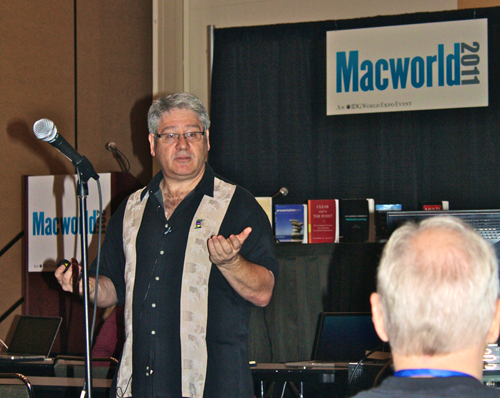
Macworld 2011 has come and gone, and I am happy to say my presentations featuring Keynote went very well. I’m now awaiting the formal evaluations to be shared from IDG which I will post, warts and all. You can read two attendees’ post-workshop reviews to get a feel from an attendees’ viewpoint of what happened on the day:
1. From Ron Albu, the President of the Hawaii Macintosh and Apple User Group, click here.
The picture at top was taken by Gary who kindly allowed me to post it here.
I will give an extended description of the full day workshop in a blog article to come, but I was very fortunate to have two senior members of the Apple Keynote team attend. They observed the workshop and listened closely to other attendees and their desires for how Keynote ought to evolve. Of course, I also offered demonstrations of Keynote’s strengths and weaknesses in the hope it might add to some future feature set.
The day after the workshop, I offered a User session of 75″, featuring Keynote on the iPad. At the time, Keynote had just been updated so that it could now operate in presentation mode, just like its older sibling on the Macintosh, and it also featured presenter notes.
I had to admit to the group present that I only occasionally use Keynote on the iPad for presentations, as usual files have until now been much too media rich to survive the transition to the iPad. I do use the iPad version almost as a sketch pad to jot down ideas for a future presentation much the way others might use a “back of the napkin” pen and paper technique to record ideas.
That said, as I do for most workshops, I started this session by placing the iPad in some kind of historical context, by firstly saying that I had written about my desire for a tablet and Keynote application for it in later 2004, here.
Here is a partial screen shot of what I wrote:
I include this screenshot (do go and read the rest of the article where I mention Keynote magic) so as to give you a date at which I first thought about tablets and Keynote for presentations.
So after this curious introduction, I then spent some time showing screenshots from the webpages of some fairly well-known iPad naysayers who shortly after January 27, 2010 when the iPad was first shown (my presentation also fell on January 27), roundly criticised the device as Jobs’ folly. It so reminded me of the reviews the first iPod received almost ten years ago, when it was greeted with much mirth from pundits who wondered who would spend $399 for a 5GB mp3 player. Who, indeed!
[UPDATE: Horace Dedieu has today blogged a reverse chronological of pundit short sightedness here, for your bemusement. It’s based on Terry Gregory’s aaplinvestor blog here.]
Now a year later, I showed the same critical pundits display long term memory loss (or active avoidance of their own short sightedness) since they were now lauding the iPad and criticising the wannabees still to find their way to the marketplace. I suppose when a device has been the fastest selling device in history (according to some estimates) and has 90% of marketshare, it would be awkward to not laud it.
With the humorous pokings at the tech media out of the way, it was my turn to take aim at what might be a surprising target: Keynote for Macintosh users.
If there was a group who were most vocal in their disappointment with Keynote 1.0 for the iPad, it was Keynote 5 users. Like me, they too had long hoped for some other ways to use Keynote, and when the iPad was shown on January 27, 2010 in a demo by Phil Schiller, the belief was formed by many that it would merely replicate the functionality of its bigger, older sibling.
Of course, once they paid their ten bucks and began bringing in their large, multi-build, multi-transition and multi-font desktop Keynote files, disaster struck. Keynote for the iPad lost many of their carefully constructed builds, could not handle animations, lost fonts, and worst of all, lost the ability to maintain groups, whereby images and text could be grouped as one image for various builds and effects.
Oh, and not to mention the absence presenter notes and no presentation display such that current and next slides could be seen adjacent to each other (since corrected in the current version, 1.0.3). Keynote could display out to a projector, but it couldn’t even operate in mirror mode.
All this meant that well-versed users of Keynote for the desktop were in for massive disappointment and frustration. Essentially, these were independent presentation softwares, and unless your desktop file resembles a very simple but all too typical Powerpoint slideshow – all text and minimal builds and transitions – there was no point in creating a super show in Keynote and then moving it over to the iPad. Which by the way required such circuitous efforts as to make many of us scratch our heads and wonder, “What were they thinking?”
Truly, the various comments I received was that Keynote 1.0 was a rush job, done at the behest of Steve Jobs in order to give the iPad the semblance of a business tool, rather than a toy for kids to play games with…
But in laying some criticisms at the feet of my Keynote-using brethren for having such high hopes even though we all knew the very low processing and graphics power of the iPad, I also suggested to them that if one had come in from the cold of the land of Powerpoint for Windows – again, all simple text slides and minimal use of animation and transitions – Keynote on the iPad would prove to be a delightful revelation!
I suggested that such users, perhaps purchasing their first Apple product (or their second after their iPhone) would nonetheless be wowed by Keynote for the iPad with its albeit limited transitions and builds. But limited in this case is a subjective term, given the low level of advanced presentations one sees in workshops and conferences. For this group, Keynote on the iPad could open up new possibilities, in much the same way those of who first began using Keynote for the Mac in 2003 had discovered a new way of producing visually rich presentation styles.
I went a little further, and noted that Keynote for the iPad was clearly a very popular app on the App Store to judge by its published rankings, and that the engineering team had produced three updates in a year, while the desktop version was still waiting for its impending update after more than two years waiting. Now we know where all that energy has gone – the Keynote team is not a big one, and Apple has limited resources after all.
What I did say too is that I expected there to be increasing parity between the feature sets of the two Keynotes, so that one day there will be easy transfer between the two platforms with no loss of functionality. Indeed, in at least one respect, Keynote on the iPad is ahead of the desktop version, in ways that suggest what we may see in a the next update. I’m referring to the ability of Keynote to layer objects on a slide, and move them forward and backward relative to other objects.
I make great use of this undervalued property of Keynote in my workshops. On the desktop version, its implementation is in dire need of improvement, and indeed Powerpoint 2011 for the Mac has a “coverflow” type means of showing and moving slide elements. On the iPad it’s also down with a slide control, as you can see in the screenshot below:
I see feature parity between the desktop and iPad versions as the next goal, with perhaps feature sets unique to the iPad to take advantage of its useability much like we see now in its versions of Garageband and iMovie. Who knows what the gyro might mean for presentations! Now that iPad 2 has arrived with its twice as fast processor and “up to nine times as fast” graphics processor, I fully expect Keynote to be updated on the iPad perhaps to version 2, and coincide with the release around the same time, of the desktop version. Don’t lay bets on this, however, as guessing when Keynote will be updated is like asking when QuarkExpress would move from System 9 to OS X (for those who remember what a laggard it was).
So with sales of iPads exceeding even Apple’s expectations (as was told to me by the Apple crew who attended my workshop), I return to something else I discussed and showed in my User group presentation: that I believe the iPad, and Keynote with it, is acting as a Trojan Horse to move Apple products into industries and sectors where they have been unwanted by the IT leadership for various reasons, cost and security being primary, and “it’s not Microsoft compatible” being in the mix too.
The story of the Trojan Horse is of course a wonderful metaphor for the secret intrusion into well-guarded locations of troops who would bring mayhem once released from the wooden beast in the dead of night.
In the iPad story, it’s not CTOs who are asking for the iPad to come into the enterprise, but it’s coming from both ends – workers bringing their own iPhones and iPads so as to better get work done – and CEOs who have discovered the delights of these products, much to the chagrin of the security minded IT departments who inwardly scream about another system to learn about, especially after years of sniping at the little computer company who could.
So for my workshop I created the video below to represent the story of the iPad acting as Trojan Horse. Watch it to the very end, and I’ll tell you more about it.
The video was gathered from YouTube clips of the movie of the Trojan Horse from a few years ago, and the mp4s downloaded moved into iMovie 6HD for editing so as to get the sequence I wanted. The sound was also heavily edited.
The video was then exported as an mp4 into Keynote, where the pictures of the iPad were duplicated into a grouped array, and then used with a motion build to move in almost precise timing with the Horse saddle as it moved into the walled city.
This got quite a laugh at Macworld, especially as I explored the metaphor of the serfs dragging the Horse in. I described these as the enterprise workers usurping the IT department and playing their role in deciding how they should work with available technologies, as you can see from screenshot here:
Later when the beast has come to a halt, the city leaders inspect it (pictured below), and I described these as being the C level personnel: CEO, CTO, CMO, CFO etc, all somewhat flummoxed by the appearance of this beast, little knowing what was in store for them.
At the conclusion of the video, I use various rotate, scale and motion path effects to create the images of the Horse basically taking a crap using iPads, metaphorically suggesting the iPad would crap all over its competition, as well as making the early naysayers (neighsayers?) look like horses’ asses.
As I read the various reviews of the iPad 2, there is a curious dichotomy.
One group expresses disappointment that iPad 2 didn’t go far enough in improving upon iPad 1, yet their suggestions as to what ought to have changed are the same old laments: no USB, no Flash, not 128GB, and the all too familiar wail of Apple’s closed garden.
Others are delighted to see the evolution of the iPad with its cameras, new form, and improved processing power. I fall into the latter camp, and look forward to seeing if my predictions of parity between the two Keynotes come about due to these improvements which now doubt will occur on an annual basis.
In fact, I fully expect Keynote on the iPad to one day have unique features not in the desktop version which might make some consider it as their primary presentation creation tool. Now that would truly fulfill the role of the Trojan Horse!
The stats helper monkeys at WordPress.com mulled over how this blog did in 2010, and here’s a high level summary of its overall blog health:
The Blog-Health-o-Meter™ reads Wow.
Crunchy numbers
The Louvre Museum has 8.5 million visitors per year. This blog was viewed about 76,000 times in 2010. If it were an exhibit at The Louvre Museum, it would take 3 days for that many people to see it.
In 2010, there were 38 new posts, growing the total archive of this blog to 77 posts. There were 101 pictures uploaded, taking up a total of 35mb. That’s about 2 pictures per week.
In my last several posts, I’ve asked you to observe with me a changing landscape for presentations, in particular how the nature of audiences is forcing a shift towards visually-rich media.
Some of the research I have cited argues that a new generation is coming through who have grown up with the internet, especially broadband, which can deliver media in different ways than it was for their parents for whom dialup was the standard, as was your traditional text- and bullet-point driven Powerpoint stacks in college and the boardroom.
Young people coming through the ranks have grown up creating their own media, using devices like Apple’s iMovie and publishing it on YouTube and Facebook for friends and strangers to share.
Other social media like Slideshare have allowed academics and authors to upload their presentations and while many old-fashioned slide stacks still abound, it’s clear that they simply won’t catch the attention of younger viewers.
We are also seeing more and more mainstream media articles challenging Powerpoint’s dominance as the major channel for delivering knowledge and blogs such as mine and Garr Reynolds’ Presentation Zen asking for a rethink of the evidence behind engaging and persuasive message delivery.
While I like this blog to be as useful to a Powerpoint user as it is to an Apple Keynote user, I want to suggest that Apple is now primed to take a leadership position in helping the knowledge sharing process with a much more active and aggressive promotion of Keynote to an audience who is primed to receive and act on this message: College students and staff.
Recent surveys suggest the Macintosh, the only platform Keynote runs on, is making serious inroads as the platform of choice for many students and faculty.
In March, 2008, Appleinsider published the following:
Apple’s rapidly rising mindshare amongst current generation college students is setting the company up for an “aging phenomenon” that will spur further market share and revenue growth as those students enter the work force, investment bank Morgan Stanley said Wednesday.
A recent higher-education survey cited by analyst Katy Huberty reveals that roughly 40 percent of college students say their next computer purchase will be a Mac, well ahead of Apple’s current 15 percent market share in the demographic.
John Gruber’s Daring Fireball blog last week offered a more recent statistical analysis:
“Among those who planned to purchase a new computer, 87% planned to buy a laptop. And among those students 47% planned to buy a Mac.”
Among student laptop owners, Apple has the highest share, at 27 percent. These numbers are short of the claim by analyst Trip Chowdhry that “70% of incoming University freshman students are coming with Macs”, but they’re still remarkable, and the trend is very strong in Apple’s favor.
At one time, Apple bundled its iWork office suite on all laptops as fully-operational demo software, which was operational for 30 days before it require the purchase online of a serial number.
It’s time for Apple to give serious thought to returning to this bundling for students. It’s also time for Apple’s online tutorials about iWork to shift to how academics can use Keynote especially in the sciences with its need often for special formulas, equations and graphs.
It’s clear to me also that the boardroom is still slavishly devoted to Powerpoint. But the trojan horse here will be those graduates who have used Apple’s laptops all their college lives, who have become au fait with Keynote as their preferred choice of multimedia knowledge sharing tool – even in MBA courses – and who will soon be entering junior then senior levels of management. It might take five years, but the statistics I’ve cited suggest a change is already underway, and it’s there for Apple to capitalise on.
Despite great improvements in the current and forthcoming versions of Powerpoint (much of it emulating or playing catchup to Keynote), there is still a huge legacy of basically awful Powerpoint for these new versions to overcome. Keynote users, in my observations, have rarely had this allegiance to old style, no evidence for it, styles of presenting now so much out of favour by those who make a study of knowledge transfer. But it’s a long way to go.
With the expected uptake of the iPad in academia and business, with its specialised Keynote app and maybe a new desktop version of Keynote, and you have a prefect storm of change brewing.
I’m guessing the next version of Keynote is in the oven almost cooked, just waiting for the sprinkles to be added before its release. Hopefully it will leapfrog Powerpoint 2010 (Windows) and 2011 (Mac). But what needs to be done also by Apple is to really ramp up its thrust into these important territories where significant change is occurring for which Keynote with its media rich properties is tailor made and a much better fit than default Powerpoint, even in its latest incarnations.
I’m hoping Apple can return its gaze for the next little while to the desktop/laptop application market place, and drive home the platform’s advances and advantages. I want Apple to especially offer a means for those in academia, student, teacher and researcher alike, to learn new ways of knowledge transfer in a manner that better suits the evidence base for how humans learn.
My visits to Apple HQ in Cupertino as well as iWork teams in Pittsburgh where I presented emphasised this shift; I am truly hopeful my message was received and applied in the next imminent version of Keynote, and beyond.
UPDATE: Even Bill Gates says so, sort of…
Gates acknowledged in a recent talk how the world of online education may well surpass traditional education in the next five years. Even more reason to get with the program of improving academic instructional training with appropriate tools and methods. Here is Engadget’s reporting:
Bill Gates just might be the world’s most famous college dropout (sorry, Kanye), but lest you think he’s changed his mind about the educational establishment, he’s got a few words of reassurance for you. As the closing speaker of the Techonomy 2010 conference, Bill dished out his vision of how learning will evolve over the next few years, stating his belief that no single university will be able to match the internet when it comes to providing the learning resources a student needs. Describing traditional studies as “place-based” and inefficient, he forecasts that university education will become five times less important within five years, with online lecture sources picking up the reins of enlightening our youth
A regular visit to the statistics for this Presentation Magic blog reveals that a consistently popular entry features a discussion of iWork 10’s date of release; that is, there appears to be a pent up demand for the next version of Apple’s productivity suite.
Now I will guess that a significant proportion of visitors are trying to hedge their bets against making a premature purchase of the current iWork, knowing that Apple does not offer dates for upgraded products. It does work in cycles, such that at least for hardware, we know that Macbooks usually get a refresh in March/April, iPhones in June/July and iPods in September/October.
Software, however rarely gets advance notice, unless it is the OS itself, such as OS X or iPhone 4.0, given the needs of developers and their use of SDKs. Apple’s application software, such as iLife and iWork, as well as Pro applications like Final Cut Pro, operate on less predictable timelines, and rarely do we get much advanced notice.
Contrast this with Microsoft’s Office Productivity suite for Windows, which has been freely available in beta for many months, and was released to manufacturing last week. Its official date for purchase is listed as June this year, and unlike Apple, Microsoft offers a free update path for Office 2007 purchasers who activate their copy between March and October this year.
This stands in marked contrast to Apple’s strategy: no beta, no release dates, no advance notice of upgrade features (albeit what you see Steve Jobs deliver in a product keynote), no free or discounted update, and no product team blogging.
When you own 99% of the presentation landscape I imagine you can offer some largesse to your customers in Microsoft’s fashion!
With Powerpoint now released to manufacturing, meaning its major features are now locked down, it’s up to the Apple Keynote team to play its hand.
As I’ve suggested in previous blog entries, the two presentation teams play leapfrog with each other in terms of feature sets and performance. Powerpoint, at least for Windows, has always enjoyed many more features than Keynote. But in its case, more can often mean less. While I occasionally see brilliant use of Powerpoint’s expansive feature set, in the vast majority of presentations I attend (where I can quickly identify a Powerpoint stack from Keynote – usually the over-used background themes are the giveaway) the slide construction is dull and repetitive. Perhaps this is because so many presentations I see in person (compared to those that make it to the web via Ted.com, YouTube, or SlideShare) are in the science domain, where “just give me the facts, ma’am” rules the presentation style, rather than something a little more engaging and thus memorable.
Why is this so? I can only imagine that time-constrained scientists, whose main creative outlets might be experimental design followed by paper publications, simply follow the cognitive style of Powerpoint, with headers, subheaders and bullet points, with plenty of text. For that, they actually don’t need Powerpoint, just a pdf which can be projected up on a screen.
There is a real possibility that this may change in the next year or two. Not just are there many more books and blogs on the subject of presenting using slideware (and now scientific conferences where they are being workshopped, as I am doing several times this year), but Keynote on the iPad will deliver more interest in graphically intense and rich presentations. But perhaps it will be very feature rich Powerpoint 2010 that will really see the acceptance of a different style of presenting.
In many respects, it has leapt ahead in terms of features with respect to Keynote. It has caught up in significant areas such as embedding movies (woeful in earlier versions), image manipulation and alpha masking (what Powerpoint calls background removal) In “sharing and broadcasting presentations“, it is in a league of its own, reflective of its importance in enterprise and educational settings, and leaves Apple’s iWork.com looking beta-like. The Powerpoint blog team has suggested ten significant benefits of using Powerpoint 2010; some of these are clearly attempts to catch Keynote, while others move ahead. See the list here.
I still find its interface confusing and non-intuitive, preferring Keynote’s simplicity, and it’s as if Microsoft likes it this way to keep alive a flourishing third party book and blog industry to help users better understand all of Powerpoint’s innards and aspirations.
So now the ball is in Apple’s court and it truly must deliver in the next update to play the leapfrog game and not let Microsoft dictate the look and feel of 21st century presentations. As I keep pointing out in my workshops, more and more consumers are becoming familiar with how graphics can better transfer information when accompanied by appropriate words, either spoken or displayed or both. They are seeing it not just in documentaries, but in the nightly news and current affairs programs. (I’m preparing a blog entry on this for publication soon). The use of text only presentations will become untenable unless that is the precise desire of the presenter, as I occasionally do to make a point.
When will Keynote be updated?
So it’s time to speculate given the recent hardware and software roadmap Apple has revealed of late. And also given the level of unhappiness with Keynote on the iPad by long term Keynote users who were hoping for something special.
One possibility is that with the iPhone 4.0 release for the iPad occurring in September or so, the iPad’s capabilities will be vastly improved and the kind of omissions unhappy Keynote users are reporting will be overcome. At the same time, we might also see iPad and desktop Keynote versions each updated, with more commonality of operations. As it stands, I would have to create Keynotes for the iPad on the iPad as my 1GB, many-groups and build files wouldn’t make the transition currently.
Mind you, I don’t believe feature parity is Apple’s aim here, preferring very high end Keynote users to remain with Macbook Pros so as not to cannibalize their sales. (I truly believe a not insignificant proportion of those 50% of switchers who buy from Apple stores do so after they see Keynote in action). And moreover, given my expectation for the next Keynote, it would make feature parity quite difficult.
So with a June release date for Powerpoint 2010 for Windows, and end of 201o for the next Mac version (news of the beta here), Keynote 6 is in the wings and being beta tested by Jobs and others in Apple special events. I’m guessing we will have to be patient until August or September for Keynote to be updated, together with its iPad brother. Of course, if negative reviews continue to accrue for this version (I am starting to see some positive reviews too, such as this one from MacApper) we might see a Version 1.2 released before August but I doubt Apple will admit to defeat so quickly.
As for Powerpoint, I think it’s great that it has made such colossal improvements, acknowledging that it needed more refined features to match the qualities so evident in Keynote. That it has leapt ahead in some regards (it remains to be seen how many average users will actually produce more engaging presentations as a result) is also a good thing, pushing Apple to up the ante too.
But for those who are holding out for a new version of iWork, my guidance would be if you’re happy with your current version of Keynote, as long as its either version 3 or 4, stay with it for now unless special Keynote 5 features like Magic Move are a necessity. If you’re on something older, invest the money and reap the benefits immediately. Getting three or four months of use will likely pay you serious dividends.
I had dinner last Friday with colleagues with whom I had studied and graduated in Knowledge Management from the University of Melbourne. That course, which was a grand experiment to combine the talents of academic staff from the University’s Education, ICT, and Business/Economics schools lasted but a few years.
Its driving force, recently retired Professor Gabriele Lakomski attended the dinner, and asked when I first started the course with her. In fact, I was in the first intake of 2003, and I remember it clearly, I told her. It’s because in 2003, Apple’s Keynote was introduced (along with Safari and 12″ and 17″ Powerbooks), and I used it very early in our course, some time in March or April. (You need to know that the Australian university year runs from March through November.)
Seated next to us was another student from the same intake, Victoria, and when I said to Professor Lakomski I still remember my first use of Keynote in class, Vicky exclaimed, “Yes, I remember. It was the study on British Aerospace Industries!”
Now this was seven years ago almost to the day, and she still remembered the presentation I did! This was because for all in the class, it would have been the first time they saw Keynote (and me) in action anywhere (unless they had seen the 2003 Macworld Jobs-delivered keynote). I still remember the “oos and ahs” this rather mature student group spontaneously let out when I first showed Keynote’s cube transition, and some red call out boxes to highlight data.
Seated at the same dinner table last Friday were students who entered the course after I had completed my studies, and whom I’ve met at other functions organised by this very social graduate group. One, Winston, works for a very large car manufacturing company whose world headquarters are in Detroit, and was in receipt of bailout money in recent months. The company has been part of the Australian manufacturing sector since the 1940s, and their vehicles remain very popular with Australians.
Somehow, the discussion moved to the iPad, perhaps after I had excused myself from the table to answer my iPhone, and Winston suggested on my return he was interested in getting an iPhone too. I suggested he wait a little while, perhaps June or July, when a new model might become available, and from there a discussion took place about the iPhone’s place in business now that Microsoft Exchange could work with it. It was a quick skip to speculation about the iPad.
Winston put me on the spot to pronounce why the iPad was a better choice than a netbook, which in Australia would be half the price and pack more features, such as a camera, “real” keyboard, iPhone tethering, and the full Microsoft Office suite.
My response was to suggest that the iPad should better be considered not as a computer in the common use of the term, i.e. a notebook or desktop device, but as a knowledge management tool in its own right, and rattled off the sort of apps it would inherit from the iPhone as well as those likely be designed to take advantage of its speed and screen size.
I suggested to Winston that the iPad would have limited initial appeal to computer wonks who wanted merely a smaller form factor for Windows-based computing. It would fail their needs. But I then suggested that there would be huge numbers of ordinary people with very limited knowledge of computer innards and workings – that is, the vast bulk of the Australian population – for whom the iPad would elicit the spontaneous remark:
So this is what computing should be!
No menu bars, no operating system to fiddle with, instant on and ready to use at the simple touch of one button, yet also have powerful business applications such as iWork and Bento and Evernote should this group of users work its way up the skill and learning curve.
When Winston said he had elderly parents who had never touched a computer but had expressed interest in what their use might bring to their lives, I asked him in all honesty which he would buy them: A $400 netbook running Windows Xp (then add the cost of Microsoft Office 2007) or a $650 iPad plus the $50 for iWork + Bento?
The picture of 75 year old mum and dad sitting on their couch wrestling with a netbook with its tiny keyboard and poor resolution screen was enough to observe Winston momentarily pause in his tracks to reconsider his options. Yes, for him, with his background in engineering, a netbook was a no-brainer. A good match for the problems he wished to solve.
But he acknowledged that perhaps he had been too quick to judge the iPad from his own perspective of what he thought computing was about, and not see it from another’s perspective. Of course, being the empathic psychologist I am, this is how I work! It wasn’t to him I was suggesting the iPad made sense, but to the many people for whom, like Winston had learnt for himself, the iPhone had delivered mobile telephony bliss – this is how a phone should work.
Now the same group would discover that the same training they had voluntarily undergone to understand the iPhone and make it a valuable and enjoyable part of their daily living was transferable to the iPad.
In Knowledge Management, one of the key elements, perhaps a Holy Grail, is knowledge transfer: how those with vast experience in complex systems which may take decades to accrue, can transfer this unspoken knowledge to those new to the organisation, lest it be lost when they leave or are fired.
(To illustrate this concept, I often invoke the sad story of Ansett Airlines, to whom I consulted, being sold to Air New Zealand in a fish-swallows-whale story. Management of its Boeing 767 fleet, one of the world’s oldest at the time, was handled by staff in New Zealand while the aircraft were serviced in Australia. Knowledgeable staff who knew these aircraft like they were their own children with their own personalities were let go, as if the aircraft were just hunks of metal. Ultimately, because of oversights, essential Boeing-driven examination for potential cracks in vital engine areas were not performed, and the fleet was grounded not once, but twice. It spelt the ultimate demise of the airline after seven decades of operation, not helped by the entry of brash new airlines like VirginBlue, and a federal government prepared for the airline to fail.)
Whenever you hear someone dissing the iPad as an overgrown iPod Touch, congratulate them, not mock them, for getting what Apple’s on about. They have given us a very practical example of knowledge transfer, something we take for granted whenever we walk to a door and see the “push” or “pull” label to know what to do, without needing further knowledge in physics or mechanical engineering.
With the iPad, school’s out when it comes to having to learn how to operate a computer. The funny thing is, watch what happens when you give a three year old, and his or her great grandfather an iPhone without instruction what to do to make things happen. That same intuitive but unspoken “I think I can understand this device just by toying with it using my fingers” will occur.
While the 3 year old will yelp with delight when they discover the iPad’s games, the 80 year old will quietly say, “I get it. This is what computing’s about.”









 Contrast this with Microsoft’s Office Productivity suite for Windows, which has been freely

 Les Posen's Presentation Magic