Aside

If memory serves correctly, reality TV shows have been around for about a decade starting with shows like Survivor and Big Brother. Others may argue that shows like Candid Camera, started and hosted by Alan Funt, were the real beginning in the 1950s, in the very early history of American TV.

What Funt did was place ordinary people in situations designed to reveal something about them, where hidden cameras captured their unprepared responses to the sort of social situations social psychologists would love to set up, if only human ethics departments would allow.

Just to remind here’s a brief clip, where you’ll not see Funt but hear his commentary. Notice too his sense of narrative as he lets us know what to look for:

In the next generation of such shows, once more TV producers took “ordinary people”, meaning they weren’t yet TV celebrities, and placed them in extraordinary situations, such as Survivor and Big Brother. These have since crossed borders (Big Brother is one of a number of reality or talent shows produced and franchised by Dutch company, Endemol) and each culture has found its own way to reproduce the essence of each show to suit the nationality.

This comes down to choosing the “contestants”, and the tasks they are given.

Given the popularity of these early shows which had high production standards and resulted in high ratings, especially for the final episode where even those who hadn’t followed the whole series would watch to see the eventual winner, many new shows spun off. Some better than others of course.

Please see Wikipedia’s voluminous entry here for a listing of the variety of shows working a similar formula.

I want to draw your attention to two reality shows from co-producers Steven Lambeth and Eli Holzman. The first is a US version of an original British series called, Undercover Boss (UB). It first aired in 2010 and concluded its third season a few weeks ago.

It has rated surprisingly well, confounding some of its critics, who see it as too unreal to be a reality show. The essence of the show is simple and straightforward: CEOs, Founders, or a senior executive of a large, national corporation agree to go “undercover” with both a physical disguise (some much much implausible than others) and with an alleged “cover” of being a contestant in a series looking at getting the unemployed or career changers back into the workforce. This explains the presence of a film crew covering the UB’s progress.

During the show, the UBs travel to various corporate outposts and take on various “jobs” under the supervision of a carefully selected cadre of low level employees.

In general, the UB comes down several rungs (the corporations are almost always multilevel from hardworking blue collar employees through several levels of middle and upper level management), and he or she takes on usually menial, physically challenging tasks, often working directly with customers, and for which they are pitifully unqualified and unskilled.

This of course talks to our fantasies of bringing down the boss to “our level”, to see what life’s like for the other 99%. (The show invariably starts with a visit to the UB’s palatial home, usually complete with charming, adoring family). But to balance this schadenfreude, we consistently see two backstories occur in parallel.

The first is the story of the low level employee who is to supervise and allegedly evaluate the UB, which sets up their transport to corporate headquarters where the UB reveals their true identity, one of the show’s reliable, emotional highpoints.

The employee (we meet several as the UB travels the country) and UB usually take a break during the “training” and here we observe their story, usually one of heroic hardship, which tears at the UB’s heartstrings, setting up what happens in the last part of the show. Here, in usually tearful scenes, is when the UB reveals themselves, and turns the tables on the misled and shocked employee, espousing their worth to the company, their personal indomitable qualities, and the esteem they are newly held in by the UB.

The second backstory is the UB’s own life hardships, usually framed within a family context, where the UB, most often a male, seeks to have the approval of their father, living or dead, who may in fact have been the company’s founder. There is a legacy to be managed, and rubbing shoulders with the hoi polloi or proletariat rehumanises the UB, brings them down to earth, and hopefully improves the company, within and without (i.e. its customer service).

After the UB reveals themselves, there is usually some kind of reward to the lowly worker: perhaps some money for a child’s college fund or hospital treatment, or a charity donation or trust set up to help with a family member’s chronic illness, or the worker if young is offered further training or education at the company’s expense. Perhaps a marriage ceremony is afforded.

These are usually tearful scenes with a surprised and grateful worker expressing astonishment that “I thought these things never happened to people like me”.

The final minute of the show is spent telling us what has happened to the UB, the company and more importantly the employees in the weeks since.

I think you can see from my description that while I am entertained by the show, it does become predictable after a few repetitions, with some UBs more compelling than others. How  long the show can continue before employees twig is also a complication.

The second show from the same executive producers is an original now in its early first season on the AMC network, the same cable channel which took a risk, ultimately hugely successful, with the period drama, Mad Men, devoted to Madison Avenue advertising companies of the late 1950s and early 1960s. That show has a cult following now, and I use various sections of it in my Presentation Magic workshops, featuring its main character, Dan Draper, and his descriptions of certain emotional states and how advertising exploits them to sell its clients’ wares.

Lambeth and Holzman have now given us The Pitch, a reality show featuring in each episode two very different advertising agencies competing for the business of one significant client, who is releasing a new product or service, or repositioning or rebranding their iconic product. The show started six weeks ago and airs straight after Mad Men late on Sunday nights.

Pitching for an advertising contract is standard practice in the corporate world with several agencies often approached and asked to make a formal presentation of their ideas after being briefed of the client’s requirements. Full fledged campaigns are not required, but sufficient understanding of the product and the market place is, and so the post-brief presentation to the decision makers is vital, given they will not see a fully formed advertisement but more a sketch outline demonstrating the agency’s concepts, often in storyboard form. They need to be convinced not just that the pitching agency has understood the brief, but has a means by which to achieve the desired results, whether that be increased sales or brand awareness.

For the pitching agencies, it means putting talented staff to work with the strong possibility they will come away empty-handed without any payment for their pitch. But the lure of a possible multi-year, multi-million dollar campaign which if successful will also bring the agency attention and kudos, is very strong for even the most celebrated of agencies.

The storyline for the The Pitch is quite simple: We early learn about the three central “characters”: The two agencies and their leadership group, with some personal backstories as well as information of previously successful campaigns; and the third of course is the client to whom they will individually pitch a week after the brief. The client may comprise the company CEO or Founder, and usually senior management, such as VP of product marketing, or an internal account director.

Something a little unreal however occurs in this process, where the competing agencies are brought together face to face in a shared briefing session with the client. Each is deeply suspicious and withholding, perhaps not asking as in-depth questions as they could or ordinarily would lest they tip off the competition. It’s always amusing to see underlings racing to their Macs to check out the successes of the competition to know what they’re up against, in an effort to differentiate themselves. They then have a week before delivering the pitch, and invariably things start very slowly while ideas brew and ferment, then reach fever pitch, pardon the pun.

There have been six episodes so far in Season 1, each of which is made available in iTunes TV the day after being shown (again, US iTunes store) for $2.99, or a season pass can be had which works out a little less per episode. I downloaded the first episode free, something iTunes offers to give new, untried programs a kick start.

The Pitch is worth blogging about here for a variety of reasons:

1. The dominance of Apple equipment as the platform of choice in this creative industry, no big surprise here.

2. The use of iMacsMacbooks and Keynote (the latter acknowledged by careful watching of Keynote-only transitions and animations) in each episode, where almost all the agencies bring in their own Macs to the client’s office to run the presentation visuals. No using USB drives with Powerpoint files to plug into the corporate Windows boxes. But additionally, the pitches do not rely solely on the Macbooks, with newspaper and magazine advertisements, and billboard mockups also shown.

3. The producers often misdirect us. There have been a few shows where the technology has fallen over, a wrong button is pressed, the TV displaying the ad doesn’t switch or the audio heard, or the presenter chosen by the agency – often new to the job and needing to impress – appears so anxious that we worry if they will freeze mid-sentence. Ultimately, this has nothing to do with the decision we eventually see portrayed. A poor man’s tension builder we can do without after a few episodes.

4. We do get a little insider’s view of the behind-the-scenes creative process, as the creative individuals and teams struggle to get across the brief. It’s edifying to see how the two agencies go about dissecting the brief in quite variant ways, and the internal battles the creative teams they must deal with to get their ideas into the final mix.

5. We see little evidence-base marketing except from the client themselves who often come to brief the agencies with focus group and market research. They are usually very clear and firm with what they want to see happen and the rigidity of sticking with the brief. Within the agencies, there seems little testing, and much self-confidence that their ideas will sell themselves, almost self-evidently. Perhaps that’s the only way to survive in the advertising industry, and pointing at your awards on the office shelf, something conspicuously filmed by The Pitch producers.

6. While older, experienced heads lead the agencies in terms of hearing the brief, they usually assign the pitch to teams of much younger staff, each of whom is very IT savvy. They in turn compete for the old heads’ attention, and who will ultimately do the pitch.

7. In the most recent episode (#106), we see two very different agencies, one specialising in multicultural issues (with a culturally diverse team) in Culver City, CA, and another from the mid-west (Omaha), and each compete for the job of rebranding a not-for-profit health service, the Juvenile Diabetes Research Foundation (JDRF).

8. The multicultural group, Muse, named after its founder, eventually goes for a very edgy campaign to draw attention to the half dozen and more times, those with juvenile diabetes must self-test their sugar levels each day. This means before and after meals use of a glucose device, similar to the one shown here,

chosen because it can be paired with an iPhone using a specific cable and software to record measures, which can be forwarded to treatment specialists.

Users must draw a small sample of blood from a finger tip using sharp device and the drop of blood is placed on a small strip inserted into the measuring device (at the black dots on the strip).

The edginess of the campaign, an effort to combat the rise of diabetes 1, is symbolised by its theme: “One less prick”, referring to the daily grind of multiple stabs to draw blood.

For conservative America, when I watched this plan hatch, my immediate thought was it would be shot down in flames by JDRF. The mid-west agency, Bozell, went with a more vanilla approach, “Be the voice of One”.

I won’t reveal who won, which – spoiler alert – you can discover if you go the AMC website.

I want however to draw your attention – those of you who want to learn about the applied skills of presenting – to what occurred in this episode, which might encourage you to see it for yourself.

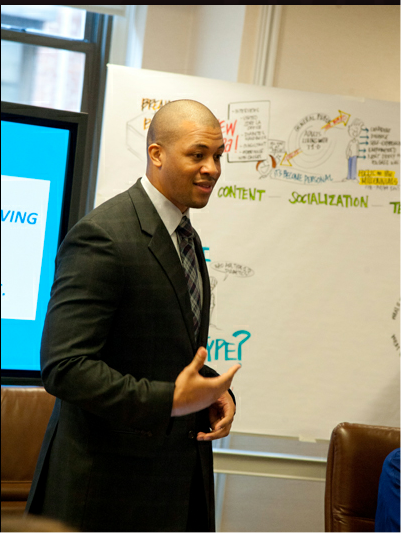
One of Muse’s young creatives, Marcus, who came up with the “One less prick” theme, is short of presentation experience, yet is encouraged by agency owner Joe Muse to conduct the pitch to the JDRF. It will be his idea and his presentation that will be crucial to Muse’s success or failure. We are once more misdirected by the producers because Marcus presents initially as self-confident, if not cocky.
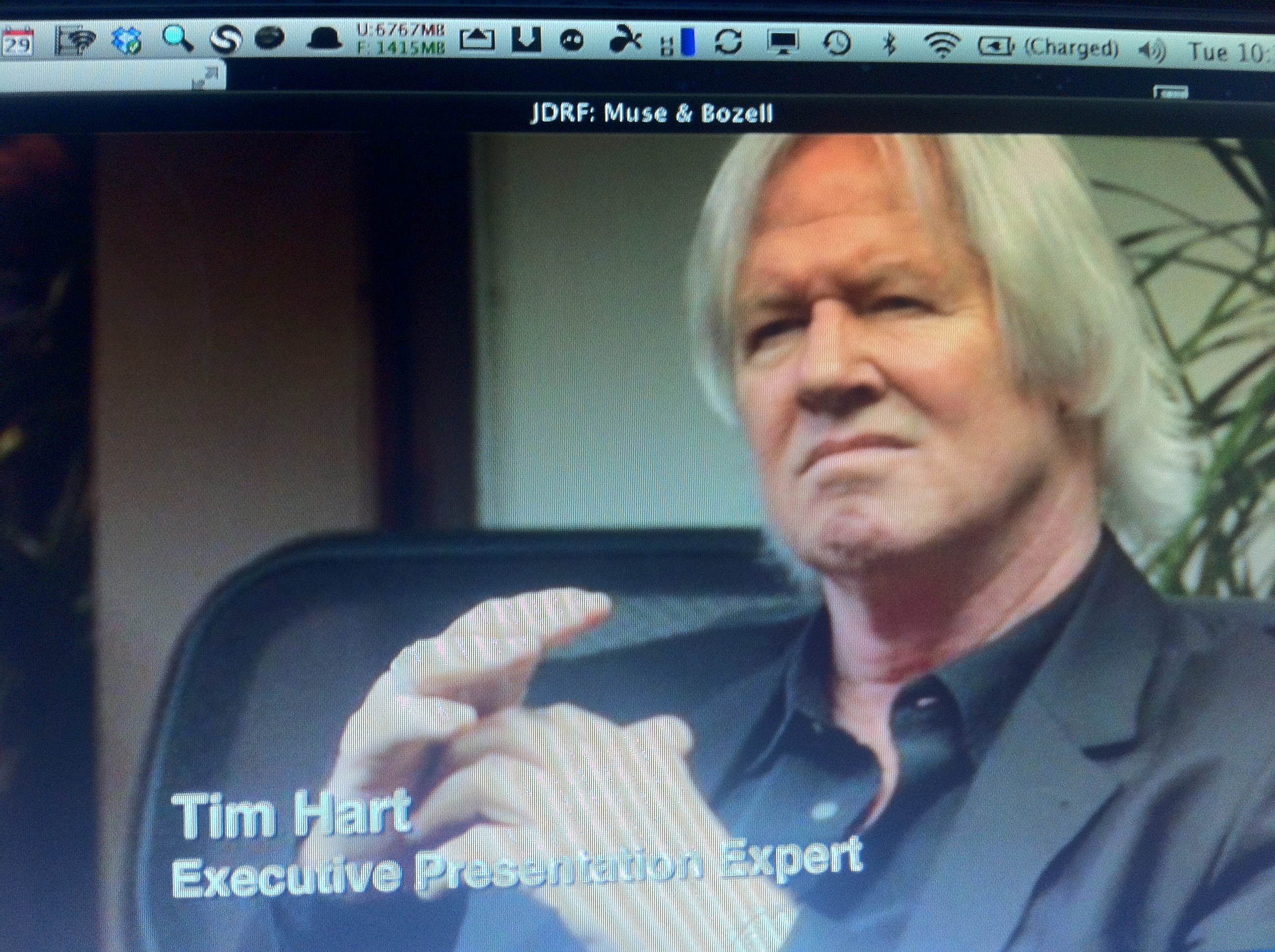
Joe Muse however, recognising Marcus’ lack of experience, brings in a heavy-hitting presentation training guru, Tim Hart, (left) who Muse introduces as an “Executive Presentation Expert”.

Hart is actually a very experienced advertising guy and C-level coach. Here’s a section of his LinkIn entry:

Specialties

Customized Presentation Skills training and presentation skills mastery, Automotive Marketing and Advertising expert, Keynote Speaker, Personality Profile training, C-level Coaching and Consulting, Expert Group Facilitator, Generational Differences Training, Personal Image consulting, Personal Branding Expert, Branding CEOs, Expert in creating Vision, Mission, Purpose statements for companies and organizations.

In front of his assembled team, Marcus is to practise his presentation under the guidance of Hart. Now I’m not sure whether the next part is played up for the camera or whether this is how Mr. Hart prefers to work, but poor Marcus has strips torn off him in front of his peers, making numerous false starts which get quickly corrected. The advice and guidance is all fine and dandy, but perhaps the stripping bare is part of the toughening up process in the hope of helping Marcus deal with any performance anxiety when it really counts.

Here’s Marcus during the actual pitch to JDFR, from a picture on the AMC website:
[Now, you may have noted the picture of Tim Hart in The Pitch, above, is actually a photo of my Macbook desktop. Why? Because the iTunes media is DRM’d, and even taking a screenshot of the downloaded movie file renders the picture a bunch of gray and white squares. So I had to use my iPhone to take a picture to upload it.]

At one point in his presentation to the client, Marcus freezes, seemingly overwhelmed by the task. He rescues the situation, but will it be enough for Muse to win the project?

In each episode of The Pitch, before they deliver their verdict to the agencies, the client evaluation panel is seen discussing the pros and cons of the two pitches, but we never see them making their decision. We only know what it is when, in turn, they ring each agency with the good or bad news. For me, that’s a huge gap, and I’d rather see more depth given to the feedback and evaluations, rather than each weekly generic “we felt the other agency came closer to what we wanted in a our brief“.

Fortunately, on the AMC website for The Pitch, and also on other websites which cover the advertising industry like The Next Wave, the clients do go into more detail in a streaming video. Here it is for this episode, but be warned it contains spoilers, and if your connection is not in the USA, the AMC site will block the video, as it did for me in Australia (where the show isn’t seen, and probably won’t be):

Luckily, there are some very clever people who can assist, and as it turns out prior to watching the video, you are assailed by a 15 second advertisement. Having someone in Australia count as a viewer of a local product advertisement, perhaps selected by the IP address the site recognises, would distort the advertising metrics, I presume.

What comes out of the video is the emphasis the client placed on the stories told by the agency, and how those stories could be extended into a variety of scenarios the client hadn’t considered previously. That’s a great match, because it says the agency truly understood the brief, and actually went beyond it in their storytelling and presentation.

In essence, it’s a little like how Apple works: Underpromise and overdeliver and let the end user ask how Apple “knew” more than they what they really needed. I think a few more agencies would do well not just to study how Apple markets, but also Apple’s ethos in delivering quality products which, when first introduced, have the tech pundits giving a thumbs down, but the buying public usually saying otherwise – with their credit cards.

I plan to incorporate more of The Pitch in my future Presentation Magic workshops to illustrate a variety of presentation concepts. If you’re in the US, you can further study the pitch concept on TV with shows like ABC’s Shark Tank, which was derived from a UK show called Dragons’ Den. Here, budding entrepreneurs bring their product and pitch to five self-made wealthy individuals from whom they seek seed money for a percentage of the profits or equity.

Because I feel a little guilty for leaving my blog unattended for so long, may I reward your wait with this mashup of what might have happened if Steve Jobs had pitched the iPad in the Dragons’ Den. Enjoy!
As expected, iWork was beefed up for the new iPad, bringing Keynote closer to parity with its desktop older sibling. But don’t fret, Keynote users: I think we saw some hints of new features of the next Keynote for the Mac.

So the new iPad has been released (I ordered two of the top models), along with an updated AppleTV to take advantage of its retina display.

I will not at all be surprised when the tech pundits today boohoo the new iPad, from its failure to cure cancer through to its ungainly name, which I predicted would be the case in a previous blog entry, just because Apple can. And indeed likely enjoys playing the punditry for fools, while it laughs all the way to the bank.

Before I get to the main points of this blog entry, a couple of non-appearances are worth noting.

1. Where was Scott Forstall? I can’t recall an Apple keynote where the iPad and iOS were featured and he was not given a place on stage. Given he reports direct to Tim Cook, was this Tim’s way of further asserting his new CEO status? Or hopefully, a much more simple explanation.

2. Where was the much anticipated Microsoft Office for iPad which had the tech punditry all atwitter in recent weeks, once today’s keynote invitations had been sent out?

Instead, what we did see but not demonstrated were beefed up iWork apps, which like iPhoto for the iPad allowed Phil Schiller to drive home the message that “don’t let anyone tell you you can’t create on an iPad”. (You can see him refer to this at 1h:15m:20s, after you download the keynote podcast from the iTunes store ).

Indeed, Schiller emphasised the parity that now exists between iPad and Mac OS X devices like the iMac and Macbook since the Apple creative applications – iLife and iWork – now exist on both platforms with an extremely similar feature set.

I downloaded the Keynote update, now in V1.6, with the most important and obvious additions being  the near match between builds and transitions. It’s not quite 100%, and of course the iPad font set is still limited, so error messages may crop up after importing  desktop Keynote file with esoteric fonts.

In a previous blog post I had predicted that an updated desktop Keynote would not be released into the wild until there was much greater feature parity between the two versions, and this would require an improved iPad with respect to CPU and graphics. The hint Apple gave us that this was on the cards can be seen with the placement of the Keynote app icon in the tray for the keynote invitation illustration. I don’t know anyone who leaves Keynote there, myself included.

Which leaves desktop Keynote users to ask: : “Whither Keynote? You’ve not been updated for more than three years, so what gives?”

Clearly, much of the iWork team’s efforts have been directed to the iPad versions plus iBooksAuthor which also received an update today (V1.1) to account for the new iPad’s retina display.

There are clues however, and in today’s keynote I believe we saw hints that a new version – or at least some feature additions to the current version – are present.

Let’s go to the video replay…

In recent keynotes, Apple has been overenthusiastic about its use of the Anvil build, something which was last added to Keynote in a point update, as well as some new text builds. It’s been used when keynote speakers wanted to drop a bomb on us, so as to demonstrate “incredible” numbers of apps sold, or stores opened, or some other fact where expectations were crushed.

In the March 7 keynote, we didn’t see it at all. Perhaps it was a favourite of Steve Jobs, and here is Tim Cook asserting his status once more. If there was one build we saw quite often in today’s keynote, it was a variation of the “move” build, but this time two elements came in almost simultaneously, while pushing other elements no longer up for discussion, out.

If you have the podcast, go to 20m:14s, and here are some screenshots of what I noticed:

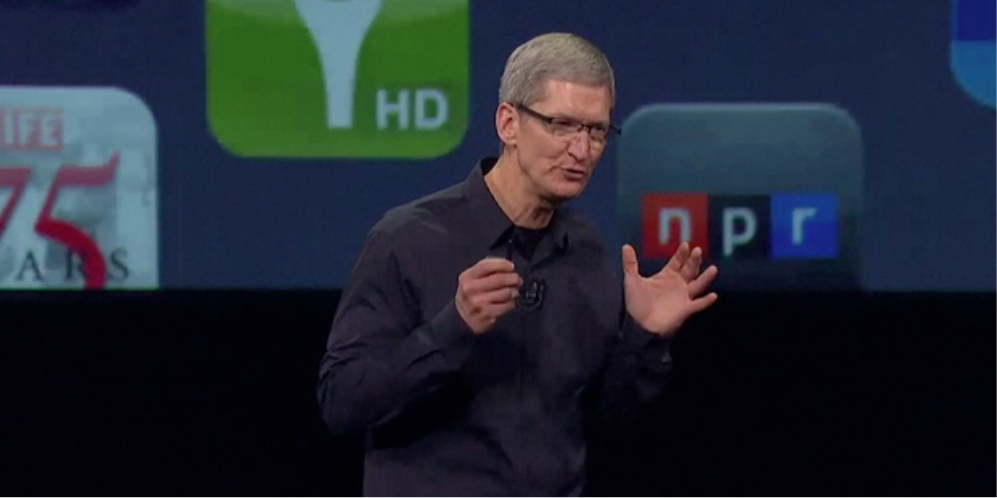
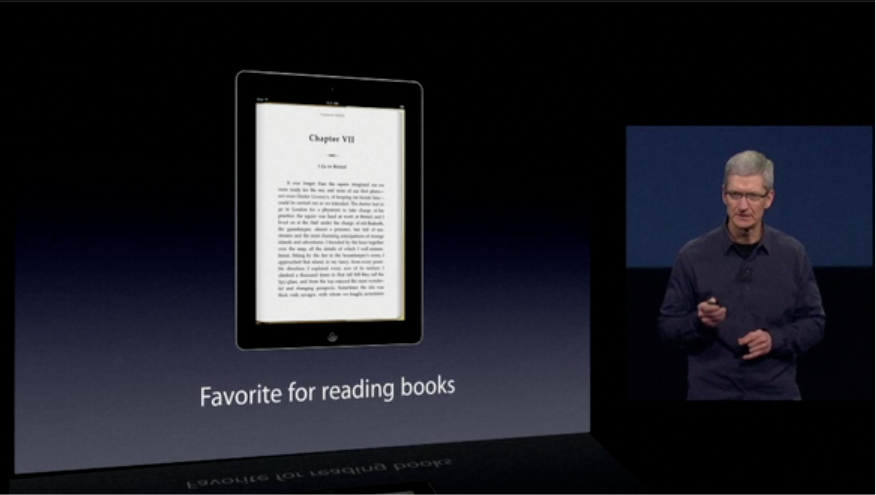
Here Tim is discussing how iPad users rate the device for various activities, such as reading books. He’s now going to discuss it as a favourite for playing games, so in the next click of his remote, the iPad image and text slide to the left, but not quite synchronously:


And now the new image and text slides in from the right, the text in the lead before the previous image has left the building:

And the rest now slides into place, the text once more leading the way:

And now the image aligns centred above the text:

Now, each of these could be performed with “move” builds – in and out – but some of these slides would require four of these, two each for text in and out, and two each of image in and out.

Because this effect was used several times in the keynote, I’m going to assert that it represents a new transition, similar to Magic Move, where you create each slide with its picture and text, and the transition does the work for you, such that you can control the delay and speed. Who wants to guess what Apple calls this new transition?

I suspect, however, this is was not the only transition. For some time now, I’ve been watching my AppleTV when it goes into screensaver mode. As with iPhoto, there are several very interesting ways that new photos can be brought in, including Origami. If you have an AppleTV, check in Settings for your screensaver options:

(Brian Burgess, at Groovypost.com has a nice set of screenshots and elaboration upon AppleTV screen saver options here).

When I noticed these in action, it caused me to wonder how nice they would be as additions to the Keynote transition set, especially as more people are using full size pictures, as well as multiple illustrations in Keynote.

I think I saw one new addition in the March 7 keynote, at 18m:22s:

It starts at the time Tim Cook has said Apple sold more iPads in the last quarter of 2011 than any PC maker sold all their PC products, and says iPads are “showing up everywhere in the daily lives of people”:

"It's showing up everywhere in people's lives"

What looks like an regular flip build out commences...

.. and we see the image on the flip side now...

Now more fully formed, but only occupying a section of the previous image's space, because...

.. a moment later it's joined by a second flipping image...

... which remains for a moment while the first flipped image now builds out with a flip...

... and now the second image begins its flip out...

... and now both images are replaced by four smaller images flipping in...

... and here is the final montage, this whole sequences taking about four seconds...

Now it’s quite possible to do all this with the current Keynote, but why would you? It’s not Apple’s way to make itself, and the user, work so hard, when it can create transitions to do it for you, with you merely selecting the images (or presumably, text).

I suspect there is one more new build or transition but the camera work was too poor to pick it up. It occurs about 20m:40s and here is the images I can grab but they are certainly uninformative:

Icons of the thousands of apps start popping in...

I suspect this popping of apps as a build in was in fact similar to what was shown at the Education keynote to introduce iBooksAuthor January 19th, and used the Object Zoom transition.

It’s a very underutilised effect, bit I did manage to use it myself at Macworld in January. See below.

If you think you saw some new Keynote effects, please add your thoughts in the comments section below.

Hey, Apple: If you can stream Paul McCartney over iTunes Live on my AppleTV, when you can start streaming your keynotes live (like the one in a few hours)? Especially if you release an upgraded AppleTV – heck, I’d even pay a few dollars from my iTunes account and get up at 5AM rather than wait for the delayed replay

If Microsoft Office comes to the iPad, it will be the best of times and the worst of times.

It was but a mere coincidence that after my previous blog article here, entitled,

“If the expression “Give me the child aged seven….” applies to the iPad and Keynote, I’d start to worry if I ran the Microsoft Office marketing department: Lessons from a Las Vegas school”

the blogosphere somewhat choked with the “news” reported by The Daily that they had seen Office ported to the iPad. From there, many sites echoed the report, some saying The Daily had been duped, others pursuing Microsoft for comment only to receive a strange kind of denial, that more would be known in a few weeks.

That didn’t help the rumour mongering, because the time schedule placed it into iPad 3 release rumour territory. “What is possible”, some asked, “that Microsoft would appear at the iPad 3 keynote to demonstrate Office for the iPad?”

And what would they mean for Apple, for Microsoft, for Google Docs, for Android devices, and for humanity in general? OK, it’s not that big a deal, but for many it’s a serious business. After all, Office is responsible for much of those billions Microsoft earns each month, it is the default communication platform in the enterprise and many academic and military settings, and its placement on the iPad is certainly worth contemplating for its meaning.

If memory serves me correctly, the last time Microsoft took to the stage with Apple in the form of Steve Jobs — happy birthday, Steve 😦 — it was in the form of Roz Ho, from the MacBU showing a version of Office for the Mac.

These were never really stellar performances, and Office for the Mac was always a step behind the capabilities of its Windows brother. So those of us with long memories will greet any availability of an Office app with a yawn, as long as we are already using iWork equivalents, such as Pages, Keynote and Numbers.

There is one Microsoft Office product in the App store, and that is OneNote. There are other MS apps of course:

Do note, if you’ll pardon the pun, that OneNote is free, but limited to 500 entries. After that, to add more you must upgrade for unlimited notes by an in-app purchase of $14.99. This may hint at the cost of individual Office apps or we may see a bundled suite.

How Microsoft chooses to price and assemble Office will intrigue some for the next few weeks, given Apple showed its hand at the very beginning of the iPad Journey almost two years ago (less a few days).

The reviews for OneNote are not great in general, and indeed it’s competing against many very fine and not very expensive notetaking apps, including the free Evernote, as well as Notify.

It was the best of opportunities

For Microsoft, it must have come as an inevitable acknowledgement of the iPad’s market power to bring Office to it, while still developing its own tablet software with a full Windows 7 installation and a version of Office very close in capabilities to that of the desktop version.

That it will bring a denuded version to the iPad is a no-brainer, much like it has suited Apple and its iWork to do so while the iPad’s CPU and GPU grow in power with each new version.

So while the opportunity exists for Microsoft to add more millions to its coffers on sales of Office for the iPad, it may come at some cost. Some may ask if a Windows 7 tablet is needed if Office can be found on the iPad, and perhaps go without. Farewell potential sales.

But of course, it’s the full completely compatible version of Office on a Windows tablet as compared to a “thin” version on the iPad, so that may be enough to steer those in the enterprise away from the iPad to the Windows powered tablet.

For Apple, this is a further opportunity to move more iPads into the enterprise by giving users their default communication and productivity tools, hopefully equipped with extras such as tracking changes and easy cloud-based updating between iPad and desktop and laptop.

Does Apple care that its own iWork suite may go Missing in Action? I don’t think so. Its addition in the first place we were told by Steve Jobs was more of a “Can we do this” aspiration rather than a dagger plunge to the heart of Microsoft. And while Pages on the iPad has met universal acclaim, the same cannot be said of Keynote. At least we have seen several upgrades for the iPad version while the updated/upgraded desktop Keynote stays locked up, ready for the right moment to pounce.

Always remembering that Apple’s software and services exists to sell hardware, Office on the iPad will do more to sell iPads than iWork ever will, if I am to be totally frank about it.

Despite iWork’s two year head start, the iPad is still on an early adopters’ curve. This means there is still a huge market to penetrate and Office will help enormously. The best of times and opportunities will continue for Apple.

The worst of times and opportunities

But there is one downside to all this merriment, if one believes Office for the iPad is a good thing.

And it is here I write selfishly, although for me it may present opportunities too.

My concern is that once Powerpoint moves onto the iPad, the grace and finesse of Keynote will be a thing of the past, and we will see the continuation of the default Powerpoint style. Even while many in the presentation world are working diligently to rid the speaking domain of its dumbed down and empirically unvalidated knowledge transfer capabilities, Powerpoint on the iPad will set presentations backwards.

Yes, I know many will say “but it’s the user, not the tool“, yada yada. But if this is the case, why do 95% of the Powerpoints I witness bore me and most of their audiences silly, breach so many of the guidelines research-based multimedia learning informs us of, and even have end-users complaining when tasked to draw up a new presentation, something I don’t hear of with Keynote users?

So, yes, the best of times for Apple perhaps, and the worst of times ahead for audiences if Powerpoint on the iPad becomes the default presentation tool.

Let’s hope if Office is coming to the iPad, that Apple has lent some UI engineering effort to the MS development team, so we at least get apps that can stand up to scrutiny, look and feel more Apple-like than Microsoft, and “just work”.

I fear it’s all too much to ask however. Reflecting on my previous blog entry, the best predictor of future behaviour is past behaviour. ‘Nuff said.


If the expression “Give me the child aged seven….” applies to the iPad and Keynote, I’d start to worry if I ran the Microsoft Office marketing department: Lessons from a Las Vegas school

My Google alert for Keynote, which by the way is far more useful for tracking Keynote mentions than the Twitter #keynote tag, this morning shows a story from the Las Vegas Sun newspaper’s online site:

(I have purposely blurred the advertisement for a Mac product I am heartily sick of seeing).

The story, available at the link here, is a lengthy piece by Paul Takahashi about an  elementary school in the eastern Las Vegas Valley called Explore Knowledge Academy (EKA), whose motto is:

Creating Leaders: One Project at a Time.

The story looks at how the school is employing iPads to live up to that motto, using something you will hear lots more about when it comes to shifting away from traditiuonal teaching methods: project-based learning.

The article states project-based learning is one:

….where students create projects — presentations, plays, dances and dioramas — to demonstrate their knowledge. Last school year, EKA began a pilot program with 25 iPads to help students research and craft more interactive projects, such as digital slideshows, movies and songs.

“The world has changed; the expectations in the workforce have changed,” said Abbe Mattson, EKA’s executive director. “You can’t even work at a McDonald’s without using a touch screen. … If we don’t change how we teach, it’s a disservice to our kids.”

Quite.

In fact, following my presentations at Macworld a few weeks ago, where many teachers were present, I’ve received enquiries from teaching staff in the USA about holding in-service training for teachers on using Keynote, both the mechanics but more importantly the theory underlying learning via presentation software.

But it’s the opening few paragraphs of the Las Vegas newspaper article which sets my imagination on fire this morning. At 2011’s Macworld where I presented for the first time on Keynote for the iPad, I described the iPad as an enterprise Trojan Horse, bringing Apple products into a world formerly closed to it and one where Apple has shown distinct disinterest. (You can see the blog entry and video here).

The real, long term Trojan Horse exists in schools like EKA. Remember when Steve Ballmer laughed upon the introduction of the iPhone in 2007? (So did the guys at Palm with their Treo). And when others dissed the iPad in 2010 as just a big iPod Touch (and by extension, near useless)?

Imagine if you are the Microsoft Marketing VP for Office  (which is really MS’s cashcow) and you read the following opening from the Las Vegas Sun newspaper’s story, and you’ve been railing at Steve Ballmer and other Senior VPs to get Office for the iPad out there:

A dozen Las Vegas second-graders were given a common English assignment one recent morning: Write a story using new vocabulary words.

But instead of picking up a pencil and paper, these students launched the Pages word processing application on their iPads and started tapping.

One precocious youngster in the back of the room raised his hand.

“Mrs. Gilbert, can we go on Keynote to do this?” the second-grader asked. (Keynote is Apple’s version of Microsoft PowerPoint.)

Katie Gilbert smiled and said, “Sure.”

What was it the Jesuits said: Give me a child until he is seven, and I will give you the man?

Now apply it to school-based hardware and software. Do you feel the planets aligning yet?

With the hype over the next iPad growing, there’s going to be a lot of disappointed pundits, Wall Street Analysts and fantasists when they don’t get what they want when they want it.

A few days ago, my head swirling with rumours and pictures of alleged iPad 3 retinal displays, I posted this on my Twitter account (@lesposen):

For those of you with iPad 2s, the iPad 3 may be no big deal at all. Certainly, many of the blog posts and comments I’m seeing in my travels are asking if it will be worthwhile updating, perhaps uncertain of how much their iPad 2 will get on eBay.

For another population of iPad owners, those like me who have the original iPad, it’s really a no-brainer. After almost two years of ownership as a first adopter, I for one am truly ready to make a leap to iPad 3 territory.* This will be on speed and screen alone, much less anything else that so many rumour sites are either positing will happen, or are expressing in fantasyland wishlists, e.g special keyboards, USB connectivity, Siri (I will be very pleasantly surprised if Siri is included), etc………… (fill in the blanks with your fantasy).

Which leads me to think there is going to be an awful lot of disappointed people claiming FAIL! when Apple doesn’t deliver the goods. Which it won’t for a lot of people. Including those who should know better like tech pundits, and Wall Street analysts.

I’m predicting another “woe is me, Apple dropped the ball” post-release crying game when the iPad 3 is officially announced, possibly early March. We’ve seen this before of course with the iPhone 4S, when so many were of the belief – no, certainty – the iPhone 5 was next in line.

Of course, the rest is history. Despite all the lamentations, the iPhone 4S has proved to be a massive hit in the months after its release, and it’s still going gangbusters.

There’s a lesson here, and it’s an old, familiar one, which can be said in at least three ways:

1. Santayana’s famous quote:

Progress, far from consisting in change, depends on retentiveness. When change is absolute there remains no being to improve and no direction is set for possible improvement: and when experience is not retained, as among savages, infancy is perpetual. Those who cannot remember the past are condemned to repeat it.

2. Newton’s First Law of Motion:

Every body persists in its state of being at rest or of moving uniformly straight forward, except insofar as it is compelled to change its state by force impressed.

3. A fundamental premise of psychology I use in my work:

The best predictor of future behaviour is past behaviour

While phrase 3 may have had its origins in forensic psychology predicting criminal recidivism, it also has its place in self-harm assessment too.

You know, it would serve right all those fantasists ready to put the hate on Apple for not delivering what they wanted when they wanted for Apple to name it the iPad 2S (for screen), just for fun while it laughs all the way to the bank.

On a more serious note however, I will apply those three guidelines above, and suggest we will see better battery life, a retinal screen, and similar price points to current iPads. Meaning there is a likelihood the iPad 2 will remain a current model but not in 64GB unless the iPad 3 (or 2S 😉 comes in 128GB size, something no one has suggested with any strong evidence or conviction.

A 32GB wifi only model for schools (16GB would be just too small for textbook iBooks coming to market) priced under $300 – ideally, $249 – would hurt a lot of tablet wannabees powered by flavours of Android.

We’re a few weeks away from the much-predicted special announcement. The hype machine will ratchet up, the fantasies will be blogged about, the disappointment safety net will go unchecked in all the hoopla, and the Apple executives in the know will casually grin like Cheshire cats as they pass each other in the Cupertino hallways.

To paraphrase Mel Brooks: “It’s good to be the King!”

* I did a rough calculation of cost of ownership. Purchased July 1, 2010 or close enough, and say I update to iPad 2S on March 7, that represents 615 days of ownership.

The unit cost around AUD $1000 at purchase including an accessory or two. In that time, I’m estimating I’ve spent another $1500 on apps, books, and Telstra and AT&T 3G connectivity.

Doing the math, I’ve spent roughly AUD$4.00 (about USD$4.28 at current exchange) per day owning the iPad – about that of a coffee. I’ve achieved much more than $4 worth of satisfaction of ownership.

OS X Mountain Lion said to deliver full desktop mirroring over Airplay: Excellent news for presenters

Just a quick note, while I’m working on a longer blog post about my Macworld 2012 adventures, of the news breaking in the Mac environs of Mountain Lion, the next iteration of OS X.

I first saw it mentioned in a dramatic blog entry of John Gruber here (http://daringfireball.net/2012/02/mountain_lion).

At first I thought he was pulling his readership’s leg by the one on one nature of the preview he received with Phil Schiller and other senior Apple officials.

Then I saw the GigaOM blog entry here (http://daringfireball.net/2012/02/mountain_lion) supporting it.

What intrigued me was a hoped-for inclusion, beefing up Airplay, one of my favourite Apple developments especially for users of AppleTV.

Here’s the part I’m referring to:

For presenters with access to a data projector with an HDMI input, it means now also bringing along your AppleTV to your presentations, and not having to have your Macbook tethered by VGA or DVI to the “guest” cable in the lecture room or equivalent, which are invariably too short. And it takes care of sound cable too, given HDMI carries audio and video.

It also means you have your iPad or iPhone as a backup or ancillary device, able to quickly switch to show a movie or slide and thus move away from the linearity that plagues so many contemporary presentations.

It remains to be seen how Airplay and the AppleTV will work with Keynote in its Presenter modality (the presenter sees on his or her Mac both current slide and the next build or slide), but I can’t imagine Apple has not thought this important feature through in order to maximise this Mountain Lion feature.

Long anticipated and finally here it seems.

Two thoughts on the Apple’s Education Event in NYC: Its presentation software, Keynote is alive and well and expected to prosper, and Android-based tablets are dead in the water in the K-12 education domain.

This morning I woke early early to attend the Channel 7 Melbourne studios for an interview on its morning program, Sunrise. The topic was the virtual site, Second Life, which had apparently been mentioned in the midst of some controversy in a Sydney-based morning radio show.

As so often happens, television picked up on it and I was rung by a producer to offer comments as a media psychologist. You can read something about what happened at this link here from the Metaverse Journal website. A video of my interview is below:

After that breakfast, a brutal workshop with a personal trainer (2012 resolution in action), it was time to settle back to watch the Apple Education Event whose details I had been avoiding all morning. That’s been my habit these past few years: avoiding another’s opinions and perceptions of Apple keynotes, and trusting my own reactions first.

In my previous post (scroll down), I had made some predictions as to what we might see announced, and I was particularly interested to see the fate of Keynote and Pages – indeed, iWork in general – should Apple roll out an iTunes Scholar app (called iTunes U in the event) as well as an book authoring tool, whether it be a beefed up Pages or a new app entirely.

As it turned out, it was both. Yes, a new app called iTunes Author but with an exceptionally close resemblance to Pages.

But my heart was gladdened, having been buoyed by learning iWork’s VP Roger Rosner had been seconded to the iBooks team, when I saw how Keynote was integrated into the iBooks Author workflow, something I had discussed in my earlier blog post.

While neither it nor Pages received published updates, it’s clear to me they will, given iBooks Author is only in version 1.0. As Apple watchers know, such versions are quite acceptable as they are for initial versions – very functional with great ease of use based on familiarity with other Apple apps. There are clear omissions which some with a predilection to diss all things Apple will seize upon, but again long term Apple observers know they will eat their words and look sheepish when V 1.5 then V 2.0 rolls out in a few months.

Witness the same thing when Keynote 1.0 for the iPad was released. Now it is a very competent app., and I expect even more feature matching (with desktop Keynote 5) when the iPad 3 is released soon with its beefier CPU and graphics.

So, with my worst fears that Keynote was to be orphaned not realised and indeed almost a centre of attention with its place in the iBooks Author workflow and feature set, I could concentrate on the event’s central message: Apple is about the inovation experience, supported by its hardware.

In returning to its educational roots, Apple once more puts itself forward as a technology company that can do it all, supplying hardware, software and content for a specialised cohort in real need of innovation.

All the time I was watching this trifecta in action, I kept thinking how any Android-based tablet maker is going to make any headway into the K-12 marketplace. Yes, I expect to hear many complaints not merely of an Apple walled-garden but such a severe lock-in as to call it a moat. Especially with respect to exclusivity of iBooks Authored works being sold only within the iBooks store. Of course, if you repackage the contents for another ePub service using other publishing/creation tools, Apple has no lock on you. Perhaps that other service does. So it seems to me Apple is applying the same prohibitions and permissions as it does for apps you create using its proprietary coding. Yes, you might create the images in Photoshop and the words in MS Word, but if you lay it out and include iBooks Author’s wrapping to publish it, yep, it’s exclusive to Apple. The content and IP is still your’s; how and where you choose to create and publish the final work is your choice.

The lock in to iPads has some arguing families will not be able to afford iPads. These are fair criticisms, but if we wait a little longer, let’s see the price of an iPad 2 when the iPad 3 is released. It’s made its moolah for Apple, and perhaps will be reduced to a more affordable $399 or even a version for $299. Do kids spend this much on Nike sneakers nowadays?

http://www.youtube.com/watch?v=O_YoyJ-w39M

So Android-based tablets might be cheaper or even preferred by those filled with anti-Apple sentiments, but where’s the content? Apple seems to have sewn up those educational textbook makers who in the USA control 90% of the market, according to figures shown at the Apple Education event.

Where do Android-based tablets go in this marketplace? Nowhere, I think, perhaps left to focus on the enterprise setting. But if you were Toshiba or ASUS or Acer or even Microsoft, you’d be worried that children in Kindergarten are being exposed to Apple’s iPad economy, and they will accept the iPad form factor as the norm for “computing”. I put this in quotes because I’m trying to think of another term these children will use as they grow up, because it’s not the computer their parents have known to be a computer.

And you know what? Those kids won’t care. It’ll be called an iPad. That’s sufficient.

[UPDATE: I have added the Sunrise TV video from YouTube, corrected some of the spelling errors from commenters, and in gratitude, include this cartoon:]

Was it Steve Jobs’ literally dying wish to upend another lazy industry – science and academic publishing? We’ll know more this Thursday

With Macworld just around the corner, I am tweaking my workshop presentation for January 25. By that time, we will know more about Apple’s publishing keynote to be held this Thursday and whether yet another industry – publishing, especially academic and scholarly – will be disrupted by Apple technologies.

Some time back I wrote about this possibility here on this blog:

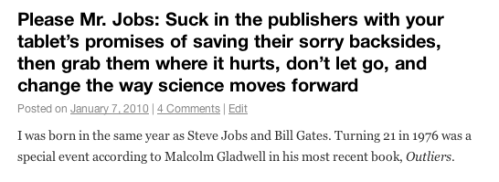
Click on the screenshot to go to the blog entry

Notice, will you, the date of this entry: January 7, 2010. The iPad 1 keynote was held on January 27, almost three weeks later, so at the time of writing we were still in the “tablet rumour” phase of iPad’s release.

But it seemed so certain that a tablet was on its way – although up to the day before no one guessed its name – that bloggers like me were already envisioning what its release would mean. For consumers and various industries too, such as publishing.

In my blog entry, this is what I wrote about scholarly publishing:

“Well, I’m saying the same thing to Steve Jobs: “Steve, mate, help science along by luring the publishing world in with a tablet as a lifeline to a dying industry, then grab them by the short and curlies like you did with the music industry!”

What I was referring to was the outlandish price of academic texts, both in book form, as well as downloadable articles for which the major publishing houses still charge anywhere between $25 and $35 for a PDF of perhaps only a few pages.

It’s wild-eyed pricing, given there are so many ways to obtain the same article, from writing directly to the lead author, going to their academic website where their publications are often listed for download, asking a friend with an academic position to get it for you, or using a search engine to eventually locate it. I would say 90% of the time I am successful with one of these methods within a few hours. Remember too, that authors get no royalties, and in some cases are prohibited from distributing their own published work as a condition of being published in a prestigious journal.

The other idea not unique to my thinking when contemplating the Apple tablet was self-publication, something which has been hinted at being included on Thursday, and for which Apple tools, like Pages, already exist, partially.

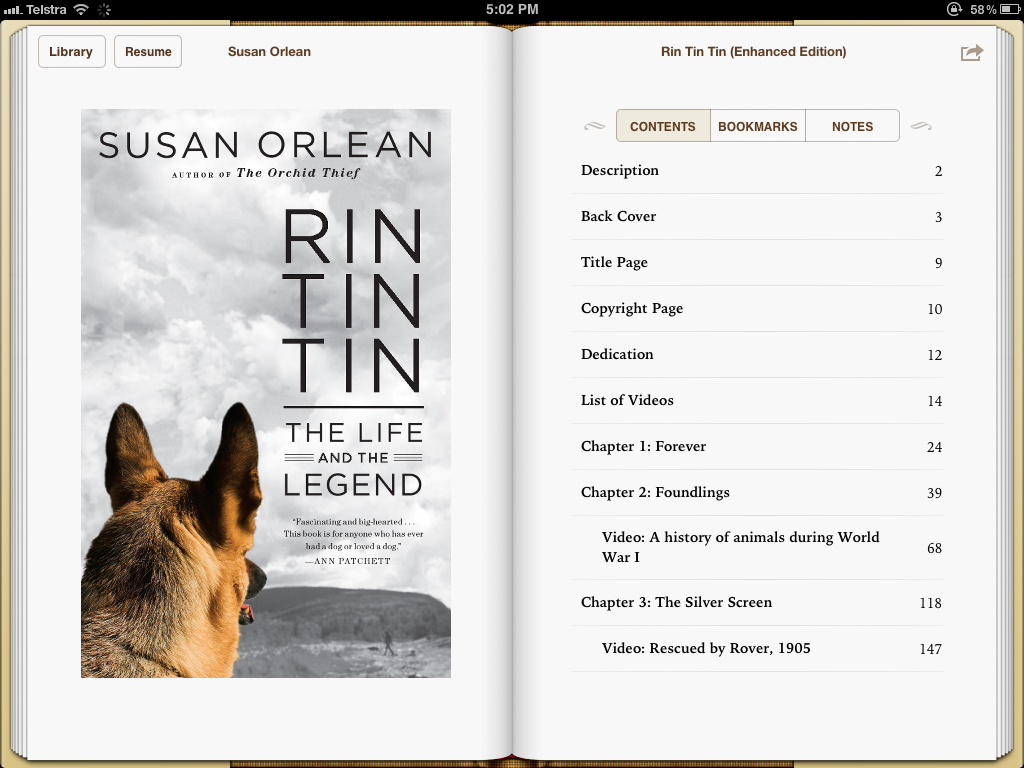
It seems the iPad is ideal for turning academic texts on their heads, including highly engaging visuals in enhanced versions. Late last year, I bought on iBooks an enhanced book about the dog, Rin Tin Tin, by Susan Orleans.

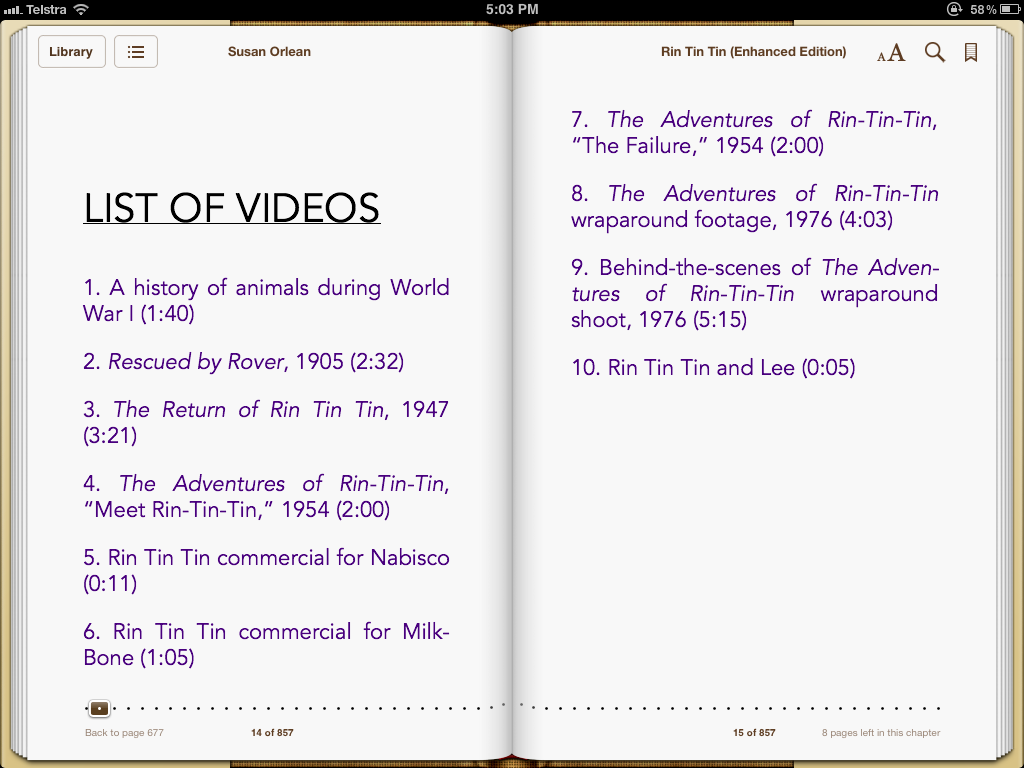
Note in the screenshot, below, both the book’s cover, and the list of videos within the book’s “covers” (page 14):

Cover and list of chapters

And if you go to Page 14, you’ll see the video listings:

List of Videos in Susan Orlean's Rin Tin Tin

And finally, without showing the movie in action, this is what it looks like, embedded, bearing in mind you can make the video full screen, as well as play it through Airplay to a monitor:

(UPDATE: My colleague Anthony Caruana asks about keeping open multiple books when say working on essays, as one does in analogue format. My response is that a beefed up iPad 3 may allow more multitasking, so that you can have multiple books open “behind” each other, and using an Misson Control-like  spread of the fingers, all the books can be seen, much like you can see all the apps or docs when using Mac OS X (below):

Hold the icon down in the Dock, and Show All Windows

Moreover, by using the iPad’s screenshot capabilities you can, as I have above, copy and paste in quotations from sources, to show you actually obtained them, rather than requoting from another source without sighting the original.)

I expect we may see a beefed up Pages announced on Thursday to assist the self-publishing process beyond its current format, and if that is the case, perhaps a reworked iWork 12 too – although it’s tiring to keep flogging a near moribund horse. Who knows, perhaps a new app. to be added to the iWork coterie.

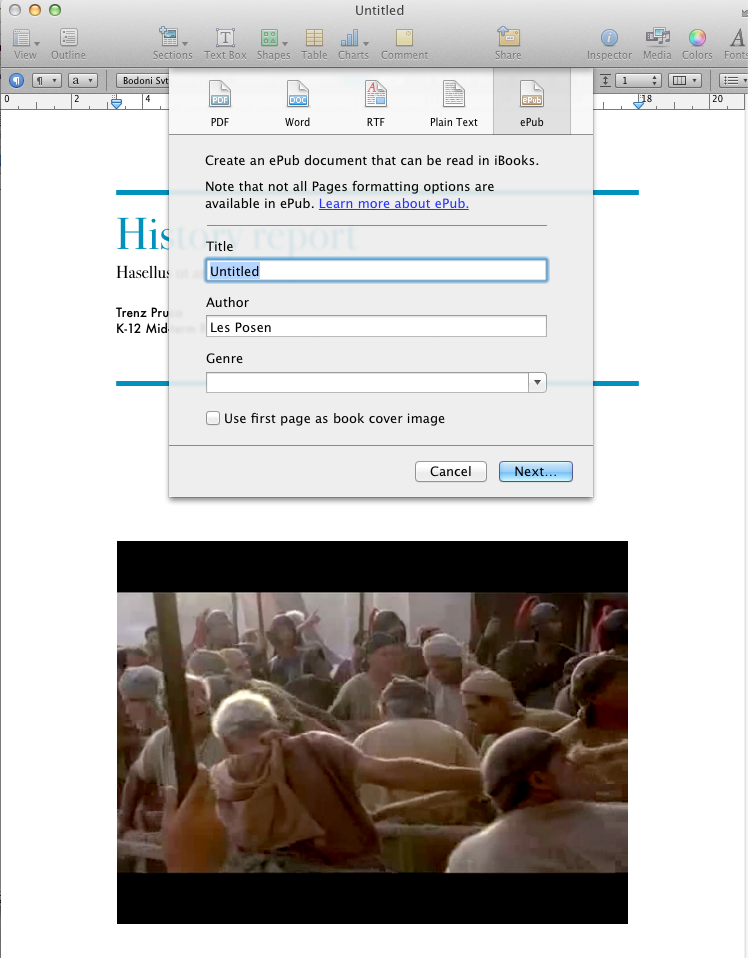
Creating an ePub in Pages is very limited, and indeed you cannot use the professionally created page layout templates Pages comes with to create an ePub. See below:

You can create a vanilla style document and insert video into it, and it will export to ePub format for transfer to an iDevice, like an iPad, using the word processor templates:

While you only see a still image, above, it’s actually a movie file I created for last year’s Macworld (Keynote on the iPad).

But that’s all well and good for private use and sharing. But what if I want to use Keynote and Pages to make a book for sale, perhaps starting with Presentation Magic using Keynote with all the effects and tutorials from my workshops? Rather than have handouts using lots of trees at workshops, why not gift my book for iPads and iPhones so that workshop attendees can either follow along (not my preferred option) or review the workshop afterwards with all the techniques I used explained and illustrated in much more detail?

And of course, the book is for sale on iBooks for a nominal price. Doesn’t this take self-publication to a whole new level? Yes, and like so many things Apple does, it’s been done before, but not this way and not this easily.

The next step is to take on the webinar, online training and Continuing Professional Education fields, which is worth billions.

Using the same tools authors use for their daily work, users could easily take their presentations and workshops and rework them for sale later without the extra expensive outside contractors needed to do it currently. Go and take a look at my APEX presentation of September 12, 2011, which I blogged about here.

The video I mention which is on YouTube was created using Keynote for the slides and presentation, my iPhone 4 to record the video and audio, and ScreenFlow to assemble the exported Keynote slides as a video and the iPhone output into a YouTube video.

This was a one person operation using inexpensive software, which easily lends itself to self-publishing workshops, and which can be value-added with an enhanced book for sale on iBooks Scholar (I just named it that). Perhaps Apple will release more tools for self-publishing a la Garageband integrating the output of Keynote, Pages and iMovie and then uploading them, like a podcast to iTunes University or the iBooks store.

The time is surely right to take on the world of science publishing, and I’m of the belief that this was in fact literally Steve Jobs’ dying wish – to disintermediate another industry which has become lazy and lacked innovation because no one dared stand up to it, much less the scientists who grasp the publishing industry’s teets for their tenured lives.

Publishing on Thursday and Television later in the year: it’s going to be a very interesting year in the science and creative arts in 2012.

[UPDATE: The website, 9-5Mac, reports an interesting juxtaposition occurring. An entry, without naming its author, suggests that Apple’s iWork Vice-President, Roger Rosner, has been transferred and “will be heading up the development of Apple’s entry into the textbook market.”

This is under Apple Senior VP, Eddy Cue, whose presenting style in Apple keynotes I’m no great fan of, but he is one heck of a smart operator, recently promoted, and I believe mentored by Steve Jobs, especially during the iTunes music rollout.

What this means for iWork is open for speculation. Will it mean tighter integration between iWork and Apple’s efforts to bring self-publishing tools to the marketplace in the form of Pages 5 (or iWork 12) or a new application, as suggested in my main blog entry, above? And what of Keynote? Abandoned or beefed up to to assist the creative aspects of self-publishing enhanced books, with audio, video and embedded animations, especially in textbooks?]

Aside

Stimulated by the interested shown in the solving of the Final Cut Pro X sneak peek keynote build effect, I’ve raced ahead and included two more Keynote files, this time of my own making.

In the first, I feature something I spend some time on in Presentation Magic workshops, especially for scientists and academics, and that is the use of data visualization or good old graphs and charts. (I cite Edward Tufte and Stephen Few’s work richly, as well as Florence Nightingale. Huh? You’ll have to attend to understand why!)

Keynote is very rich in ways to graphically illustrate data, and there are better ways than others to use such visuals to engage your audience and explain complex relationships even to naive audiences. Some would say a great graph is the best way to work with such audiences.

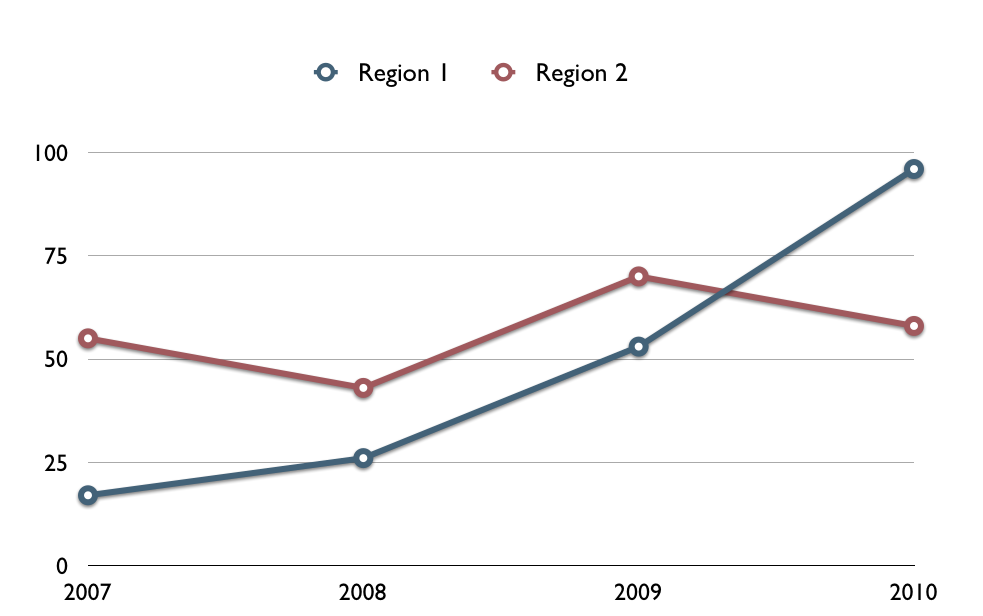
In the video below, I look at a very simple graph which is a Keynote default comparing two regions’ growth over a time period. What I’m interested in is the area between the lines, as you’ll see, below.

Keynote will let you fill in titles and axis labels at your leisure

You could draw each line separately, or you could show them both simultaneously, then highlight as I have in the video, below, the meaning of the area between the lines.

So here is the video of the effect I’d like you to think about. The wipe transition I used to fill the area between the brown and green lines is not a current feature of Keynote, so how was it done?

In the second brain tease, literally, I’m showing a glow callout, as I like to call it. Here is where I emulate as best I can in standard Keynote 5 a CGI effect from a professional documentary. I showed a similar effect to the Keynote engineering team a few years ago in the hope they could include such an effect yet with Apple simplicity of use in the next version of Keynote. Still waiting…

Can you deduce how it was done? Solutions in the next few days…

UPDATE: Lots of clever Keynote users out there skipping steps and coming up with solutions in the comments. Perhaps these challenges are too easy for some.

Still, at Macworld workshops, my experience is that many people are hungry to learn Keynote’s tricks of the trade, as well as incorporate third party apps to make up for its deficiencies. More of that to come. If you are a self-proclaimed Keynote guru, send along a challenging quicktime movie of your effect, and let’s see how the crowds source an answer. But only created in Keynote please.