Tag Archives: Keynote

While Wall Street went “meh” over the Let’s Rock keynote, Steve Jobs stealthily showed us the next version of his presentation software, Keynote

Whilst Wall Street sighed with feigned non-interest at the outcome of Apple’s “Let’s Rock” presentation on Tuesday, and others wondered if Apple had lost its sparkle with no surprises – the rumour sites put paid to that – another group of Apple observers were watching keenly.

This is a group that has come to learn that there is one Apple product that Steve Jobs does not keep wrapped up tightly and hidden under a bushell, lest the rumour sites steal his thunder. Indeed, I think what I’m talking about is the only product that Apple regularly lets the public see ahead of its release, with nary a mention. Those who have visited my blogs from time to time know of which product I speak: Keynote, Apple’s presentation software first released at Macworld 2003.

Nowadays, during each of Steve Jobs presentations, Keynote observers watch for tell-tale signs that an update is imminent. We saw a little hint at this year’s Macworld keynote, when the Macbook Air was released: a few new transitions.

But at Tuesday’s “Let’s Rock” iPodfest, we got the message loud and clear that a significant Keynote update, perhaps a version update, not just a point-update (ie Version 5 rather than version 4.0.4) was on its way.

Evidence

Since my teachings with Keynote so emphasise the visual (“the visual system is to broadband what the audio system is to dial-up”), how better to demonstrate the likely forthcoming update by sharing with you screenshots of Let’s Rock presentation, in the order I spotted them. Perhaps there are others I missed, so please let me know: les-at-lesposen.com

Let’s Start:

The first hint comes very early in the keynote, just a few minutes in:

This is actually the placing of the word “Music” onto the screen, in a starburst kind of way, much like the old Screen Gems logo used in TV shows of long ago. Let’s see what happens a moment later:

Now we can see the word “Music” appearing. The effect is hardly subtle, but one that really draws your attention. Let’s see what happens next:
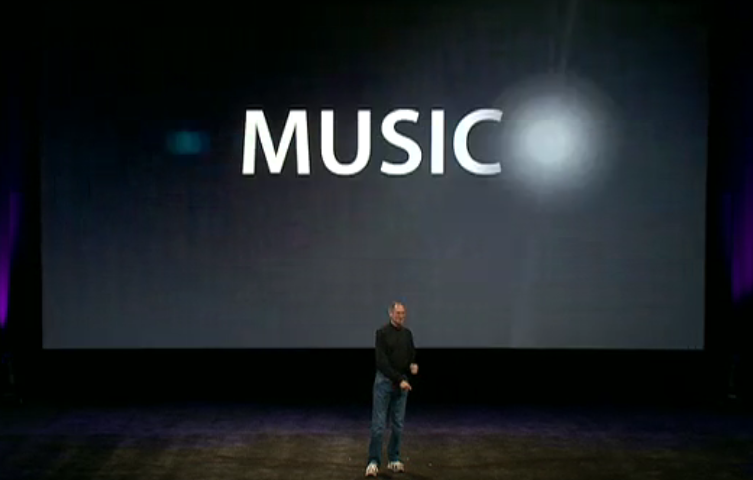
The starburst finshes its “orbit” and the full word is revealed. This is a full-on animation which these screenshots can barely illustrate in an adequate fashion. But even so, I see them as evidence of new effects. Together with what else we see as the keynote progress, it can be taken as evidence of continued improvement in the Keynote app.

Nextnew image manipulation abilities or just an imported Photoshopped image?

Take a look at what comes next in the Jobs’ slideshow: an image of iTunes 7, below:
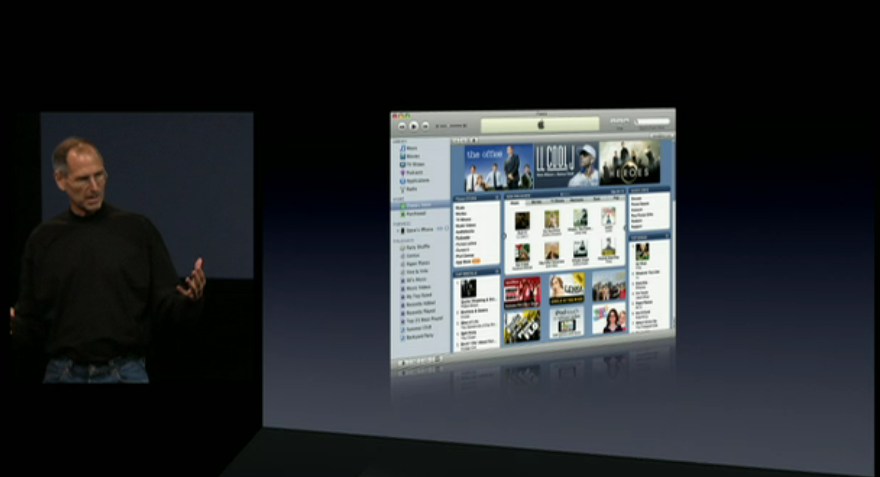
I want you to notice an effect I use frequently in my own Keynotes, especially when I’m showing book covers, newspaper articles, or journal papers. This is a skewed image where the left edge angles down to a shorter right edge, as if the image was rotated slightly. This has the effect of drawing the eye along the image from left to right, and in my own slides there is a large amount of black (or white space) where your eye moves to and you just “know” something will appear there. This is me taking control of the message delivery by directing your gaze where I want it to go – let’s call this “direction” as compared to the magician’s “misdirection” where he sets you up for a “gosh, how did he do that?” moment.

Currently, to do this effect in Keynote means using another software, such as Photoshop or GraphicConverter. Indeed, even Powerpoint for Mac 2008 has rudimentary image manipulation tools which I have used to distort and image then import it into Keynote. My guess is, judging by this image, Keynote is about to match Powerpoint’s ability, if not leapfrog past it. Look further at the image above, and note how the reflection leaves no gap at the bottom, which is what would happen if you just dropped in a Photoshopped image. This gives further support to the notion that Keynote has received upgraded photo tools.

Next: New text animations

Keynote has far fewer animation effects than Powerpoint, but what it does have screams at you that you are seeing a Keynote rather than more of the same Powerpoint. In the next series of slides we see a new text animation effect. We start with a number displayed, “8,500,000” and underneath it, “songs” in smaller print.

In actual fact, the animation has just begun, if you notice how the “5” and the third “0” are a tad brighter than the other digits.

In the next slide, a moment later, we see this:

There is the same “5” and “0” and the comma, but also notice that in the word “songs” some letters have gove missing. Transpositions are taking place, as we see in the next slide:
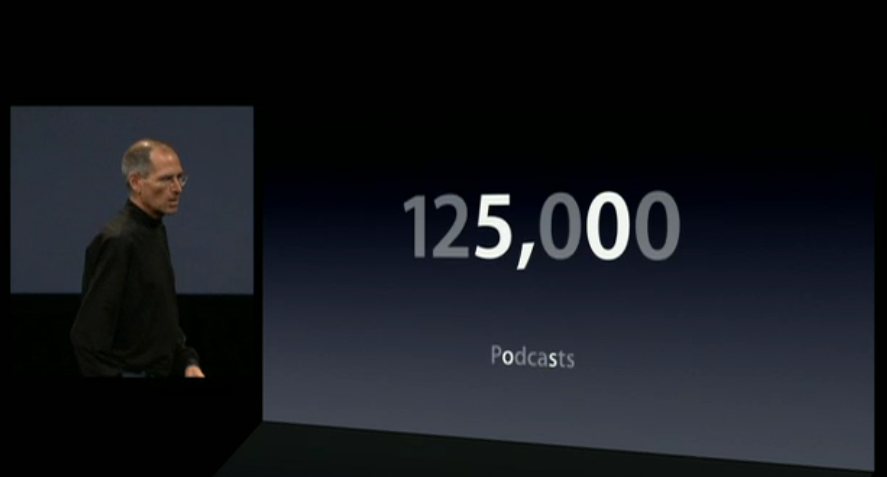
In fact, we now see a new text image: 125,000 Podcasts. But notice how the “5” and the “0” in 125,000, and the “o” and “s” in Podcasts are brighter, having remained from the previous text (8,500,000 songs). What an interesting transition, and I’m going to be curious to see when to use it in my own slide creations when I get my hands on this version of Keynote. And what the development team have called this effect!

Moving along… a “flip and hang” transition

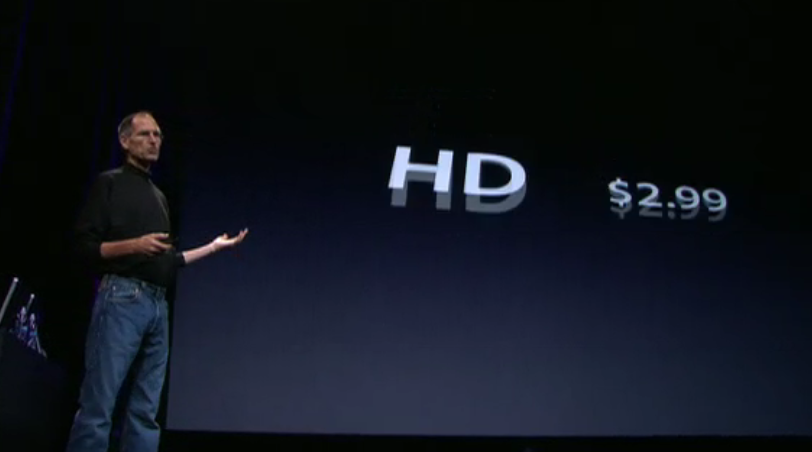
In the next new transition, we start at the point where Steve is discussing the pricing of Standard Definition (SD) television shows (priced at $1.99) and how iTunes 8 will also now support High Definition (HD) at $2.99.

Here’s how we move from one price point to the other. We start with SD:

Notice in the next image a moment later how the price starts to flip upwards:

… and in the next slide, as it flips right over, it and the letters “SD” are being replaced by the $2.99, and the HD letters:

But in the next slide, below, we see the fun element. The “HD” has now appeared but the price $2.99 is still flipping around on a different time basis. Again, another transition that captures the gaze.
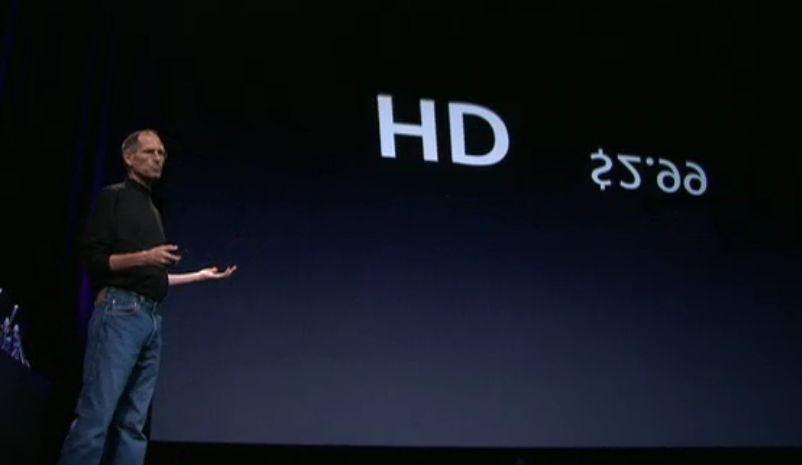
And in the next slide both HD and $2.99 rock on their horizontal axes – quite an unusual yet strangely familiar effect.
Next: Follow the bouncing hoola-hoop

One of the things I teach in my Presentation Magic classes is how to draw the eye to specific locations on the slide. There are any number of reasons for doing this, and any number of ways. Most presenters are utterly lazy and use those awful laser pointers to circle or point to something on the slide. Most times, it looks as if they have early onset Parkinson’s Disease because it’s very difficult to hold the pointer steady, and drawing circles around specific areas is usually of little help.

My preferred solution is to know ahead of time, when you prepare your slides, just what on the slide you want your audience to look for. You can state it: “Now, of you notice this column in the spreadsheet” or “Let’s take a closer look at this aeroplane’s engine exhaust”. Or, you can either circle these areas with a shape outline, or grey out the areas around the target location, leaving the target the only object in full colour or you can cut out the target, enlarge it, and bring it forward over a fuzzy background image. These are but two ways of drawing the audience’s eye where you want it to go.

In the slide sequence below, we see that Keynote’s developers have attended to this and we get a new way, probably one of several, to highlight a specific area of a slide. We start with the iTunes interface once more:

In the next moment, at the bottom left corner, we see a purple circle emerge – it actually bounces onto the slide from the left:
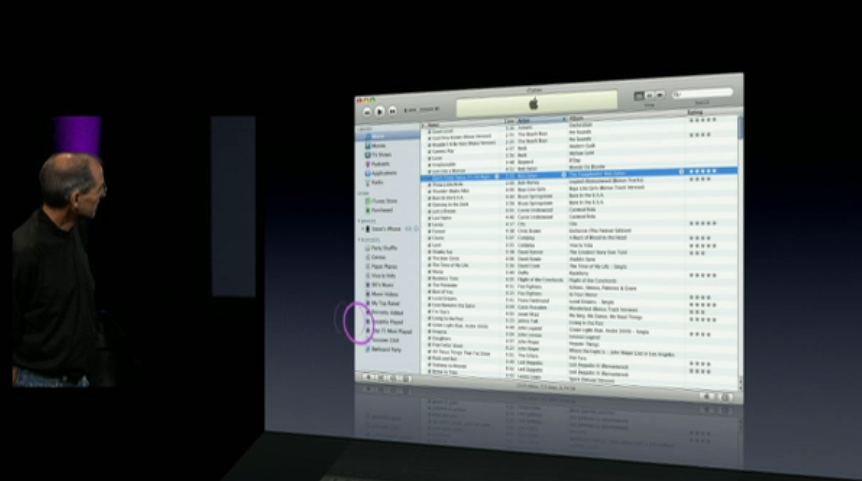
… and like a demented and distorting hula hoop keeps bouncing over to the right:

…bouncing and rolling…

… almost there…

… until fully formed as a circle, it highlights the new “Genius” icon in iTunes 8:
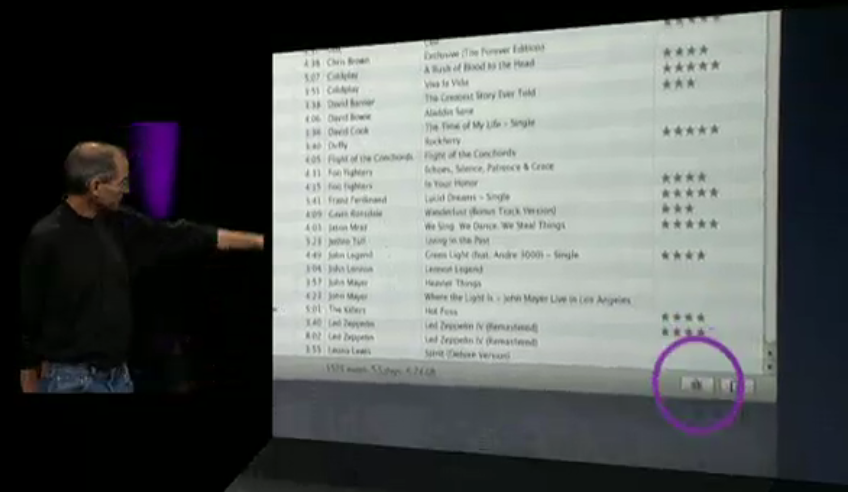
I’m guessing this is just one of a few new ways Keynote will allow you to highlight various aspects of a slide, and I am guessing its developers have been looking closely at how some of us have been using Keynote’s abilities and both making it easier for us (less clicks) as well adding features from their own imaginations.

Such as this graph below, which shows the “rock solid” growth of iPod sales. So why not use a slab of rock to drive home the point?

Jobs reaches the end of the new Nano announcements with a replication of the “screen gems” effect but its orientation is vertical, whereas at the beginning of the keynote it was horizontal. Let’s see. We start with the new Nano:
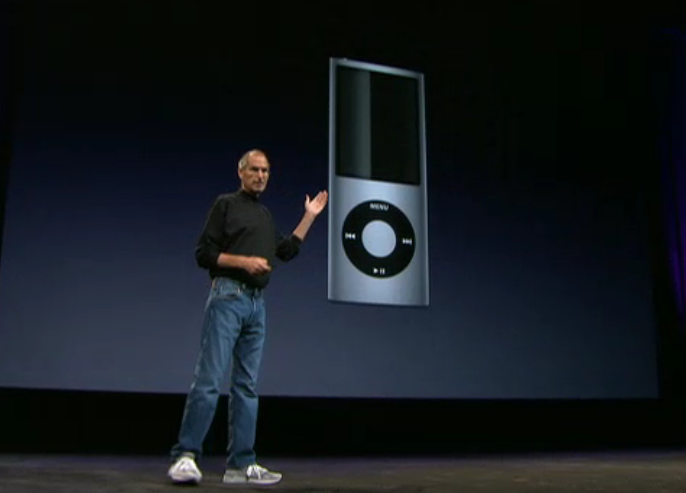
And with the curviness of the new screen, it’s a no brainer to “highlight” it:

… drawing attention to its new appearance, now added to by movement of the “screen gems”:

… which really gets the eye’s attention:

Were there other new effects I missed?

Well, I kind of got the feeling that one of my wishes for Keynote came true: A Ken Burns’ effect where one could enlarge and pan across the slide, dropping down onto a section to highlight. But perhaps I was only seeing things, and it was the camera videoing the keynote that was performing this effect.

Yet perhaps….

In any case, out of all this rather obsessional Keynote watching, comes the renewed belief that we are in for a Keynote upgrade, hopefully way before Macworld, so I can incorporate its new effects in my two-day workshop, shortly to be announced by IDG/Macworld.

I’ll write more about this in the next few weeks as the Conference starts to shape up, and perhaps the Keynote community can share with me some of their desires for Keynote. I have a strong suspicion the Keynote team at Apple will be listening closely to our ideas for how to further improve Keynote, and help it to help us elicit more creativity and less boredom in our audiences.

Are my Keynotes killing Hollywood’s senior actors?

Those of you who’ve been following my treatises on presenting or who have attended a workshop I’ve conducted on presentation skills, will know the emphasis I place on story telling.

I’m certainly not alone in this endeavour, and others like the Heath brothers have talked about the importance of story telling in their recent book, Made To Stick.

I’m always trying in my workshops to come up with new ways to persuade people of the importance of letting each slide become part of the overall story you’re telling, be it to sell ideas or goods, educate and inform, or brief an audience on your current research. And that each slide in its own way has a story to tell, or at least assist you to tell.

At Macworld 2008 where I presented on presentation skills (evaluation form available if you want to see it courtesy of IDG Macworld), I had planned to introduce a few new slides to illustrate to the audience, by involving them in a “theatre of the mind” activity, just how important story telling is in our world.

But I pulled the slides the night before because of worries over copyright, once I knew my presentation would be recorded. They were to be clips from well-known movies which were to illustrate my point, but being unsure of what constituted “fair use” in the USA I pulled the slides.

Later in Australia only a few days after returning from the US, and with no possibility of my all day workshop being videod, I included the slides, to great effect.

Here’s what I was trying to do.

Over several slides, I showed excerpts from films important to me, covering more than 40 years of filmgoing. Some of the actors in the clips were still alive, some had already passed on.

Not all in the workshop knew all the films, but most had seen some of them, enough to get my central idea of the importance of story telling.

I chose clips which were film highlights, perhaps even passing into common speech. But for this audience of mental health specialists, I let them know these clips told a lot about me, the presenter, because of what they all had in common. These clips illustrated not just memorable scenes, but collectively, they represented a peak in the story arc, an “Oh my gosh” moment where the story zagged into new narrative territory. These are scenes you wait to see again, even if you’ve seen the film many times. They are an emotional highlight.

Let me illustrate with some stills from the movies:

1. In the Heat of the Night (1967) – Sydney Poitier

\

Martin Luther King was still campaigning for human rights when this Academy Award winning film was released.

In this classic scene, Sydney Poitier is confronted by a Mississippi small town police chief, played by the late Rod Steiger. An industrialist bullding a new plant has been found murdered in the small hours of the morning, and Poitier has been taken in for questioning having been found waiting in the train station by Steiger’s deputy, and with more than a hundred dollars in his wallet. (This is 1967 after all).

Aggressively questioned by Steiger (who thinks he’s got his murderer standing in front of him) about where he got the money, Poitier tells him he earnt it, only to be rebutted with “Colour can’t earn that kind of money.” Asked what work he does to earn the hundreds of dollars now on the table, Poitier responds, “I’m a police officer!” Soon enough, Steiger discovers that not only is Poitier a “colleague” but he is Philadelphia’s finest homicide detective.

Later, after he’s seconded to the case against his own wishes, Poitier doesn’t hand over some FBI lab evidence he’s sent for. Steiger makes fun of his first name, Virgil. “Now that’s a funny kind of name for a nigger boy that comes from Philadelphia. What do they call you up there?”

To which Poitier replies with a phrase that becomes the title of a follow up movie, “They call me Mister Tibbs!”

2. Planet of the Apes (1968) – Charlton Heston

\

A year later, the first of a franchise of science fiction films featuring the evolution of man to ape began when Chartlon Heston landed on a planet where the apes ruled, and humans were mute and experimented upon.

In one scene, Heston, playing astronaut George Taylor, is captured and taken to the centre of an adobe village where he is taunted by the local adolescent chimps. Mauled once too often, he screams to an astonished crowd, “Take your stinking paws off me, you damned dirty ape!”

But the scene I included comes at the very end of the film, where Taylor (Heston) has captured the Minister for Science, Professor Zaius, whom he thinks knows the answers to how the planet is the way it is, with simians running the show.

On horseback, armed with his rifle (of course), and local female companion, Nova, he confronts Zaius for the last time:

George Taylor: A planet where apes evolved from men? There’s got to be an answer.

Dr. Zaius: Don’t look for it, Taylor. You may not like what you find.

A minute or so later, as Taylor rides along the shoreline, he confronts the explanation for the planet’s situation. (I won’t spoil it for those who haven’t seen it).

3. Jaws (1975) – Roy Scheider

\

Several years later, Steven Spielberg took a rather unknown novel and turned it into box office gold, keeping people away from beaches for years.

In the scene I’ve chosen, the fish hasn’t been sighted, his presence known to the audience by a musical phrase which must be one of the best known after the opening sequence of Beethoven’s 5th symphony. Scheider, playing a small town police chief joins old shark hunter Robert Shaw and young rich scholar of things fishy, Richard Dreyfuss, out in open waters to hunt the shark down.

In the setup to the scene, Shaw is quietly repairing fishing nets, Dreyfus is playing solitaire on the deck, while Scheider is “chumming”, throwing out offal to attract the beast. When he does, he and the audience share in the frightening moment, with Scheider slowly backing into the cabin, not taking his eyes from the ocean, before uttering the words, “You’re gonna need a bigger boat!”

4. Capricorn One (1978) – Sam Waterston

Almost ten years after the first manned landing on the moon, the general public had become a little jaundiced with NASA’s continuing Apollo launches. Mind you, some had put forward conspiracy theories that the landings were all faked, so taking this as a story plot, Peter Hyam’s film constructs a manned mission to Mars. But NASA’s budget has been cut to the bone, and so its director, played by Hal Holbrook, sets up an elaborate scheme to fake a landing and safe return, expecting the three man crew, played by James Brolin, O.J. Simpson and Sam Waterston to go along with the plan, for the good of the company.

When Holbrook suspects Brolin’s character, Colonel Brubaker, will not keep the secret, he unrolls plan B which will see the astronauts disappear. Breaking out from their desert-based Mars simulation, the astronauts escape in a sleek Learjet, only to crash land it in the desert when it runs out of fuel.

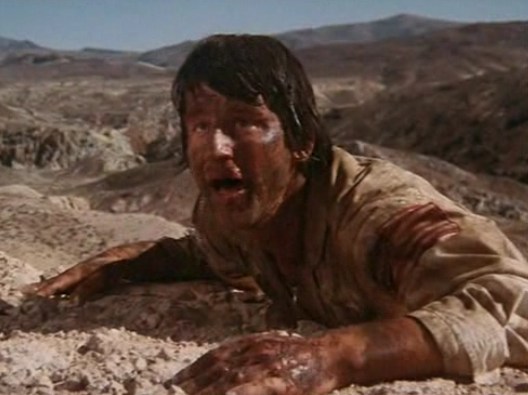
Each astronaut goes their separate ways according to the compass in the hope that one of them will make it back to tell their story. O.J. is captured first, while Waterston finds that his chosen direction takes him to a huge outcropping he’s got to climb. Exhausted and dehydrated, he begins the climb, telling himself a joke in the form of a long-winded story about how to to gently break bad news. As he reaches the punchline and the outcropping’s peak, he looks over the edge, only to find…

I won’t spoil it for you, but the camera pulls back from Waterston’s character and we get to see what he has just seen… and we know then that Brolin will soon become the last man standing.

An irony in the film is that Brolin’s character is eventually rescued by a journalist played by Elliot Gould who has been suspicious all long. Do you know the connection in real life between Brolin and Gould? (Hint: She’s a rather funny girl).

5. History of the World – Part 1 (1981) – Mel Brooks

...these fifteen.. oy..ten commandments

I had planned to show a scene from this film to 120 lawyers at a professional meeting on teaching presentation skills… but I chickened out. I was running short of time, having condensed a day’s workshop into an hour’s presentation, so decided to discard this sequence.

I wanted to draw the lawyers’ attention to man-made commandments when it comes to slides, especially the ones that say “follow the 6 x 6″ rule, no more than six lines per slide, with no more than six words per slide.”

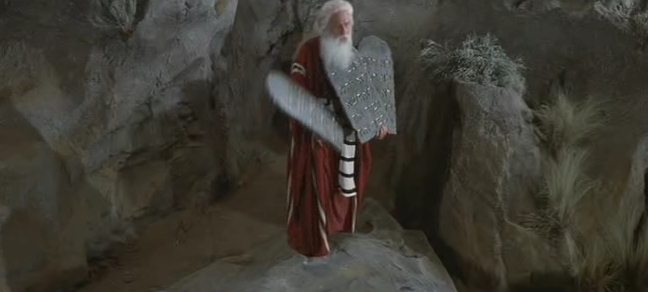
I wanted to say that presenters follow this mantra as if it was a commandment, but it’s a hoax, with no evidence to support it. In the film clip, Moses, played by Mel Brooks come down from Mt. Sinai carrying three tablets, of five commandments each.

But as he speaks, he drops one: “Here are the fifteen (drop, crash).. oy… ten commendments the lord gives us.”

I wanted the audience to equate this humorous piece with challenging “laws” of presenting which have no foundation.

And so, in my workshops where I use these clips, I ask participants to share with their neighbours films like these that have them pausing to watch and wait for their favourite scene, to emphasise the power of story telling, and how it’s so important to acknowledge when presenting.

Oh, and the title of this blog entry? A few weeks after I presented this workshop, Roy Scheider from Jaws died, then a few weeks later after another presentation, Charlton Heston died. I am hoping like crazy I haven’t put the mozz on any surviving actors in my slides.

UPDATE: September 28, 2008 – I had thought of including the famous scene in “Cool Hand Luke” where the prison superintendent, played by Strother Martin, says “What we have here is a failure to communicate.”

Strother Martin let's Paul Newman know of a failure to comminicate.

Strother Martin lets Paul Newman know of a "failure to communicate".

I include mention of it in this update to honour the passing of a true acting mensch, Paul Newman, on September 26.

What are your favourite scenes you would use if you were running a workshop like mine?

It’s time for a change! Welcome to Presentation Magic…

After several years using Blogwavestudio as my blogging software, and housing my presentation thoughts on my Cyberpsych blog, it’s time for a change.

Actually the change was foistered on me, after my seemingly indestructible Powerbook G4 (c.2004) got a cracked screen courtesy of your’s truly, and Blogwavestudio couldn’t make the transition from a PPC to an Intel-based Mac. It didn’t help either that the software developers, from Korea, were nowhere to be found.

Blogwavestudio was hardware-bound: I had to have my Mac with me to blog and publish. Sure, I could write an entry then wait to get to the Powerbook and transfer it. But that was tedious, and with the iPhone due for launch in Australia sometime this year, the invitation to blog at will is likely to prove too strong. I can’t tell you how many blog entries I’ve developed on train trips, or while waiting for someone, and not had the opportunity to publish it almost immediately… in which case, it vanishes.

With WordPress, I’m hoping to blog more often, and enable a better comments system to run, as well as Web 2.0 features like tags, categories, and other social networking possibilities.

Why the title “Presentation Magic”?

Well, this was the name given to my presentation on using Apple’s Keynote at Macworld 2008 by Paul Kent, Macworld’s Director. This was my first time at Macworld at it came at Paul’s invitation, as he was a reader of my Cyberpsych blog which covered things Apple as well as presentations.

The actual presentation I gave went over well, and I’m hoping to return to the US this year to offer more presentations and training for those ready to change the way they present.

The “magic” in the title doesn’t refer to doing extraordinary things with Keynote or Powerpoint. It more refers to how magic is an important part of human life, something that both entertains, intrigues, confuses, and persuades us. All things that presentations are capable of performing.

As a psychologist, I have always been interested in illusions and how humans can be fooled. In my clinical work, patients are often “fooled” by the messages their bodies send them, and perceive danger where it doesn’t exist, thus narrowing their opportunities.

Good presentations are effective by understanding how the human mind works, and strive to use current knowledge of the cognitive sciences to help audiences understand complex messages.

More than ever, audiences are being bombarded with presentations which are presenter-focussed. Magicians are always audience-focussed, knowing how audiences function and surprising them when their misdirection leads to an “aha!” moment.

The audience doesn’t really care how you pulled off your magic, they just want to be entertained. Professional audiences who have come along to be educated, and wish to leave knowing more than what they knew beforehand, aren’t interested in how you performed your magic (ie., animations, transitions, etc). That might interest those in the audience who too are presenters. But the special effects are there as augmenters of the presenter’s knowledge base, to help him or her transfer knowledge in the simplest and easiest manner. Easy for the audience that is, often hard for the presenter, as they need to be creative, well-rehearsed, and of course, knowledgeable of the subject at hand.

That’s why good presenters are paid well, get invited back, and are sought for training: their talents are in short supply!

In the next few months, I’ll be elaborating on my presentation ideas, keeping this blog updated frequently as new ideas come to mind, and I give presentations and use the blog as a journal to debrief myself. I expect you’ll learn heaps as you read the articles.

But be aware that many of the ideas you’ll read are quite subversive, and you may not be able to present in your usual fashion once the ideas penetrate possibly years of traditional presentation giving. Certainly, that’s the feedback I get after people have seen me present about presenting: Doing the walk and the talk at the same time is profoundly interfering to how most people present currently.