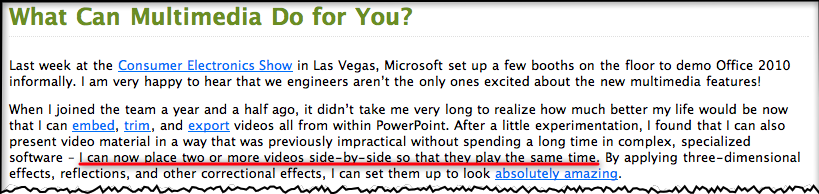
The official Powerpoint 2010 blog today made an exciting announcement regarding how Powerpoint will handle video in the future. Here’s a screenshot below (I’ve added the red underline to draw your attention to the money quote, click to enlarge):
Because Powerpoint 2010 will take advantage of hardware acceleration and DirectX9.0, you no longer need to use auxiliary software like Windows Media Player to play videos on a slide. If you’re a Apple Keynote user, you’ll know that since it was released in 2003, seven years ago, it’s had superb video handling capabilities even on old G4 Powerbooks. It’s because Steve Jobs wanted it to have “cinematic” properties, in addition to very fine text rendering.
In 2006, shortly after Keynote 3 was released, and when Powerpoint 2003 was still the current version, I created a Keynote slide for a presentation I was giving to challenge Powerpoint’s dominance of the presentation market place. I was particularly enamoured of Keynote’s video handling abilities while Powerpoint struggled with it, keeping its users from truly becoming creative and keeping them to awfully pixelated images and multi-step complicated management of video placement on slides (as the Powerpoint blog states above).
The video below is one I created today using that old 2006 Keynote 3 slide, playing in Keynote 5 on my MacBook Pro (2008). As I explain, you’ll see nine videos with sound playing simultaneously, all on the one slide, all timed to come in one after the other automatically. The video is a little on the dark side because I’m using a data projector to show the Keynote slide, while simultaneously using the Macbook Pro’s built-in iSight camera to create a Quicktime Pro movie (actually an mp4). So the poor Macbook’s doing double time!
So while the Powerpoint crowd can whoop it up today (and it really is an important change for that crowd and hopefully means we’ll see more creativity emerge from the average user), those in the Keynote community will be looking forward to update announcements for Keynote to be made very soon, truly making it the presentation software of choice for those who value creativity in their presenting.
(Before you watch the video below, keep in mind I created it to be watched in YouTube so I give an introduction first. The money shot starts around 4’20” in after I setup verbally what I’m doing and why!)
With the extra spare time due to the summer break here in Australia (things get busy again next week), I have been experiencing a “Perfect Storm” of blogging: Intense interest in things electronic via CES 2010 (now history), the headiness of a major Apple product revolution that even has sceptics agreeing something big this way cometh January 27, and of course thinking and preparing for my Macworld trip in a month’s time.
It will be an intense two weeks away, with several days at Macworld for a Presentation Magic Powertools workshop the second week of February, a folk dance camp in Palm Spring immediately after (where TEDActive is also occurring), then a Presentation Magic seminar for the Psych Department at USC, back to San Francisco for a visit to Apple for a presentation the day after, then a three day conference in San Francisco on Smarter Brains and Improving IQ.
I’ll also be leaving on the first anniversary of catastrophic bushfires in my state where 170 people died, and for which a Royal Commission is being held into how the disaster was managed. I was involved as a Personal Team Leader for the Australian Red Cross working in the days and weeks after with victims and survivors of the fires, as well as trying to match reports of missing people with those who had made the reports, to see if there were people still missing. With last night being the hottest on record (36C) there are fires again today in the State.
If I can pull all these activities together into a theme, it’s one of diversity and continuing learning experiences, where I take what I have learnt in the past, and place myself in a position of “not knowing” yet finding ways of applying my knowledge in new situations with new populations.
I remember working in a Red Cross welfare centre 150km from Melbourne not far from the fires where people would gather to seek safety, food, shelter, and clothing, as well as seek out their neighbours, friends and family who had “gone missing”. In addition to comforting them, my task was to supervise other workers to take down details of the people attending and those being reported missing. We were setting up lists that were then faxed to Red Cross headquarters in Melbourne where 24/7 workers sitting in front of PCs would enter the faxed data sheets into a database, so that if people turned up at my or other rescue centres, they could be crossed off the list of being safe, and added to lists of those who might need follow-up for both material and psychological aid.
As I think about it (I’ve been invited to attend a further training session in preparation for anniversary effects) I’m left wondering how a 3G/Wifi Apple tablet could have helped us out, taking pictures of those who attended, using face matching as we can in iPhoto to match up with pictures of those presumed missing, and directly placing survivor details into the database. I’m fairly sure hours went by when PC operators were swamped with faxes.
If I think now about the training I expect to offer at Macworld, the task will be to offer a theory of presenting based on cognitive and affective neuroscience, basic design principles, commonly seen effects for text and visuals in the movies, on television and on the web as models for driving Apple’s Keynote, and of course, exploring Keynote’s functions and operations in order to achieve the best exposition of my theories of presenting.
I’ll also be referring to various texts which I’ll also be giving away as prizes (I think everyone enrolled will probably get one book!). One will look at iWork 09, and give a section by section breakdown of Keynote’s features, while others will offer considerations of design principles including slide makeovers, as well as examples of good presentation technique. For that, I’ll also use my own and TED videos for the good to excellent and downloaded Powerpoints for the bad to really horrible.
If I think abut the books, they are all good in their respective endeavours of enlightening readers. But by necessity, they are static examples of what is really a dynamic human activity. Moreover, as much as reading about, or seeing screenshots of Keynote’s Inspector or font menu is useful, it can’t really compare with watching someone take you step by step through the process of using Keynote’s facilities, then seeing the interim, then end product.
To my knowledge, there is no book yet on the market that really tells you how to use something like Keynote and think about how to use design principles such as Garr Reynold’s new book contains (Garr is giving me some of his books as prizes of course!) Garr’s book like many others tries to be platform-agnostic and thus broaden readership. Powerpoint keeps improving but as long as its major settings for its use are academia, the military and the enterprise, Garr’s book could be included with the next version (due for release in June) but improvements in presenting with Powerpoint would still happen very slowly. (Previous criticisms of Garr’s approach with respect to scientific data has been addressed, and I certainly give this aspect close attention in all my workshops).
In fact, given the nature of the subject, can a book accomplish these two tasks? Can a book help you choose an animation, or build or transition for your particular subject matter and let you see the various effects possible. I know of this difficulty given each time Steve Jobs presents at an Apple keynote, I (and others) watch very closely for any new Keynote effects and designs. When I spot them, I can’t show a video on my blog for copyright reasons, but I can show screenshots of the builds or transitions in action. Not a very satisfactory method, but it’s the only way to show the new effects until I get my hands on the update and can use it myself.
So if one of the functions of the tablet will be to deliver reading material, as many have suggested will be the case, why not show how to use Keynote’s feature set while describing why one is creating certain effects. I already do a little of this on this blog, uploading screencasts of my Keynote files to YouTube for display here. It’s clumsy however, requiring a fair amount of effort for a few minutes. Not that I’m against that of course, if you’ve been reading this blog, since I know how much effort is required for great presentations. But we’re talking here of cutting down on multiple clicks, a centrepiece of Apple functioning.
I’d like the tablet to enable me to use a tabletised iWork to help me create a book form of my Presentation Magic workshop, Pages for assembling the text and layout and Keynote for demonstration purposes. Hopefully, the tablet will have some way of recording screen activity, much like the iPhone allows for static screenshots.
Then I can assemble my book, with my text in place, my demoes including how I setup each slide, and what the final output will look and sound like. I can include hotlinks to sites like iStockphoto for photos and movies, and other sites for audio files, as well as newspapers and journals for headlines and abstracts I wish to show.
The idea of using videos to demonstrate science journal writing already exists in the Journal of Visualised Experiments which shows viewers how the experimenters performed their tasks, the equipment and questionnaires they used, and the interpretation of the data. Take a look at this publication about using biofeedback in working with anxiety (screenshot below).
I’m going to guess the first of “augmented book” you’ll see, hear and read on the Apple tablet will be Apple’s own tablet manual, guiding you through a hands-on demonstration of its wares, with videod commentary and feedback about how you’re doing. This will be terribly important if the tablet does in fact include something of a learning curve for a new interface.
It kind of reminds me of the first few days I spent with my first Mac, a Mac Plus in 1990. I used the included floppy discs which taught you mouse functions, like clicking and dragging, as well as how to resize windows and use the drop-down menus. I vividly remember having dreams of mousing around with the Mac and then spending hours the next day practising how to manage this new interface, so different was it from my previous experiences, using mainframes, PDP-11s and Tandy TRS-80s.
I’m going to guess it will be the same twenty years later, such will be the change in input method. I can hardly wait this time however to write my own tabletised book complete with Keynote demoes. No more need to include CD or DVD samplers in the backs of books to demo what your chapters are trying to illustrate with words and static pictures.
Did you catch the CES keynote delivered by Microsoft CEO, Steve Ballmer during the week?
In the last few years, Microsoft has been the kick-off keynote at CES, with many looking forward to see what it has to offer for the year to come. Bill Gates of course did several of them, and the world’s richest man was always a drawcard. He was not a great speaker, and his slides were not what you could call inspired, as I have described on a blog entry from a few years ago. (At TED recently, he has obviously been coached in terms of slide design and presentation skill).
When Steve Ballmer took the reins as CEO, he too became the first keynoter at CES, showcasing Microsoft’s wares in terms of software and hardware, usually giving time and space to OEM partners like Hewlett-Packard.
This year was no different, and rumours that Ballmer might show a much-rumoured tablet called “Courier” raised temperatures a little, even if they didn’t reach the fever-pitch Apple’s alleged tablet created.
When Apple makes it known that it will be holding a “special event”, speculation begins and builds huge expectations. There are many reasons to wait in anticipation of an Apple keynote:
1. Will Steve Jobs be the primary speaker (and how will his health appear)?
2. What new products will be shown?
3. Will these products be updates to existing ones, or will Apple introduce a new genre, taking something familiar and turning it on its head? And when will they become available?
4. Will Steve Jobs perform his keynote using an updated version of Apple’s presentation software, Keynote?
5. Will it be confirmed, yet again, that he is one of the world’s great presenters and speakers, worthy of emulation?
Steve Jobs regularly makes lists of admired presenters, with many attempting to emulate his style, often not successfully. Probably the worst attempt to “channel” Jobs was Facebook’s Mark Zuckerberg’s 2007 F8 performance.
His performance was contrived and stilted, leaving those who had been comparing him to Steve Jobs at the same age a little embarrassed. He’s a smart cookie, but somewhat shy which shows in his presentations and interviews. Search YouTube for his many interviews.
One person who has taken more than a passing glance at Jobs’ presentation style as one to emulate is California-based Carmine Gallo, who maintains a BusinessWeek blog here.
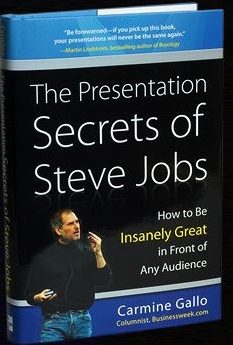
Last year, he wrote a very popular column which then became a best selling book deconstructing Jobs’ presentation skills.
Here’s the book cover for Carmine’s publication, which he has kindly allowed me to offer as a prize during my Presentation Magic workshop at Macworld next month.
While many including myself have discussed Jobs’ presentations, Carmine’s is the first in book form, and which allows him to personalise, through Jobs, his own long-considered thoughts on how CEOs in particular ought to present ideas, concepts, services and products.
It’s hard to put a value on how much these presentations add to the acceptance at first blush of Apple’s product announcements, but it should be added that not all Apple Keynotes showing new products see Apple’s share price rise.
Quite often they fall, due to the extraordinary hype and expectations leading up to the keynote, and the disappointment sometimes experienced by financial commentators.
This past week, this fall occurred to both Microsoft and Hewlett-Packard after Steve Ballmer took the CES stage and showed an H-P tablet powered by Windows 7.
In the months prior to CES, the rumour mill had struck up a conversation about the “Courier” tablet. Take a look at this supposed leak reported by Gizmodo here.
Long time observers of Microsoft have become very aware of its capacity to hype “vapourware”, but there had been high hopes that Steve Ballmer would discuss Courier, what with an Apple tablet seemingly on its way. When a regular H-P tablet running Windows 7 was displayed, the disappointment was palpable, and widely reported in mainstream media and unforgiving blogs.
But there is more to it than the product. There is something about how Ballmer presented at CES that draws a comparison to Jobs, for those interested in presentation skills.
You can watch the official Microsoft stream of CES 2010 here, but for now watch this audience-generated YouTube version below (be aware of cuts between views of the stage and projector-based close-ups):
There are also numerous CES 2009 Microsoft keynotes with Ballmer you can view on YouTube so that you don’t think 2010 is the exception, because it’s not.
But if we keep ourselves to the keynote just past, there are a number of contrasts with Steve Jobs to offer, some of which might help readers with their own presentations.
1. Despite his avuncular appearance, Ballmer is more Phil Schiller than Steve Jobs. Which means his overt cudliness doesn’t translate into emotional warmth. As with Schiller, (I have attended a Schiller and a Jobs Macworld Expo keynote, but not a Ballmer one) I feel like he’s talking, even shouting, at me. Despite what has been written about his interpersonal style one-on-one, Jobs’ on stage persona exudes warmth, approachability, and yes, friendliness. You feel he’s holding a conversation with you, even when he’s in front of a 5,000-strong audience.
2. On stage, Ballmer reminds us that “once a salesman, always a salesman”. Both Jobs and Ballmer talk up their companies’ financial success in the year just gone, but Jobs chooses to illustrate his review, while Ballmer just tells me. But more conspicuously while both overuse hyperbole – “it’s perfect vs. we couldn’t be happy” – I never lose sight I’m in the presence of a salesman with Ballmer. That’s fine for some audiences, especially inhouse, but when you’re being broadcast to millions around the world, you need more than being a “Mad Man”, you need to convey a vision for the future, where these products will take me.
Perhaps because the tablets and devices (other than gaming) he was showing were made by others, powered by MS software, there was limited ownership of what the product was going to do for me. With Jobs, whose Apple owns the whole widget, you get the feeling the company has thought through a vision for their technologies and how they will be used. These aren’t Ballmer faults per se, but for a CES keynote you want more than just a few warmed over products (as they have been described) to excite the masses.
3. Ballmer tells no stories, just sales pitches. It’s the proverbial solution in search of a problem. As Gallo points out, when Jobs introduced the iPhone, when many had said Apple should stick to computers and not enter “a mature” technology domain of mobile telephony, Jobs set up the usual suspects (Nokia, Sony, Motorola etc) as antagonists, then brought in the iPhone as a hero who would save us from complicated, incomplete and limited solution devices. He offered a solution to a problem we didn’t know we had, a mantra for Apple if ever I heard one.
4. Probably the least happy part of the CES 2010 keynote (apart from the very lame Seth Myers videos) was how Ballmer demoed the HP tablet. If he didn’t already know that there would be widespread disappointment that the Courier would not be discussed and the H-P would be a poor substitute, he showed an 18 second demo from H-P which told me nothing. See it below:
Yawn-worthy, and the tech mags have paid out heaps on Ballmer for this…
But then he picks it up, holds it in front of his tummy so he has to bend his bald pate down to see what he’s doing upside down, and fumbles the demo. How hard would it be to hold it out in space, let us see its form factor (remember how Jobs demoed the MacBook Air?) and operate it away from his body in its own space? Or move himself to a lounge chair and simulate how an end user might work with it (it’d look warm too), while a camera on stage offered close ups. This was a big mistake, and suggests a combination of lack of rehearsal and feedback from others.
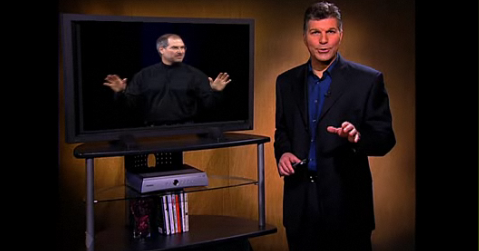
5. There are some awkward moments on stage when Ballmer is joined by a colleague doing another demo. Ballmer hangs about on stage, hands on hips watching close up, or looking around (below). What’s with that?
Then he invites his colleague to walk across the stage for another demo, which invokes the classic comedy routine, “Walk this way“, (below).
Watch how Jobs works with colleagues and guests on stage. He greets them with a handshake, hands them the clicker, and leaves the stage! He doesn’t crowd them, nor have them hanging around looking limp, but either gets out of their way, or interacts with them, as in his comical interactions with Schiller. In other words, he is generous on stage, helping his colleagues look good (even when they may know they can’t compete with his presentation skills). Take a look at this Apple Keynote video compilation where Jobs is working with the CEO of Sony Japan who is almost incomprehensible on stage and see for yourself. (Advance to 1’15”)
6. Finally, within a few minutes of opening his Keynote, Ballmer disempowers himself by giving centre stage to the previously-mentioned Seth Meyers clips (left) which are unfunny and don’t lend itself to a visionary experience to come.
When Jobs shows clips they usually feature his own team and how they came to conceive and build an Apple product or service, professionally delivered and not playing for cheap laughs. They excite us about the product, showing us what exists below the simple, shiny surface demonstrating the amount of thought which has gone into the product.
You can bet we will see this when Apple unveils its tablet. Rather than a few stingy minutes spent in a poorly conceived demo, we will be left with a sense of awe and desire for the tablet. That feeling may pass in the hours and days that will pass, only to be invoked once more when we pick up the object of our desires in our own hands.
Is there a way out for Ballmer, so that we don’t see a re-occurrence of these presentation foibles at future CES conventions?
Yes. I’ve just been sent a book by Steve Jobs himself, inspired by what Carmine Gallo wrote about him. It’s a one of only two so far produced (the other one was sent direct to Redmond). Let’s hope that a PDF of it is created, as well as Powerpoint slides given away free embedded in Office 2010 when it’s released in June.
Three years ago, speculation was rife that Apple would release a mobile phone at Macworld 2007. Apple kept shtum, admitting nothing publicly but as history now show, a chosen few got their hands on the iPhone ahead of its release under NDAs.
I wrote about it then on my now-orphaned Cyberpsych blog, not ready to accept it was actually coming, but predicting if it did arrive, it would contain all the hallmarks of Apple product design we’ve become familiar with over the years, especially since Jobs returned in 1997.
During December especially, with Macworld 2007 being the first week of the new year, the rumours and “confirmations” mounted daily, and now in 2010, in feels like deja vu all over again.
Another landmark product, which as Jobs showed with the iPhone gives Apple a further opportunity to introduce the next interface (r)evolution to the masses, is my prediction, despite commentaries asking why we need another tablet (Joe Wilcox, don’t hold Apple to Microsoft’s product standards and marketing).
If you’ve been watching Apple for the last decade or so, or at least kept up your observation at a distance of how Jobs operates, you’ll know his design mantra centres on bringing complex engineering feats within the reach of ordinary users who don’r need degrees in rocket science to manage. This kind of exactness of execution and attention to detail can’t be achieved at the cut throat prices Apple’s apparent competitors sell their wares for. I say apparent because Apple and say Dell or HP sell computers with much the same internals. Where they differ is:
1. Design
2. Packaging
3. Marketing
4. Operating System software
5. Point of sale experience, Price and After purchase experience.
For some people, price is all that counts, which is how Microsoft’s most recent advertising using “real” buyers pitched its cause, even acknowledging the coolness of Apple’s products. The coolness factor is meaningless for many, perhaps even a turn off, and as long as the specs. appear much the same, the experience ought to be as well, no?
Er, no. It’s like saying because two presenters use slideware their presentations will be equally satisfying or effective. As if.
So when it comes to an Apple tablet don’t expect just another interface that we’ve already experienced. It’s not the Jobs’ way. Whether it brings with it a new tactile feedback device for both keyboard and object manipulation – such as application “windows” , flicking pinballs in various games, underlining or highlighting words on a page, and turning that page or chapter with the flick of a finger or two which feels like a flick – it will likely exceed what we’ve seen in the iPhone. It gave us visual and auditory feedback, rather than haptic as has been mooted for the tablet.
But if history is to repeat itself – yes, early adopters will pay a special Apple tax – it won’t be the design alone that will win hearts and minds, and have competitors scratching their heads dreaming of counterattacks (apart from suing Apple for alleged patent infringement). As we saw with the iPhone, it’ll be the software. Not just the operating system software, perhaps iPhone OS 4.0, but what the software will allow in terms of Apps. I fully expect a chosen few app. developers will demonstrate their special versions of existing iPhone apps. as well as new ones specifically designed for the tablet. And I further expect companies fully immersed in the enterprise setting in a very big way to show both hardware and software developments which could only be constructed for the tablet. I’m thinking here of medical applications, already utilising tablet configurations for data storage, but which will really come of age with the Apple tablet’s OS and feature set.
I have no insider information, but I will not be surprised if Apple released its own homebrew set of apps for the creative set, in particular versions of iLife and iWork which will enable users to create endproducts which will somehow be compatible with desktop versions of iLife/iWork.
Let’s think of Pages for a moment, with its dual functions as word processing and desktop publisher. What if Apple provided you with all the necessary tools to create your own book, upload it to the new version of iTunes which will be released the same day as the tablet, and be a saleable item – yep, Apple takes 30%, you get 70%.
Talk about cutting out the middle man, the publishers of expensive textbooks, magazines, and novels! There may be a new industry of for-hire editors to help shape it up, deals with sites like iStockphoto to enable you to fill your book with royalty-paid illustrations (or perhaps help you find specialist illustrators who can also show their wares on a new iTunes store), and even the opportunity to add music to your publication from the iTunes store. Apple will take of royalties for the music publisher in one easy and attractive arrangement.
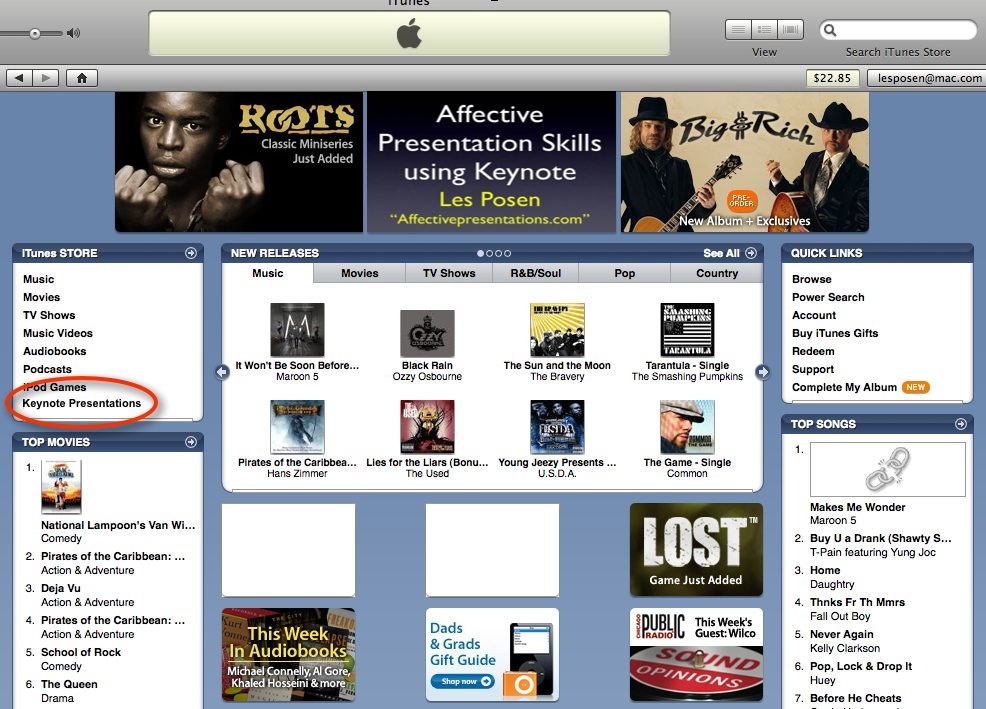
With respect to Pages’ older brother, Keynote, I have some time back (May, 2007) written of what might happen if your Keynotes could be uploaded to the iTunes store.
Again, a place to show your wares, but it seems iTunes U has to some extent executed this vision by using Quicktime movies exported from Keynote rather than raw Keynote files to provide the educational material. Given the possibility that the next version of Keynote may well be Snow Leopard-only, it’s hard to see how a tablet could create Keynote files to be imported into the desktop version.
That’s not to say a tablet couldn’t be integrated with the management of regular Keynote files, much like the iPhone can in a rudimentary fashion. But rather than just control the slides forward and back, why not call up each slide at will while they’re laid out in order on the tablet, big enough to identify. Stacks of slides that go together, which can be organised in Keynote now, would take care of huge numbers of slides in a stack. And going beyond that, as I have suggested elsewhere on this blog, why not use the tablet to live annotate your Keynotes, even monitoring Twitter feedback during your presentation which is becoming a popular conference activity. This already occurs with tablet-based Powerpoint for Windows.
So, to all those focussed on the hardware aspects of the tablet, don’t forget how after the excitement of the iPhone form factor, it was the app store that provides for its clear lead over its competitors (who will ever catch up with 100,000+ apps?).
I have no doubt that while we swoon over a tablet’s form factor in late January, it will be its software, interface and ability to disintermediate the current publishing houses that will be its permanent “of course, why didn’t I see it coming” factors. It won’t happen first, because for the tablet to succeed it will provide for the same publication houses to sell their wares. But as the music recording industry discovered when they allowed iTunes for the Mac to come to market, in a few years, self-publishing via the tablet will have them asking if they made a deal with the devil, which is where the details will be.
Oh, and one more thing… just as with the iPod and the iPhone, watch the detractors leap on it, disappointed the tablet doesn’t also make toast. The usual suspects will also emerge without the wit or elan to actually commend Apple on shifting the digital world forward incrementally. Don’t worry, that’s their job… someone’s got to do it.
As we enter the last year of the first decade of the current millenium (that’d be 2010) it occurs to me this will be the first year since Steve Jobs returned to Apple that neither he or the next in line at Apple will be presenting any new products at Macworld early in the new year.
About this time each year, mid-December, various pundits would wax lyrical about future Apple product releases “expected” to be released at the Jobs’ Keynote in early January. In 2006, the iPhone was the hot topic although none of the soothsayers predicted its form factor nor its OS. (I guessed it would be something like OS X in operation but didn’t come straight out and say it would be a flavour of OS X).
The hot prediction, hardware wise, for 2010 is an Apple tablet. Let’s put that to one side, however.
Apple’s software releases for 2010
I’m more interested in Apple’s software pipeline for 2010, especially as I prepare for my 2010 Macworld Powertools workshop (using Apple’s Keynote presentation software). I still have strong memories of predicting Keynote 5’s arrival, as part of iWork ’09), even though I’d prepared my 2009 workshop based on iWork ’08 and Keynote 4. Lucky for me, I accessed it after Macworld’s Schiller keynote, and partially reworked my slides the night before.
With this in mind, let’s turn to predictions for the next version of iWork, and iLife for that matter.
A little history first
But first, think about the nomenclature systems of the major OS suppliers in use by the majority of consumers. This puts Linux and Unix to one side, and leaves us with Mac OS and Windows variants.
Windows has now returned to numerical naming systems for Windows 7, with a visual descriptive term – Vista – now a sullied brand best forgotten. The last one of these was Windows 3.1 two decades ago. In between, we’ve had Windows 95 (which began Microsoft’s assault on Apple’s GUI lead), followed by Windows 98, Windows Me (another non-numerical nomenclature best forgotten like Vista), then Windows 2000. Lettering then followed in the guise of NT and Xp.
When the Mac OS reached version 10, Arabic numerals were dropped in favour of Roman (Mac OS X), and as each variation took place (10.0 through to 10.6) it was named after a big cat. Jobs himself in all his Keynotes much preferred to refer to the Mac OS by these more colloquial expressions, mentioning numbers in passing.
The first bundling of Apple’s much-lauded consumer applications such as iMovie, iTunes and iPhoto occurred at Macworld 2003, a keynote which had received such little advanced expectations from the rumour mills that at its conclusion when he summed up all he had offered in a two hour spectacular (including not one but two new Powerbooks when certain pundits the week before had said on air, “read my lips… they’ll be no new Powerbook’s at next week’s Macworld), Jobs told the audience not to believe all they read on rumour sites.
All initial iLife apps. had been out in the wild in their own incarnation, but in 2003, with each undergoing an update, iLife (undated) brought them all together for download (all except iDVD), free bundling with a new Mac purchase, or purchase as optical media for USD49, to operate with OS X 10.1.
In later, years, other popular apps were added including iWeb and Garageband. Most were iterative improvements, although iMovie 7, which followed iMovie HD6, proved particularly unpopular, a situation cleared up in iMovie 8, released in January 2009.
As usual, Wikipedia provides a comprehensive history of iLife, a table reproduced below which sets out its lineage.
Unlike Microsoft, which persists in allowing its dated Office Suite to linger on for years (the current version is 2007, with many still using 2003, and awkward version compatibility), it appears it’s anathema to the Apple team to be so out of date with respect to how it names its suites such as iLife and iWork. Each in previous years since their inception has been “rebooted” at Macworld just a few days or weeks into the year that carries its name, with the exception of iLife 08 released in the fall of 2007, well ahead of 2008. You can say that this was Apple flaunting its uptodateness in Microsoft’s face, or that it was so late with iLife 07 it skipped it completely and went to 08 instead.
While none had predicted iLife, iWork had received much speculation once a prior arrangement between Apple and Microsoft has reached its use-by date. This was the much misinterpreted “saving” of an Apple on life support by Microsoft by an injection of $150m purchase of Apple non-voting stock, an agreement to continue Office for Mac for the next 5 years after Jobs return to Apple, and the use of Internet Explorer for the Mac, announced at August Macworld 1997. (For a more radical interpretation of these events, read Roughly Drafts’ entry here.)
Keynote 1.0 itself was released at the same Macworld which saw iLife bundled for the first time (2003) and one might ask why it was left as a stand alone app, and not bundled with iLife given its creative DNA. (It was given away to all who attended Jobs’ keynote).
One could guess that with the MS Office agreement concluding, Apple was already plotting to release its own Office suite, and bundling Keynote with iLife would contaminate its brand as a professional, not consumer, app.
Unlike iLife which was not rumoured to be released in the lead up to 2003’s Macworld, news that Apple might take on the might of Office was always a big deal, given Office’s place in the business firmament as the default suite for enterprise on both platforms. Even now, despite frequent requests to have friends send me text embedded in an email, or even as a text document, they insist on sending Word documents. I usually view them first in Quick Look, and if I need to copy any text, download and open them in TextEdit.
It would be prudent to point out at this point for younger readers (!) who may have grown up with Microsoft Office as the “only” productivity suite, that one of the first suites for PCs (to use the term generically) had been introduced for the Apple II in 1984, as Appleworks. It continued on into the Macintosh, released in the same year but earlier, and was eventually named Clarisworks. Its interesting history is available at Wikipedia here.
Rumours that Apple would produce a productivity suite for OS X apart from Appleworks and its derivatives, reached their peak in very late 2004, when the now defunct Think Secret rumour site went public with “news” of a slew of new products for Macworld 2005, including the update of Keynote to version 2, some non-specific add-ons to Keynote, a hardware appliance called Asteroid (which eventually saw Think Secret put out of business by Apple), and a mysterious software called Sugar.
On New Year’s Eve 2004, just a few days before Macworld 2005, MacRumours reported Sugar to in fact be iWork, containing Keynote 2 and a word processing document called Pages. Rumours that it was to be called iWork got a boost when software developer IGG Software (whose products iBank and iBiz I personally use and enjoy) stopped using the name iWork for their billing suite, and renamed it iBiz.
When iWork was revealed, it was a rather anaemic combo of Keynote 2 and Pages 1.0. Nonetheless, it certainly raised eyebrows that Apple was not afraid to take on the might of Office. Keynote was already winning hearts, minds and eyes of those tired of the usual Powerpoint backgrounds and amateurish animations and transitions, while Pages’ dual page layout/word processing roles seem to hold promise.
But unlike the initial release of iLife in 2003 which received no year appendix, the first iWork was named iWork 05, and each year has been updated up to iWork 09 at Macworld in January, except for 2007. In this year, just as for iLife, iWork 07 was skipped, and iWork 08 released in August, four months ahead of January 2008.
So, in thinking about the next update to iWork, if history is a good predictor of Apple’s behaviour, we will see an update early in the new year, or in August at a special Apple event.
But 2010 will be a little different of course. There is no official Apple presence at Macworld for the first time in decades, and no Steve Jobs or Phil Schiller keynote scheduled for the official release of new Apple products.
Would Apple simply release a major software product simultaneously while Macworld is proceeding and presumably garnering considerable attention? Would it release it, and perhaps new hardware, during CES in January to once more steal some media spotlight from Microsoft’s showings, just as it did when the iPhone was released in 2007? Think Tablet, in this case, as the ideal attention-grabber (but it’s unlikely).
What’s clear to me is that Apple will not allow too much time to pass with iWork 09 or iLife 09 on its Apple store shelves once 2010 rolls around. Too much like Microsoft to let products linger in some outdated fashion.
And if either of these two products make it to the next version, will it be iWork 10 or iWork X? And as a commenter has reported, will it be restricted to Snow Leopard?
In iWork 09, Keynote 5 is the most mature of the products, and certainly the one I’m most familiar with. Pages I use, but less frequently and not exclusively, spending time also in TextEdit, Mellel, and Word (when I have to.) I almost never use Powerpoint except to open others’ Powerpoint stacks to see them in their original format, despite being able to open them in Keynote. I use Numbers once a year to update my professional development workshop schedule.
I’ve also played with Powerpoint 2010 for Windows, and it has come a long way since Powerpoint 2003 or 2007. Its attempts to emulate Keynote are palpable, and it seems its developers are very aware of the criticisms heaped upon it, some unnecessary, and others quite appropriate.
Somewhere between now and June 2010 when Powerpoint 2010 is released officially, Apple will update Keynote, I’m sure. The question I have is whether they’ll wait until they feel Keynote is ready (there is no known beta program outside of Apple), or leave it late until Powerpoint is virtually locked down and then release a stunning leapfrog, making Powerpoint’s emulation efforts look pitiful. Expect very short notice from Apple, rather than a long, “lock-you-in, can’t go back” strategic effort, as per Microsoft.
A few Keynote 6 (iWork 10) predictions
I have a strong feeling that whenever Apple chooses to release a Keynote update, it will be stunning. Already in Keynote 5 we saw such effects as Magic Move which will be further refined in Keynote 6. I predict more advanced alpha masking approaching that which can now only be performed in third party software such as Photoshop or Vertus Fluidmask; more subtle but powerful 3D effects such as we can see in Picturesque; more impressive manipulation of Quicktime movies including angular display distortions to accentuate 3D possibilities, and of course some transitions added and some retired (such as the turntable effect).
The big hope will be a streamlined and easy to use timeline which is desperately needed to bring Keynote up a notch. Several iLife consumer-level applications have timeline devices built in, and it’s very odd that its professional software in Keynote doesn’t. Its inclusion, which would mean a radical restructuring of the Inspector, whilst attempting to maintain some semblance of simplicity and UI ease of use, will be a sore test of Apple’s UI creativity and engineering mix.
When it does so, my prediction is that it will make Powerpoint’s efforts to control elements on a timeline look very weak indeed. You just know that Apple wants a timeline in Keynote, but it has waited this long to do it right.
I am hoping that the Keynote team will also make users’ lives easier with new and creative ways to highlight events on the screen thus doing away from laserpointers in the Mac community! Again, if they do include new “call outs”, expect them to have strong 3D elements and animations similar to what you see on television current affairs programs.
I’m not particularly enthusiastic about new themes or transitions, as we’re well served by both Apple and third parties currently, but I do expect certain build styles to be dropped, and some seriously eye-popping ones to be added, especially word and letter effects. I am hoping that the motion and scaling builds will be extended and include freehand drawing of object movement, rather than the more cumbersome method in Keynote 5.
There are lots of things to be hoped for in the next update, some of which are truly necessary, and others less needed. I do expect one or two delightful surprises however, if past updates are anything to go by…
The big question is, when? I have hinted that it will be sooner rather than later given Apple’s naming history, but it may be that delaying is a good option while Powerpoint moves into final form. My own feeling is that while Apple observes Powerpoint – if only to keep its export to Powerpoint feature current and accurate – it marches to its own beat, knowing the Microsoft development team will have an awfully tough task playing catch up not just to new Keynote features, but its sheer elegance and panache.
After all, Bill Gates may have left the building on a full-time basis, but his lack of taste still lingers and permeates the design culture at Microsoft.
Should an Apple tablet be released and coincide with Keynote 6 features (as I have written elsewhere on this blog) Apple will move the field of presenting up several notches.

 Because Powerpoint 2010 will take advantage of hardware acceleration and DirectX9.0, you no longer need to use auxiliary software like Windows Media Player to play videos on a slide. If you’re a Apple Keynote user, you’ll know that since it was released in 2003, seven years ago, it’s had superb video handling capabilities even on old G4 Powerbooks. It’s because Steve Jobs wanted it to have “cinematic” properties, in addition to very fine text rendering.








 Les Posen's Presentation Magic