Category Archives: Presentation Skills

Are video games good or evil – examining them through different presentation styles and audiences

Just to let you know, I’m a media spokesperson for my professional psychological society, having been trained and then offered training in media for almost 30 years now… I had my own radio show when I was in my late 20s in the early 1980s soon after graduation, and have appeared on radio, TV and in print media on many occasions. I’m sure it’s been a boon to my public speaking skills, both in terms of my delivery, anxiety management and the training of others. Since then, I’ve also turned my attention to slideware this past decade, and especially so after Apple released Keynote in 2003, when the scales fell from my eyes and I decided against socially conforming to the still present standard – Powerpoint (or the alleged Gold Standard – the Cognitive Style of Powerpoint, as Edward Tufte has referred to it).

I get media referrals for topics like anxiety disorders, as well as how technology is affecting society, especially things like “internet addiction”, the effects of violent video games on children, the pro-social effects of technologies, and “technofears”, where people are afraid to take up new technologies. Kind of runs the whole gamut of behaviours around technology.

So yesterday saw the intersection of three media related events.

The First Media connection to young people and video gaming – A GP newsletter media enquiry

First, the media section of my professional society asked if I would take a call for assistance from a medical journalist writing for a General Practitioners’ weekly publication on how GPs can best understand “internet addiction”, recognise its presence, and thus offer assistance to those “afflicted”. You’ll note by my uses of quotation marks that I am somewhat opposed to the terms used as the best ways to define a real concern members of the wider community possess. No doubt some of the conversation I will have with the journalist will be about the effects of prolonged gaming on children and adolescents.

Here are some of the questions I’m told will be asked of me:

Why are some people so susceptible to the online role playing environment and is it a substitute for real relationships for those who have difficulty in real situations?

Is it an illness and what sort of illness? If not what what is it?

Should it be classified as an addiction? Treating internet addiction has become a huge industry in China and the US some rehab centres charging 10s of thousands of dollars for programs. Do these work?

The Second Connection – TED talk by Jane McGonigal

Secondly, yesterday TED published a new talk by Jane McGonigal. Here’s what the TED write-up looks like at this link:

(Curiously, next to this writeup is a TED section, with links to “related speakers” where one finds a link to Steve Jobs. When I saw this yesterday, I could have sworn I would know if he had done a TED talk, but instead it’s TED linking to Steve’s famous Stanford Commencement speech from a few years back.)

McGonigal, who has a Ph.D in performance studies from USC Berkeley is pro-gaming and has constructed a number of games for institutes like the World Bank. You can read more about her in a recent Wired article, here, conducted in the week before her TED talk. (Beware of staring too long at her mesmerising blue eyes).

In a current world where so much of mainstream media is out hunting for negative gaming stories and how children’s and adolescents’ brains might be negatively affected by “too much” gaming (whatever that may be, but someone with a MD or PhD will come up with a definition that works for them), McGonigal throws a curve ball with her TED talk and will get you thinking afresh, like it did me, on the whole concept of gaming.

Naturally, not just am I watching and trying to comprehend her story, but I’m also watching her presentation technique and her commanding use of slideware.

In her case, I’m pretty sure she’s either using Powerpoint for the presentation or PDFs of her Powerpoint. There’s no computer in sight to assist, but when you watch the TED talk, you’ll notice a few things (now that I point them out to you).

Jane uses no transitions, builds or animations in her talk, which suggests to me she’s not using Keynote! Something about Keynote compels one to think creatively about their use, while as Tufte has written, Powerpoint is a useful picture container (or words to that effect). In fact, she doesn’t need to, as her use of full picture slides, colour, and matching of her story with the pictures together with her own animated expressiveness (she refers to it as her exuberance) is sufficiently compelling.

Shown below are screenshots from her TED talk.

Two slides in, she's captured the audience's attention with the epic moment gamer face

The sign at McGonigals workplace - very Apple-like.

What gamers get from immersion in their connected gaming experience
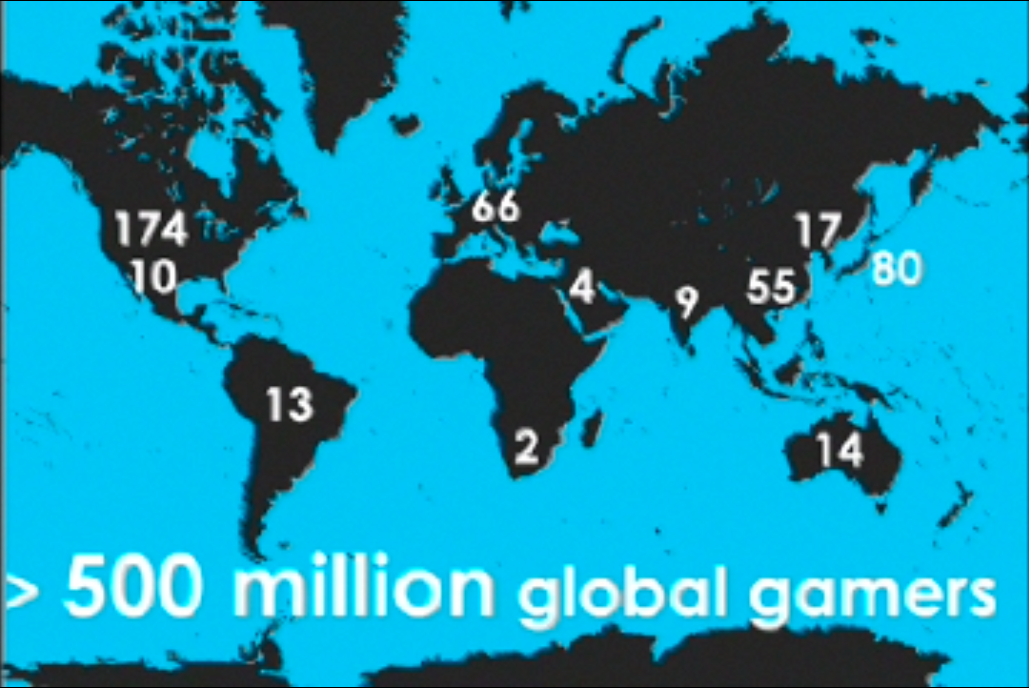
Are there really 14 million gamers in Australia, which has a total pop. of 20 million?
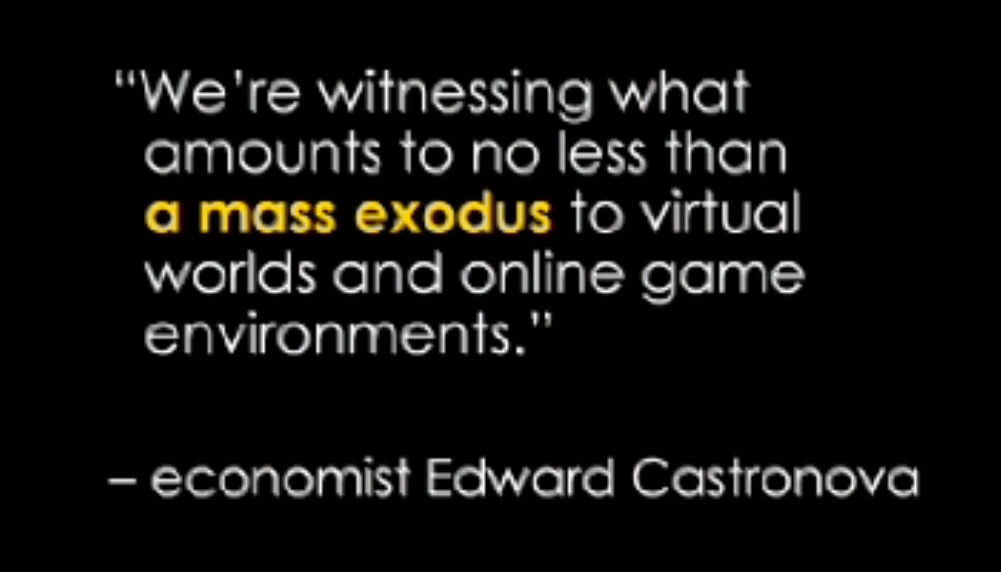
Good use of a simple, referenced and highlighted quote

The first game? 2500 years ago, using sheep knuckles for dice

By now, you’ve got the idea. Big, bold bright pictures and words which truly illustrate her storytelling.

But a couple of other things: Jane rarely ums and ahs. She pauses as she collects her thoughts, prompted by her good use of current and next slides as shown in this “over the shoulder” screenshot from her talk. You’ll notice too the countdown clock (total of 18 mins) yet she had about two more minutes to go at this point! By using this slide arangement, rarely do we see Jane casting her eyes away from the audience and turning to look back at the main screen.

What the speaker sees at TED - current slide, time remaining, next slide

So by now I hope I have sufficiently teased you about this talk about gaming, so below is the embedded TED talk of 20 mins, so come back and we’ll look at another set of slides presented to the British Parliament on gaming just a day or two back – for contrast.

The Third Connection – Mindhack’s Vaughan Bell presents to UK parliamentarians on the evidence about video games and young people

The third connection is a presentation given March 17 to the UK’s All-Party Parliamentary Group on Scientific Research in Learning and Education by MindHack’s blogger and neuroscientist, Vaughan Bell. From its website the purpose of the Group is:

Notice that one of the Chairs is Baroness Susan Greenfield, who in Britain is a very famous neuroscientist (Parkinson’s disease is her speciality) but not one without controversy. She has been very vocal about children’s development and gaming’s ill effects as she sees it, but she has also been criticised for going beyond the current empirical evidence in making her assertions.

As it turns out, Baroness Greenfield also gave a presentation, which was then followed by Bell’s. You can read his take on following her (to her own committee, moreover) at his current blog entry here.

Let’s look at some of slides, to contrast them with McGonigal’s and bearing in mind to whom he is presenting! (His blog states videos of his and Greenfield’s talk will also be posted sometime soon.)

You can download the full set of PPT slides here, by the way.

First, here’s the title slide, which didn’t inspire me to expect great slides from the get-go:
Vaughan Bell's opening slide - pure Powerpoint

Things improve however, when Vaughan illustrates how the media is reporting gaming and children in an alarmist fashion, using the exact online sources:

Vaughan begins to tell a story: that alarms over technological changes to society are nothing new, and he illustrates them thus:


and he continues the story by showing evidence for their debunking:

and it’s here that we really get bogged down in standard science presentation style:

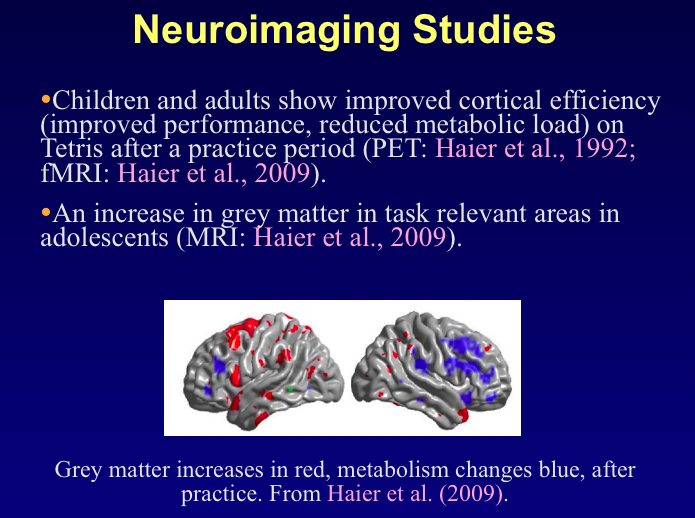
I wonder if you can see the issues I have with these standard means by which to present complex data?

Basically, these slides are tired. They lack engaging properties, with too much (small text), small pictures, and a general sameness from slide to slide that needs a good shaking up.

Of course, we must bear in mind the audience to whom Vaughan is presenting, who as politicians may well live and breathe Powerpoint, but it seems to me his vital message could have been better illustrated by moving away from so much text by including more visually engaging material.

Baroness Greenfield’s slides are yet to be posted, but you can see her in presentation mode in a talk from October 2008 here, and judge for yourself.

But Bell does offer a description of her talk to the All-Parliamentary Group, thus:

Her talk was sincere, very well delivered but unfortunately her argument was poorly lacking in terms of its scientific content, and I’m afraid to say, wouldn’t pass muster as an undergraduate thesis. This was not least because she discussed not a single study on the effect of games or the internet.

And this has been the crux of much of the criticism levelled at her, that she is going way beyond the available data and extrapolating beyond her own knowledge base, not to mention that of researchers working in this domain.

Once more, this goes to my increasingly repetitive notion that in 2010 if you’re a presenter, you must bring to your audience reasons why they can consider you a presenter of authority and authenticity. Baroness Greenfield has been awarded for her contributions to the public’s understanding of complex scientific topics, but when I read her material related to young people and the internet I’m reminded of an old Yiddish joke:

Young eager son to old wise father: “Pop, look at the nice new yacht I bought with my latest sharemarket killing… and look at my shiny new Captain’s outfit I bought to sail in…”

Father to eager son: “That’s nice, sonny. By your mother, you’re a Captain, by your father, you’re a Captain, but by a Captain, you’re NO Captain!”

What Temple Grandin (and Steve Jobs) can teach us about presenting – more from Presentation Magic at Macworld 2010

Did you catch the TED talk given last month, and posted just recently, by Temple Grandin, left?

I first came across her life and work several years ago in a documentary, and since then have listened to her being interviewed several times whenever she has published a new book.

In her TED talk, Temple pleads for her audience present, and those of us watching via the TED site, to consider the many different learning styles students bring to the learning environment. She invokes her own Autism Spectrum Disorder, which was once referred to as “Infantile Schizophrenia” and hopeless to treat, requiring institutional care, as the exemplar.

If you haven’t see her TED talk, here it is, below. Either watch it first, and come back, or continue with this blog entry, and view the 20 min video in your own time.

There are two principle points I want to make about this video, and Temple’s work.

Firstly, Temple in eventually acknowledging her being “different”, found a place in the world by focussing on how to make those differences work for her, and make a difference in the world. To that extent, she reminds me of Apple’s Steve Jobs, whose self-professed desires for technologies his company brings to the marketplace is that they make a difference, rather than “we have to be in this market because our competitors are”, implying a company’s value is dependent on having high market share. Instead, he wants to leave a legacy of changing how people use technologies, from listening to music and watching video, to interacting with the printed word, to enriching our knowledge through interacting with the web and creating our own media.

For Temple, if you read her work, you will see her animal activism acknowledges that humans consume animal meat and make animals work for us, but her desire is that it be done respectfully and without pain and suffering, even when an animal is to be slaughtered for its meat. To do that, she has attempted over several decades to adopt an animal-centric view of the world when it comes to animal management and husbandry. For her this comes easy, as her TED talk tells us, because she thinks in pictures, not language, a function of her autism.

To that end, it’s her belief she is much more empathic towards animal’s views of the world than she is to human’s, as if her brain’s “empathy centre” was diminished, but her visual pattern detection systems grew as a compensation.

Her ability to see the world, in particular cattle yards and slaughterhouses, through cattle eyes has seen her take very important roles in US meat production through better design of these areas, reducing the stress the animals experience, and this improving the quality of the meat while reducing cattle loss through accidents and injury in crowded pens.

So something in the chutes the animals would move through to be vaccinated for instance might be overlooked by human eyes as a perfectly normal thing, such as a waving flag nearby, or a shadow cast across the floor, but to a cow it could cause fear to be experienced, thus releasing adrenaline and cortisol, affecting the meat.

Screenshot from TED talk, illustrating the animal's viewpoint

For presenters, it’s a way to remind us all that we need to take an audience-centric view when we construct our presentations. That when we sit down in front of our computers and construct our slides,  there is an audience to whom they will eventually be shown, and it is their engagement we seek, not our time at the microphone.

The second point Temple states directly, is that there are different learning styles and these need to be acknowledged. For some, the big picture is what they wish to hear described, for others, it’s the small details and the story we build up using these details before we get to the bigger picture. For Temple, these are natural differences, accentuated by clinical conditions such as autism. For a presenter, it’s important to acknowledge that disengagement comes not because our stories are uninteresting, but because we overuse one method of story telling, and leave out others.

An example would be a 30 minute scientific presentation featuring text-only slides, now commonly referred to as Death by Powerpoint. But just showing movie after movie in say Apple’s Keynote would also be disengaging in some contexts, unless the presenter pauses between, makes the point, and then uses the next video to further embellish the story or highlight some subtle but important elements.

The task of the presenter is to keep their audience engaged by means now well understood but too often ignored about the brain’s attentional systems. We need variety, we need to ascertain difference as much as sameness, we need surprise amidst predictability. This goes for our voice as much as it does our slide construction. With more and more books and websites devoting themselves to better slide construction to do away with Death by Powerpoint, the final frontier will in fact be the first frontier – the telling of stories using our voices to help audiences modulate their arousal and engagement.

My prediction is that 2010 will be the year we hear lots more about Attention and Engagement, and it’s been one of the themes in my Presentation Magic workshops and talks these past three years. If the previous Ages we lived in could be described by the tools we used – The Stone Age, the Brass Age, The Industrial Age, The Knowledge economy – the age in which we now find ourselves could be described as the Age of Attention and Connectivity. These are the tools of the internet, where websites compete for our attention, their underlying technologies helping connect us to like minded people and groups we ordinarily would not meet face to face.

And yet because of the advantages these technologies bring, we are left with a missing element, and that is who do we trust to give us the information we crave. Basic Trust is the first of the generational needs psychologists talk about, and it is a theme that stays with us throughout our lives. Clinical psychologists like me often meet patients whose lives have never possessed basic trust, or where trust has been shattered through life events, whether they be earthquakes or war or being fired after twenty years loyal employment.

I take my presentation giving, training and receiving very seriously because I take the issues of trust and authority seriously. I want those who come to a presentation to have faith that the trust they have given me by their attendance has been reciprocated by my efforts to keep them engaged by my storytelling, both narrative and visual. I take pride in my ability to take complex ideas and transform them into understandable and actionable slides and stories to help make a difference. This is the same reason we go to see movies with known film “stars” who we trust to align themselves with entertaining products, but on whom we can round if they turn in too many stinkers, so called box-office “poison” (Think Nicole Kidman and Kevin Costner).

When you go about thinking about your next presentation, think about the difference you wish to make for your audience. Think like Temple Grandin or Steve Jobs about each presentation being a time capsule, a legacy of your thinking, that makes a difference for someone. If you’re a scientist, engineer or medico, don’t just get up at a conference and put into bullet points a summary of your latest publication complete with mandatory graphs, as is if that’s all that’s expected of you. Take the opportunity offered by the conference organisers to reciprocate the faith placed in you to keep their audience engaged by doing just that: transform your printed article into something special, using slides and graphs if you want to, or simply using the oral tradition to create a “theatre of the mind” to help audiences understand the importance of your work for them, their patients or clients or subjects, or for the institutes for whom they work. Don’t just treat it as another entry on your CV – sooner or later, that kind of thinking in the years to come, will come back to bite you, hard.

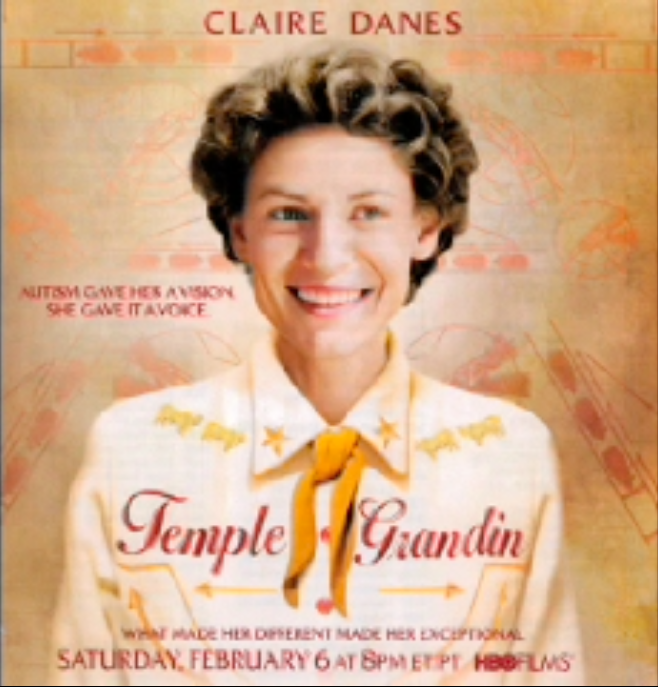
Finally, if you get a chance to locate the biopic of Temple Grandin she refers to in her TED talk, shown in February on HBO, do so. You will be thinking about its effects on you for days afterwards, and will want to share its story with friends and family.

Screenshot from Temple's TED talk, for her HBO movie biopic

In my next post, I’ll focus on how the educational system is failing our students by relying on outdated and traditional teaching methods, far removed from how young people seek information for themselves. And how presentation skills can make a world of difference.

With the iPad release now dated April 3, will this also be the date a new iWork for the desktop is released?

We are approaching the end of March, three months into the new year, and a few weeks before the release of the first iPad variants in the US.

This is fifteen months out from the last iWork upgrade, taking one of its apps, Keynote, from version 4 to version 5. And we know that version 6 is waiting in the wings, if its showing at the iPad formal release this past January 27 in the hands of its most famous “beta tester” Steve Jobs can be relied upon, left.

Keynote has a special place I think in Jobs’ heart, given his use of Keynote and its ancestors in the NeXT days of exile, and since 2003 when he began to use it publicly in his keynotes. Each public display had Keynote aficionados like myself watching for new transitions and builds.

We saw a few this past January, confirming the likelihood of not just a minor upgrade but a major one. In the past, when Apple has updated Keynote in point form, e.g. 5.0 to 5.0.1, it referenced only minor bug fixes, but no new functionality such as MagicMove when transiting from Keynote 4 to Keynote 5. (Some of these new builds are below.)

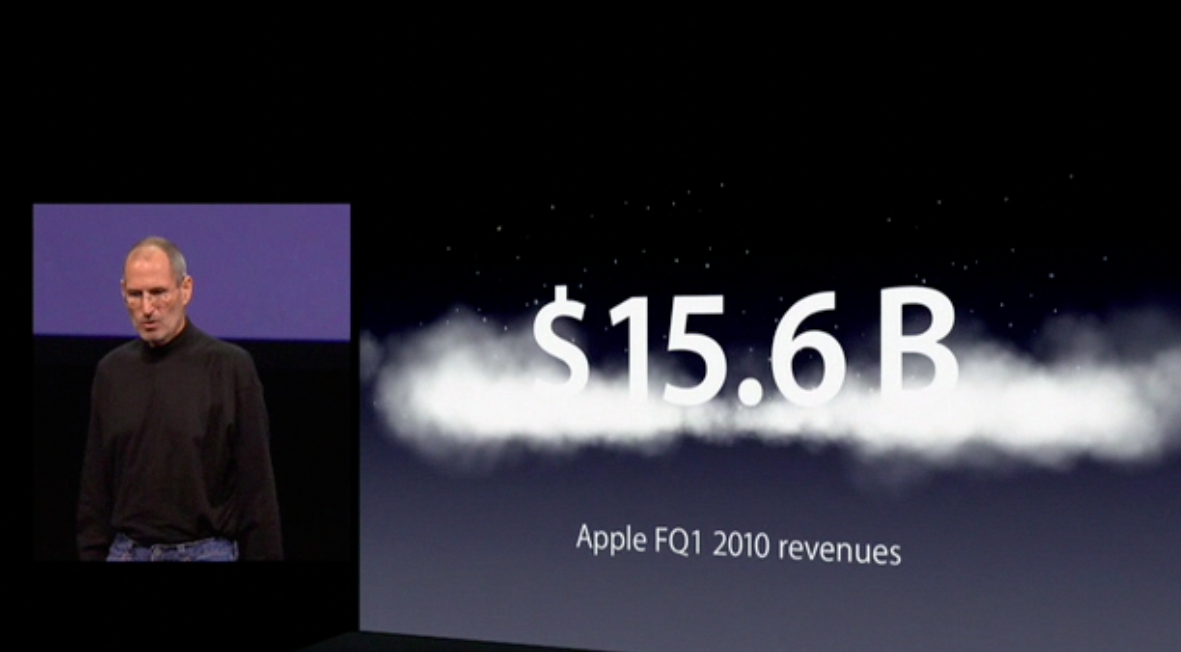
A new build, dropping a value with dustcloud

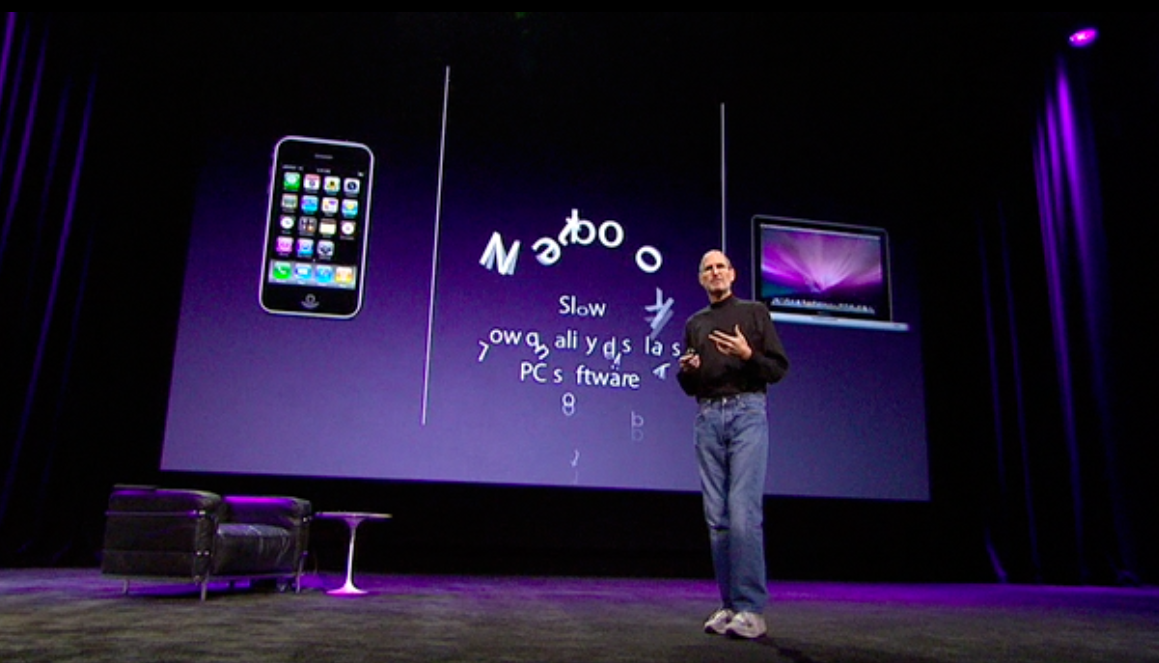
A new text build out or transition - got a great laugh from the iPad announcement audience

$499 pounds the pundits $999 expected pricing into the ground, with fallout!

I am aware that the iWork team, particularly the Keynote team, are working to a deadline to have the iWork apps ready for sale on the iTunes App store in time for the official delivery of the launch iPad Wifi-only units April 3. The apps contain familiar elements from the desktop iWork applications, although with respect to Keynote, it only contains twelve familiar “themes”. While video of the iPad shows some variation from the desktop applications, keen users ought to have little difficulty adapting to the iPad’s ways.

One wonders if third party themes will be allowed to be included – here’s a way Apple can “contain” those themes it doesn’t like because they perhaps contain background animations which will, I predict, become very popular, but which Apple doesn’t like. If it did, Apple would have done them themselves by now, but clearly the current Apple hardware and software doesn’t play nice quite yet, not allowing smooth reliable transitions from one background animation to another. See the YouTube video I created below to see what happens even when you use no transition through a slow dissolve and one other transition.

In fact, I had to use a screen movie maker (Screenflow) to make this video, as Keynote fell over everytime I tried to export it to Quicktime, below.

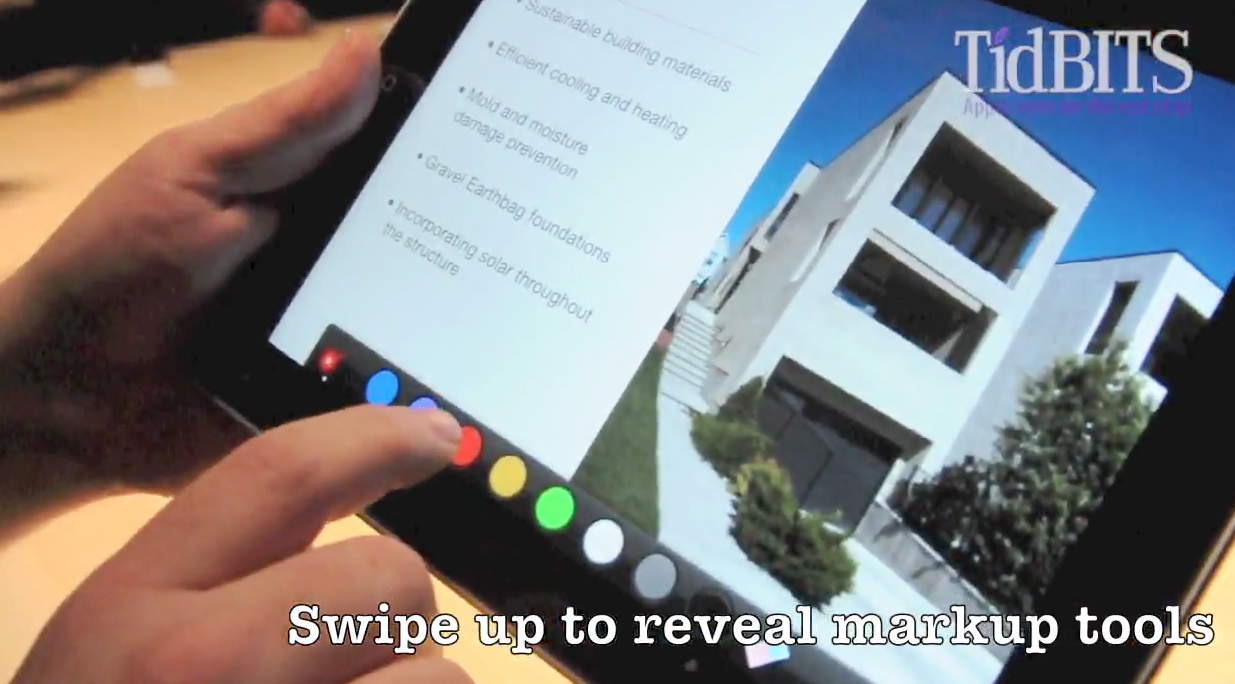
The Keynote app. also contains some new elements not yet seen in desktop Keynote, and makes the iPad an ideal small group standalone demonstration tool, as well as a great presentation assistant when attached (by cable or wireless variant) to a data projector. Note the screen shots from this TidBits video showing new highlighting tools and “laser” call out tools, below, recorded at the iPad official announcement, January 27.

I’m going to predict that while we know a new version of Keynote exists and has been demonstrated to us, the likely time for its release is just before or at the time of iPads being delivered into users’ hands, April 3. It makes sense to have compatibility between Keynote App and Keynote Desktop. We have seen unique elements displayed for each, so a synchronisation with a Keynote desktop update to allow files created on either platform to be shared is a no-brainer.

There are two questions to be asked then: Will the release of the Keynote Desktop application be timed to coincide with the iPad’s delivery date (along with the other iWork apps.), and what other new elements, many of which have been asked by Keynote users for many years (myself included) might be included?

I think we’ll only have to wait a few weeks to find out. It’s especially important it happen soon, with the release of a much beefed up Powerpoint 10 only nine weeks away.

Presentation Magic at Macworld 2010 – using Penn and Teller to demonstrate some of Keynote’s magical effects

Because I’m not placing my Powertools file on the Macworld website for attendees to review (I used several Keynote files, the main one being more than 2GB in size), I thought I’d share some of the Presentation Magic workshop here on my blog.

One of the changes I made from last year’s workshop, was a more definitive “behind the scenes” look at how I created various effects and why I employed them.

In 2009, quite a few attendees wanted me to stop during the presentation and explain what I had done with Keynote to achieve the effects I displayed. It was a little offputting, with some people feeling it interrupted the narrative “flow”, while others felt they had missed out on something important for their professional development (the “how I did it” part.)

So this year, I made a more planned and strategic workflow which emphasised some of Keynote’s overlooked tools which don’t really get that much attention. Sure, the transitions, from the supersmooth “dissolve” which Powerpoint 2010 might get close to, to the “smart builds” like MagicMove get Keynote much of its attention from audiences who only know Powerpoint.

But early in my workshop I wanted to discuss basics like the layering in Keynote – the “bring forward, send to back” menu items. part of the Keynote “Arrange” menu, below:

This menu item is one of Keynote’s secret treasures, but so often gets overlooked in favour of more sexy, but too often employed effects for effects sake. Just think how tired you may have become of the “cube” transition which so excited us when Steve Jobs first showed it in 2003’s Macworld keynote, below:

During his introduction of Keynote, Jobs emphasised that each night, we sit in front of our television sets and watch production level transitions and effects, and it was these he wanted Keynote to emulate. You don’t want to know the transitions and effects Powerpoint 97 was using when Keynote was introduced! It was no surprise the Macworld keynote attendees applauded loudly when Jobs showed these transitions. It was a paradigm shift, because we didn’t know we could have production level graphics effects on a PC, much less using software costing $99.

I must say I now rarely use the cube transition, especially now that Powerpoint 2010 has included a version that seems to work reasonably well (prior attempts were lamentable). With Powerpoint upping its game, expect to see more people overusing these “new” inclusions in it, effects which Keynote users have taken for granted since 2003.

The way I introduced the Arrange menu was to briefly discuss very early in the day the basis for Presentation Magic’s name, something IDG Macworld Expo MD Paul Kent and I came up with in 2008. (He had wanted to call the User conference I delivered “The Zen of Presentations”, but out of respect for Garr Reynolds I rejected that and Presentation Magic was what we came up with). For 2009, my first two day Powertools workshop, Paul had asked me this in July 2008:

The path to success for the two day class is to clearly describe how you will BOTH take attendees inside the keynote features that will make their presentations stand out, AND, how you will provide valuable insights how to structure presentations to best use a software tool to communicate when public speaking. In other words – the class should be more than just whizzy transitions! I’d be happy to read any drafts you come up with and offer suggestions. You did such a great job last year – I’m sure you understand the essence of what I’m asking you: the attendees want to do magic with the software, but we also want to help them with the invaluable advice of crafting and delivering memorable presentations.

I took his use of the term “Magic” seriously, and began to research the psychology of magic, given it is one of the oldest performing arts. But also because in using Virtual Reality in my clinical psychology practice, I am attempting to use the age old principles of magic to misdirect and deceive to produce a clinical effect. In this case, to raise levels of anxiety so as to practice a variety of interventions. In professional magic, being deceived is perceived as delightful and engaging; in clinical psychology, it gives one an opportunity to help patients retrain their anxiety-generating mechanisms via exposure and arousal modulation practice.

There is also a code of practice for professional magic, much like there is for professional psychology. One of them is not to reveal your secrets to non-performers. So I was aware of “spoiling” the magic of presenting by showing how I conceive then construct my presentations. The task was to integrate the psychology of presenting (ie the stuff about being persuasive and memorable) with the little behind the scenes trickery Keynote can let us perform to get the Wow factor without it being “whizzy” to use Paul Kent’s term, above. And at the same time, I wanted to keep the workshop flow going so we didn’t get bogged down in the sort of “how to” detail better suited to a Macworld MacIT workshop.

The clue to do this came about when I stumbled across a Penn and Teller YouTube video. These are two of my favourite performers, not just for their magic acts, but also their television show, now in its seventh series on Showtime, called “Bullshit!”, below:

The video I discovered, and subsequently showed at Macworld, was a performance showing Teller, the silent one on the right, above, walking out on stage to a bass guitar accompaniment played by Penn Jillete (left) who narrates a story of magic’s sleight of hand’s seven basic elements which Teller demonstrates. But half way through the video, Penn has Teller turn 180 degrees, to show the audience the magical elements in action, revealing how Teller performed his sleight of hand. It was a perfect metaphor for what I wanted to do, giving me “permission” to reveal some of the secrets of Keynote presenting where effects are hidden from the audience, who don’t even know they’re being misdirected and persuaded at the same time.

Below, please watch the video in its entirety, then I’ll show you what I did with Keynote to demonstrate the magic of the “Arrange” menu. See if you can remember the seven elements of sleight of hand when the video finishes:

Did you remember the seven elements?

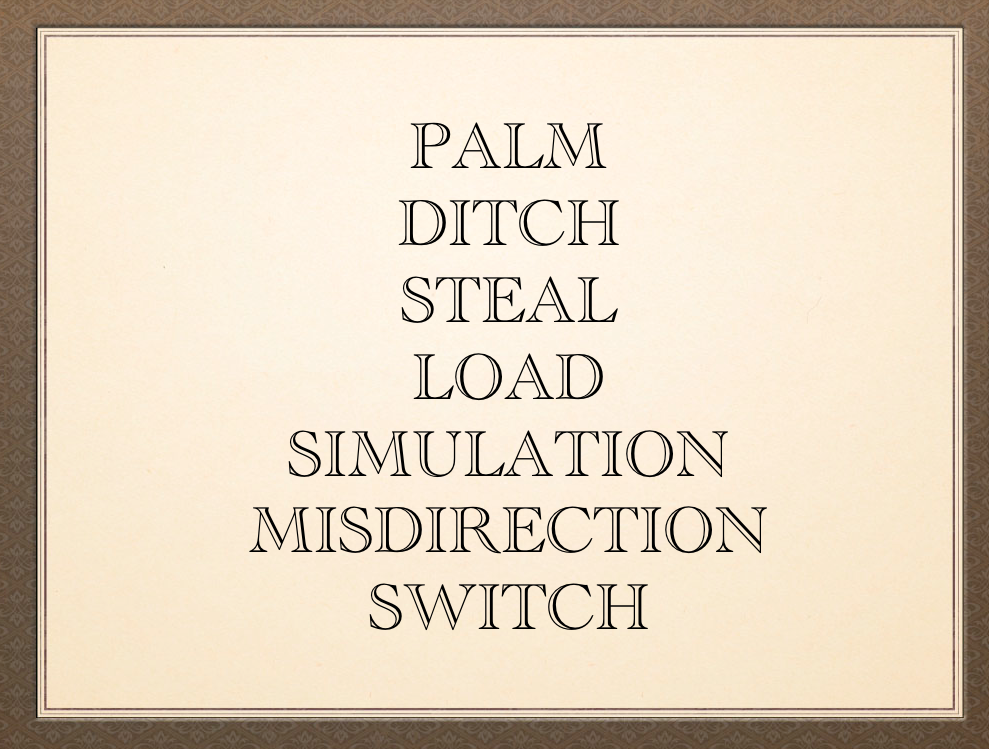
Here they are if you didn’t remember:

Here they are displayed on a Keynote slide using a font which conveys the art of performing (Academy Engraved LET)

I wanted to assert that very few of those attending would be able to remember all seven, even a few minutes after seeing them mentioned several times during the video. Seven is the upper limit for working memory (four elements or chunks more the norm), where we try and hold onto concepts or memory elements before they are encoded for later retrieval. They can easily be pushed out of memory when new concepts come along, unless we can find a “hook” to keep them in. Indeed, even with the offer a free Presentation Zen Design book as incentive, no one took up the opportunity to try and publicly recall all seven.

Simply relisting them, as I do above on a slide (naturally I left out bullet points or numbers as they would only distract not add to their recall), wouldn’t help much.

The task was to make this part memorable, entertaining, and a teachable moment with respect to Keynote’s abilities. So I decide to create some slides which listed each element, and show how Keynote could emulate each one using the “Arrange” menu elements. I’ve put the slides together using Keynote’s Quicktime export menu so you can watch them in YouTube. Note that I begin the video with a quotation you will be hearing a lot in the next month, given how Apple has described the imminent release of its iPad:

The author of the well known phrase is Arthur C. Clarke, shown in the video in his home in Sri Lanka sitting before his iMac. (I showed this slide to the Keynote group in Pittsburgh last year, with its smoky background theme from Jumsoft. The Keynote team aren’t happy with such animated backgrounds, despite their increasing frequency of use. They break quite easily and don’t allow for smooth transitions. Indeed, during my Powertools workshop, this slide froze my Macbook Pro for a minute, which perfectly illustrated my Keynote team story!)

Here’s my series of slides from YouTube (stop and replay the video as necessary to determine for yourself what I did):

After I showed each slide, I dragged the Keynote window to the main projector screen, and showed how I used the “bring forward, send back” menu items to create a series of layers so that the words could move between layers to emulate the effect it was describing. Not all could be illustrated this way, sometimes it being better merely to illustrate the concept using familiar, funny or exceptional items to enhance encoding and recall. There is empirical evidence that matching pictures with words enhances recall, so I asked the group to remember the seven elements by thinking of the pictures I used to illustrate the concepts.

So the question you might have is how did I perform some of these effects?

Here’s a clue:

Further hint: I use Global Delight’s Voila software to take, manipulate and export screenshots.

I’ll put more of my Powertool’s workshop slides up on the blog in the days to come.

Presentation Magic at Macworld 2010

Just a brief update about the Presentation Magic workshop at Macworld this past week; evaluations are in and it looks after talking to Macworld MD Paul Kent that we’ll be back in 2011, January 25-29 for Macworld 2011.

Here’s a brief Fox News report broadcast February 9 featuring a glimpse of the Presentation Magic Day 1 session, plus an interview about Macworld 2010 without Apple.

Next week when I return to Australia, I’ll give a lengthier entry with thoughts about the Macworld experience.

Why the iPad will change Apple users’ skepticism for its version 1 products

I’m preparing a rather lengthy (even for me) blog post about the iPad which I’ll publish once I complete my Presentation Magic workshop at Macworld next week.

Curiously, the dust has yet to settle on the iPad, even though more than a week has passed. Can you recall a product in this class which has garnered as much pre-release hype and guesswork, and one where the punditry continues the discussion long after?

I’ll keep this blog entry short and sweet, prompted by deadlines to prepare my workshop yet inspired by some great comments on the muledesign blog following an article called, The failure of empathy, looking at how geek designers perhaps fail to understand (or are even contemptuous of) the end user. The blog, written by Mike Monteiru (linked to from John Gruber), extols the virtue of the iPad.

Here are two of the blog comments which I relate to given my workshop next week:

(My own blog about the iPad keynote will focus once more on how Jobs tells the iPad “reason for being story” and plays it as hero against the villainous cheap, slow and “clunky old PC software” netbooks.)

The second comment that caught my attention:

Someone truly gets it. In this context, it’s in support of the argument that there is a torrent of people who couldn’t care less about a computer’s operating system, or how to drill down as a root user to make something magical happen for them, perhaps forbidden or obscured by the original designer. No, these are people who just want to do stuff, perhaps basic as in reading a novel or newspaper, or perhaps composing a letter to the editor of said newspaper and emailing it, or creating a more formal response in Pages for snail mailing.

It won’t come as a surprise that many people not of the computing world but of other domains I inhabit (but who know of my faux geekiness) have had one of two things to say to me about the iPad:

1. “I think I’m going to get one. It’ll be only the second Apple product I’ve owned (following an iPod or iPhone) and I think our household might be turning Apple” (usually from friends steeped in Microsoftiness, meaning they don’t care what computer they use as long as it’s cheap);

2. Les, are you getting one?

Now, amongst my Apple owning friends, it’s well known that I’m not necessarily an early adopter of its hardware, while I often rush to buy software. New hardware products from Apple have had a history of suffering version 1.0 issues (hardware quality issues in Macbooks and iMacs, and missing functions in iPhones), and my purchase of a Titanium Powerbook G4 in 2001 taught me some valuable lessons.

Such purchases are big ticket items, expected to last at least three years (or so my accountant informs me), and function as mission-critical items, or ought to have such reliability.

But – and I’m wondering how many others will feel this way – we know the iPad is at the beginning or genesis of its being a revolutionary product. It’s truly a version 1 product, whereas my Powerbook G4 was a version 1.0 evolutionary product. This is one reason there continues to be so much post-keynote discussion, given how many people wish to keep reminding the geeks who wanted everything and more in the iPad that they need not judge the iPad’s success or failure as a genre leader by this first model.

So given the outrageous pricing (compared to the $1000 expectations rumoured or leaked for mass consumption), how much can one lose by now being an early adopter? I’d worry more about sunk costs if I’d just purchased the latest Kindle while being receptive to all those tablet rumours previously circulating.

No, at the price of US$499, without the 3G, or $130 more with it – and without having to be on contract which I presume will also be the case outside of the US – it’s a small and possibly short-lived (maybe a year) investment in learning a new way of interacting with data. When the new model comes out in 2011, what’s the bet thousands of first buyers will hand it up or down, or donate it to schools, or somehow pass it on. My 84 year old mother has played with my iPhone (she still uses a decade old Nokia phone) but sees no reason to change. With an iPad and a few lessons from me, she’ll be reading even more than the five books a week she borrows from the local library.

What I’ll conclude with is that even some people’s usual ways of interacting with Apple products (I’ll wait until version 2) no longer needs to hold given its relative cost of entry to a new paradigm.

Apple Tablet naysayers: get your heads around the idea it’s not a new form of PC, but another and superior way of interacting with data.

On the eve of the Apple special event, and considerably more information dribbling out from sources that we are looking at a tablet-format device, spare a moment for those naysayers asking why the world “needs” another tablet, when the models before (powered by flavours of Windows) have all but failed to make an impact, except for very highly specialised fields, such as medicine and logistics.

My reading of their assertions, usually anonymously posted in the comments sections of mainstream IT or Apple websites and blogs, has all the echoes of past attributions about previous Apple breakthrough devices, specifically the iPod and the iPhone. (Most of the commenters are too young, judging by the grammar and spelling, to be around when the other breakthrough device, the Macintosh was released in 1984.)

Others of a more erudite nature are asking what solution the tablet is seeking to address, which is a reasonable question to ask of any technology. But they forget the history of technologies in human development, as I usually elaborate upon in my workshops on Technologies and Society. (I am often asked by professional colleagues to address fellow psychologists who wish to be updated on technology trends and how to better incorporate changes into their practices. I always start by giving a potted history of mankind’s relationship with technology).

Technologies like the tablet always bring a curious mixture of hope, doubt, powerlessness, and empowerment to those who spend time considering how a new technology might impact them. Change, not of your own decision-making, is hard. IT departments in large enterprises know that about 50% of IT projects fail in their implementation, either because it was the wrong solution for the estimated problem, there are cost overruns, loss of significant project personnel at a critical time sees the project delayed, there is political interference should a merger take place simultaneously, and finally, the end user – the data entry staff – reject the new technology because it is a poor match for what they do, they are so accustomed to how to do things, or their training has been poorly managed.

But like most things Apple, this new device is not aimed at taking over the enterprise market place. I’m sure Apple is very content to leave that to the likes of Microsoft and Oracle for instance. Big profits, but big headaches too, with Windows Vista being a good example of the latter, and not the former.

In these introductory minutes I spend with workshop groups, I attest to how technologies have been used down the ages: as tools to enable, extend, augment, and connect humans and their innate abilities. The best technologies, those that have the most impact for the most people, do all four. These technologies often leave previous technologies that bear a faint resemblance to their purpose, as archival pieces, to be studied in history class, or to be repurposed.

Those who believe the tablet will be just another computer but in a different, but hitherto unsuccessful  physical form, and thus doomed to failure, are dooming themselves to repeat history: that of misunderstanding how technology progresses, and in particular how Apple conceives of technology and its place in human-computer interaction.

You only need to recall the negativity when rumours of an Apple cell phone began in earnest in 2006: “.. the market is too mature for an outsider like Apple to enter” was the gist of one type of message heard. “What does Apple know about making phones…?” was another, utterly forgetting that Apple is a hardware company as well as a software developer. Given the “maturity” of the cellphone market, meaning the stuff that makes them operate was now so ubiquitous and cheap that the cost of entry to the cellphone market was not the issue – it was how to differentiate oneself from the usual suspects.

And this is where Apple’s design superiority and integration caught the senior citizens of telephony flatfooted, locked as they were into seeing hardware as the differentiator (how many models does Nokia have at any one time – dozens if not scores. Makes choosing just the right one easy, right? Wrong!), rather than software.

Apple saw that universal access to the internet (web, email, file sharing etc) was the next bold step for a portable device to take, and its mobile Safari browser was at the time the best reproduction of a desktop browser available, compared to the poor excuse for internet connectivity of other phones.

As the iPhone went through generational improvements (in Australia we got the 3G version to start us off) it became clear to many users that the phone had much of the functionality of their laptop computer, albeit restricted to the connectivity aspects. But in other respects, the iPhone, via the innovativeness of its ecosystem of developers, exceeded the functions of a laptop. Ask a long term user of the iPhone how often they now feel naked if they leave home without their laptop…

Witness such new endeavours as SquareUp, (left) with its e-commerce abilities, and hardware addons. Or in the medical field, what a company called AirStrip Technologies is doing with the iPhone.

Did Apple envision the iPhone performing these tasks in 2004 or 2005, when Steve Jobs is said to have moved Apple towards a cellphone business? Who knows, but it’s clear Apple does not wait for others to lead the way forward with respect to human-technology interaction. It waits until the hardware components have sufficiently matured (i.e., small enough, reliable enough, cheap enough) to then apply its software and design savvy to new solutions to the same old problems of the big four: “enable, extend, augment, and connect humans and their innate abilities.”

It’s true other technology companies often enter a field earlier than Apple, but too often their technologies are too big, too unreliable and too clumsy to use other than for specialist needs and where there is very limited competition. And thus also too expensive to break out of the enterprise and into the consumer world.

Apple takes the reverse path, designing for the masses (yes, those in the mass who can afford and appreciate well-designed and built equipment). Later, those early adopters bring it (e.g., the iPhone) into the enterprise, where IT staff are made to kick and scream in protest that it’s all too much and their expertise – and importance – is being challenged by those who don’t understand the role of enterprise level IT. Go here to read what I’m sure has to be a tongue in cheek apocalyptic blog entry from an IT specialist).

So, the lesson is that Apple releases groundbreaking devices that change how we both think about and interact with digital technologies, usually in fields already explored but not exploited by other companies, and does it in a compelling fashion not for IT geeks, but for those who want something better than “good enough“.

When the tablet is unveiled, you’ll see a combination of gasps and disappointments. Some will immediately see the road ahead, especially developers who can see how to extend their product line and reach new audiences, and who have learnt from the iPhone’s introduction to look beyond the initial release product and roadmap. And the disappointment will be from those who expected some miracle device in a version 1.0 product without understanding how Apple operates.

They’ll stick as long as they can with their Kindles, looking for reasons why its one pony show is a great solution for that problem; or they’ll stay with a Windows 7 powered tablet so they can exercise their minds with Microsoft Office in a tablet format, as if somehow that’s better than a desktop or netbook or laptop solution.

But for those who gasp, who get what Apple’s doing yet again with familiar but newly thought through technologies, they will be very anxious to change how they conduct their lives on a day to day basis, for the better.

Who will join Steve Jobs on stage next week? A few educated guesses… perhaps Rupert himself?

I was having lunch last Friday with the guys at Connecting Point, a Melbourne Apple reseller with a large customer roll within the educational sector, from primary (elementary) through to college (university). It also makes sales to individuals, and I have referred a number of switchers to them over the last year or so.

I was booked to see Avatar for the second time at the iMax cinema not far from the Connecting Point Friday lunch get together, last week including an Apple engineer, so dropped in to discuss my preparation for Macworld, and of course rumours over the tablet. I jokingly offered that joining Steve Jobs on stage would be none other than Rupert Murdoch, whose parent company News Corp. has multiple media interests ranging from Fox Studios, through to the Wall Street Journal, and publishing houses such as HarperCollins.

Rupert, known in his Aussie homeland and especially the UK as “the dirty digger” for his union busting activities, has been outspoken about how users must eventually pay for quality journalism, even though critics of his publications such as the New York Post and the Fox cable network might question the meaning of “quality” in this context.

But Murdoch now owns the Wall Street Journal which in recent years has obtained accurate leaks of forthcoming Apple products, so we can assume that News Corp. and Apple may well have reached a deal, even if Murdoch and Jobs’ politics diverge considerably. Both are huge business risk takers and surround themselves with highly competent and trusted senior executives. Both share a love and passion for how their respective products and services are world-changers, and so there is a business synergy between the two. Whether they would share a stage together to make a compelling announcement is up for grabs, but I fully expect a News Corp (or one of subsidiaries) rep. to be up on stage at some point on January 27. If it is Murdoch or a senior News Corp. exec., it will cause other publishers to sit up and really pay attention to what Apple’s doing in the publishing world. I should also note the long term connection between Murdoch and Prince Alwaleed Bin Talal, from the Saudi Royal family, who has major media interests in the Middle East and who is also a long time significant Apple shareholder.

Who else then? (Assuming Steve himself does the heavy lifting for most of the keynote. I wonder if he will show the Amazon Kindle, as he did with the “usual suspects” smartphones in 2007’s iPhone launch, and make a comparison between it, its target market and what the tablet will do?)

No doubt, Phil Schiller will play some role as Senior VP of Worldwide Marketing on stage, demonstrating some Knowledge Navigator-type of function of the tablet. We’ve already seen Jobs and Schiller do something like this when showing new competencies of iWork 09, as well as a three-way conversation when Jobs introduced the iPhone in 2007. I don’t expect Phil to do a demo on his own as he has done in the past with desktop Macs (do you remember Photoshop bakeoffs comparing Macs to Dells in previous Macworld keynotes?). If the tablet includes a webcam (perhaps using the screen itself as the camera, based on patents going back several years), then perhaps we will see a video conference with Phil take place.

Scott Forstall, Senior VP of iPhone development will get the stage to himself to demonstrate the next iPhone software, version 4.0, especially if this is also what powers the tablet. If it doesn’t, then Bertrand Serlet, Senior VP of Software Engineering may do the duties. At an outside chance, they may share some time on stage demonstrating how iPhone 4.0 can allow OS X apps like iWork/iLife to be modded to work on the tablet and sync with your Macbook or iMac. And of course speak of the roadmap for iPhone 4.0 developers and when they can expect to get their new software underway.

I don’t predict we will see Jonathan Ive live on stage, but he will be featured in a lengthy promotional video discussing in his passionate way the design philosophy of the tablet, plus the engineering challenges Apple spent years overcoming, which will leave its competitors dumbfounded in their efforts to match the Apple solutions Ive and his design team have developed. In the same video, I would expect to see interviews with other Apple senior engineers, well known within the company but without the fame the others mentioned so far have garnered over the years.

Naturally the same video will also include providers of third party services discussing the impact the tablet will have on their business and how Apple offered them unique solutions no one else had the foresight to conceive. And we’ll say video of famous faces being “amazed” at what the tablet can perform.

Up on stage again, I am fully expecting a New York Times senior staffer or family owner to meet and greet Steve, then discuss how the NYT sees the tablet as the right step forward for its pay-per-download subscription model, something it tried and failed with previously for its elite content, such as Maureen Dowd and Paul Krugman’s columns.

From there, it will be time for the select few app. developers to show their wares, including how their current apps can be resized, but also how they’ve developed new apps especially to take advantage of the tablet’s special features. I’d include here comic developers for whom the tablet seems an ideal platform to reach new audiences.

Also expect one or two major gaming production studios to present, then some highly specialised domains to show how they intend to use the tablet. Something medical is a certainty, whether it be a hospital staffer showing new imaging software, Johnson and Johnson once more showing blood pressure or glucose measuring addons, or a less well known but highly innovative specialist company showing how the tablet has a place in the hospital setting, say in radiology.

Who else?

Clearly, those who will team with Apple to place the tablet into its own niche, and own it. Perhaps it will be a 3G cellphone CEO (but which one?), a major recording industry partner, or a rep. from Disney who will demo the downloading on demand of its products using a new version of iTunes, which Jobs himself will give a more full featured demo for when showing how the tablet integrates with other domestic appliances, including AppleTV and perhaps other set top devices.

And then there’s one more thing… I can’t even speculate on this, and frankly don’t want to. Like most others who follow Apple closely, I enjoy being delighted by surprises even after I spend time tracking Apple’s history which allows for the guesswork I’ve made in today’s post.

Like most predictions about Apple, there will be many who will see the tablet as a weak solution to a non-problem, just as many predicted after the iPod’s release in 2001 that it was a brick going nowhere, or that Apple would fail with its iPhone because that technological domain was already mature. What these soothsayers focussed on was the hardware, not the ecosystem that is Apple’s ownership of the entire widget, starting with its ability to harness its software prowess.

With the tablet, Apple will enter into new fields of publishing with new partners, where once again the hardware is a mere conduit to content which is either too expensive or hard to access (I’m thinking here of specialised journals and literature), as well as new twists on familiar domains such as music and video, which a much larger screen with new user interface will leave us entranced. As Jeff Goldblum famously said in the first advertisement for the titanium Powerbook G4 in 2001, “you’re gonna so want one”.

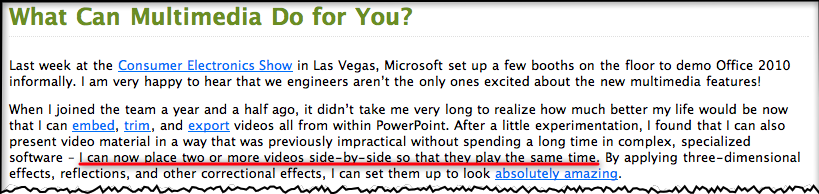
Newsflash: Microsoft announces Powerpoint 2010 will be able to run two videos on the one slide at the same time! (Yawn) Watch this demo I made in 2006 with Keynote 3 running nine (yes, nine) videos simultaneously, without dropping a frame.

The official Powerpoint  2010 blog today made an exciting announcement regarding how Powerpoint will handle video in the future. Here’s a screenshot below (I’ve added the red underline to draw your attention to the money quote, click to enlarge):

Because Powerpoint 2010 will take advantage of hardware acceleration and DirectX9.0, you no longer need to use auxiliary software like Windows Media Player to play videos on a slide. If you’re a Apple Keynote user, you’ll know that since it was released in 2003, seven years ago, it’s had superb video handling capabilities even on old G4 Powerbooks. It’s because Steve Jobs wanted it to have “cinematic” properties, in addition to very fine text rendering.

In 2006, shortly after Keynote 3 was released, and when Powerpoint 2003 was still the current version, I created a Keynote slide for a presentation I was giving to challenge Powerpoint’s dominance of the presentation market place. I was particularly enamoured of Keynote’s video handling abilities while Powerpoint struggled with it, keeping its users from truly becoming creative and keeping them to awfully pixelated images and multi-step complicated management of video placement on slides (as the Powerpoint blog states above).

The video below is one I created today using that old 2006 Keynote 3 slide, playing in Keynote 5 on my MacBook Pro (2008). As I explain, you’ll see nine videos with sound playing simultaneously, all on the one slide, all timed to come in one after the other automatically. The video is a little on the dark side because I’m using a data projector to show the Keynote slide, while simultaneously using the Macbook Pro’s built-in iSight camera to create a Quicktime Pro movie (actually an mp4). So the poor Macbook’s doing double time!

So while the Powerpoint crowd can whoop it up today (and it really is an important change for that crowd and hopefully means we’ll see more creativity emerge from the average user), those in the Keynote community will be looking forward to update announcements for Keynote to be made very soon, truly making it the presentation software of choice for those who value creativity in their presenting.

(Before you watch the video below, keep in mind I created it to be watched in YouTube so I give an introduction first. The money shot starts around 4’20” in after I setup verbally what I’m doing and why!)

Augmented books and the Apple tablet: I can hardly wait to create one on Keynote for the tablet

With the extra spare time due to the summer break here in Australia (things get busy again next week), I have been experiencing a “Perfect Storm” of blogging: Intense interest in things electronic via CES 2010 (now history), the headiness of a major Apple product revolution that even has sceptics agreeing something big this way cometh January 27, and of course thinking and preparing for my Macworld trip in a month’s time.

It will be an intense two weeks away, with several days at Macworld for a Presentation Magic Powertools workshop the second week of February, a folk dance camp in Palm Spring immediately after (where TEDActive is also occurring), then a Presentation Magic seminar for the Psych Department at USC, back to San Francisco for a visit to Apple for a presentation the day after, then a three day conference in San Francisco on Smarter Brains and Improving IQ.

I’ll also be leaving on the first anniversary of catastrophic bushfires in my state where 170 people died, and for which a Royal Commission is being held into how the disaster was managed. I was involved as a Personal Team Leader for the Australian Red Cross working in the days and weeks after with victims and survivors of the fires, as well as trying to match reports of missing people with those who had made the reports, to see if there were people still missing. With last night being the hottest on record (36C) there are fires again today in the State.

If I can pull all these activities together into a theme, it’s one of diversity and continuing learning experiences, where I take what I have learnt in the past, and place myself in a position of “not knowing” yet finding ways of applying my knowledge in new situations with new populations.

I remember working in a Red Cross welfare centre 150km from Melbourne not far from the fires where people would gather to seek safety, food, shelter, and clothing, as well as seek out their neighbours, friends and family who had “gone missing”. In addition to comforting them, my task was to supervise other workers to take down details of the people attending and those being reported missing. We were setting up lists that were then faxed to Red Cross headquarters in Melbourne where 24/7 workers sitting in front of PCs would enter the faxed data sheets into a database, so that if people turned up at my or other rescue centres, they could be crossed off the list of being safe, and added to lists of those who might need follow-up for both material and psychological aid.

As I think about it (I’ve been invited to attend a further training session in preparation for anniversary effects) I’m left wondering how a 3G/Wifi Apple tablet could have helped us out, taking pictures of those who attended, using face matching as we can in iPhoto to match up with pictures of those presumed missing, and directly placing survivor details into the database. I’m fairly sure hours went by when PC operators were swamped with faxes.

If I think now about the training I expect to offer at Macworld, the task will be to offer a theory of presenting based on cognitive and affective neuroscience, basic design principles, commonly seen effects for text and visuals in the movies, on television and on the web as models for driving Apple’s Keynote, and of course, exploring Keynote’s functions and operations in order to achieve the best exposition of my theories of presenting.

I’ll also be referring to various texts which I’ll also be giving away as prizes (I think everyone enrolled will probably get one book!). One will look at iWork 09, and give a section by section breakdown of Keynote’s features, while others will offer considerations of design principles including slide makeovers, as well as examples of good presentation technique. For that, I’ll also use my own and TED videos for the good to excellent and downloaded Powerpoints for the bad to really horrible.

If I think abut the books, they are all good in their respective endeavours of enlightening readers. But by necessity, they are static examples of what is really a dynamic human activity. Moreover, as much as reading about, or seeing screenshots of Keynote’s Inspector or font menu is useful, it can’t really compare with watching someone take you step by step through the process of using Keynote’s facilities, then seeing the interim, then end product.

To my knowledge, there is no book yet on the market that really tells you how to use something like Keynote and think about how to use design principles such as Garr Reynold’s new book contains (Garr is giving me some of his books as prizes of course!) Garr’s book like many others tries to be platform-agnostic and thus broaden readership. Powerpoint keeps improving but as long as its major settings for its use are academia, the military and the enterprise, Garr’s book could be included with the next version (due for release in June)  but improvements in presenting with Powerpoint would still happen very slowly. (Previous criticisms of Garr’s approach with respect to scientific data has been addressed, and I certainly give this aspect close attention in all my workshops).

In fact, given the nature of the subject, can a book accomplish these two tasks? Can a book help you choose an animation, or build or transition for your particular subject matter and let you see the various effects possible. I know of this difficulty given each time Steve Jobs presents at an Apple keynote, I (and others) watch very closely for any new Keynote effects and designs. When I spot them, I can’t show a video on my blog for copyright reasons, but I can show screenshots of the builds or transitions in action. Not a very satisfactory method, but it’s the only way to show the new effects until I get my hands on the update and can use it myself.

So if one of the functions of the tablet will be to deliver reading material, as many have suggested will be the case, why not show how to use Keynote’s feature set while describing why one is creating certain effects. I already do a little of this on this blog, uploading screencasts of my Keynote files to YouTube for display here. It’s clumsy however, requiring a fair amount of effort for a few minutes. Not that I’m against that of course, if you’ve been reading this blog, since I know how much effort is required for great presentations. But we’re talking here of cutting down on multiple clicks, a centrepiece of Apple functioning.

I’d like the tablet to enable me to use a tabletised iWork to help me create a book form of my Presentation Magic workshop, Pages for assembling the text and layout and Keynote for demonstration purposes. Hopefully, the tablet will have some way of recording screen activity, much like the iPhone allows for static screenshots.

Then I can assemble my book, with my text in place, my demoes including how I setup each slide, and what the final output will look and sound like. I can include hotlinks to sites like iStockphoto for photos and movies, and other sites for audio files, as well as newspapers and journals for headlines and abstracts I wish to show.

The idea of using videos to demonstrate science journal writing already exists in the Journal of Visualised Experiments which shows viewers how the experimenters performed their tasks, the equipment and questionnaires they used, and the interpretation of the data. Take a look at this publication about using biofeedback in working with anxiety (screenshot below).

I’m going to guess the first of “augmented book” you’ll see, hear and read on the Apple tablet will be Apple’s own tablet manual, guiding you through a hands-on demonstration of its wares, with videod commentary and feedback about how you’re doing. This will be terribly important if the tablet does in fact include something of a learning curve for a new interface.

It kind of reminds me of the first few days I spent with my first Mac, a Mac Plus in 1990. I used the included floppy discs which taught you mouse functions, like clicking and dragging, as well as how to resize windows and use the drop-down menus. I vividly remember having dreams of mousing around with the Mac and then spending hours the next day practising how to manage this new interface, so different was it from my previous experiences, using mainframes, PDP-11s and Tandy TRS-80s.

I’m going to guess it will be the same twenty years later, such will be the change in input method. I can hardly wait this time however to write my own tabletised book complete with Keynote demoes. No more need to include CD or DVD samplers in the backs of books to demo what your chapters are trying to illustrate with words and static pictures.