My next Workshop on Presentation Magic is a combined morning event, culminating in a lunch, and including vocal coach specialist, Dr. Louise Mahler. It will be held in Brighton, Victoria on May 6, 2009.
You can see the flyer and all details below, but it should be an exciting and fast-paced dynamic morning’s work, and one where both of us expect you can immediately use what you’ve learnt. I’ll focus on presentations using slideware but won’t discuss the mechanics of the software itself except in passing. I WILL by necessity discuss the shortcomings of the “elephant in the room” – the Cognitive Style of Powerpoint – without going into the software’s shortcomings.
Nor will it evangelise Apple’s Keynote application, but I imagine those attending for the first time and who have worked exclusively with Powerpoint will have their eyes opened as to what slideware can actually do to better support your presentation in order to make it persuasive, memorable and engaging.
Contact me for my information, say if you want particular topics covered should you wish to attend, and I’ll also be attempting a slide makeover section of the workshop so you can see my ideas in action. Otherwise contact the Coaching Connection’s Jim Moore for bookings.
Thanks to those who’ve contacted me about my upcoming workshop. It looks like it will now be post-Easter in April, and be a double bill with another presenter who specialises in vocal skills. You’ll be able to do one or both workshops. Keep watching this space, or subscribe via RSS to be kept updated with venues (likely to be in Elwood by the beach, below).
The likely venue for the next Melbourne-based Presentation Magic
One of the things I pride myself on when I hold Presentation Magic workshops is an adherence to an evidence base for almost all the guidelines and demonstrations I offer, such that attendees are ready to put into practice what they’ve learnt at their first opportunity.
I have long argued that there is very little evidence for how many people present with slideware in particular, something which has become known in the presentation criticism trade as the Cogntive Style of Powerpoint. (See my previous entry on the Ignite format for a description).
Rules such as 10/20/30 or 7 x 7 have no evidence for them other than anecdotal, or succumb to a “we’ve always done it this way around here” conformist mentality.
As a trained family therapist, I am always curious as to how family “rules” originate and perpetuate, often in the face of evidence that they’re no longer working. In the world of presenting, 2009 will see many books and blogs published which will continue to challenge customs of presenting, and this is a good thing.
In my Presentation Magic workshop at Macworld this year, I focussed day 1 on my philosophy of presenting, complete with hopefully compelling evidence. Day 2 was more focussed on the techniques I employed to convey my messages, with a strong emphasis on how to best employ Apple’s Keynote software to achieve favourable results.
I started the workshop by looking at the inclusion of presentation-style effects in mainstream media as evidence that consumers are becoming more savvy about information transfer. Talking heads in the news and current affairs programs no longer cuts it, it seems.
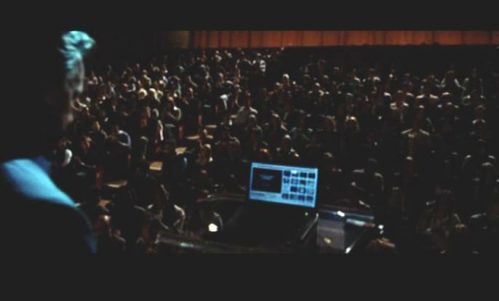
I started with an edited version of the opening scenes of the recent Ron Howard film, The Da Vinci Code, where Dr. Robert Langdon (Tom Hanks) is giving a guest symposium on religious symbolism in Paris, while an old colleague is murdered in the Louvre. I edited out the murder, wanting to focus on Langdon’s demonstration of symbolic images and how they can mislead us. We don’t know what software he uses but it’s not relevant. Here’s some screenshots of one of the scenes I used, showing his hardware setup and one of the images (Poseidon and his trident):
Tom Hanks (Dr. Robert Langdon) address his Parisian audience
Presentation Software close-up
Langdon and Poseidon
When I later gave a one-day version of Presentation Magic to an audience of Seventh Day Adventist ministers and youth workers soon after Macworld (religious groups are very attracted to my style of presentation training with its emphasis on history, science, visuals, and story-telling), a new TV program had just started that week (actually the night before!) called Lie to Me.
The drama series, starring Tim Roth, is loosely based on the academic and professional work of psychologist Paul Ekman (UCSF) who has studied cultural variations in facial responses to emotional states such as anger, disgust, sadness, etc. The psychologist and his team in the TV show help police and FBI verify whether suspects are telling the truth or not.
Lie to Me: Tim Roth play Dr. Carl Lightman play Dr. Paul Ekman
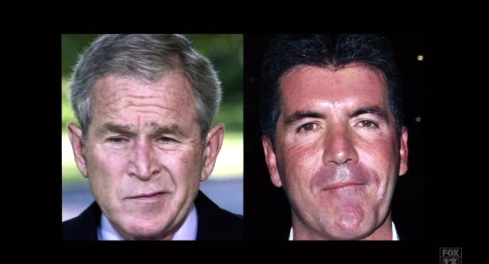
In the opening sequence, even before the opening credits roll, the Roth character, Dr. Carl Lightman, is seen lecturing an audience of FBI agents and illustrating his talk with a strong series of visual elements:
Lecturing to the FBI and displaying stereotypical scorn using two familiar public characters (the one on the left is an actor)
Throughout the series, common facial expressions are demonstrated using well known public figures, showing the series has an active research department tracking down stock images.
Here’s a few more from the opening sequence of episode 1 for your entertainment:
Public expressions of shame
Contempt
How I illustrated "Lie to Me"
Notice in the illustration above how I actually placed the video clip into a widescreen TV to help “contextualise” the story. Rather than just placing a video file onto a slide, I embedded it into a TV image. Most audiences find this an attractive metaphor.
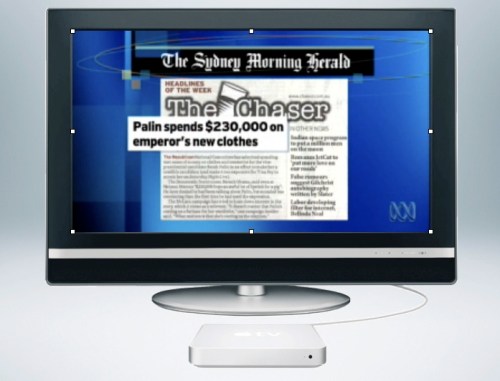
In my talks, I also showed some current affairs programs and how they were illustrating their stories especially where newspapers were being quoted. What was seen were the words, and what was heard was a voice 0ver artist narrating. Here is a screenshot of a clip from the Australian media criticism show, Media Watch, I used:
Current Affairs program, the ABC's Media Watch
In my own keynotes, I emulate these semiotics, which is especially appealling to young people who have grown up with this kind of visual. It certainly is far more appealing than bullet points.
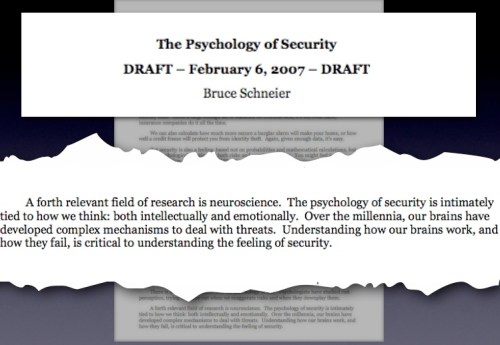
But what’s more important is that it lends an air of authenticity and authority to the presentation. I’m not creating an all-text slide and copy and pasting words – I’m showing the real McCoy, whether it be a newspaper clipping, a magazine headline, or the header and abstract from a scholarly journal, as shown below:
My preferred way of displaying actual article quotes
Notice in the illustration above, that I use a screenshot from the actual article, which having initially been shown, I then fade and fuzz it into the background. Doing this requires some effort on my part, perhaps taking ten minutes to construct for a slide that may only stay on screen for less than a minute. But it conveys to the audience my respect for them, in that I go to the trouble of locating evidence to support my contentions, which are usually quite challenging for audiences whose own presentation style is the dreaded cognitive style of Powerpoint, ie presenter-centric, not audience-centric.
Let me come to the main point of this blog-entry, the week-long argy-bargy between CNBC and the Daily Show, personified by Jim Cramer and Jon Stewart. This matchup occurred following Stewart’s commentary the week before (March 4) when CNBC’s Rick Santelli, below, labelled Americans who had lost their homes as “losers”.
CNBC's Rick Sanatelli and "losers"
This inflamed Stewart who took Santelli and CNBC to task for not being tougher on financial CEOs and calling out their duplicity. When Santelli withdraw his invitation to be on the Daily Show, Stewart let loose the entire week, focussing in particular on former hedge fund manager, Jim Cramer and his “Mad Money” evening CNBC program.
Stewart showed a series of clips wherein Cramer informs his viewers of the “safety” of certain financial institutions:
Jim Cramer recommends holding BearStearns
Stewart goes for the jugular, contrasting the over the top graphics and hyperbolic presentation style of Cramer and CNBC with a very Keynote-like simple and to-the-point graphic, white sans-serif font on black background for impact:
On his March 9, Daily Show, Stewart continued his evidence against the trustworthiness of CNBC and its talent:
Notice how the Daily Show uses exact cutout quotes from original sources
On Thursday, March 12, Cramer accepted an invitation to be interviewed by Stewart, and ultimately turned out to be a good sport, while Stewart aggressively filleted him.
Jim Cramer and Jon Stewart in discussion on the Daily Show
What would have interested many Apple followers was the section where Stewart showed a clip of Cramer discussing the Apple iPhone in the weeks leading up to its release in January 2007, when rumours of its existence were running hot. Essentially, Cramer discussed how easy it was to manipulate Apple stock prices (“shorting”) and getting away with it.
Cramer discussing how to short Apple stock
Stewart came to the debate armed and dangerous, despatching each of Cramer’s efforts to defend his actions with evidence from previous episodes of Cramer shows which showed him to be a disingenuous showman with debatable credentials for providing long term financial advice.
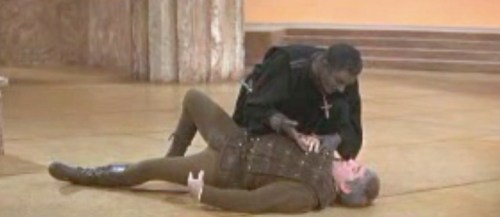
I was especially taken by Stewart’s approach, since I do the same when it comes to convincingly condemning the standard, socially normed presentation style of powerpoint (and Keynote if merely used to copy the powerpoint style). The best way to do this is not by arguing with words, but as Shakespeare has Othello tell Iago, “Show me the ocular proof”, below:
Olivier's Othello seeks ocular proof from Iago for Desdimona's infidelity
Involving audiences with visual proof, have them interact with the presentation such that they cannot help but see, feel and hear the evidence in action is compelling, memorable, and engaging – if not difficult to do, because it asks you to constantly think about your audience.
Stewart’s efforts clearly hit a nerve, and proved most convincing if the comments section in the New York Times is to be believed, which you can access here (login required). Many ask why mainstream media have left it up to the Court Jester to ask the tough questions (and some recall the lead up to the Iraq invasion when asking the same question.)
In some ways, we ought not be surprised. History has repeatedly shown that the clown, the comic, and the simpleton who knows no better (and nowadays we can include the lack of social graces displayed by those with autism spectrum disorders, e.g. Sheldon in the Big Bang Theory) can get away with questions and observations the rest of us shy away from. Witness any newspaper’s political comic section for cartoons that cut to the chase very, very quickly. I use them liberally in my talks, especially ones which make fun of Powerpoint (just Google <Powerpoint+comic>)
Next time you want to convince an audience of your authenticity and the logicality of your argument, go back and locate Stewart’s March 4 and 9 CNBC take down and remind yourself of the need to do proper research, using appropriate evidence, presented in a way for which few in your audience could disagree. And which packs an emotional punch or two.
If for nothing else, you will be remembered for doing the talk and the walk, something all too rare nowadays.
An RSS feed pointed me to the latest IGNITE presentation gathering in Phoenix in late February, 2009. The purpose of an IGNITE gathering is simple – allow a community to gather and be an audience to a special kind of presentation. Speakers each have 20 slides which stay on screen for 15 seconds each and automatically move to the next.
There are no screen builds or transitions and no limits on the speakers’ subjects.
Commercial pitches are allowed but there are provisos, to wit:
“BIAS/PITCHES/SPAM
We want Ignite to be about promoting and sharing burning ideas. If those ideas happen to take the form of the company you work for, the startup you’re trying to get funded, or any other self-serving commercial interest, then so be it. We’re fine with it, really. But whatever you present had better be interesting, because that’s what it’s going to be judged on in people’s minds. if you’re going to market to people at Ignite Phoenix, you’d better be smart about it. Because if you’re not, it won’t be pretty…”
Think about this for a moment. You have 15 x 20 = 300 = 5 mins to present on a topic using slides you’ve created which will change on cue every twenty seconds. Your task is to keep the audience engaged, amused, entertained, informed, and most likely provoked while keeping in memory 20 slides.
To be frank, when I saw some of the presentations, they acted as a reminder of all the rules and guidelines I teach in my Presentation Magic workshops, mainly what not to do. First, let me show you how I went about viewing the presentations, using software I located at Macworld 2009 called Web2 Delight from an Indian software company, called Global Delight.
Web2 Delight allows you to search a number of popular video and picture aggregators sites such as YouTube and Flickr. It then allows you to either stream the videos in a separate window, or download them, choosing to convert them on the fly for import into your iPod, Apple TV, iPhone or burn them to CD or DVD – a great time saver.
Using the URL for the Phoenix Ignite BlipTV location here, this is what the screen looks like when Web2 Delight locates the videos:
Web2 Delight display of some of Ignite Phoenix's video collection
By the way, Web2 Delight has a sister product called Voila, which is an advanced screen shot maker and library which I will blog about in another entry because it has some great features presenters who use slides will want to utilise. I used it to create the screenshot, above.
When you pass your mouse over each thumbnail, an icon appears allowing to either stream the video, or download it to a desired location on your hard drive. A red progress bar appears in the thumbnail window, and you can simultaneously search and view other videos.
The download is a one-pass operation, whereas other YouTube apps. have a two-pass operation, once to download the flv file and the other to convert into your preferred format, such as mp4.
Ok, enough of the technologies, I’m using… why my interest in Ignite? And why am I sharing it with you?
Because, despite the look and feel of some of the presentations which look suspiciously like the Cognitive Style of Powerpoint (you know what I mean,
• 7 x 7 rules for lines and words per slide,
• chintzy clip art,
• overexposed backgrounds,
• pixelated images, and
• basically a presentation that is presenter-centric, not audience-centric)
• oh, and lots of pointless bullet points ;-),
the emphasis with the Ignite community is to help people think more about their presentations, and break some rules.
An Ignite was held in Sydney in late January, 2009 (I didn’t know so I didn’t go – perhaps Melbourne is ready for one) and here is the guff from its website:
“Why Ignite?
You may have heard of Ignite. It’s a presentation style pioneered in the US by some guys who wanted to spice up their presentations – and it quickly became a worldwide phenomenon.
The idea is simple – make the presenters stick to a rigid format of 20 slides, each of which changes automatically after 15 seconds, giving a guaranteed 5 minute presentation.
Why is this a good idea?
It forces the presenters to think long and hard about every slide. How many times have you heard the presenter say “this slide isn’t important”? Well – get rid of it then!
Conversely, there are the presenters who talk to a single slide for 10 minutes, by which time you’ve lost interest, the plot, and probably the will to live.
Ignite is all about making the slides dynamic and exciting, and forcing the presenters to think about what they show.
If you’re sick of Death By Powerpoint, then come along to Ignite Sydney, where you’re guaranteed a fun night of entertaining and educational presentations.”
Now both Sydney and many other cities’ Ignites are online now, some using BlipTV and others YouTube.
What is clear when you watch some of these videos is how tough it is to organise one’s timing, such that one doesn’t break some of the Rules of Multimedia knowledge transfer which have been offered the presentation community by evidence-based researchers such as Richard Mayer and John Sweller.
The most prominent rule I’ve seen broken (and hey, I’m as guilty as the next person, perhaps more so since I do know better!) in the Ignite videos – and the format of a fixed 15 seconds doesn’t help – is the overload produced when audio and video channels collide. That is, our two main senses for retrieving data and beginning the process of making sense of it – every pun intended – are the auditory and visual-spatial organs. When the two offer the brain much the same message, albeit in two different forms, there is a better chance of not being overloaded and remembering the main message, than when the two channels are receiving dissimilar material.
With the 15 second rule in Ignite, presenters are faced with either having really rehearsed their timing and words, much like an actor hitting their marks, or an opera singer being one with the orchestra; or allowing the slides to cue them in to what to say. Each is not without its difficulties. The former requires hours of rehearsal and practice, most likely more than most presenters will want to spend for what’s really just a fun night out.
The latter, while much easier, runs the risk that the slide runs the show, and the presenter becomes an adjunct to the visuals, not a very satisfactory outcome. In other words, if the slide changes while the presenter is still talking, guess where the audience’s attention will go?
I spend a considerable amount of time both discussing this and demonstrating in my Presentation Magic workshops such that the audience experiences what I’m demonstrating, and hopefully will make an effort to change their ways.
I don’t want to select for you some of the IgnitePhoenix casualties – those who really had a hard time integrating what they were saying with what they were showing – because what they did deserves positive reinforcement, not public humiliation. You can go look for yourself and see if you can detect what I’m talking about…
But I did find one or two who not just gave engaging presentations, but seemed to hit their marks nicely, such that from the video alone I didn’t suffer overload or channel conflict.
The one I liked the most so far (and I haven’t see all) is Pamela Slim’s, whose newsletter and blog on being entrepreneurial I subscribe to.
You can see Pamela’s Ignite presentation, here. (You can scroll to the bottom of this blog entry for the entry)
(UPDATE: I’ve looked at a few more from Phoenix, and the one more that stands out is called “Toilet Training” by Dan Messer. He takes us through a history of effluence, from Roman times through to the modern electronic self-flushers. What makes his presentation stand out is his ability to weave seemingly unconnected historical events into a seamless storytelling for the entire five minutes he has to present. So many of the other presenters are telling the audience facts with little use of the slides to enhance their message delivery. Truly, see each of these presentations as mini-lessons in presentation giving. Most are what not to do, a few are gems, and they will be easily recognised, even if the subject matter holds no initial curiosity for you.)
Now there are some concerns I have with the Ignite idea, in that we might just be replacing one cognitive style of Powerpoint with another. But clearly, in its favour, Ignite will simply not sustain the way so many presentations continue to be conducted (all text and reading) and so it does represent a small advancement.
But I’m not sure it represents a necessarily brilliant advance which best matches how information can be shared. I mean, could you imagine a film as brilliantly edited as “Apocalypse Now” (Walter Murch) being held to 15 second scenes?
For now, the Ignite concept, which began in Seattle in 2006, represents another effort to help us question the social norms which have seen Powerpoint become the lingua franca of information exchange, and anything which helps us question its dominance in 2009 gets a conditional vote of approval from me.
Update: Trawling about the blogosphere, shows my hometown of Melbourne will have its own Ignite on April 1, 2009, and yes I have put my hand up via email to have a go, all my caveats above notwithstanding.
I’ve writtent to the local organiser, Stephen Lead, with some questions of clarification (e.g. is 20 secs a maximum or fixed amount, are movies allowed to be embedded, animations too? etc) and I’m having to assume that if it follows the Ignite guidelines it will be shown via ..ugh, Powerpoint. But at least it will restore Powerpoint to what it’s good for – as a picture show application.
The Melbourne information is here, so enrol and come along and have some fun!
While I’m still in post-Macworld 2009 contemplation mode (meaning I’m still to get around to blogging about Macworld and my Presentation Magic Powertools workshops – with example movies), here’s a heads-up for Australian locals that I’ll be doing a two-hour workshop in March in Elwood. Featuring an updated series of slides and ideas from previous workshops, I’ll focus very much on new developments in presenting, and look at a “slide makeover” section as well, so the audience can see directly how I apply my ideas to rather ordinary (yet oh-so-popular) styles of presenting complex information.
Contact me by email (les.at.lesposen.com – don’t forget to sub. @ for at) of by phone (0413 040 747) to find out more details.
I’m preparing to head to the US where I’ll enjoy some R and R in Miami/Fort Lauderdale then head across to San Francisco to Macworld.
My two day Powertools conference is coming together, but folks, I have a dilemma…
You see, I’m strongly of the belief that Apple’s Keynote, which I’ll be using to discuss my Presentation Magic ideas – actually, more than discuss, I’ll be exploring Keynote’s capacities to render great persuasive presentations – is due for an update very soon.
We’ve seen over the past twelve months or so various Steve Jobs keynotes (remember them?) where he has shown new transitions and builds (animations for those of you switching from Powerpoint), which have eventually found their way into the next update to Keynote.
Would it not be ironic that at the 2009 Macworld keynote, to be delivered by Phil Schiller, that Keynote and iWork get a makeover, updated for 09?
There have been a number of point updates in the time Keynote has been in version 4, as the Wikipedia entry shows here. Going from version 3 in iWork 06 to version 4 in iWork 08 (does that mean perhaps that we have to wait for iWork 10 which sounds awful?) produced a massive overhaul including alpha masking, new transitions and “smart” builds, and most importantly motion effects, Keynote’s most glaring deficiency compared to Powerpoint.
My conference preparation has been centred on the current iWork 08 version of Keynote, as I’m not party to any beta testing of the next version. But my dilemma centres around what I might have to do in the two days I have to work with other Keynote afficionados: stay with what I have prepared or spend time exploring some of the new features of any new Keynote that might be released in a few weeks.
As it is, I’ve probably overprepared the syllabus for the two days. Including any coverage of a new version means leaving something out… looks like it could be a late night on Day 1 (Wednesday) if the crowd asks me to go over additional features in a potential update. Actually, to do so removes some pressure to be spot on with my choice of materials and ideas the attendees could be exposed to… I’m quite happy to “wing it” should it come to that, and I’m guessing an excited Keynote-oriented crowd would be quite forgiving if I slip off the prepared syllabus which they’ll receive in a workbook I’ve prepared.
Let’s imagine for a moment that Keynote 5 will be released at Macworld 09… spend a few moments with me fantasising how to improve upon a great presentation tool. It’s important to visualise this every so often, by the way, lest you settle for what Keynote allows you to do rather than stretch beyond it. To do this would be to create a “Cognitive Style of Keynote” and see it vilified in much the same way as Powerpoint.
No, we have to think outside the rather creative box Keynote has constructed for us, and push the limits as we currently understand the workings of message delivery systems to broad audiences.
But first, an aside.
Some people have suggested to me that I ought to focus more attention in these blog entries on presenting in general and not be so Keynote-specific. Their suggestions are warmly received and where possible I try to balance my general ideas and views on presentations with entries on Keynote alone, albeit tied in with better presenting skills.
I could I suppose write more positively about the elephant in the presentation room (Powerpoint) and possibly generate more work for myself from corporations and industries who see no alternative to it. But guess what? There are thousands of people writing, discussing, blogging and authoring about and with Powerpoint. Why would I want to, minnow-like, jump into a Pacific-ocean sized pond and try and get my message out there?
At some point, we each have to make decisions and follow them through as far as we can, and for me it’s advocating Keynote as the better knowledge-sharing tool, because of the means by which it seems to generate greater creativity and workflow styles than Powerpoint. It seems “truer” to the cause of memorable presenting, despite its shortcomings and fewer features than Powerpoint. If that means losing out on workshop and training opportunities because I won’t toe the corporate line, so be it. Been there, done that, no thanks ma’am. I much prefer to work with those who can see beyond the Marketing Department’s demand that each slide has the corporate logo taking up valuable real estate.
Was 2008 the year we changed how we thought about presenting?
That said, I want to share with you my belief that 2008 was a turning point for Keynote and presentations in general. Seriously. It came about through the massive increase of Mac sales, each with a full working demo of iWork installed. It came about through the publication and wonderful take-up of books like Presentation Zen and Slide:ology, and the creation and exposure of sites like Slideshare. It also came about because of the massive public awareness of YouTube and the expectation of higher quality multimedia now that the technology to do so is inexpensive and easy to use. Web 2.0, or social media seemed to reach a certain developmental stage where old-fashioned textual information exchange was inadequate to the task. It came about when Macworld allowed me to have some time with attendees and present about presentation skills, and then left the video of the session (or the slides with narration) up on the Web.
And like so many things, all technologies have a limited time span to make their mark before something new comes along. Last year (2007) marked 20 years of Powerpoint, and on that anniversary we had time to pause and ask if our communication skills are any better, despite the clear demand that abundant information from a huge reservoir of sources deserves better means of knowledge transfer.
And probably that hoary old chestnut that so often saw education-based IT department heads condemn Macs to the graphics department – “kids need to learn on the hardware and software they’ll use when they leave school” – was also finished off once and for all.
2009 – a presentation revolution on its way
So 2009 will be the year of a presentation revolution, in my humble opinion. It’s time has come. There have been many attempts to topple the cognitive style of Powerpoint (You don’t know what it is? OK – just come up with any esoteric subject, put it into Google search, add “ppt” to search for Powerpoint on the topic and sit back and be appalled 99% of the time. Increase it to 99.5% by only choosing those presentations from sites that have .gov or .mil in their domain name. Why? The greater the levels of bureaucracy, the more the levels of text on slides, with sub- and sub-sub-headers. And less degrees of imagination in case you don’t conform.)
If Keynote is to lead the charge to better presentations in 2009, I am fantasising it will include the following features. A number of these have been floating about the web and Keynote discussion groups for some time, but these are my personal preferences to suit my style:
1. Highest on my list of priorities will be some kind of timeline addition to the Inspector. This will allow for much more precise timings of builds, and much better matching between sounds, the delivery of text and images, as well as movies.
Apple introduced many users to the concept with the original iMovie, with its video and twin audio channel timelines for precise editing. This continued into the video Pro apps, and then returned in slightly different form when the iLife suite was introduced, including Garageband. It too allowed for precise matching of multiple tracks including in an updated version, graphics for podcasts.
It’s clear that Apple engineers understand the importance of precision editing. At the moment in Keynote, it feels pretty much hit and miss, requiring much manual tweaking.
I want to go one step further though, as so far the timeline pertains to a slide. I’d like to see a Master timeline so that audio can be faded in and out across slides, not just within. At the moment, in order to do that, you need to export the sequence of slides as a Quicktime movie into iMovie (for instance, or it could be Final Cut), add the desired sounds including any “ducking” using the provided timeline, then import into Keynote. I’ve found this produces less than sharp images and text. Better to do it within Keynote.
2. Greater control over the choice of slides to allow less linear operations.
At the moment if you hit the command key in Keynote it will bring up the current slide and one each side of it (i.e., before and after) when in Presenter Mode (current and next slide is visible to the speaker). But there are times when that choice is limiting. Currently, the work-around is to printout the slides (including all builds on the one slide) and clearly number them so you hit, say Command-42 to take you to that slide.
My preference would be a means to view all slides using a hot key selector then point and click on it to go straight there, leaving the audience unaware of this occurring. Perhaps some integration with the iPhone or iPod Touch in wi-fi mode will allow some measure of this to occur, with the handheld unit acting as both remote and Preview device.
While in Presenter mode I’d like to be able to see all the linked hot-spots I might have created on a slide, where clicking in the area would take me to that slide in the Keynote deck. At the moment, it’s doable, but requires fiddling and guesswork.
3. Free form line drawing. This is a real oversight, where I now have to use a third party drawing application to draw precise curved lines, then import it into Keynote. My preference would be to allow Keynote to do this, as long as we don’t end up with a top-heavy inspector, which starts to look like the Powerpoint ribbon. Once the free form line is drawn, I’d like to be able to make an object traverse it accurately and smoothly. It’s still fiddly in the current version of Keynote.
4. Better image manipulation tools including masking. Let me be able to distort, skew and change perspective, rather than having to open Photoshop and then import into Keynote. Powerpoint has moved a great distance down this path, allowing for a great deal of image manipulation which at a pinch can be an aid to Keynote. In my experience this is not a perfect solution producing artifacts, but it’s easier than using Photoshop for novices.
5. An improvement in motion builds. There are a variety of effects I’d like to achieve, but the four motion builds (scale, move, rotate, opaque) are too limiting for some of my ideas.
6. One of the the things I like to do when creating a slide is gather all the materials I’ll be using onto the slide, or more accurately around the slide, which I’ve placed in 25% size. This gives you a great deal of surrounding white space to “store” your slide components, and plan some motion builds. But Keynote puts the slide in the top left hand corner of the work space. This is OK if you are bringing elements onto the slide from the right or below, but requires imprecise guesswork for the other two sides. Better to be able to place the slide in the centre and thus use all four sides for any motion builds.
7. Some build refinements, such that I can make an object glow or pulse to draw attention to it. I can do it now, and will show how at Macworld, but it’s a lot of clicking and pasting and effort. Drawing attention to slide objects, such as cells in a data table, or parts of an object, is now a very important element of presenting, and will hopefully do away with silly laser pointers. There are third party tools for this currently on the market, like Mousepose, but as usual. I’d prefer to see it within Keynote.
To that extent, once I have constructed some builds, give me better preview options, rather than the miniscule Inspector to see how an effect will look.
Now this is not an exhaustive list, and late night tiredness prevents me from adding some illustrations (which I might add in an update once I’m settled in Florida with a high speed connection). And others will no doubt have their own wishlists, which you can see if you head to the comments section of a blog entry I wrote some time back here. That blog entry was written pre-Keynote 4, just as I am writing this one, but almost two years later! And while one or two of my requests have been fulfilled, the main ones are still outstanding.
It would be a pity of Keynote users spend another year or so feeling abandoned as happened between Keynote 1 and Keynote 2. Hopefully, at Macworld they’ll be an opportunity to chat with Keynote users and engineers (fingers crossed) and let them know how much Keynote is enjoyed for its ease of use and creativity-generating properties, and it shouldn’t be abandoned as Apple continues to build itself as a digital media powerhouse.
To that extent, while I’ll miss Steve Jobs give his keynote in two weeks, I’m hoping that he’ll give others during product launches in 2009, and the high level of presentation standards are maintained when Apple VPs stand and deliver. Fingers crossed on that one.
The clues were all there in recent months that big shifts were being put in place with respect to Apple and Macworld. Hindsight being the wonderful thing it is, one can see Hansel-and-Gretel like clues being dropped along the way leading to certain conclusions being made.
Apple has been going from strength to strength, continuing its domination in the digitial music and player domain, and continuing to challenge incumbents in the cellphone territory, much to the surprise of pundits and competitors like.
But in recent months there has been a deafening silence with respect to Steve Jobs’ keynote rumours. Maybe an “iPhone Nano”, maybe a netbook, maybe bringing Snow Leopard’s release forward, and so on. But compared to previous years, this has been a particularly quiet pre-Macworld lead up.
The pullout of Adobe and Belkin from the Expo floor was also a “tell” that things were changing with respect to well-known companies having to be attend Macworld. And the announcement we had all laughed at each year – “Apple announces Steve Jobs will deliver the keynote at this year’s Macworld” – never came in what seemed like a game of PR chicken.
Intead we got the old boxer’s one-two combo: No Stevenote, and the last Apple attendance at Macworld. I’m sure many observers felt like they’d been punched in the gut.
For myself, who in years past had attended Boston-based Expos and a few San Francisco-based shows, the news was very mixed. This year, IDG MD Paul Kent had invited me to attend for the User Conference US 915 called Presentation Magic. (In 2009, I’m scheduled to do a two day Powertool conference on the same subject focussing on Apple’s Keynote. US 914 will feature Nancy Duarte discussing Visual Thinking in slide presentation for 75″).
It was on this occasion as faculty I attended my first and what may be my only Stevenote. It was an OK experience, but nothing like it must have been to be in the audience in 2007 for the iPhone release, or in 2003 for the release of two new Powerbooks (as the one more things, would you believe), Final Cut Express, Airport Extreme, Keynote, and Safari.
What we have seen as further clues in recent times has been the increasing use of other venues and times for Apple to release new products and chart its future course. This year, in March, we saw a number of Apple senior management, Steve’s inner circle as it were, participate in the unveiling of Apple’s iPhone roadmap, performing as Steve himself put it, the “heavy lifting” needed to describe the technical aspects of the iPhone SDK properties.
I carefully watched this “Town Hall” unveiling, initially to gather any new intelligence on Keynote updates which might be around the corner, usually leaked by Steve showing new transitions, or textual effects. Later in October at the release of the new Macbooks we saw more Apple staffers in action. I was intrigued overall to see the performances of the Four Horseman: Phil Schiller, Jonathan Ive, Scot Forstall and Tim Cook, all of whom have been touted within the press and Apple blogosphere as potential Apple CEOs, upon the retirement of Steve Jobs.
Now few of us will ever know what each of these men bring to Apple on a day to day basis, perhaps happy to be delighted with the wares they bring to us. But in the recent past, Steve has given us the opportunity to review each of them in the role of keynote giver, one of the very public ways we have to come to understand Steve, apart from the books written about him.
Jobs’ keynotes are legendary, not just because they so often have been the means by which Apple announces new products, but also because of the style by which Steve presents, eschewing the cognitive style of Powerpoint, and preferring the heavily graphical style which better accords with how our brains function.
(I’ll speak more of this in my Powertools conference, but essentially the brain starts as an outcropping of the eye, and the visual system occupies about 30% of brain real estate. Language, particularly the visual expression of language in the written word, came much later in our evolution.)
But you would short-change yourself if you only thought of Jobs’ style as being centred on his slides. What I saw in the two Town Hall meetings, is that few of Apple’s senior management have the ease and comfort standing before an audience on their own, and using Steve’s technology to offer passionate and persuasive stories about the technologies they are demonstrating.
To this extent, Phil Schiller for all his cuddliness and good humour, plays a great Lou Costello to Steve’s Bud Abbott, or Steve is to Dean Martin as Phil is to Jerry Lewis. Each of the latter performers, after the breakup of the duo, went on to successful solo careers (Lewis was just here in Melbourne, and I had the good fortune to see him in London some years back in Damn Yankees). I single out Phil because of the undoubted comparisons he will receive when compared to Steve’s Macworld keynotes. It’s a tough gig he’s been asked to do.
That said, in reviewing the iPhone SDK demo, I have a problem with Phil alone on stage doing the heavy lifting. And that is that while his words contain elements of passion and exuberance, his body language and prosody are incongruent with what he’s saying. In other words, to my eyes and ears, there’s an emotional monotone to his delivery which sounds, well, inauthentic. As if he’s walking through the prepared speech but not truly letting us know how he really feels. Now that could be stage anxiety, or there’s perhaps other explanations.
What doesn’t help either is that when he’s up there on his own he hardly ever smiles – I mean a genuine smile. Even when he says he’s excited or a product is “incredible”. Too much smiling in a speaker is also inauthentic because it’s inappropriate, something we human beings develop an awareness of very early in our lives. But too little smiling especially when you say you’re excited, just says you’re nervous or too focussed on the words and afraid to really connect to your audience. So while Phil is fun, especially with Steve playing straight man, on his own Phil lacks warmth.
"I'm so excited!"
Back when I saw the iPhone roadmap keynote, and began like others to wonder of Steve was trialling the Horseman for their ability to stand and deliver, I looked closely at something I wanted to blog about. That is the use of remote slide switching equipment, and the use of presenter displays.
If you watch a Steve Jobs keynote, every so often you’ll see him glance down. This is where he’s looking at his presenter display to see the next slide or build to remind him of his story. I advocate the same, and never use written notes, preferring to walk the tightrope of live performing and the spontaneous telling of stories, albeit well-rehearsed stories.
(If you see me driving in my car and looking like I’m talking hands-free on the cellphone, it might really be the case that I’m on the way to give a presentation or a radio interview and I’m practising my lines. You must actually speak out what you want to say rather than simply read it on a sheet of paper or index card, or simply “think” the lines. If, for instance, you easily trip over the word “epidemiology”, don’t read it silently, but get your voice muscles (lips, tongue, face) to develop muscle memory.)
Using the presenter display, your remote, and your body to communicate with your audience (while remembering all your stories) is incredibly difficult to do well, consistently. Steve seems able to do it, never letting us see when he’s pressing the remote advance (look carefully next time), while looking down occasionally at the presenter display to keep on track. But also notice when you have the chance how Steve also looks at the screen behind him and uses it almost like a flip chart or white board, directing the audience’s attention to it, at will.
If there’s a lot of detail on the screen, especially words, he won’t walk in front of it; if it’s just one big uncomplicated photoimage, such as an application’s icon, he’ll let you see it, take it in, then superimpose himself upon it, making a connection in your mind. These are quite subtle stage performance techniques, and not at all easy to emulate without much study and practice.
Look at the picture below to see Scott Forstall pointing his wireless clicker (the same one Jobs uses) at the presenter display he’s looking at (from the March iPhone SDK event). The audience gets a mixed message here. Should we follow what Scott’s hand is doing (jabbing at the screen to bring up the next slide for our attention, cueing us in to look at the main screen not Scott) or should we be looking at what Scott’s looking at (which we can’t since that screen faces the stage, not us). This is only one element of stagecraft, but watching an hour of this kind of incongruity from different presenters will wear an audience down, and interfere with your message delivery. In other words, there is more to public presenting than just the design of slides or telling of stories. This is hard stuff!
"Don't look where I'm clicking"
UPDATE (December 20): Reader John in the comments section, below, adds some words of wisdom, and brings me to write that I omitted my remarks about Jonathan Ive in my haste to publish. He’s correct in my view in referring to Ive’s apparent passion, enthusiasm and specialist expert knowledge as it comes across in videod segments, as well as the October release of the Macbooks. Occasionally, his passion feels a little cloying, but there is no doubt he knows his stuff and lives and breathes industrial design. What’s curious is that while there has been much recent discussion about Jobs’ successor waiting in the wings, there has been little offered up if Ive was ever poached by the likes of Microsoft or RIM. Clearly, Ive feel on his feet when he first joined Apple pre-Jobs’ return, and he and Jobs fell into lockstep in terms of design philosophy. We’ve heard little about who’s in the wings should Ive suddenly leave his post, and one can speculate what effect this would have on Apple’s share price (throws salt over shoulder for possessing such thoughts!)
Let me return to Macworld thoughts to conclude this blog entry. I expect we’ll hear all kinds of new rumours about what Apple may or may not deliver this January at Macworld, and I’m guessing expectations are low at the moment. Only when Steve has been ill have others been allowed to be the first to show new Apple products (Think iMac G5 in Paris). So can we really expect Phil to do much more than orchestrate the Snow Leopard demo, and some minor hardware variation, perhaps calling on other Apple staff to do their fair share of heavy lifting once more?
Will Steve even attend any part of Macworld (given he was accosted on the Expo show floor after last year’s keynote may have left a bad taste in his mouth)? And will attendees really be all fuzzy and warm with each other (despite the bleak financial outlook) with the prospect that we are attending possibly the final campfire vacation together? (Cue violins).
I’m hoping Paul Kent and his team can pull a Macworld Expo together in 2010, and I’ll work hard to get an invite back in one form or other to be faculty then, based in my 2009 performance. But I can’t help but think one era has finished and another is about to start. A fresh broom is sweeping through many halls of power and influence, old and tired ideas about “how things should happen” are being forcefully challenged, and much change abounds. Steve knows how to manage change better than most (head to my blog entry about his capacity here), and hopefully Apple’s ability to even more tightly control its message delivery, while leaving some unhappy, will lead to better product development and quality assurance.
All of Apple's VPs could take some lessons on how Steve smiles and interacts with his audience
My attention this week was partially taken up with the news that the Boeing Corporation had completed tests on a core component of its newest design, the 787 Dreamliner, below.
Boeing 787 roll out at Everett
The Dreamliner is Boeing’s answer to rival Airbus’ giant A380, which recently commenced service from Melbourne to Los Angeles with QANTAS. Smaller, and with a longer range, Boeing believes it is a better match for what the flying public desires than the Airbus competitor.
Built of new lightweight but very strong materials, some of the parts being assembled here in Melbourne, the Dreamliner is undergoing many tests before taking its first ever flight. This week on its website Boeing showed video of a very important test outcome: the destruction of the wing box, the central part of the aircraft to which the wings will be joined as well as the fuselage. It needs to be able to withstand huge forces and strain. You can see the test here.
In my work with fearful patients, especially those who believe severe turbulence will rip the wings from the aircraft, I show a similar test performed by Boeing more than ten years ago when its 777 was being tested before entering service. In this case, Boeing built a plane just for the purpose of destroying it, to see what forces the wings could withstand before breaking. To do this very strong steel cables were attached to each wing tip and pulled up in increments, with the hope the plane’s wings could withstand 150% of the worst the weather and a pilot’s poor handling could throw at it, as well as test it in advance of heavier versions being built.
In regular flight, wing tips can flex above or below the centre line by six foot. In the test, the wings bent twenty four feet from the horizontal before an explosive compression took place. You can see the video I show below:
It’s a pretty impressive video, and can start the cognitive shift fearful flyers need in the quest to feel safe on board commercial aircraft. (Touch of irony: The guy in the frame above holding his neck is former Boeing Commercial VP Allan Mullaly who was initially in charge of the 777 program. Later, he was cherry-picked to become Ford’s CEO and it was he and the other Detroit CEOs who copped huge ridicule when each flew in their company’s corporate jets to Washington DC seeking automotive bail-outs this week.)
I first saw this video, narrated by actor Peter Coyote, after a visit to the Boeing plant in Everett, Seatte, WA, and purchased the five-VHS tape series, made by PBS.
The design and manufacture of the 777 set new principles of collaboration for Boeing, between various departments as well as launch customer, United Airlines. (In the wing destruction video, above, the guy who puts the binoculars to his eyes, at 1’27”, is United’s liaison staff member.)
But the design of the airliner was also a first for Boeing in that it used computer workstations to perform many of the designs previously performed by hand on paper. Different departments designed various systems, such as air-conditioning, hydraulics, moving control surfaces, interior design, etc. At various times in the past, full-sized aircraft mockups were designed, often out of wood or clay (much like cars are designed) to see how the various systems “came together”.
Every so often, a hydraulic element would “interfere” with the positioning of say an air conditioning duct. Then it was back to the drawing board for each department to eliminate this “interference”. Call it stamping out the bugs, to use a coder’s lingo.
What they had to do was design “affordances”, room for piping and other elements like wiring to co-exist in the same space. The advent of large and powerful computers and CAD/CAM software allowed engineers to make redesigns easily achieved while calling up other departments’ system designs to make sure of their shared affordances. (If you go back to the Boeing website and look at the middle video describing the undercarriage, you’ll see how many systems are involved and the close tolerances needed to allow the gear to move into position.)
It is here that I learnt of this concept of affordance, and I now apply it in my presentation magic training.
If you got to Wikipedia, here, you will see a variety of definitions of affordance, some of which contradict each other.
But if you’re reading this while toying with your iPod, then you’re likely to experience the kind of affordance I have in mind for my presentations. It’s an aspect of industrial design that leads the eye and hand to act in a certain way. The iPod’s scroll wheel and menu system were designed such that no manual was needed to operate the device, and learn its nuances.
Indeed, just this week, I was showing a colleague an iPod for his first time. He wanted to borrow it to record some lectures, and I was happy to lend it to him together with attachable iTalk recorder hardware. Within a few minutes, with me guiding him with words, and he using his fingers and thumb, he caught the essentials and reproduced them on his own without my advice.
This is affordance at work, and it has perhaps reached a near-zenith with the iPhone where again one needs very little instruction as to its use, and the design implicitly guides you into action. Contrast that with how Steve Jobs described its so-called “smart phone” competitors at the iPhone’s release almost two years ago, and you will also understand the concept of “interference”, where the menu system seems to be conspiring to make your use of the competing phone difficult and thus stressful.
Users, and audiences for that matter, give up if the task they are being asked to perform is too stressful or interfering with how they usually do things. Sometimes they know what they should do, and other times they don’t understand how things operate but that doesn’t matter as long as they get the main message. This is how magic becomes entertaining, when we know we are being fooled, but don’t know how the trick is done.
In presentations, I use my knowledge of neuroscience, and the social psychology of persuasion, to create affordances leading the audience where I want them to go. This is why the use of colour, pleasing animations, movies, sounds, text which matches voice, and other affordances make for engaging and memorable presentations.
It’s why I choose to use Keynote rather than other software because it better matches my desire to create affordances, not just for the audience but for slide design, while say, Powerpoint seems more intent to my taste on creating interferences.
This is why I so often describe Keynote as eliciting creativity because it seems to reduce the likelihood of interferences, even though at times I wonder what the programmers were thinking about. For instance, in Keynote 4, the addition of Instant Alpha has changed the way I work with Keynote. Look at the video below to see what I’m talking about.
Using Art Text’s wonderful icons, I wanted to use a paper clip to create a special effect, which most in an audience wouldn’t notice (but a Keynote user would).
Here’s what it looks like when I try to place the paper clip onto the picture in a way that emulates the real thing:
All that happens is that the picture covers up the clip. Of course, if you send the Clip forward of the picture, you will simply see the clip sitting on top of the picture, not doing its job of being a paper clip.
But with some use of a new affordance introduced in Keynote 4, Instant Alpha, a photo retouching device previously only available in third party software such as Photoshop, and somes screen shot magic, I can fool the eye into believing the photo is being placed between the loops of the clip – a 3D illusion in 2D, seen below.
It’s a very simple illusion which many wouldn’t bother to notice because it’s something they do most days (using paperclips) and is hardly outstanding. But those who create presentations will momentarily wonder how I did it, knowing it’s doable, but which “magic” was elicited to do so.
If you got a hold of the original Keynote file I created, you could “reverse engineer” my actions by looking within Keynote’s Inspector at the actions I created and seeing each step. In my Powertools session at Macworld 2009, I’ll be creating features like this, some more complex, and showing how to use Keynote’s abilities to elicit illusory acts which take quite some time to plan and execute in the design phase, and which may only last a few seconds in the audience’s attention span. So be it.
The whole idea about knowing the secret of affordances is that you are abandoning the cognitive style of Powerpoint (which is about making life easy for the presenter with bullet points, copy and paste text, and chintzy clip art providing a dumbed down message), by making your slides tell a story to make life for the audience easy, allowing your central message to penetrate and stick.
You see, if your presentation contains interferences – jarring transitions, pixelated images, written text competing with what your saying, and smartass animations for the sake of it – your messages are compromised and won’t stick. What will stick is an idea that will spontaneously form within about three minutes (the length of a speaker’s “honeymoon” period after commencing their presentation) which is that the audience will first check their watches, then their iPhones or Blackberries, and then how covertly they can leave the auditorium.
Affordances, if you know how to create those that sync. with how the brain works, will engage your audience. The best affordances involve the audience. Some presenters choose to do this, depending on their personal style, by asking questions directly of the audience, or having them chat to the person next to them, or have them close their eyes and imagine a scene, or break people up into small groups and have them do tasks. All well and good, and I’ve used each of them and more in workshops.
But I take particular pride in involving audiences without their knowing I’m doing it by my cognitive style, supported by what I can do with my voice, my body, and my slides.
In my Powertools workshop, we’ll look at all these factors and how to (hopefully) seamlessly integrate them while always keeping a focus on the central story. Indeed, telling stories is a major affordance by my definition, tapping into the human hard-wiring for story telling.
While it’s great to become extremely competent with your presentation software, knowing its in’s and out’s and becoming technically proficient, the danger is that this same competency can become an interference if all you do with it is to show off your prowess and thus lose your message in the process.
I’ve seen this happen when some have seen my presentations, taken some of the effects and devices, and applied it without suffcient thought to why I did what I did. What’s left is a pastiche of clever animations, funny cartoons, and an audience that leaves amused but not persuaded.
And a presenter who thinks they’ve abandoned their old traditional means of presenting in exchange for something for the 21st Century, but they’re only part of the way there. As are we all!
There are times when I don’t give workshops on Presentation Magic, but use the magic to distill complex and confusing ideas in workshops on Technology. Note I use a capital T here, to speak of the concept underlying what a technology is.
I’m often invited to speak to groups who by dint of their age, or life experiences, didn’t jump on board the Internet Train but instead have been thrown on board by their employers, children or friends and expected to enjoy the ride. But it’s not fun when you’re just being jostled about in rattling carriages with windows half-open and you can’t enjoy much of a view. Oh, and those same “benefactors” give you their hand-me-down Windows 98 boxes, or conversely Windows Vista! But that is the subject of another blog!
So I see my task for this group is to be a travel advisor and commentator, a kind of Lonely Planet guide, helping them plan their itineraries, pack the necessary gear for the trip, and make the journey more comfortable. Believe it or not, in my other work where as a Clinical Psychologist working with fearful flyers, I actually do take on that role, but that is also the subject of another blog, here.
In workshops like these, my primary aim using Apple’s Keynote is to illustrate the journey we humans have taken to get to 2008 technologies, by noting that all the Ages of Man have been denoted by the tools humans used, or the outcome of using those tools.
Think about it: We have the Iron Age, not just because ferrous material was discovered but the use to which it was put; and thus we also have a Copper Age and a Bronze Age. Later, after the Middle Ages and the Dark Ages where the Church’s edicts ruled how knowledge about nature was to be understood, an Age of Enlightenment dawned, led by the likes of Sir Isaac Newton.
In living memory, following another technology-based age, the Industrial Revolution, we’ve had the Information Age, the Age of the Knowledge Worker, and now with Web 2.0 and beyond, the Age of Connectivity, following the advent of the Internet which some have suggested has caused a more profound global shift than the Age of Moveable Type, i.e., Gutenberg’s development of print technologies.
By heavily illustrating these concepts in Keynote, I’m allowed to convey to my workshop audience the concept I hold to: that while technologies about us mught shift very quickly (e.g, the adoption rate of the cellphone, with the major exemplar being the iPhone) we humans don’t change too quickly at all – we use technologies for the same purposes as our ancestors did thousands of years ago. And sometimes we must acknowledge how technologies live double lives: that for which its creator intended it to be used, to solve some identifiable problem better than the previous “mousetrap” (for better, read cheaper, faster, more reliably, etc); and a second purpose, when others seeking to solve other problems, co-opt the technology to serve them.
So while the Internet’s fathers in the US, particularly around Stanford and MIT, wanted a means to have academic departments communicate and share files, would they ever have conceived of Google or YouTube or the iPhone for that matter?
We’re talking here of the late 1960s… a time of major social change following Kennedy’s pledge to put a man on the moon, the spread of the integrated circuit, and the effects of the introduction of the contraceptive pill.
There were movies and books discussing the “generation gap”, where a motto sprang forward in the late 1960s: “Don’t trust anyone over 30.”
But in recent times, analysts and social commentators have argued that this simple dichotomy based on year of birth is insufficient to explain the social changes currently being experienced. So we have descriptions of “Baby Boomers”, Gen X and Gen Y, and some say Gen M, where the M stands for Media or Me, reflecting a certain self-centredness perceived by Baby Boomers in their offspring.
But in a video below, made prior to the US elections urging young people to get out and vote for the first time, the young people portrayed describe themselves as Generation We.
The “We” is a collective noun, and reflects I think on new social media’s enabling one of technology’s main purposes: connectivity.
This is a generation of can-do’s, opting not to wait for their parents’ generation to fix the problems they created in their pursuit of happiness bought by consumerism. This is a generation who knows that technology must be harnessed if their future is not to be stricken with the excesses and ignorance of the previous generations.
And this is the generation who can decipher complex messages as long as they are delivered in an appropriate and appealing way. This generation, who have grown up with the expectation that information is available to them at the touch of a button, will not tolerate dumbed down, bullet-point driven message delivery methods (you knew I was getting there eventually, didn’t you?).
This is a group who will see thousands of messages in their lifetime, each competing for limited attention span. This group demands a much higher level of involvement in their own learning, who will not tolerate being lectured, and who will be far more self-sufficient than the current crop of recent college graduates.
If you are going to work with this group, either at college or by employing them, be aware that you will have to explore new ways of reaching out and holding their attention.
You will really have to understand learning styles, and accommodate the variations which hitherto have been ignored under a welter of poorly designed conventional slides or boring uninvolving presentations.
It’s presenting for the times we live in, with the available research on how knowledge is shared and shaped demanding technologies which can truly be called “enablers”.
When presenting I choose to use Apple’s Keynote as my enabling technology because it’s a better match to my cognitive style of conveying my ideas. It’s a personal thing, but I find Powerpoint even on the Mac, stifling and constraining. Mind you, when I speak to general audiences about styles of learning I’m platform-agnostic, and I rarely talk people out of using Powerpoint unless they expressly ask me what I used in my talks. That tells me they saw a difference and might be a little open to shifting their allegiances if they feel confident they can reproduce the kind of effects the have just witnessed.
Now take a little time to view the Generation We video, bearing in mind the pre-election period it was created in, and I thank my colleague Shawn Callahan of Anecdote.com for the heads-up.





















 Les Posen's Presentation Magic