Steve is to Dean Martin as Phil is to Jerry Lewis: Can Phil Schiller do a Macworld keynote using Keynote in the shadow of Steve Jobs?

The clues were all there in recent months that big shifts were being put in place with respect to Apple and Macworld. Hindsight being the wonderful thing it is, one can see Hansel-and-Gretel like clues being dropped along the way leading to certain conclusions being made.

Apple has been going from strength to strength, continuing its domination in the digitial music and player domain, and continuing to challenge incumbents in the cellphone territory, much to the surprise of pundits and competitors like.

But in recent months there has been a deafening silence with respect to Steve Jobs’ keynote rumours. Maybe an “iPhone Nano”, maybe a netbook, maybe bringing Snow Leopard’s release forward, and so on. But compared to previous years, this has been a particularly quiet pre-Macworld lead up.

The pullout of Adobe and Belkin from the Expo floor was also a “tell” that things were changing with respect to well-known companies having to be attend Macworld. And the announcement we had all laughed at each year – “Apple announces Steve Jobs will deliver the keynote at this year’s Macworld” – never came in what seemed like a game of PR chicken.

Intead we got the old boxer’s one-two combo: No Stevenote, and the last Apple attendance at Macworld. I’m sure many observers felt like they’d been punched in the gut.

For myself, who in years past had attended Boston-based Expos and a few San Francisco-based shows, the news was very mixed. This year, IDG MD Paul Kent had invited me to attend for the User Conference US 915 called Presentation Magic. (In 2009, I’m scheduled to do a two day Powertool conference on the same subject focussing on Apple’s Keynote. US 914 will feature Nancy Duarte discussing Visual Thinking in slide presentation for 75″).

It was on this occasion as faculty I attended my first and what may be my only Stevenote. It was an OK experience, but nothing like it must have been to be in the audience in 2007 for the iPhone release, or in 2003 for the release of two new Powerbooks (as the one more things, would you believe), Final Cut Express, Airport Extreme, Keynote, and Safari.

What we have seen as further clues in recent times has been the increasing use of other venues and times for Apple to release new products and chart its future course. This year, in March, we saw a number of Apple senior management, Steve’s inner circle as it were, participate in the unveiling of Apple’s iPhone roadmap, performing as Steve himself put it, the “heavy lifting” needed to describe the technical aspects of the iPhone SDK properties.

I carefully watched this “Town Hall” unveiling, initially to gather any new intelligence on Keynote updates which might be around the corner, usually leaked by Steve showing new transitions, or textual effects. Later in October at the release of the new Macbooks we saw more Apple staffers in action.  I was intrigued overall to see the performances of the Four Horseman: Phil Schiller, Jonathan Ive,  Scot Forstall and Tim Cook, all of whom have been touted within the press and Apple blogosphere as potential Apple CEOs, upon the retirement of Steve Jobs.

Now few of us will ever know what each of these men bring to Apple on a day to day basis, perhaps happy to be delighted with the wares they bring to us. But in the recent past, Steve has given us the opportunity to review each of them in the role of keynote giver, one of the very public ways we have to come to understand Steve, apart from the books written about him.

Jobs’ keynotes are legendary, not just because they so often have been the means by which Apple announces new products, but also because of the style by which Steve presents, eschewing the cognitive style of Powerpoint, and preferring the heavily graphical style which better accords with how our brains function.

(I’ll speak more of this in my Powertools conference, but essentially the brain starts as an outcropping of the eye, and the visual system occupies about 30% of brain real estate. Language, particularly the visual expression of language in the written word, came much later in our evolution.)

But you would short-change yourself if you only thought of Jobs’ style as being centred on his slides. What I saw in the two Town Hall meetings, is that few of Apple’s senior management have the ease and comfort standing before an audience on their own, and using Steve’s technology to offer passionate and persuasive stories about the technologies they are demonstrating.

To this extent, Phil Schiller for all his cuddliness and good humour, plays a great Lou Costello to Steve’s Bud Abbott, or Steve is to Dean Martin as Phil is to Jerry Lewis. Each of the latter performers, after the breakup of the duo, went on to successful solo careers (Lewis was just here in Melbourne, and I had the good fortune to see him in London some years back in Damn Yankees). I single out Phil because of the undoubted comparisons he will receive when compared to Steve’s Macworld keynotes. It’s a tough gig he’s been asked to do.

That said, in reviewing the iPhone SDK demo, I have a problem with Phil alone on stage doing the heavy lifting. And that is that while his words contain elements of passion and exuberance, his body language and prosody are incongruent with what he’s saying. In other words, to my eyes and ears, there’s an emotional monotone to his delivery which sounds, well, inauthentic. As if he’s walking through the prepared speech but not truly letting us know how he really feels. Now that could be stage anxiety, or there’s perhaps other explanations.

What doesn’t help either is that when he’s up there on his own he hardly ever smiles – I mean a genuine smile. Even when he says he’s excited or a product is “incredible”. Too much smiling in a speaker is also inauthentic because it’s inappropriate, something we human beings develop an awareness of very early in our lives. But too little smiling especially when you say you’re excited, just says you’re nervous or too focussed on the words and afraid to really connect to your audience. So while Phil is fun, especially with Steve playing straight man, on his own Phil lacks warmth.

"I'm so excited!"

"I'm so excited!"

Back when I saw the iPhone roadmap keynote, and began like others to wonder of Steve was trialling the Horseman for their ability to stand and deliver, I looked closely at something I wanted to blog about. That is the use of remote slide switching equipment, and the use of presenter displays.

If you watch a Steve Jobs keynote, every so often you’ll see him glance down. This is where he’s looking at his presenter display to see the next slide or build to remind him of his story. I advocate the same, and never use written notes, preferring to walk the tightrope of live performing and the spontaneous telling of stories, albeit well-rehearsed stories.

(If you see me driving in my car and looking like I’m talking hands-free on the cellphone, it might really be the case that I’m on the way to give a presentation or a radio interview and I’m practising my lines. You must actually speak out what you want to say rather than simply read it on a sheet of paper or index card, or simply “think” the lines. If, for instance, you easily trip over the word “epidemiology”, don’t read it silently, but get your voice muscles (lips, tongue, face) to develop muscle memory.)

Using the presenter display, your remote, and your body to communicate with your audience (while remembering all your stories) is incredibly difficult to do well, consistently. Steve seems able to do it, never letting us see when he’s pressing the remote advance (look carefully next time), while looking down occasionally at the presenter display to keep on track. But also notice when you have the chance how Steve also looks at the screen behind him and uses it almost like a flip chart or white board, directing the audience’s attention to it, at will.

If there’s a lot of detail on the screen, especially words, he won’t walk in front of it; if it’s just one big uncomplicated photoimage, such as an application’s icon, he’ll let you see it, take it in, then superimpose himself upon it, making a connection in your mind. These are quite subtle stage performance techniques, and not at all easy to emulate without much study and practice.

Look at the picture below to see Scott Forstall pointing his wireless clicker (the same one Jobs uses) at the presenter display he’s looking at (from the March iPhone SDK event). The audience gets a mixed message here. Should we follow what Scott’s hand is doing (jabbing at the screen to bring up the next slide for our attention, cueing us in to look at the main screen not Scott) or should we be looking at what Scott’s looking at (which we can’t since that screen faces the stage, not us). This is only one element of stagecraft, but watching an hour of this kind of incongruity from different presenters will wear an audience down, and interfere with your message delivery. In other words, there is more to public presenting than just the design of slides or telling of stories. This is hard stuff!
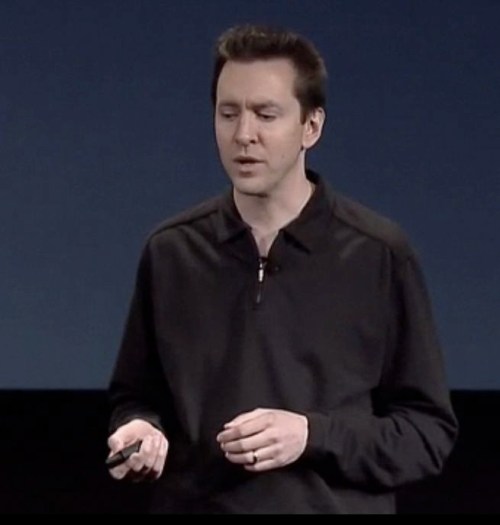
"Don't look where I'm clicking"

"Don't look where I'm clicking"

UPDATE (December 20): Reader John in the comments section, below, adds some words of wisdom, and brings me to write that I omitted my remarks about Jonathan Ive in my haste to publish. He’s correct in my view in referring to Ive’s apparent passion, enthusiasm and specialist expert knowledge as it comes across in videod segments, as well as the October release of the Macbooks. Occasionally, his passion feels a little cloying, but there is no doubt he knows his stuff and lives and breathes industrial design. What’s curious is that while there has been much recent discussion about Jobs’ successor waiting in the wings, there has been little offered up if Ive was ever poached by the likes of Microsoft or RIM. Clearly, Ive feel on his feet when he first joined Apple pre-Jobs’ return, and he and Jobs fell into lockstep in terms of design philosophy. We’ve heard little about who’s in the wings should Ive suddenly leave his post, and one can speculate what effect this would have on Apple’s share price (throws salt over shoulder for possessing such thoughts!)

Let me return to Macworld thoughts to conclude this blog entry. I expect we’ll hear all kinds of new rumours about what Apple may or may not deliver this January at Macworld, and I’m guessing expectations are low at the moment. Only when Steve has been ill have others been allowed to be the first to show new Apple products (Think iMac G5 in Paris). So can we really expect Phil to do much more than orchestrate the Snow Leopard demo, and some minor hardware variation, perhaps calling on other Apple staff to do their fair share of heavy lifting once more?

Will Steve even attend any part of Macworld (given he was accosted on the Expo show floor after last year’s keynote may have left a bad taste in his mouth)? And will attendees really be all fuzzy and warm with each other (despite the bleak financial outlook) with the prospect that we are attending possibly the final campfire vacation together? (Cue violins).

I’m hoping Paul Kent and his team can pull a Macworld Expo together in 2010, and I’ll work hard to get an invite back in one form or other to be faculty then, based in my 2009 performance. But I can’t help but think one era has finished and another is about to start. A fresh broom is sweeping through many halls of power and influence, old and tired ideas about “how things should happen” are being forcefully challenged, and much change abounds.  Steve knows how to manage change better than most (head to my blog entry about his capacity here), and hopefully Apple’s ability to even more tightly control its message delivery, while leaving some unhappy, will lead to better product development and quality assurance.
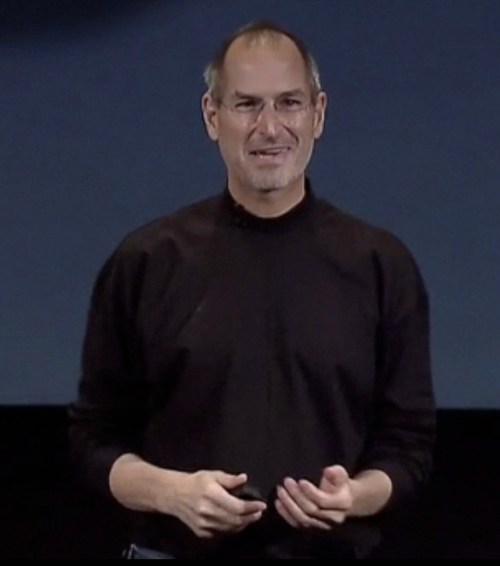
All of Apple's VPs could take some lessons on how Steve smiles and interacts with his audience

All of Apple's VPs could take some lessons on how Steve smiles and interacts with his audience

What the designing of the Boeing 777 taught me about how to use Apple’s Keynote to give memorable presentations

My attention this week was partially taken up with the news that the Boeing Corporation had completed tests on a core component of its newest design, the 787 Dreamliner, below.

Boeing 787 roll out at Everett

Boeing 787 roll out at Everett

The Dreamliner is Boeing’s answer to rival Airbus’ giant A380, which recently commenced service from Melbourne to Los Angeles with QANTAS. Smaller, and with a longer range, Boeing believes it is a better match for what the flying public desires than the Airbus competitor.

Built of new lightweight but very strong materials, some of the parts being assembled here in Melbourne, the Dreamliner is undergoing many tests before taking its first ever flight. This week on its website Boeing showed video of a very important test outcome: the destruction of the wing box, the central part of the aircraft to which the wings will be joined as well as the fuselage. It needs to be able to withstand huge forces and strain. You can see the test here.

In my work with fearful patients, especially those who believe severe turbulence will rip the wings from the aircraft, I show a similar test performed by Boeing more than ten years ago when its 777 was being tested before entering service. In this case, Boeing built a plane just for the purpose of destroying it, to see what forces the wings could withstand before breaking. To do this very strong steel cables were attached to each wing tip and pulled up in increments, with the hope the plane’s wings could withstand 150% of the worst the weather and a pilot’s poor handling could throw at it, as well as test it in advance of heavier versions being built.

In regular flight, wing tips can flex above or below the centre line by six foot. In the test, the wings bent twenty four feet from the horizontal before an explosive compression took place. You can see the video I show below:

It’s a pretty impressive video, and can start the cognitive shift fearful flyers need in the quest to feel safe on board commercial aircraft. (Touch of irony: The guy in the frame above holding his neck is former Boeing Commercial VP Allan Mullaly who was initially in charge of the 777 program. Later, he was cherry-picked to become Ford’s CEO and it was he and the other Detroit CEOs who copped huge ridicule when each flew in their company’s corporate jets to Washington DC seeking automotive bail-outs this week.)

I first saw this video, narrated by actor Peter Coyote, after a visit to the Boeing plant in Everett, Seatte, WA, and purchased the five-VHS tape series, made by PBS.

The design and manufacture of the 777 set new principles of collaboration for Boeing, between various departments as well as launch customer, United Airlines. (In the wing destruction video, above, the guy who puts the binoculars to his eyes, at 1’27”, is United’s liaison staff member.)

But the design of the airliner was also a first for Boeing in that it used computer workstations to perform many of the designs previously performed by hand on paper. Different departments  designed various systems, such as air-conditioning, hydraulics, moving control surfaces, interior design, etc. At various times in the past, full-sized aircraft mockups were designed, often out of wood or clay (much like cars are designed) to see how the various systems “came together”.

Every so often, a hydraulic element would “interfere” with the positioning of say an air conditioning duct. Then it was back to the drawing board for each department to eliminate this “interference”. Call it stamping out the bugs, to use a coder’s lingo.

What they had to do was design “affordances”, room for piping and other elements like wiring to co-exist in the same space. The advent of large and powerful computers and CAD/CAM software allowed engineers to make redesigns easily achieved while calling up other departments’ system designs to make sure of their shared affordances. (If you go back to the Boeing website and look at the middle video describing the undercarriage, you’ll see how many systems are involved and the close tolerances needed to allow the gear to move into position.)

It is here that I learnt of this concept of affordance, and I now apply it in my presentation magic training.

If you got to Wikipedia, here, you will see a variety of definitions of affordance, some of which contradict each other.

But if you’re reading this while toying with your iPod, then you’re likely to experience the kind of affordance I have in mind for my presentations. It’s an aspect of industrial design that leads the eye and hand to act in a certain way. The iPod’s scroll wheel and menu system were designed such that no manual was needed to operate the device, and learn its nuances.

Indeed, just this week, I was showing a colleague an iPod for his first time. He wanted to borrow it to record some lectures, and I was happy to lend it to him together with attachable iTalk recorder hardware. Within a few minutes, with me guiding him with words, and he using his fingers and thumb, he caught the essentials and reproduced them on his own without my advice.

This is affordance at work, and it has perhaps reached a near-zenith with the iPhone where again one needs very little instruction as to its use, and the design implicitly guides you into action. Contrast that with how Steve Jobs described its so-called “smart phone” competitors at the iPhone’s release almost two years ago, and you will also understand the concept of “interference”, where the menu system seems to be conspiring to make your use of the competing phone difficult and thus stressful.

Users, and audiences for that matter, give up if the task they are being asked to perform is too stressful or interfering with how they usually do things. Sometimes they know what they should do, and other times they don’t understand how things operate but that doesn’t matter as long as they get the main message. This is how magic becomes entertaining, when we know we are being fooled, but don’t know how the trick is done.

In presentations, I use my knowledge of neuroscience, and the social psychology of persuasion, to create affordances leading the audience where I want them to go. This is why the use of colour, pleasing animations, movies, sounds, text which matches voice, and other affordances make for engaging and memorable presentations.

It’s why I choose to use Keynote rather than other software because it better matches my desire to create affordances, not just for the audience but for slide design, while say, Powerpoint seems more intent to my taste on creating interferences.

This is why I so often describe Keynote as eliciting creativity because it seems to reduce the likelihood of interferences, even though at times I wonder what the programmers were thinking about. For instance, in Keynote 4, the addition of Instant Alpha has changed the way I work with Keynote. Look at the video below to see what I’m talking about.

Using Art Text’s wonderful icons, I wanted to use a paper clip to create a special effect, which most in an audience wouldn’t notice (but a Keynote user would).

Here’s what it looks like when I try to place the paper clip onto the picture in a way that emulates the real thing:

All that happens is that the picture covers up the clip. Of course, if you send the Clip forward of the picture, you will simply see the clip sitting on top of the picture, not doing its job of being a paper clip.

But with some use of a new affordance introduced in Keynote 4, Instant Alpha, a photo retouching device previously only available in third party software such as Photoshop, and somes screen shot magic, I can fool the eye into believing the photo is being placed between the loops of the clip – a 3D illusion in 2D, seen below.

It’s a very simple illusion which many wouldn’t bother to notice because it’s something they do most days (using paperclips) and is hardly outstanding. But those who create presentations will momentarily wonder how I did it, knowing it’s doable, but which “magic” was elicited to do so.

If you got a hold of the original Keynote file I created, you could “reverse engineer” my actions by looking within Keynote’s Inspector at the actions I created and seeing each step. In my Powertools session at Macworld 2009, I’ll be creating features like this, some more complex, and showing how to use Keynote’s abilities to elicit illusory acts which take quite some time to plan and execute in the design phase, and which may only last a few seconds in the audience’s attention span. So be it.

The whole idea about knowing the secret of affordances is that you are abandoning the cognitive style of Powerpoint (which is about making life easy for the presenter with bullet points, copy and paste text, and chintzy clip art providing a dumbed down message), by making your slides tell a story to make life for the audience easy, allowing your central message to penetrate and stick.

You see, if your presentation contains interferences – jarring transitions, pixelated images, written text competing with what your saying, and smartass animations for the sake of it – your messages are compromised and won’t stick. What will stick is an idea that will spontaneously form within about three minutes (the length of a speaker’s “honeymoon” period after commencing their presentation) which is that the audience will first check their watches, then their iPhones or Blackberries, and then how covertly they can leave the auditorium.

Affordances, if you know how to create those that sync. with how the brain works, will engage your audience. The best affordances involve the audience. Some presenters choose to do this, depending on their personal style, by asking questions directly of the audience, or having them chat to the person next to them, or have them close their eyes and imagine a scene, or break people up into small groups and have them do tasks. All well and good, and I’ve used each of them and more in workshops.

But I take particular pride in involving audiences without their knowing I’m doing it by my cognitive style, supported by what I can do with my voice, my body, and my slides.

In my Powertools workshop, we’ll look at all these factors and how to (hopefully) seamlessly integrate them while always keeping a focus on the central story. Indeed, telling stories is a major affordance by my definition, tapping into the human hard-wiring for story telling.

While it’s great to become extremely competent with your presentation software, knowing its in’s and out’s and becoming technically proficient, the danger is that this same competency can become an interference if all you do with it is to show off your prowess and thus lose your message in the process.

I’ve seen this happen when some have seen my presentations, taken some of the effects and devices, and applied it without suffcient thought to why I did what I did. What’s left is a pastiche of clever animations, funny cartoons, and an audience that leaves amused but not persuaded.

And a presenter who thinks they’ve abandoned their old traditional means of presenting in exchange for something for the 21st Century, but they’re only part of the way there. As are we all!

Apple’s Keynote as an enabling technology for Generation We

There are times when I don’t give workshops on Presentation Magic, but use the magic to distill complex and confusing ideas in workshops on Technology. Note I use a capital T here, to speak of the concept underlying what a technology is.

I’m often invited to speak to groups who by dint of their age, or life experiences, didn’t jump on board the Internet Train but instead have been thrown on board by their employers, children or friends and expected to enjoy the ride. But it’s not fun when you’re just being jostled about in rattling carriages with windows half-open and you can’t enjoy much of a view. Oh, and those same “benefactors” give you their hand-me-down Windows 98 boxes, or conversely Windows Vista! But that is the subject of another blog!

So I see my task for this group is to be a travel advisor and commentator, a kind of Lonely Planet guide, helping them plan their itineraries, pack the necessary gear for the trip, and make the journey more comfortable. Believe it or not, in my other work where as a Clinical Psychologist working with fearful flyers, I actually do take on that role, but that is also the subject of another blog, here.

In workshops like these, my primary aim using Apple’s Keynote is to illustrate the journey we humans have taken to get to 2008 technologies, by noting that all the Ages of Man have been denoted by the tools humans used, or the outcome of using those tools.

Think about it: We have the Iron Age, not just because ferrous material was discovered but the use to which it was put; and thus we also have a Copper Age and a Bronze Age. Later, after the Middle Ages and the Dark Ages where the Church’s edicts ruled how knowledge about nature was to be understood, an Age of Enlightenment dawned, led by the likes of Sir Isaac Newton.

In living memory, following another technology-based age, the Industrial Revolution, we’ve had the Information Age, the Age of the Knowledge Worker, and now with Web 2.0 and beyond, the Age of Connectivity, following the advent of the Internet which some have suggested has caused a more profound global shift than the Age of Moveable Type, i.e., Gutenberg’s development of print technologies.

By heavily illustrating these concepts in Keynote, I’m allowed to convey to my workshop audience the concept I hold to: that while technologies about us mught shift very quickly (e.g, the adoption rate of the cellphone, with the major exemplar being the iPhone) we humans don’t change too quickly at all – we use technologies for the same purposes as our ancestors did thousands of years ago. And sometimes we must acknowledge how technologies live double lives: that for which its creator intended it to be used, to solve some identifiable problem better than the previous “mousetrap” (for better, read cheaper, faster, more reliably, etc); and a second purpose, when others seeking to solve other problems, co-opt the technology to serve them.

So while the Internet’s fathers in the US, particularly around Stanford and MIT, wanted a means to have academic departments communicate and share files, would they ever have conceived of Google or YouTube or the iPhone for that matter?

We’re talking here of the late 1960s… a time of major social change following Kennedy’s pledge to put a man on the moon, the spread of the integrated circuit, and the effects of the introduction of the contraceptive pill.

There were movies and books discussing the “generation gap”, where a motto sprang forward in the late 1960s: “Don’t trust anyone over 30.”

But in recent times, analysts and social commentators have argued that this simple dichotomy based on year of birth is insufficient to explain the social changes currently being experienced. So we have descriptions of “Baby Boomers”, Gen X and Gen Y, and some say Gen M, where the M stands for Media or Me, reflecting a certain self-centredness perceived by Baby Boomers in their offspring.

But in a video below, made prior to the US elections urging young people to get out and vote for the first time, the young people portrayed describe themselves as Generation We.

The “We” is a collective noun, and reflects I think on new social media’s enabling one of technology’s main purposes: connectivity.

This is a generation of can-do’s, opting not to wait for their parents’ generation to fix the problems they created in their pursuit of happiness bought by consumerism. This is a generation who knows that technology must be harnessed if their future is not to be stricken with the excesses and ignorance of the previous generations.

And this is the generation who can decipher complex messages as long as they are delivered in an appropriate and appealing way. This generation, who have grown up with the expectation that information is available to them at the touch of a button, will not tolerate dumbed down, bullet-point driven message delivery methods (you knew I was getting there eventually, didn’t you?).

This is a group who will see thousands of messages in their lifetime, each competing for limited attention span. This group demands a much higher level of involvement in their own learning, who will not tolerate being lectured, and who will be far more self-sufficient than the current crop of recent college graduates.

If you are going to work with this group, either at college or by employing them, be aware that you will have to explore new ways of reaching out and holding their attention.

You will really have to understand learning styles, and accommodate the variations which hitherto have been ignored under a welter of poorly designed conventional slides or boring uninvolving presentations.

It’s presenting for the times we live in, with the available research on how knowledge is shared and shaped demanding technologies which can truly be called “enablers”.

When presenting I choose to use Apple’s Keynote as my enabling technology because it’s a better match to my cognitive style of conveying my ideas. It’s a personal thing, but I find Powerpoint even on the Mac, stifling and constraining. Mind you, when I speak to general audiences about styles of learning I’m platform-agnostic, and I rarely talk people out of using Powerpoint unless they expressly ask me what I used in my talks. That tells me they saw a difference and might be a little open to shifting their allegiances if they feel confident they can reproduce the kind of effects the have just witnessed.

Now take a little time to view the Generation We video, bearing in mind the pre-election period it was created in, and I thank my colleague Shawn Callahan of Anecdote.com for the heads-up.

Why Apple’s Keynote keeps raising the bar when it comes to presentations – it’s all to do with why it was created in the first place.

Is the Powerpoint style of presenting on the way down?

Is the style of Powerpoint on its way down?

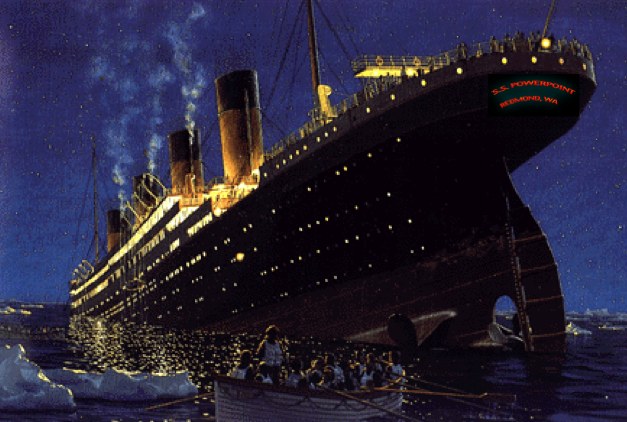
There’s a long running comparison between Microsoft and Apple that suggests that while Apple can turn on a dime (or sixpence if you prefer) when it comes to dealing with the changing technology landscape, Microsoft is like the Titanic, unable to chart its way through troubled waters, and make the necessary rapid diversions to avoid obstacles, foreseeable or otherwise.

It had a chance to do so with mobile phone technologies, but CEO Steve Ballmer who saw the iPhone coming laughed it out of contention and continued on his predictable path. We’ll see where the SS Microsoft navigates to in a year or two with respect to cellphone software and market share.

It’s its sister ship, SS Powerpoint (above) that I’m considering in this post. Some time back, I wrote a blog entry entitled, “Just what is it about Keynote that is changing the way people present? where I trawled through the blogosphere looking for who was using Keynote and why. I was searching for others’ notions of Keynote’s ability to elicit creativity, non-conformity and and persuasiveness in its users so as to deliver impactful messages.

Since that time, I’ve noticed (because I look for such things) an increasing number of high profile presenters overtly using Keynote. I’ll update that blog entry soon, transferring over onto this Presentation Magic blog. Just this morning, on a discussion list I subscribe to, I saw the following message:

“My employer wants me to look into taking an advanced Apple Keynote course…. Our company is looking to migrate from PowerPoint to Keynote and I am the person who will be performing all of these tasks… I’m pretty versed in Keynote, but I think I’m just at the tip of the iceberg with the program. I know it can do more.

Well yes; it can.

In my travels where I’m just speaking about presentations, much like my friend Garr Reynolds with his Presentation Zen approach, I take a platform-agnostic stance. Audiences have not come to learn about software choices. But no matter whether the audience are teachers or CEOs, they know they haven’t seen Powerpoint in action.

They see razor sharp text (usually just a big word or two per slide), megasharp pictures (no pixelation), unfamiliar themes and backgrounds which don’t compete with what’s in the foreground (the message!), movies which play flawlessly within the slide without revealing the controls, spoiling the sense of a seamless presence, and they see intriguing, enhance-the-story transitions and builds (otherwise known as animations).

It’s not that Powerpoint, the application, can’t do these effects adequately – it can. Indeed, it goes one or two better than Keynote when it comes to picture manipulation abilities, for which one needs to leave Keynote 4 and seek third party assistance, such as Photoshop. And it has better timing controls, for sound and image “ins and outs”, something sorely lacking in Keynote 4, but which I expect to be addressed in an update, utilising the timing features we’ve seen in iLife apps. such as Garageband, iMovie and iDVD.

For me, in 2008, the historical differences in the products’ DNA is becoming glaringly obvious. Powerpoint, the app., can’t seem to shake off its corporate lineage, its graduation from being an ersatz overhead transparency producer for the Mac Plus and an adjunct for sales and marketing professionals, complete with bullet point templates for outlining a widget’s selling points.

Keynote’s origins, as a medium for Steve Jobs’ keynotes, where he would display his company’s wares, came as a cinematic, narrative device. Few will disagree that a Jobs’ keynote is a keenly anticipated event, often as not letting the non-techie world know where the techie world is heading. That’s not to say Jobs usually introduces unheard-of products. But he and Apple have displayed an uncanny knack since 1997 to reinvent the familiar, and turn it into something emotionally satisfying rather than a sterile object to be endured due to an impenetrable user interface or lack of reliability.

To help persuade us of Apple’s foresight and ability to provide emotionally satisfying products and future offerings, thus building up anticipation and desirability, as we witnessed with the iPhone introduction in 2007, Jobs uses Keynote to tell stories. Even when on rare occasions it fails, he tells stories such as when he and Woz would play pranks in their dorm using Woz’s gadgets, all the while no doubt hoping that the tech. gnomes in the support area are getting things working again. Pronto!

Keynote was designed from the ground up as a story telling device in the tradition of movie making, hardly surprising given Jobs’ involvement in Hollywood. It elicits in the user, scene construction, editing facilties, and high quality graphics and sound reproduction. A great deal of thought has been put into matching its themes with default fonts and photo cutouts. The reflection and shadowing effects, which Powerpoint has now added and in some ways exceeded, allows for lifting images and text off the page, playing into the audience’s depth perception capacities it takes for granted.

The capacity of Keynote to allow for exceptional vividness and presence is one of its secret herbs and spices, all too easy to neglect when all you’re doing is preparing the next bullet point series (must remember to keep to the 7 x 7 rule – as if!), and locating brain-wearying clip art. At least Powerpoint 2008 for the Mac has eschewed clip art for high quality photo objects.

One shouldn’t underestimate the story-telling, narrative-building capacities of Keynote. More than ever, the power to weave a story arc, with its beginning – middle – end, is essential for conveying complex ideas and concepts to naive audiences. By “naive” I don’t mean willfully ignorant, but an audience who is attending in order to learn and assimilate unfamiliar concepts into their own knowledge base. In order to do so, presenters would do well to make essential assumptions of the audiences prior knowledge, and build a story, using metaphors and similes and even biographical tales.

This is where Keynote’s advanced transitions and builds help the presenter weave his or her story, sometimes applying cinema quality dissolves Powerpoint is incapable of achieving, or advanced masking controls, much like matte artists at Industrial Light and Magic.

Indeed, it’s my guess that we will see in the next Keynote update even more acknowledgement of its cinematic heritage by the inclusion of the sort of effects we have come to see in such Apple products as Final Cut and Motion.

For the past five years since its introduction, Keynote has gently added new features, starting from a fairly low base compared to the bells and whistles Powerpoint users have come to expect. Long time users had to become quite innovative and clever in their use, making up for Keynote’s feature deficits, yet capitalising on its superior visual and text qualities. In Keynote 4, Apple unleashed some of the most desired and necessary features such as motion, alpha masking and scaling.

Keynote still lacks the diversity and multiplicity of features Powerpoint boasts. But if the feedback I receive is to be relied upon, audiences certainly don’t notice the disparity. Indeed, because they so often see the same unimaginative themes and unnecessary animations in Powerpoint, the simplicity of Keynote shines through.

It does mean that Keynote users work harder to achieve these effects, using the application’s precision features. This may come as a shock to those who expect Apple products to make life easier, but this is to misunderstand the desired effect: to make the audience’s task easier in understanding the presenter’s essential points.

I was once told that an expert makes a difficult task look so easy a beginner could contemplate undertaking the task, only to discover the task’s inherent difficulty.

Helping audiences understand difficult concepts, including ones they may intially resist, requires tools which help the presenter make the difficult seem possible. Keynote’s cinematic qualities taps into the dominant medium by which we learn and are entertained simultaneously.

Powerpoint will get there too, once its users shift from its cognitive style incorporating an overabundance of the written word, and it improves its graphics abilities. We are already seeing this shift with a number of books recently published acknowledging its deficits, and helping its users achieve more, focussing on essential presentation skills. Google the names “Cliff Atkinson“; “Stephen Kosslyn” and “Rick Altman“.

But by then, Keynote will have leapt ahead, improving its audio handling abilities, and incorporating sophisticated timeline features to assist presenters’ ability to have even more precise control over the slide and its elements. As Keynote’s strengths attract more third party developers, expect some thrilling breakthroughs in presentation capabilities.

That’s what I’m looking forward to including in my Powertools workshop – I won’t be surprised to receive news of such developments in the lead up to Macworld. Plus more rumours of a Keynote 5 on the way.

Powerpoint users may console themselves that it is still the dominant knowledge transfer tool on the planet. But today more than ever given financial circumstances, it’s time to stand out from the crowd and differentiate oneself. And with Macintosh market share growing, more and more switchers will peer inside their new Macs’ Application folder and wonder what this trial iWork bundle can achieve. Some will “get it” straight away, revelling in Keynote’s comparatively simple interface, while others will wonder how they will get by with such a “minimal” set of tools. But if they persevere, use facilities like Apple’s online seminars featuring Keynote or sign up for Lynda.com self-paced tutuorials, they will ultimately come to understand why Keynote generates so much enthusiasm by its long-term users, despite its shortcomings.

Please use the comments section to share your Keynote stories, especially if you’re a switcher. You can be assured Apple’s Keynote team will be listening!

Will Obama’s Victory speech change the way people present for the better? And does that mean more acceptance of Apple’s Keynote software as the tool of choice?

This week in Melbourne we’ve observed, neigh(!), participated in two races: a 22 horse race known as the Melbourne Cup, and a two horse race in the US, which will have a far greater impact on the world’s future than the horse race.

Nonetheless, in an ironic twist, so iconic has the Melbourne Cup become (it is the second richest race in the world after the Dubai Cup), that Victorians have a public holiday! Yes, we get a day off from work in celebration of a horse race, while the rest of Australia works. It’s not called “The race that stops a nation” for nothing!

This day off gave me time at home to further prepare some presentations, and try and get my Macworld 2009 workbook ready for publication. From it and my blogs, I hope I can publish a book (in print or pdf) which details some of my thoughts and actions when it comes to presentations.

You see, I believe being able to present well, whether it’s at a conference for scientists, or a small business proposal meeting to raise funds, be it a CEO delivering at an annual shareholders’ meeting, or yes, a Presidential candidate trying to get your vote, it is a fundamental 21st century skill. It’s also one of the most feared modern human activities! I count myself lucky to have had much exposure when I was young to presenting, whether it be in class at school or college, or on radio, in print, or on TV. I feel comfortable in all media, and indeed have taught media management skills previously.

When a tool like Keynote comes along, as it did in 2003, one grasps it fiercely, having recognised its qualities to elicit emotional responses to message delivery, quite at variance to the dominant message delivery platform for presentations, Powerpoint. Yes, I have seen bad Keynote and good Powerpoint, but each is rare!

With Obama winning on Tuesday, we were witnesses to two very important speeches: Obama’s victory speech, and McCain’s concession speech. Each was a emotional symbol of the man’s character, as I heard and felt them.

McCain revisited himself, without the weight of the Republican party hopes resting on his shoulders. Here in Australia, the power of the former conservative government was in keeping its factions in check, while pointing to the opposition’s “ownership” by powerful trade unions (sound familiar to my US colleagues?) in over-riding more moderate progressives within the party.

This year, the Republican factions became all too obvious and those more moderate Republicans and swinging independents refused to hear the same old FUD (see my previous blog entry, comments and all).

While Sarah Palin impressed many at the Republican Convention and held her own during the single Vice-Presidential debate, it was clear to me she had been well-rehearsed and coached, and had much presence and appeal.

But in her one-on-one interviews, her lack of depth, both intellectual and political, was on show for all to see. Like actors, she was only as good as her last performance, and while many will hold on to her initial presentation at the Convention, her later performances with the likes of Katie Couric and the merciless parodies by Tina Fey will likely see Gov. Palin reduced to a page on Wikipedia.

Obama left his best speech until last, following McCain’s concession speech, which you can see him watching below, courtesy of a Flikr link here.

Obama watches McCain's concession speech

Obama watches McCain

While those who had kept an eye and ear on Obama since 2004 knew he was going places through his oratory and passion, it’s only in these last two years and in particularly these last few months when many have really listened to the man speak.

His speech on Tuesday night in Grant Park, Chicago, will be listened to again and again, for all manner of reasons. It reminded me of one of my slides from my Macworld 2008 presentation, which I modelled on this book, below:

Peak Performance Presentations

Peak Performance Presentations

In my presentation, I wanted to remind the audience that we ought not rely on technology to help us be persuasive. That like lead actors, we need to use technology as support acts to help us get our message across, not be the message. Initially, I showed a humourous video of technology gone wrong, then referred to a blank slide where I reminded the audience that some of the most memorable and influential speeches in living (and recorded) memory came without technological assistance (albeit with microphones).

On a blank slide, I brought in a panel showing Winston Churchill behind a microphone, accompanied by a his voice: “We will fight them on the beaches….”

This slide occupied the left third of the screen, such that audience members were now expecting the other two thirds to be filled with more speeches. I then showed a picture of JFK behind the microphone on the slide’s right third, with his voice saying, “Ask not what your country can do for you…”.

This left the middle panel to be filled.

I chose to fill it with Martin Luther King behind the microphone, with his voice: “I have a dream…”

It was a powerful moment in the Macworld presentation, and I was taken back to that moment when I listened to Obama’s speech on Wednesday, my time. No doubt in a future presentation, I will likely include parts of it, perhaps leaving Churchill to one side, especially if I’m working with a youngish audience.

There are any number of phrases to select:

“It’s been a long time coming, but tonight, because of what we did on this day, in this election, at this defining moment, change has come to America.”

“The road ahead will be long. Our climb will be steep. We may not get there in one year or even one term, but America – I have never been more hopeful than I am tonight that we will get there. I promise you – we as a people will get there.”

“And to all those watching tonight from beyond our shores, from parliaments and palaces to those who are huddled around radios in the forgotten corners of our world – our stories are singular, but our destiny is shared, and a new dawn of American leadership is at hand.”

And while it’s long, these three paragraphs, with their story telling, and emotionality, will no doubt bring a tear to some:

“This election had many firsts and many stories that will be told for generations. But one that’s on my mind tonight is about a woman who cast her ballot in Atlanta. She’s a lot like the millions of others who stood in line to make their voice heard in this election except for one thing – Ann Nixon Cooper is 106 years old.

She was born just a generation past slavery; a time when there were no cars on the road or planes in the sky; when someone like her couldn’t vote for two reasons – because she was a woman and because of the color of her skin.

And tonight, I think about all that she’s seen throughout her century in America – the heartache and the hope; the struggle and the progress; the times we were told that we can’t, and the people who pressed on with that American creed: Yes we can.”

And while I will show a picture of Obama when we hear his voice, as the audio concludes, I’ll transit to this picture of Jesse Jackson listening to the speech (I think a very slow dissolve will add to the emotionality), and no doubt many in the audience familiar with him will be empathising with his feelings, knowing his struggles and how his hopes have now been realised.

jackson
You see, even though I might be telegraphing what I will do in a future presentation, it won’t spoil the emotions of the moment nor the persuasiveness of slide and my commentary.

What this all means is that we now have a President who is an orator of the first order, unlike the incumbent President Bush, whom Dave Letterman pillories each night in his “Great Moments in Presidential Speeches” parody.

My prediction is that now more than ever is the time when expectations of giving great presentations, whether in scientific or academic conferences, in business or in ministries and schools, will peak. Lacklustre Powerpoint-based “shows” will no longer cut it.

This will be the case especially in schools and colleges. This election had a huge turn out of young people, some voting for the first time, impressed no doubt with the change desired by so many, together with Obama clear technological savvy  with his exemplary use of SMS,  Facebook, iApps for the iPhone and so on.

This is a cohort who are themselves media savvy, creating their own entertainment and news reporting, and it is this group who will reject long winded, passionless speeches and bullet point-riddled presentations with accompanying chintzy clip art and moronic “beanie” people. This is the group who take megapixel-sharp photos with their cellphones, and share them on Flickr and Facebook.

This group will expect their teachers and figures of authority to present well, and Obama has set a very high standard indeed. Expect an increase in enrolments in speech coaching groups like Toastmasters.

But just as importantly, this is a group very switched on to the Mac, which as you know comes bundled when purchased with a trial copy of iWork and thus Keynote.

I’m guessing in the next update of Keynote we will see even more movement to a merging of Keynote and elements of iMovie and Garageband. We have already seen how the current version of Keynote has numerous export options suitable for podcasting. But I also expect to see more tools to help Keynote help you create memorable presentations. Like most things Apple, it will guide its users to be more creative, then get out of their way when they need to be centre stage.

This is why Paul Kent, MD of Macworld, and who invited me to present at once more at Macworld 2009, is such a smart guy.  But he has made life tough for me. He knows he wants my Powertools workshop to evoke the same reaction as this year’s presentation, where I showed Keynote in action rather than talked directly about it (to the disappointment of about 10% of the audience, judging by the evaluations).

But he also asked me to show how I go about thinking and creating with Keynote, so you get to see how the magic happens. Unlike a magician who never gives away his or her secrets, I am in my element sharing my knowledge, receiving feedback, and showing how to do things differently. Not just to be oppositional, but because my way of doing things differently is a better match for what the science of persuasion and influence tells us.

Teaching presentation skills is so much more than teaching the mechanics of how software works, which seems to be how so many workshops on Powerpoint operate.

Over to you now… regardless of your political persuasion and whether you think Obama’s actions can match his rhetoric, what do you think about my central thesis, that he has raised expectations for anyone who wishes to speak to an audience?

What an Obama victory next week will mean for Apple and its users

I’m in the process of making final plans for my next trip to the US, where I’ll be visiting Florida (Miami Beach, Fort Lauderdale and Boca Raton), then off to Macworld in San Francisco for my Powertools workshop on Apple’s Keynote (details upcoming).

After, I’ll stay on to do some more training, hopefully picking up some workshops, but likely leaving California before the Presidential Inauguration in January. Certainly, I will be able to pick up some of the feeling of change by the time I arrive in Florida on Christmas Eve (look for my reindeer).

Here in Australia, we experienced our change from a tired, conservative, “let’s go to war with George W.” fear-mongering government almost a year ago, and the relief has been palpable. Many of those who took the time to write to newspapers and blog about the shift noted a sense of human dignity having been returned to the Australian landscape, when a more progressive government was elected in November, 2007.

Now, because of the way I think about presentations (and how to best use Keynote), I am very aware of the power of presentations to persuade, using engaging and involving methods based on cognitive neuroscience, adult learning principles, and knowledge management. I am picking up “gigs” from individuals and organisations who wish to learn how to use these methods with their particular audiences, whether they be colleagues, politicians and their advisors, or church attendees.

In many respects, the Democrat party has been lousy at delivering persuasive messages, ineffectual at dealings with Republican hubris. In my presentation at Macworld this year, I discussed the power of emotions to persuade, and referred to psychologist Drew Westen’s book, The Political Brain, as evidence of this.

Here is part of the slide I used, showing a quote from the book:

My slide from Macworld 2008, featuring Drew Western

Drew Westen and Macworld 2008

I wanted the Macworld audience to understand the pervasiveness of emotions, whether in presenting, in politics, or in teaching, and how this aspect of human behaviour could be harnessed to make message giving more persuasive.

Westen’s thesis is that the Democrats have been poorly informed in how to deliver messages, allowing the GOP and its fear-based messages to hold sway, none more so than what the world is observing with the McCain/Palin team. (Believe me when I say the world is watching the US elections intensely, and we can see how poor economic management in the US has global effects. Ask the Icelanders, whose state-based airline just went bankrupt).

In Australia, surveys have shown that about 75% of Australians want an Obama victory next week. And we’ve had a year of living through “You’ll be sorry” messages from the conservative elements within Australia. So far, despite the economic challenges, the current progressive Government is managing quite well, and we here have been afforded some protection from the worst of the impending global recession.

If you heard last week’s Apple Q4 earnings call (I played some of the audio from the iTunes podcast at this week’s iMUG AGM as part of my President’s report), you would have heard CEO Steve Jobs singing the praises of Apple customers, of how they cleverly choose Apple products despite their premium price, even if it means waiting a little longer to afford them. He spoke of the economy’s unpredictability while speaking of Apple’s being protected from the buffeting the PC world is experiencing with their razor-thin margins and lack of innovation. Great products and $25 Billion in cash and no debts is a great means by which to weather the current turbulence.

In an insightful column recently, Robin Bloor wrote of “the sound of crashing Windows” referring to his observations, backed by data, that the Mac is making incredible inroads into the public and corporate mind and market share, challenging Windows’ dominance.

About Microsoft he wrote,

“Microsoft has very little territory on which to fight. In fact it almost feels as though the game is already over. It has no direct retail footprint and it doesn’t do hardware. It even suffers from the indignity that while you can run Windows under OS X, you cannot run OS X under Windows. Because of virtualization, Windows has become a Mac app for running legacy PC applications in the Mac world – and the Mac world is currently expanding at 3 times the rate of the Windows world.”

In other words, at least with respect to IT, change is on its way and it’s inevitable.

I want to suggest to you that an Obama victory next week will hasten that change significantly.

It’s not just that Obama is a switched-on technophile (as compared to the near-technophobic MacCain), able to better use social media to get his message across, but he far more mirrors how Apple operates. He comes from a minority background and must overcome huge resistance to change by conservative elements who prefer a “the herd might stink, but at least it’s safe with them” mentality that has prevailed hitherto.

But pain in the hip-pocket, loss of jobs at home and children in a flawed war, and the sub-prime mortgage fiasco, appears to have Americans asking themselves if the Microsoft-style FUD the GOP is asserting about Obama remains tenable.

If Obama succeeds, then a shift in how FUD is experienced by the voting public (we here in Australia have compulsory voting) will be demonstrated. FUD can only be effective if the product you have to offer has “good enough” qualities compared to the “as good as it gets”, and thus price and conformity are preferred over innovation and difference. The failure of Vista to even make the “good enough” grade has proved a tipping point for Microsoftian FUD.

Obama winning next week will be like the horns at Jericho blowing, bringing down many walls of separation between sections of the American populace, in place for hundreds of years. It will have far reaching effects, locally and globally, and the world will definitely alter its attitude to the US and its citizens after eight years of President Bush and his administration.

My assertion is that an Obama victory will loosen up many prejudices, while others will harden in the first year when the vanquished sit around ready to pop out the inevitable “told you so”. But the overarching effect I expect many will feel, including nations other than the US, will be a sigh of relief together with the generation of hope.

Many of us who have been part of the Mac world, experiencing prejudice and being squeezed out from the mainstream despite preferring the better, more emotionally satisfying product, will perhaps also feel a sense of joy if Obama succeeds. That’s not to say all Mac users are Democrats – far from it. But even progressive Republicans will prefer change this election, having had enough of the present administration with its central message of “family values” and a “war on terror”, and not wishing its de facto continuation with McCain/Palin.

Just like the effects of Roger Bannister running the first sub-four minute mile in 1954 saw many others quickly follow with their own sub-four records, thus breaking through a shared psychological barrier, the breaking through the race barrier next week, should it happen, ought to see many other shared psychological barriers also fall over.

I believe one of those barriers will be that artificially imposed on the Mac in industry, schools, and personal use. If there is one negative here, it’s that despite the psychological shift that would occur with an Obama win, the economic recession America will experience (is currently experiencing?) may see excessive financial conservative belief reflected in a “stay the course” with Windows attitude, despite evidence of its failures, doubts about getting Windows 7 out on time, and of course total cost of Windows ownership. The continuing moves to Open Source, a further threat to Microsoft, will parallel the openness of an Obama led government I would hope, in strict comparison to the incumbent’s history of secrecy.

I can’t vote in the US election, even though my father served in the US military at Fort Bragg in WWII, but I have a real love for the nation and its original principles, and a dislike for the faux patriotism displayed by those who believe they represent “real Americans”. I’m hoping when I get to the US in December I will experience the winds of change blowing through.

We did it here in Australia, and we’re doing OK, all things considered. Perhaps we’ll chat about the election results at Macworld in January. See you there.

(Today’s New York Times has an interesting piece on how Drew Westen’s ideas are influencing the Democrat’s message delivery process here. If his process is show to be effective in an Obama win, it will also put another nail in the Powerpoint coffin, with its “just fill in the bullet point cognitive style”, in preference to a more visual and emotionally effective Keynote-style I will be teaching at Macworld 2009).

While Wall Street went “meh” over the Let’s Rock keynote, Steve Jobs stealthily showed us the next version of his presentation software, Keynote

Whilst Wall Street sighed with feigned non-interest at the outcome of Apple’s “Let’s Rock” presentation on Tuesday, and others wondered if Apple had lost its sparkle with no surprises – the rumour sites put paid to that – another group of Apple observers were watching keenly.

This is a group that has come to learn that there is one Apple product that Steve Jobs does not keep wrapped up tightly and hidden under a bushell, lest the rumour sites steal his thunder. Indeed, I think what I’m talking about is the only product that Apple regularly lets the public see ahead of its release, with nary a mention. Those who have visited my blogs from time to time know of which product I speak: Keynote, Apple’s presentation software first released at Macworld 2003.

Nowadays, during each of Steve Jobs presentations, Keynote observers watch for tell-tale signs that an update is imminent. We saw a little hint at this year’s Macworld keynote, when the Macbook Air was released: a few new transitions.

But at Tuesday’s “Let’s Rock” iPodfest, we got the message loud and clear that a significant Keynote update, perhaps a version update, not just a point-update (ie Version 5 rather than version 4.0.4) was on its way.

Evidence

Since my teachings with Keynote so emphasise the visual (“the visual system is to broadband what the audio system is to dial-up”), how better to demonstrate the likely forthcoming update by sharing with you screenshots of Let’s Rock presentation, in the order I spotted them. Perhaps there are others I missed, so please let me know: les-at-lesposen.com

Let’s Start:

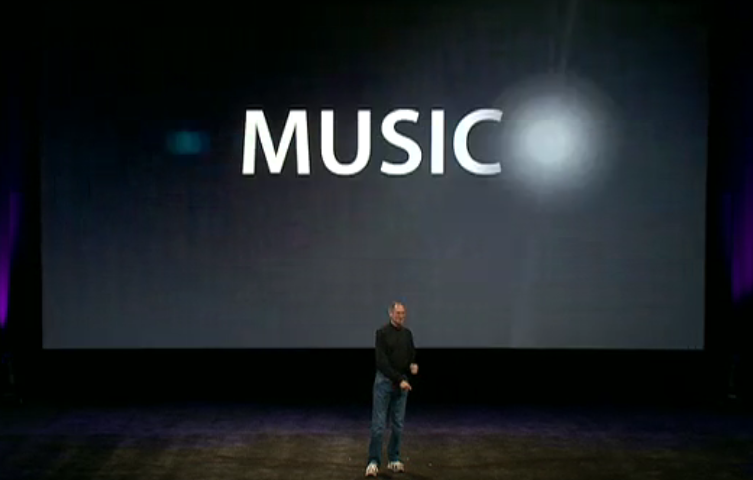
The first hint comes very early in the keynote, just a few minutes in:

This is actually the placing of the word “Music” onto the screen, in a starburst kind of way, much like the old Screen Gems logo used in TV shows of long ago. Let’s see what happens a moment later:

Now we can see the word “Music” appearing. The effect is hardly subtle, but one that really draws your attention. Let’s see what happens next:

The starburst finshes its “orbit” and the full word is revealed. This is a full-on animation which these screenshots can barely illustrate in an adequate fashion. But even so, I see them as evidence of new effects. Together with what else we see as the keynote progress, it can be taken as evidence of continued improvement in the Keynote app.

Nextnew image manipulation abilities or just an imported Photoshopped image?

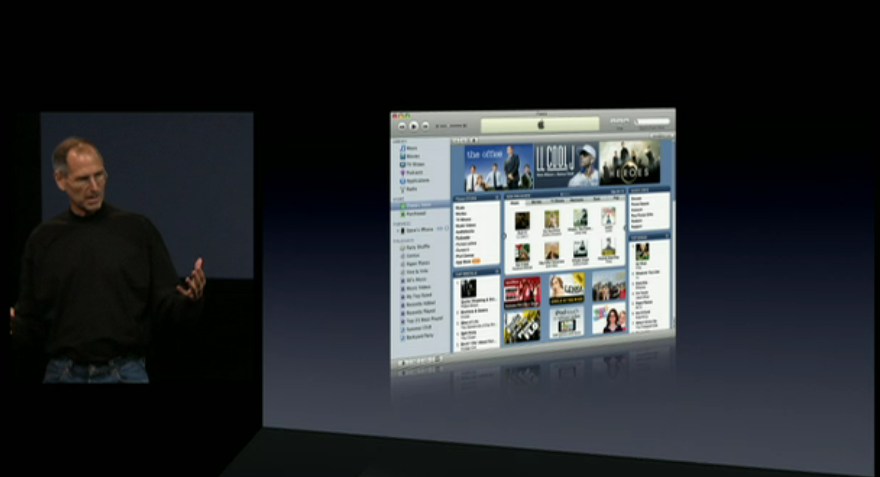
Take a look at what comes next in the Jobs’ slideshow: an image of iTunes 7, below:

I want you to notice an effect I use frequently in my own Keynotes, especially when I’m showing book covers, newspaper articles, or journal papers. This is a skewed image where the left edge angles down to a shorter right edge, as if the image was rotated slightly. This has the effect of drawing the eye along the image from left to right, and in my own slides there is a large amount of black (or white space) where your eye moves to and you just “know” something will appear there. This is me taking control of the message delivery by directing your gaze where I want it to go – let’s call this “direction” as compared to the magician’s “misdirection” where he sets you up for a “gosh, how did he do that?” moment.

Currently, to do this effect in Keynote means using another software, such as Photoshop or GraphicConverter. Indeed, even Powerpoint for Mac 2008 has rudimentary image manipulation tools which I have used to distort and image then import it into Keynote. My guess is, judging by this image, Keynote is about to match Powerpoint’s ability, if not leapfrog past it. Look further at the image above, and note how the reflection leaves no gap at the bottom, which is what would happen if you just dropped in a Photoshopped image. This gives further support to the notion that Keynote has received upgraded photo tools.

Next: New text animations

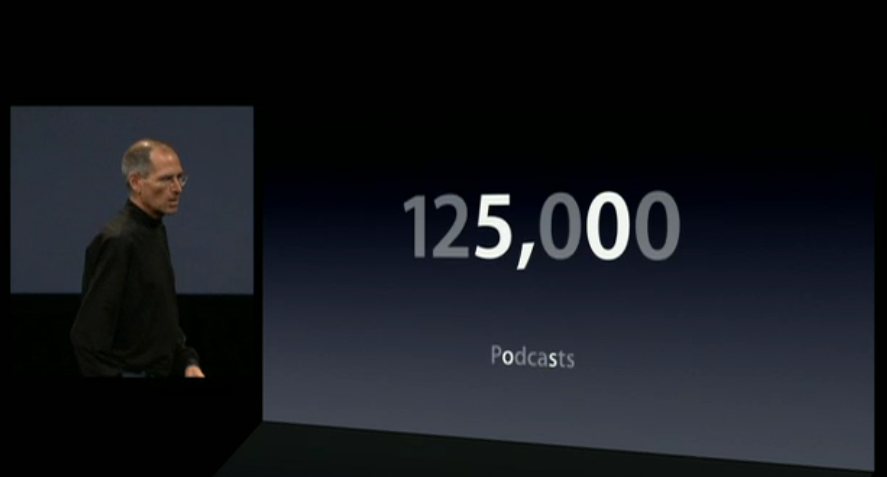
Keynote has far fewer animation effects than Powerpoint, but what it does have screams at you that you are seeing a Keynote rather than more of the same Powerpoint. In the next series of slides we see a new text animation effect. We start with a number displayed, “8,500,000” and underneath it, “songs” in smaller print.

In actual fact, the animation has just begun, if you notice how the “5” and the third “0” are a tad brighter than the other digits.

In the next slide, a moment later, we see this:

There is the same “5” and “0” and the comma, but also notice that in the word “songs” some letters have gove missing. Transpositions are taking place, as we see in the next slide:

In fact, we now see a new text image: 125,000 Podcasts. But notice how the “5” and the “0” in 125,000, and the “o” and “s” in Podcasts are brighter, having remained from the previous text (8,500,000 songs). What an interesting transition, and I’m going to be curious to see when to use it in my own slide creations when I get my hands on this version of Keynote. And what the development team have called this effect!

Moving along… a “flip and hang” transition

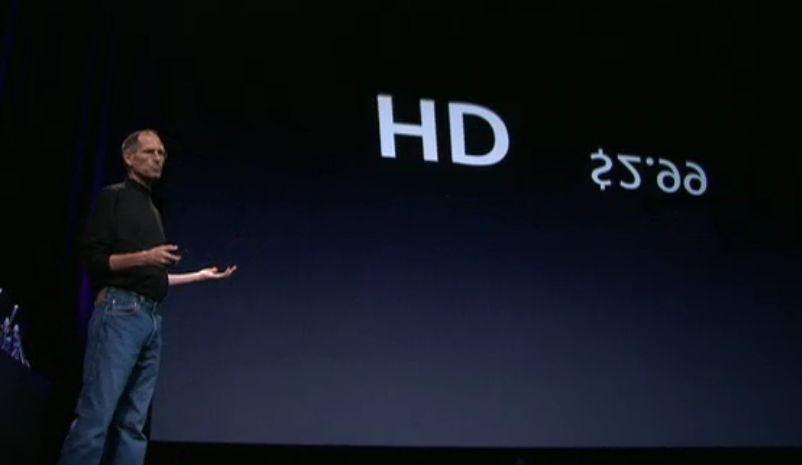
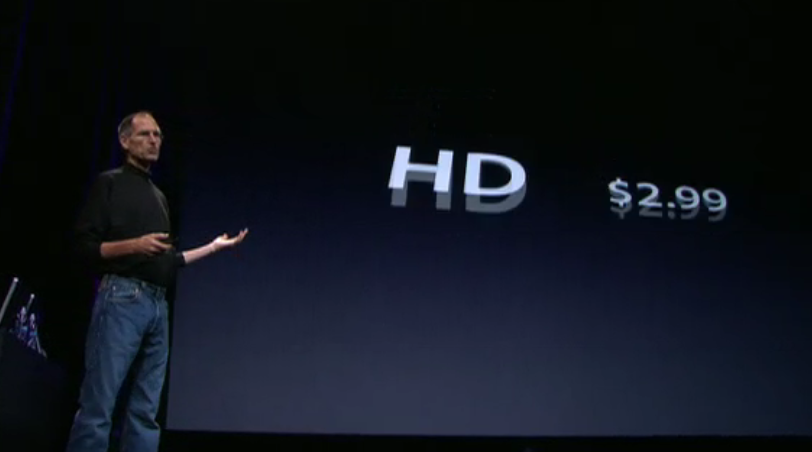
In the next new transition, we start at the point where Steve is discussing the pricing of Standard Definition (SD) television shows (priced at $1.99) and how iTunes 8 will also now support High Definition (HD) at $2.99.

Here’s how we move from one price point to the other. We start with SD:

Notice in the next image a moment later how the price starts to flip upwards:

… and in the next slide, as it flips right over, it and the letters “SD” are being replaced by the $2.99, and the HD letters:

But in the next slide, below, we see the fun element. The “HD” has now appeared but the price $2.99 is still flipping around on a different time basis. Again, another transition that captures the gaze.

And in the next slide both HD and $2.99 rock on their horizontal axes – quite an unusual yet strangely familiar effect.

Next: Follow the bouncing hoola-hoop

One of the things I teach in my Presentation Magic classes is how to draw the eye to specific locations on the slide. There are any number of reasons for doing this, and any number of ways. Most presenters are utterly lazy and use those awful laser pointers to circle or point to something on the slide. Most times, it looks as if they have early onset Parkinson’s Disease because it’s very difficult to hold the pointer steady, and drawing circles around specific areas is usually of little help.

My preferred solution is to know ahead of time, when you prepare your slides, just what on the slide you want your audience to look for. You can state it: “Now, of you notice this column in the spreadsheet” or “Let’s take a closer look at this aeroplane’s engine exhaust”. Or, you can either circle these areas with a shape outline, or grey out the areas around the target location, leaving the target the only object in full colour or you can cut out the target, enlarge it, and bring it forward over a fuzzy background image. These are but two ways of drawing the audience’s eye where you want it to go.

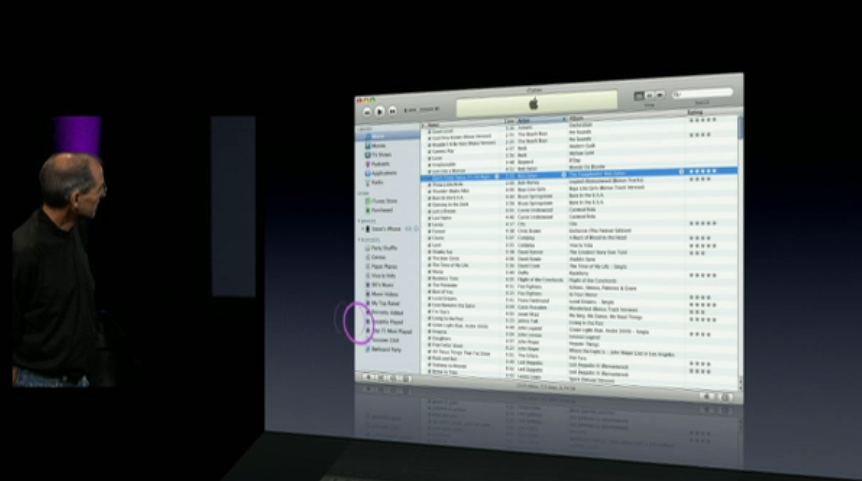
In the slide sequence below, we see that Keynote’s developers have attended to this and we get a new way, probably one of several, to highlight a specific area of a slide. We start with the iTunes interface once more:

In the next moment, at the bottom left corner, we see a purple circle emerge – it actually bounces onto the slide from the left:

… and like a demented and distorting hula hoop keeps bouncing over to the right:

…bouncing and rolling…

… almost there…

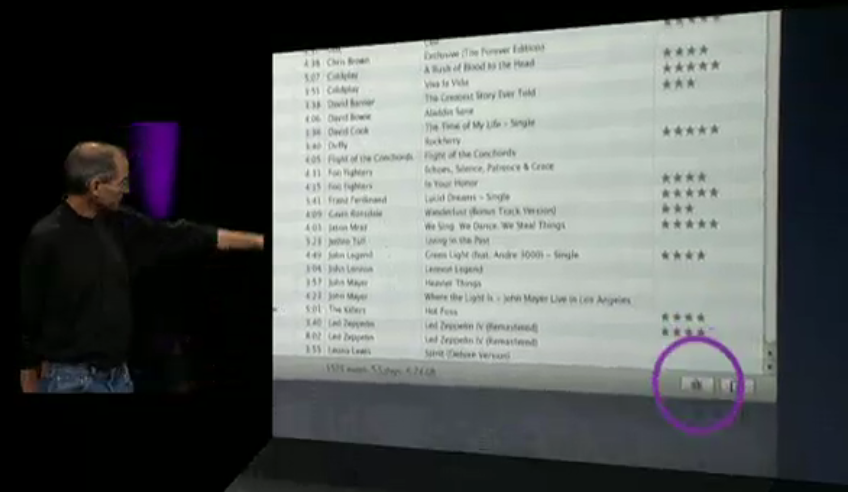
… until fully formed as a circle, it highlights the new “Genius” icon in iTunes 8:

I’m guessing this is just one of a few new ways Keynote will allow you to highlight various aspects of a slide, and I am guessing its developers have been looking closely at how some of us have been using Keynote’s abilities and both making it easier for us (less clicks) as well adding features from their own imaginations.

Such as this graph below, which shows the “rock solid” growth of iPod sales. So why not use a slab of rock to drive home the point?

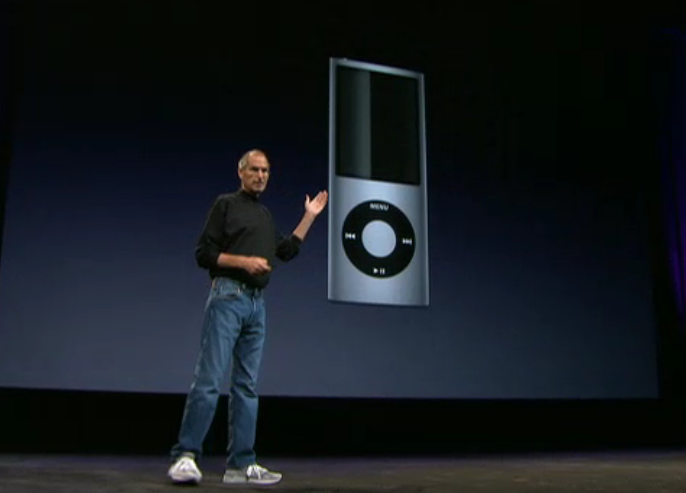
Jobs reaches the end of the new Nano announcements with a replication of the “screen gems” effect but its orientation is vertical, whereas at the beginning of the keynote it was horizontal. Let’s see. We start with the new Nano:

And with the curviness of the new screen, it’s a no brainer to “highlight” it:

… drawing attention to its new appearance, now added to by movement of the “screen gems”:

… which really gets the eye’s attention:

Were there other new effects I missed?

Well, I kind of got the feeling that one of my wishes for Keynote came true: A Ken Burns’ effect where one could enlarge and pan across the slide, dropping down onto a section to highlight. But perhaps I was only seeing things, and it was the camera videoing the keynote that was performing this effect.

Yet perhaps….

In any case, out of all this rather obsessional Keynote watching, comes the renewed belief that we are in for a Keynote upgrade, hopefully way before Macworld, so I can incorporate its new effects in my two-day workshop, shortly to be announced by IDG/Macworld.

I’ll write more about this in the next few weeks as the Conference starts to shape up, and perhaps the Keynote community can share with me some of their desires for Keynote. I have a strong suspicion the Keynote team at Apple will be listening closely to our ideas for how to further improve Keynote, and help it to help us elicit more creativity and less boredom in our audiences.

Are my Keynotes killing Hollywood’s senior actors?

Those of you who’ve been following my treatises on presenting or who have attended a workshop I’ve conducted on presentation skills, will know the emphasis I place on story telling.

I’m certainly not alone in this endeavour, and others like the Heath brothers have talked about the importance of story telling in their recent book, Made To Stick.

I’m always trying in my workshops to come up with new ways to persuade people of the importance of letting each slide become part of the overall story you’re telling, be it to sell ideas or goods, educate and inform, or brief an audience on your current research. And that each slide in its own way has a story to tell, or at least assist you to tell.

At Macworld 2008 where I presented on presentation skills (evaluation form available if you want to see it courtesy of IDG Macworld), I had planned to introduce a few new slides to illustrate to the audience, by involving them in a “theatre of the mind” activity, just how important story telling is in our world.

But I pulled the slides the night before because of worries over copyright, once I knew my presentation would be recorded. They were to be clips from well-known movies which were to illustrate my point, but being unsure of what constituted “fair use” in the USA I pulled the slides.

Later in Australia only a few days after returning from the US, and with no possibility of my all day workshop being videod, I included the slides, to great effect.

Here’s what I was trying to do.

Over several slides, I showed excerpts from films important to me, covering more than 40 years of filmgoing. Some of the actors in the clips were still alive, some had already passed on.

Not all in the workshop knew all the films, but most had seen some of them, enough to get my central idea of the importance of story telling.

I chose clips which were film highlights, perhaps even passing into common speech. But for this audience of mental health specialists, I let them know these clips told a lot about me, the presenter, because of what they all had in common. These clips illustrated not just memorable scenes, but collectively, they represented a peak in the story arc, an “Oh my gosh” moment where the story zagged into new narrative territory. These are scenes you wait to see again, even if you’ve seen the film many times. They are an emotional highlight.

Let me illustrate with some stills from the movies:

1. In the Heat of the Night (1967) – Sydney Poitier

\

Martin Luther King was still campaigning for human rights when this Academy Award winning film was released.

In this classic scene, Sydney Poitier is confronted by a Mississippi small town police chief, played by the late Rod Steiger. An industrialist bullding a new plant has been found murdered in the small hours of the morning, and Poitier has been taken in for questioning having been found waiting in the train station by Steiger’s deputy, and with more than a hundred dollars in his wallet. (This is 1967 after all).

Aggressively questioned by Steiger (who thinks he’s got his murderer standing in front of him) about where he got the money, Poitier tells him he earnt it, only to be rebutted with “Colour can’t earn that kind of money.” Asked what work he does to earn the hundreds of dollars now on the table, Poitier responds, “I’m a police officer!” Soon enough, Steiger discovers that not only is Poitier a “colleague” but he is Philadelphia’s finest homicide detective.

Later, after he’s seconded to the case against his own wishes, Poitier doesn’t hand over some FBI lab evidence he’s sent for. Steiger makes fun of his first name, Virgil. “Now that’s a funny kind of name for a nigger boy that comes from Philadelphia. What do they call you up there?”

To which Poitier replies with a phrase that becomes the title of a follow up movie, “They call me Mister Tibbs!”

2. Planet of the Apes (1968) – Charlton Heston

\

A year later, the first of a franchise of science fiction films featuring the evolution of man to ape began when Chartlon Heston landed on a planet where the apes ruled, and humans were mute and experimented upon.

In one scene, Heston, playing astronaut George Taylor, is captured and taken to the centre of an adobe village where he is taunted by the local adolescent chimps. Mauled once too often, he screams to an astonished crowd, “Take your stinking paws off me, you damned dirty ape!”

But the scene I included comes at the very end of the film, where Taylor (Heston) has captured the Minister for Science, Professor Zaius, whom he thinks knows the answers to how the planet is the way it is, with simians running the show.

On horseback, armed with his rifle (of course), and local female companion, Nova, he confronts Zaius for the last time:

George Taylor: A planet where apes evolved from men? There’s got to be an answer.

Dr. Zaius: Don’t look for it, Taylor. You may not like what you find.

A minute or so later, as Taylor rides along the shoreline, he confronts the explanation for the planet’s situation. (I won’t spoil it for those who haven’t seen it).

3. Jaws (1975) – Roy Scheider

\

Several years later, Steven Spielberg took a rather unknown novel and turned it into box office gold, keeping people away from beaches for years.

In the scene I’ve chosen, the fish hasn’t been sighted, his presence known to the audience by a musical phrase which must be one of the best known after the opening sequence of Beethoven’s 5th symphony. Scheider, playing a small town police chief joins old shark hunter Robert Shaw and young rich scholar of things fishy, Richard Dreyfuss, out in open waters to hunt the shark down.

In the setup to the scene, Shaw is quietly repairing fishing nets, Dreyfus is playing solitaire on the deck, while Scheider is “chumming”, throwing out offal to attract the beast. When he does, he and the audience share in the frightening moment, with Scheider slowly backing into the cabin, not taking his eyes from the ocean, before uttering the words, “You’re gonna need a bigger boat!”

4. Capricorn One (1978) – Sam Waterston

Almost ten years after the first manned landing on the moon, the general public had become a little jaundiced with NASA’s continuing Apollo launches. Mind you, some had put forward conspiracy theories that the landings were all faked, so taking this as a story plot, Peter Hyam’s film constructs a manned mission to Mars. But NASA’s budget has been cut to the bone, and so its director, played by Hal Holbrook, sets up an elaborate scheme to fake a landing and safe return, expecting the three man crew, played by James Brolin, O.J. Simpson and Sam Waterston to go along with the plan, for the good of the company.

When Holbrook suspects Brolin’s character, Colonel Brubaker, will not keep the secret, he unrolls plan B which will see the astronauts disappear. Breaking out from their desert-based Mars simulation, the astronauts escape in a sleek Learjet, only to crash land it in the desert when it runs out of fuel.

Each astronaut goes their separate ways according to the compass in the hope that one of them will make it back to tell their story. O.J. is captured first, while Waterston finds that his chosen direction takes him to a huge outcropping he’s got to climb. Exhausted and dehydrated, he begins the climb, telling himself a joke in the form of a long-winded story about how to to gently break bad news. As he reaches the punchline and the outcropping’s peak, he looks over the edge, only to find…

I won’t spoil it for you, but the camera pulls back from Waterston’s character and we get to see what he has just seen… and we know then that Brolin will soon become the last man standing.

An irony in the film is that Brolin’s character is eventually rescued by a journalist played by Elliot Gould who has been suspicious all long. Do you know the connection in real life between Brolin and Gould? (Hint: She’s a rather funny girl).

5. History of the World – Part 1 (1981) – Mel Brooks

...these fifteen.. oy..ten commandments

I had planned to show a scene from this film to 120 lawyers at a professional meeting on teaching presentation skills… but I chickened out. I was running short of time, having condensed a day’s workshop into an hour’s presentation, so decided to discard this sequence.

I wanted to draw the lawyers’ attention to man-made commandments when it comes to slides, especially the ones that say “follow the 6 x 6″ rule, no more than six lines per slide, with no more than six words per slide.”

I wanted to say that presenters follow this mantra as if it was a commandment, but it’s a hoax, with no evidence to support it. In the film clip, Moses, played by Mel Brooks come down from Mt. Sinai carrying three tablets, of five commandments each.

But as he speaks, he drops one: “Here are the fifteen (drop, crash).. oy… ten commendments the lord gives us.”

I wanted the audience to equate this humorous piece with challenging “laws” of presenting which have no foundation.
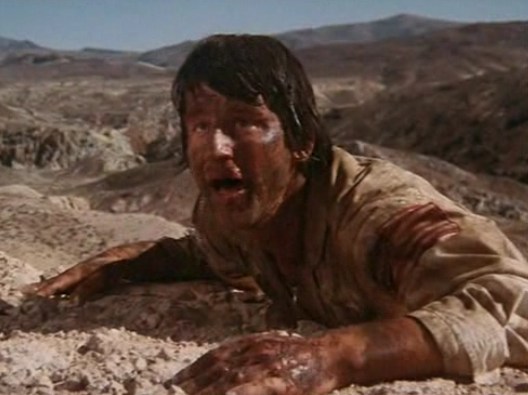
And so, in my workshops where I use these clips, I ask participants to share with their neighbours films like these that have them pausing to watch and wait for their favourite scene, to emphasise the power of story telling, and how it’s so important to acknowledge when presenting.

Oh, and the title of this blog entry? A few weeks after I presented this workshop, Roy Scheider from Jaws died, then a few weeks later after another presentation, Charlton Heston died. I am hoping like crazy I haven’t put the mozz on any surviving actors in my slides.

UPDATE: September 28, 2008 – I had thought of including the famous scene in “Cool Hand Luke” where the prison superintendent, played by Strother Martin, says “What we have here is a failure to communicate.”

Strother Martin let's Paul Newman know of a failure to comminicate.

Strother Martin lets Paul Newman know of a "failure to communicate".

I include mention of it in this update to honour the passing of a true acting mensch, Paul Newman, on September 26.

What are your favourite scenes you would use if you were running a workshop like mine?

Australia 2020 summit – an exercise in Powerpoint-poisoning or great use of dashboards?

In November 2007, Australia tossed out its conservative government of eleven years, rejecting the direction the government was taking the country. The prime minister of the day had strongly aligned himself with the US president, and taken the country to war in Iraq and Afghanistan. Many complained about the government’s attitudes to human rights both in Australia and abroad, and the then-opposition proved a most attractive alternative. This was despite Australia enjoying a particularly strong economy.

The now-opposition is in disarray with its new leader (the previous prime minister lost his own seat, something which has only happened once before in Australia’s history) having approval ratings of less than 10%, compared to more than 70% for the current prime minister, who is now in China and letting the Chinese government know his opinion of their human rights stance, particularly with respect to Tibet.

One of the election promises made by the now-prime minister, Kevin Rudd, was to have a summitt of Australia’s brightest thinkers, who would come to the nation’s capital in April 2008 for a multi-day talkfest, and set an agenda for future policies, constructing a snapshot of life in Australia in 2020.

Naturally, with numbers limited to about a thousand, many hoped they would be tapped on the shoulder, while others took advantage of application forms for the consideration of the talk-fest’s organising committees.

The talk-fest is divided into various categories designed to help plan Australia’s future, and the area of Health is one of these areas where “experts” have been invited to share their knowledge. The list of the those attending has been published, and it’s no surprise that the list is heavy on academics.

The Government has also published some orientation papers to help set the agenda. These have also been published online, on both Powerpoint and pdf format. The pdf file is a converted Powerpoint stack.

Now far be it from me to cast doubts on the process so soon, but it seems to me that if the talk-fest days are to be held under the auspices of the Powerpoint method of knowledge sharing, I have to wonder just how much can be achieved. I’m hoping no data projectors will be used, and handouts of the slides will be merely a starting point for discussion. I’m also hoping that some excellent scribes using techniques for recording and comparing ideas will be present. But given the stacking with academics who live and die by Powerpoint, my hopes aren’t high.

Let’s have a look at some of the slides so far made available. Here is the “cover slide” attendees will likely see projected somewhere in the meeting room:

Here\'s the first slide in the deck

Now my guess is that all the first slides in decks for all the summit meetings will look the same – you know, keep the brand. For me, since the talkfest is really about people, a crisp photo to get the attention would work better, but since this is a gabfest with lots of words being exchanged amongst academics (mostly), pictures have little place. That’s their loss, but my guess is that’s how most of those attending present anyway.

Let’s have a look at slide 3:

longevity

This is a very dense slide, stacked with data points. As it’s a handout as well, the very small print down the bottom won’t be an issue. It’s not the sort of slide I would include in a presentation, but given that the slide is really part of a briefing process to be consumed prior to the summit, it perhaps makes easier reading that a text-filled paper.

What I do like about it is that while the graph itself gets a header, the slide’s header tells the story: “Australians enjoy one of the longest life expectancies in the world.”

This is super-important when you use slides loaded up with either graphs or text (when you can’t do otherwise) which can overwhelm the reader when projected: i.e, cognitive overload. So label the slide right up top with what its take home message is. Later on, in private, audience members can delve into the details. But during the gabfest, treat each slide like a newspaper story: great headline to get the reader engaged, then show the supporting evidence in detail which you will talk to – either using the current slide or on a new slide drawing attention to detail.
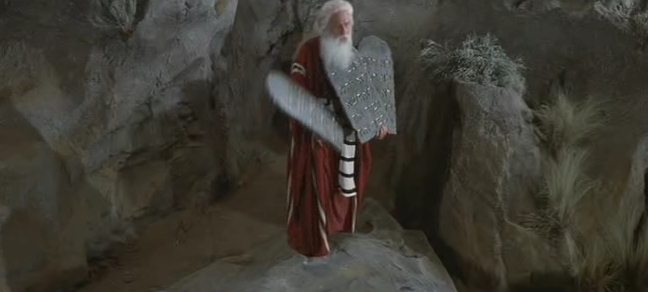
Ok, let’s move further into the slide stack and see how things go:

Again, this is not the sort of style you want to include in a slide show presentation – it’s just overwhelming. But as a dashboard-style compilation of data and commentary, it has its merits. But let’s not kid ourselves that this is a good slide without an accompanying handout for people to read at their own pace. It’s an orientation slide, but I have real fears that the facilitator will use it as per a standard presentation, no doubt using a laser pointer to highlight various areas.

Personally, to highlight one of the areas, Mental Illness, I would have used different colour bars, as well as the text box over on the right. It’s interesting from a personal perspective to see how the slide mentions the rapid growth of mental illness, yet the new Health Minister is considering limitations to the population gaining access to psychologists as part of a new program initiated by the previous government.

Let’s leap into some slides which for me break some of my personal rules for presenting:

On this slide, we see two ideas set side by side, which could have better conveyed their message on two separate slides, somehow joined with an appropriate transition. The slides have no action, and make the audience work quite hard to make the causal connections. Now, the audience is very bright, and so they can more readily make the intended connections quickly. But when the summit releases its final decisions and recommendations, and begins a process of rolling it out to the general population who are not exposed to these dashboards on a regular basis, let’s hope that the slide design takes into account non-academic populations who would do better with a more dynamic presentation style.

One more slide for illustrative purposes:

Take a look at the left panel of the three above, and notice how close the dates are: 1999200020012002.

This is really making the audience work hard, as well as the density of the information on this one slide. If the author of the slide was trying to make cogent comparisons or lead us through a story of panels 1 through 3, it’s not easy to see. Again, as a dashboard, it’s OK, especially if as an academic you’re used to seeing such diagrams. But again, one hopes that in the final publication, such slides give way to more illustrative ones where the reader more easily grasps the ideas and their connections.
If you want to see the entire stack of slides, go the Summit’s homepage and download a selection just to see for yourself how the highest echelons of government doles out information. Ask yourself if you were presenting, how would you change the slides.

There’s a comment section, so please use it and provide some feedback.

It’s time for a change! Welcome to Presentation Magic…

After several years using Blogwavestudio as my blogging software, and housing my presentation thoughts on my Cyberpsych blog, it’s time for a change.

Actually the change was foistered on me, after my seemingly indestructible Powerbook G4 (c.2004) got a cracked screen courtesy of your’s truly, and Blogwavestudio couldn’t make the transition from a PPC to an Intel-based Mac. It didn’t help either that the software developers, from Korea, were nowhere to be found.

Blogwavestudio was hardware-bound: I had to have my Mac with me to blog and publish. Sure, I could write an entry then wait to get to the Powerbook and transfer it. But that was tedious, and with the iPhone due for launch in Australia sometime this year, the invitation to blog at will is likely to prove too strong. I can’t tell you how many blog entries I’ve developed on train trips, or while waiting for someone, and not had the opportunity to publish it almost immediately… in which case, it vanishes.

With WordPress, I’m hoping to blog more often, and enable a better comments system to run, as well as Web 2.0 features like tags, categories, and other social networking possibilities.

Why the title “Presentation Magic”?

Well, this was the name given to my presentation on using Apple’s Keynote at Macworld 2008 by Paul Kent, Macworld’s Director. This was my first time at Macworld at it came at Paul’s invitation, as he was a reader of my Cyberpsych blog which covered things Apple as well as presentations.

The actual presentation I gave went over well, and I’m hoping to return to the US this year to offer more presentations and training for those ready to change the way they present.

The “magic” in the title doesn’t refer to doing extraordinary things with Keynote or Powerpoint. It more refers to how magic is an important part of human life, something that both entertains, intrigues, confuses, and persuades us. All things that presentations are capable of performing.

As a psychologist, I have always been interested in illusions and how humans can be fooled. In my clinical work, patients are often “fooled” by the messages their bodies send them, and perceive danger where it doesn’t exist, thus narrowing their opportunities.

Good presentations are effective by understanding how the human mind works, and strive to use current knowledge of the cognitive sciences to help audiences understand complex messages.

More than ever, audiences are being bombarded with presentations which are presenter-focussed. Magicians are always audience-focussed, knowing how audiences function and surprising them when their misdirection leads to an “aha!” moment.

The audience doesn’t really care how you pulled off your magic, they just want to be entertained. Professional audiences who have come along to be educated, and wish to leave knowing more than what they knew beforehand, aren’t interested in how you performed your magic (ie., animations, transitions, etc). That might interest those in the audience who too are presenters. But the special effects are there as augmenters of the presenter’s knowledge base, to help him or her transfer knowledge in the simplest and easiest manner. Easy for the audience that is, often hard for the presenter, as they need to be creative, well-rehearsed, and of course, knowledgeable of the subject at hand.
That’s why good presenters are paid well, get invited back, and are sought for training: their talents are in short supply!

In the next few months, I’ll be elaborating on my presentation ideas, keeping this blog updated frequently as new ideas come to mind, and I give presentations and use the blog as a journal to debrief myself. I expect you’ll learn heaps as you read the articles.

But be aware that many of the ideas you’ll read are quite subversive, and you may not be able to present in your usual fashion once the ideas penetrate possibly years of traditional presentation giving. Certainly, that’s the feedback I get after people have seen me present about presenting: Doing the walk and the talk at the same time is profoundly interfering to how most people present currently.